当前位置:网站首页>小熊派开发板实践:智慧路灯沙箱实验之真实设备接入
小熊派开发板实践:智慧路灯沙箱实验之真实设备接入
2020-11-06 22:01:00 【华为云开发者社区】
摘要:尝试用小熊派开发板(E53_SC1、NB35)真实设备代替模拟器完成构建智慧路灯应用实验体验。
智慧路灯是城市智能化道路上重要一环,智慧路灯的实施具有节约公共照明能耗、减少因照明引起的交通事故等多种社会意义。路灯也是大家在日常生活中可以强烈感知到的公共设施,更易理解其智能化的场景。
基于物理网解决方案,我们可以实现路灯的远程监控与控制,实现远程控制、按需照明等功能,降低路灯运行成本。
体验《沙箱实验:基于IoT平台构建智慧路灯应用》实验后,有些小伙伴总觉得模拟器体验没有真实设备好,故小主尝试用小熊派开发板(E53_SC1、NB35)真实设备代替模拟器完成实验体验。其中,大部分操作步骤相同,本文仅列出需要修改及注意的地方。
平台侧:
1、创建产品:
- 模拟器:协议类型为MQTT
- 真实设备:协议类型为LwM2M/CoAP,且需要开发部署编解码插件。
2、配置智慧路灯应用(注册设备):
- 模拟器:设备标识可自定义,如123456789f。
- 真实设备:设备标识填写为NB35通信模组IMEI,可使用串口工具+AT指令(AT+CGSN=1)查询获取设备IMEI。
应用侧:
1、编译构建智慧路灯应用:
创建代码仓库后,需要修改部分代码适配真实设备。
① 修改src/main/java/com/huawei/service/RegisterDirectConnectedDevice.java,添加如下代码。
paramReg.put("device_name", deviceInfo.getVerifyCode());


② 修改src/main/java/com/huawei/service/CreateDeviceCommand.java,变更及添加如下代码。

③ 修改src/main/java/com/huawei/controller/PushReceiver.java,变更及添加如下代码。

2、完成如上修改,重新编译构建出包;再基于新构建的包重新部署路灯应用到ECS服务器。
设备侧:
1、资源准备:
- 模拟器:HubSimulator.jar
- 真实设备:小熊派开发板(E53_SC1、NB35)
2、真实设备需要端侧开发,代码编译、烧录。推荐IDE:VS Code+IoT Link插件
3、基于示例工程创建:oc_streetlight_template

4、修改Demos\oc_streetlight_template\oc_streetlight_template.c,填写对接的IoT平台的实际IP、端口。
#define cn_endpoint_id        "BearPi_0001"
#define cn_app_server        "119.3.250.80"
#define cn_app_port         "5683"
5、完成如上修改,编译烧录即可。
结果验证:
1、请将开发板拨码开关拨到AT+MCU侧,并通过USB连接PC上电,进行数据上报。
2、等待1-2分钟查看应用界面,页面应该显示“环境亮度”为设备上报数值,“灯状态”为toggle状态。
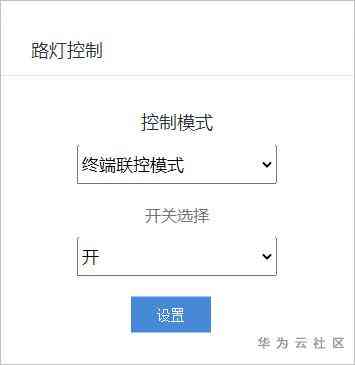
3、“路灯控制”选择“终端联控模式”,开关选择“开”,单击“设置”。
- 查看开发板路灯状态,灯应该点亮。
4、“路灯控制”选择“自动调光模式”,设置亮度阈值为100。
- 若此时设备上报的光感强度大于100,应用会自动下发关灯命令,指示路灯关闭。
- 用手遮住路灯扩展板上的光强传感器,使光强小于100,若路灯是关闭状态,则应用会下发开灯命令,指示路灯开启。

5、“路灯控制”选择“分段定时模式”,设置关灯时间段为06:00-18:30。
- 如果系统当前时间位于关灯时间段内,且路灯状态为开,应用会自动下发关灯命令,指示路灯关闭。
- 如果系统当前时间位于关灯时间段外,且路灯状态为关,应用会自动下发开灯命令,指示路灯开启。

综上,通过路灯开发板作为真实设备的接入体验即完成。
版权声明
本文为[华为云开发者社区]所创,转载请带上原文链接,感谢
https://my.oschina.net/u/4526289/blog/4703547
边栏推荐
- Elasticsearch database | elasticsearch-7.5.0 application construction
- Flink's datasource Trilogy: direct API
- 解决 WPF 绑定集合后数据变动界面却不更新的问题
- Using iceberg on kubernetes to create a new generation of cloud original data Lake
- image operating system windows cannot be used on this platform
- The legality of IPFs / filecoin: protecting personal privacy from disclosure
- 【ElasticSearch搜索引擎】
- Swagger 3.0 brushes the screen every day. Does it really smell good?
- Small program introduction to proficient (2): understand the four important files of small program development
- An article takes you to understand CSS3 picture border
猜你喜欢

Git rebase is in trouble. What to do? Waiting line

What kind of music do you need to make for a complete game?
【:: 是什么语法?】
Kubernetes and OAM to build a unified, standardized application management platform knowledge! (Internet disk link attached)
2020-08-20:GO语言中的协程与Python中的协程的区别?

The native API of the future trend of the front end: web components
意派Epub360丨你想要的H5模板都在这里,电子书、大转盘、红包雨、问卷调查……
Zero basis to build a web search engine of its own
如何在终端启动Coda 2中隐藏的首选项?
2020年第四届中国 BIM (数字建造)经理高峰论坛即将在杭举办
随机推荐
面试官: ShardingSphere 学一下吧
ES中删除索引的mapping字段时应该考虑的点
Summary of front-end interview questions (C, s, s) that front-end engineers need to understand (2)
ES6 learning notes (4): easy to understand the new grammar of ES6
【涂鸦物联网足迹】涂鸦云平台全景介绍
Python basic data type -- tuple analysis
Road to simple HTML + JS to achieve the most simple game Tetris
mongo 用户权限 登录指令
An article will introduce you to HTML tables and their main attributes
Why is the LS command stuck when there are too many files?
意外的元素..所需元素..
Digital city responds to relevant national policies and vigorously develops the construction of digital twin platform
Visual rolling [contrast beauty]
PHP application docking justswap special development kit【 JustSwap.PHP ]
Helping financial technology innovation and development, atfx is at the forefront of the industry
Swagger 3.0 brushes the screen every day. Does it really smell good?
git远程库回退指定版本
统计项目代码行数
C and C / C + + mixed programming series 5 - GC collaboration of memory management
IPFs rudder filecoin landing at the same time, fil currency price broke a thousand