当前位置:网站首页>How does flutter achieve different zoom animation effects
How does flutter achieve different zoom animation effects
2022-06-23 04:31:00 【Yisu cloud】
Flutter How to achieve different zoom animation effects
This article mainly explains “Flutter How to achieve different zoom animation effects ”, Interested friends might as well come and have a look . The method introduced in this paper is simple and fast , Practical . Now let Xiaobian take you to learn “Flutter How to achieve different zoom animation effects ” Well !
Demand background
Component scaling can be scaled in one direction , Zoom in on a... In the list Cell Expect it to zoom back rather than starting at the center of the component . The specific effect is shown in the figure below :

Introduction to scalable components
ScaleTransition
ScaleTransition The specific implementation is as follows , Set up AnimationController If the controller needs to increase the numerical operation, it can add Animate Call again forward Method execution .
PS: Animation implementation has been introduced in previous articles
Animation controller _scaleAnimationController = AnimationController( vsync: this, duration: Duration(milliseconds: 3000),);scale = Tween(begin: 1.0, end: 1.29).animate(_scaleAnimationController);ScaleTransition( scale: scale, alignment: Alignment.centerLeft, child: Container( margin: EdgeInsets.all(50), color: Colors.yellow, height: 200, width: 100, ),)_scaleAnimationController.forward();
If you want to change the zoom direction , It can be for ScaleTransition add to alignment To configure . for example centerLeft Indicates that the component is zoomed left to right .
ScaleTransition( scale: scale, alignment: Alignment.centerLeft, child: Container( margin: EdgeInsets.all(50), color: Colors.yellow, height: 200, width: 100, ),)
As shown in the figure, the default zoom effect is to zoom by the component center point , Set up alignment Zoom to the opposite position .

but ScaleTransition It does not meet the required functions , It is impossible to scale the animation in one direction .
SizeTransition
SizeTransition Is to change the sub component size to achieve the animation effect , Support vertical or horizontal animation .
AnimationController _animationController = AnimationController(vsync: this, duration: Duration(seconds: 1));_animationController.value = 1.0;Animation<double> _animation = CurvedAnimation( parent: _animationController, curve: Curves.fastLinearToSlowEaseIn);SizeTransition( sizeFactor: _animation, axis: Axis.horizontal, child: Container( color: Colors.blue, height: 100, width: 100, alignment: Alignment.center, child: Text("SizeTransition"), ),)
However, it still does not meet the expected results in terms of requirements ,SizeTransition It is more applicable to the animation effect of expanding or flying in .
AnimatedSize
AnimatedSize It is a component with its own animation effect , Modify the size of the component to perform the zoom animation .
GestureDetector( child: AnimatedSize( duration: Duration(seconds: 2), child: Container( color: Colors.red, width: 100, height: height, alignment: Alignment.center, child: Container( height: 50, width: 50, color: Colors.yellow, child: Text("AnimatedSize"), ), ), ), onTap: () { height = 150; width = 150; setState(() {}); },),
but AnimatedSize The problem with is that it only works on itself , If the child layout sets its own size, it will not change with the size of the parent component .
AnimatedBuilder
AnimatedBuilder Mainly combined with Transform.scale Component settings alignment by Alignment.centerLeft The component can be animated to the right .
AnimationController _scaleAnimationController = AnimationController( vsync: this, duration: Duration(milliseconds: 3000),);Animation<double> scale = Tween(begin: 1.0, end: 1.29).animate(_scaleAnimationController); AnimatedBuilder( animation: scale, builder: (context, widget) { return Transform.scale( alignment: Alignment.centerLeft, scale: scale.value, child: widget, ); }, child: GestureDetector( child: Container( margin: EdgeInsets.only(left: 15, right: 15), color: Colors.blue, width: 100, height: 50, child: Text("AnimatedBuilder"), ), onTap: (){ _scaleAnimationController.forward(); }, ),);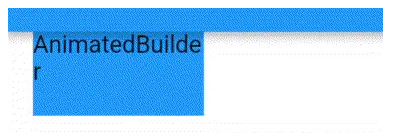
AnimatedBuilder To achieve scaling, you need to reserve enough space for component scaling to zoom in , Avoid component overlapping with other components after scaling .
Here we are , I'm sure you're right “Flutter How to achieve different zoom animation effects ” Have a deeper understanding of , You might as well put it into practice ! This is the Yisu cloud website , For more relevant contents, you can enter the relevant channels for inquiry , Pay attention to our , Continue to learn !
边栏推荐
- Halcon胶线检测—模板匹配、位姿变换、胶宽,胶连续性检测
- Mobile terminal city list sorting JS plug-in vertitylist js
- Prince language on insect date class
- 两招提升硬盘存储数据的写入效率
- 【深度学习】深度学习推理框架 TensorRT MNN OpenVINO ONNXRuntime
- How to ensure application security
- node+express如何操作cookie
- Inscription of lougu brush
- 电商如何借助小程序发力
- 在 KubeSphere 上部署 Apache Pulsar
猜你喜欢

x64dbg 基本使用技巧

Pytorch---使用Pytorch的预训练模型实现四种天气分类问题

Mobile terminal city list sorting JS plug-in vertitylist js

基于HAProxy实现网页动静分离

Inscription of lougu brush

什么是元数据

8 key indicators to measure technology debt in 2022

深度学习 简介

Review the SQL row column conversion, and the performance has been improved
Idea import module
随机推荐
无线网络安全的12个优秀实践
Halcon胶线检测—模板匹配、位姿变换、胶宽,胶连续性检测
Twitter cooperates with Shopify to introduce merchant products into twitter shopping
浅析2022年物联网现状
[tcapulusdb knowledge base] [list table] example code of batch deleting data at specified location in the list
Xiaojinwei, chairman of Chenglian Technology: implement the national strategy of data economy and lead the development of new consumption in the digital era!
Pytorch---Pytorch进行自定义Dataset
[tcapulusdb knowledge base] [list table] example code for replacing the data at the specified location in the list
[advanced binary tree] AVLTree - balanced binary search tree
Bug STM32 interrupt (everyone knows)
2022年的软件开发:首席信息官应该知道的五个现实
电商如何借助小程序发力
粒子动画背景登录页面particles.js
svg d3. JS generate tree tree view
P1347 sorting (TOPO)
靜態查找錶和靜態查找錶
背景彩带动画插件ribbon.js
两招提升硬盘存储数据的写入效率
leetcode 91. Decode ways (medium)
AI video cloud: a good wife in the era of we media