当前位置:网站首页>Shader 常用函数
Shader 常用函数
2022-06-24 06:43:00 【Kenight_】
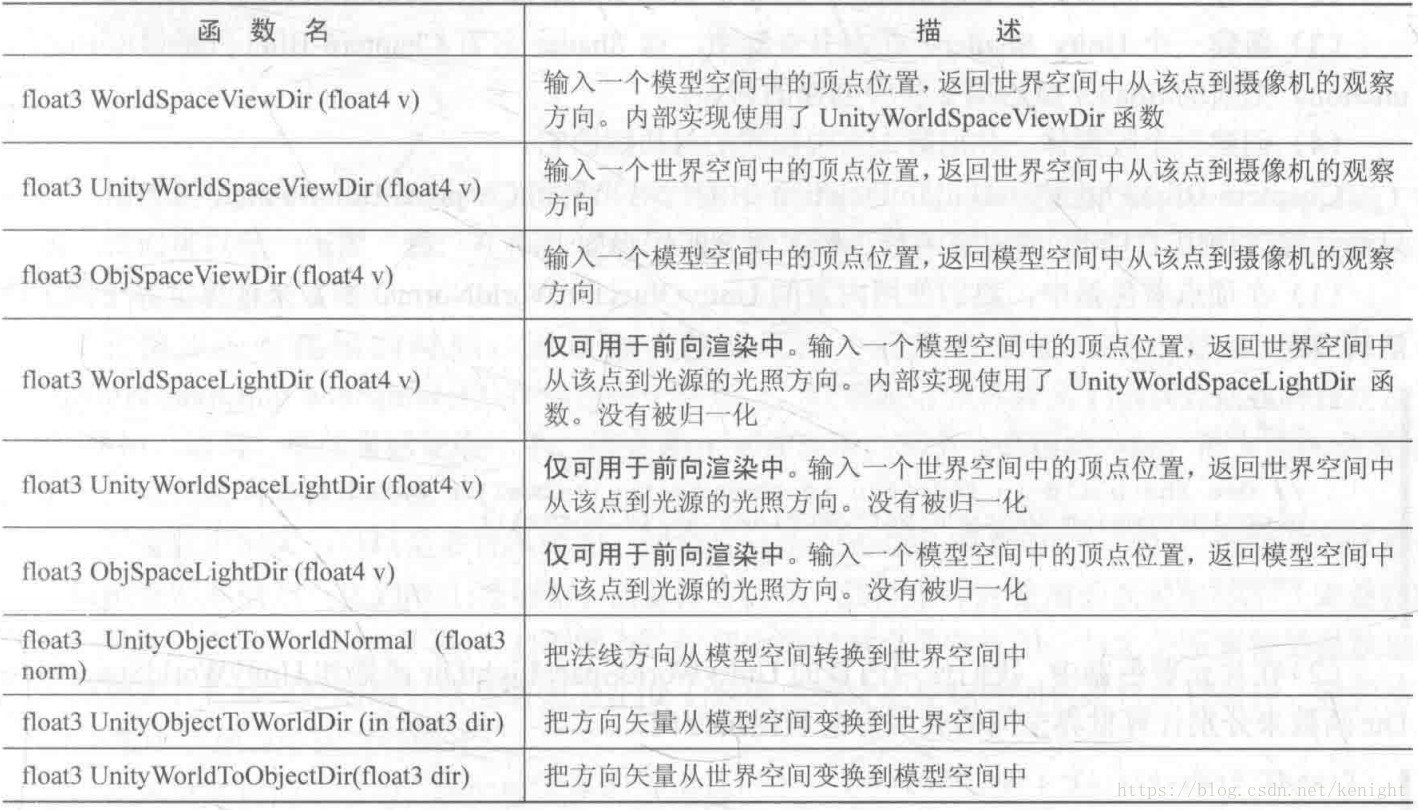
- 将方向向量由模型空间变换到世界空间
float3 UnityObjectToWorldDir(float3 dir)
// 相当于
float3 normalize(mul((float3x3)unity_ObjectToWorld, dir));
变换方向只需要乘 float3x3 矩阵,这是因为方向向量的 w 坐标为 0 [x,y,z,0] 而顶点的 w 为 1 [x,y,z,1],变换方向如果与 float4x4 矩阵相乘,矩阵中第四列平移量将不会对变换起影响。
- 将顶点由模型空间变换到世界空间
// 与变换方向相比,变换顶点就需要 float4x4 矩阵
float3 mul(unity_ObjectToWorld, v.vertex).xyz;- 将顶点由模型空间变换到观察空间
 // 只返回顶点的 xyz 坐标,且 z 是负值(视野空间为右手系)
float3 UnityObjectToViewPos(float3/float4 pos)- 将法向量由模型变换到世界空间
float3 UnityObjectToWorldNormal(v.normal)
// 内部实现细节
#ifdef UNITY_ASSUME_UNIFORM_SCALING // 如果是统一缩放,则可直接使用变换方向的矩阵
    return UnityObjectToWorldDir(norm);
#else // 如果是非统一缩放,则需要右乘变换方向的矩阵的逆转置矩阵
    // mul(IT_M, norm) => mul(norm, I_M) => {dot(norm, I_M.col0), dot(norm, I_M.col1), dot(norm, I_M.col2)}
    // 解析上行注释:右乘逆转置矩阵 => 左乘逆矩阵 => 分别点乘逆矩阵的列(点乘列相当于点乘转置后的行)

    // 根据上面的等式,则可使用左乘变换方向矩阵的逆矩阵来得到结果(I_M 等同 unity_WorldToObject)
    return normalize(mul(norm, (float3x3)unity_WorldToObject));
#endif
如果模型经过非统一缩放如 Scale(1,2,1),如果使用变换顶点相同的矩阵变换法线,则变换后的法线无法保持原垂直性。根据矩阵的运算,左乘的意义是相当于右乘该矩阵的转置矩阵。
- 将法向量由模型变换到观察空间
// 根据上面法线变换到世界空间可知,非统一缩放时,需要右乘逆转置矩阵
// Unity 直接提供了这个逆转置矩阵 UNITY_MATRIX_IT_MV
float3 mul((float3x3)UNITY_MATRIX_IT_MV, v.normal);- 世界空间下的视线方向(顶点朝向摄像机的方向)
float3 UnityWorldSpaceViewDir(float3 worldPos)
// 相当于(注意结果未 normalize)
return _WorldSpaceCameraPos.xyz - worldPos;

// 一般使用方式:
float3 normalize(UnityWorldSpaceViewDir(worldPos))- 模型空间到切线空间的变换矩阵
// 内置宏,输出 rotation 矩阵,变量名固定为 rotation
TANGENT_SPACE_ROTATION
// 实现细节
// v.tangent.w 决定副切线的方向
float3 binormal = cross( normalize(v.normal), normalize(v.tangent.xyz) ) * v.tangent.w;
float3x3 rotation = float3x3( v.tangent.xyz, binormal, v.normal ) // 这是行向量矩阵切线空间到模型空间的矩阵是由切线、副切线、法线的顺序按列排列即可得到,再根据正交矩阵的性质,仅存在旋转和平移的矩阵的逆矩阵等于它的转置矩阵。因此把切线、副切线、法线按行排列则可得到这个逆矩阵。
- 切线空间到世界空间的变换矩阵
// 获取顶点法线、切线、副切线在世界空间下的表示
fixed3 worldNormal = UnityObjectToWorldNormal(v.normal);
fixed3 worldTangent = UnityObjectToWorldDir(v.tangent.xyz);
fixed3 worldBinormal = cross(worldNormal, worldTangent) * v.tangent.w;

// 这三项相当于子空间坐标轴在父空间下的表示,直接按列构造矩阵则得到切线空间到世界空间的变换矩阵
o.TtoW0 = float3(worldTangent.x, worldBinormal.x, worldNormal.x); // 矩阵第一行
o.TtoW1 = float3(worldTangent.y, worldBinormal.y, worldNormal.y); // 矩阵第二行
o.TtoW2 = float3(worldTangent.z, worldBinormal.z, worldNormal.z); // 矩阵第三行
使用多个变量构建矩阵,可自由的按列向量或行向量排列。使用 float3x3 变量是按行向量排列的矩阵。
// 举例:使用该矩阵将切线空间法线贴图储存的向量变换到世界空间下
fixed3 bump = UnpackNormal(tex2D(_BumpMap, i.BumpUv));
fixed3 normal = normalize(half3(dot(i.TtoW0, bump), dot(i.TtoW1, bump), dot(i.TtoW2, bump)));
按照矩阵乘法的定义,正好是由 bump 点乘 列矩阵 的每一行来获得相应的分量
- 获取顶点对应的屏幕空间采样坐标
// 目的是,得到 [0,1] 之间可采样屏幕纹理的坐标
// 实际上,函数本身只将 xy 变换到 [0,w] (zw不变),需要在片元函数中进行透视除法得到最终的 [0,1]
// 其中 z 是观察空间的 z 经过缩放平移(投影矩阵变换)后的非线性值
// 而 w 是观察空间的深度值(取正),即 view space's -z

// 注意:接收的参数是 clip space position
float4 ComputeScreenPos (float4 clipPos)

// for sampling a GrabPass texure (对采样坐标进行了跨平台处理)
float4 ComputeGrabScreenPos (float4 clipPos)
为什么不在函数中直接进行透视除法?因为从顶点函数到片元函数经过的插值过程将导致结果不正确。
- 采样法线贴图并获取正确的法线信息
fixed3 UnpackNormal(fixed4 packednormal) // packednormal = tex2D(_BumpMap, i.BumpUv)
// 实现细节:
#if defined(UNITY_NO_DXT5nm) // 如果纹理未压缩,则直接还原到 [-1,1] 之间
    return packednormal.xyz * 2 - 1;
#else // 否则(经过压缩),通过 xy 分量计算出 z 分量
    return UnpackNormalmapRGorAG(packednormal);

// UnpackNormalmapRGorAG 函数的实现细节
packednormal.x *= packednormal.w; // This do the trick
fixed3 normal;
normal.xy = packednormal.xy * 2 - 1;
normal.z = sqrt(1 - saturate(dot(normal.xy, normal.xy)));
return normal;
当把法线纹理的 Texture Type 标识为 normal map 时可以让 Unity 根据不同的平台压缩法线纹理,压缩之后纹理只保存两个通道,第三个通道可用另两个推导出来(法线是单位向量,且切线空间下 z 分量始终为正)。
// 一种控制凹凸程度的技巧:缩放 xy 分量再重新计算 z
fixed3 bump = UnpackNormal(tex2D(_BumpMap, i.BumpUv));
bump.xy *= _Scale;
bump.z = sqrt(1.0 - saturate(dot(bump.xy, bump.xy)));- 获取顶点深度
// 获取观察空间深度值(取正值,本身是负值)
// 方式一:使用宏,并将结果输出到 o (o.screenPos.z) 中
o.screenPos = ComputeScreenPos(o.vertex);
COMPUTE_EYEDEPTH(o.screenPos.z);
// 方式二:其实就是 COMPUTE_EYEDEPTH(o) 的内部实现
float -UnityObjectToViewPos( v.vertex ).z
// 方式三:通过投影矩阵知道,齐次坐标下的 w 值,就是观察空间 z 值取正
o.screenPos.w

// 获得[0,1]之间的深度值
// _ProjectionParams.w is 1/FarPlane
float -UnityObjectToViewPos(v.vertex).z * _ProjectionParams.w
// 等同于
float -mul(UNITY_MATRIX_MV, v.vertex).z * _ProjectionParams.w- 获取并使用深度图
// 获取深度图
// 延迟渲染中,已生产深度、法线缓存,在 shader 中直接使用变量即可获得
// 前向渲染中,需要设置摄像机手动获取(底层使用着色器替换,并使用 ShadowCaster Pass 得到深度)
Camera.depthTextureMode = DepthTextureMode.Depth
Camera.depthTextureMode = DepthTextureMode.DepthNormals // 深度 + 法线

// 在 shader 的变量
sampler2D _CameraDepthTexture
sampler2D _CameraDepthNormalsTexture

// 采样 _CameraDepthTexture
// 方式1,一般用于屏幕后期效果
// uv 来自 Graphics.Blit 产生的 full-screen quad
fixed4 d = SAMPLE_DEPTH_TEXTURE(_CameraDepthTexture, i.uv)
// 通过 MVP 转换后,得到的深度纹理中的值是非线性的高精度值(主要是投影矩阵变换后Z值是非线性的)
// LinearEyeDepth 转换回观察空间的线性深度值(+Z)
// Linear01Depth 转换到 [0,1] 的线性深度值
float linearDepth = Linear01Depth(d)

// 方式2,用于单个物体需要深度信息时
float4 d = SAMPLE_DEPTH_TEXTURE_PROJ(_CameraDepthTexture, i.screenPos);
float linearDepth = Linear01Depth(d);

// 采样 _CameraDepthNormalsTexture
fixed4 d = tex2D(_CameraDepthNormalsTexture, i.uv);
float depth; // 接受解码后的深度,是 [0,1] 的线性值
float3 normal; // 接受观察空间法线,范围 [-1,1]
// 解码深度与观察空间法线
DecodeDepthNormal(d, depth, normal);- Shader 中计算某空间顶点的距离
// 实际就是求向量的模(长度/大小)
float sqrt(dot(float3 pos, float3 pos))上面的函数相当于:pos.x2+pos.y2+pos.z2−−−−−−−−−−−−−−−−−−−−√ p o s . x 2 + p o s . y 2 + p o s . z 2 ,即点乘同一个顶点(向量)再开方。
// 一些用例:
// 采样光源纹理的衰减值,使用了距离(模)的平方,避免了开方带来的开销。
// dot(lightCoord, lightCoord) 和脚本中的 lightCoord.SqrMagnitude 是一个意思
fixed atten = tex2D(_LightTexture0, dot(lightCoord, lightCoord).rr).UNITY_ATTEN_CHANNEL;

// UnpackNormal 中计算 z 分量
normal.z = sqrt(1 - saturate(dot(normal.xy, normal.xy)));- CG 常用几何函数
// 两个vector之间的距离
float distance(x, y)

// vector的模
float length(x)

// 通过入射光线与表面法线来获取反射矢量
vector reflect(i, n) // 注意 i 是指向顶点的方向
// 通常用法:
o.worldPos = mul(unity_ObjectToWorld, v.vertex).xyz; // 得到世界空间下的顶点
o.worldViewDir = UnityWorldSpaceViewDir(o.worldPos); // 顶点指向摄像机的视线方向
o.worldRefl = reflect(-o.worldViewDir, o.worldNormal); // 反射矢量

// 通过入射光线与表面法线来获取折射矢量(i,n必须是归一化后的矢量)
vector refract(i, n, float(x)) // i 是指向顶点,x 是入射介质与折射介质折射率的比值
// 通常用法:
o.worldRefr = refract(-normalize(o.worldViewDir), normalize(o.worldNormal), _RefractRatio);常用内置函数官方文档
Shader Property attributes and drawers
// Attributes recognized by Unity:
[HideInInspector]
[NoScaleOffset]
[Normal]
[HDR]
[Gamma]
[PerRendererData]
// Drawers:
// Will set "_INVERT_ON" shader keyword when set [Toggle] _Invert ("Invert?", Float) = 0 // Will set "ENABLE_FANCY" shader keyword when set. [Toggle(ENABLE_FANCY)] _Fancy ("Fancy?", Float) = 0 // Also will set "JUSTOUTLINE_ON" shader keyword when set. [MaterialToggle] JustOutline ("JustOutline", Float) = 1Attributes 详情查看 Property attributes and drawers,更多 Drawers 请查看 MaterialPropertyDrawer
边栏推荐
- [GUET-CTF2019]zips
- How to open the soft keyboard in the computer, and how to open the soft keyboard in win10
- Huawei experimental topology set, learning methods are attached at the end of the article!
- [Lua language from bronze to king] Part 2: development environment construction +3 editor usage examples
- Reppoints: Microsoft skillfully uses deformation convolution to generate point sets for target detection, full of creativity | iccv 2019
- Event related | reveal how Ti-One's support ability for large-scale events is developed
- Lend you a pair of insight, Frida native trace
- Combine with (& &) logic or (||), dynamic binding and ternary operation
- Global and Chinese market of offshore furnaces 2022-2028: Research Report on technology, participants, trends, market size and share
- [从零开始学习FPGA编程-42]:视野篇 - 后摩尔时代”芯片设计的技术演进-1-现状
猜你喜欢

Learning to use BACnet gateway of building control system is not so difficult
![[image segmentation] retinal vessel segmentation based on morphology with matlab code](/img/e3/0805df81a597346ea7c2d2da20ac96.png)
[image segmentation] retinal vessel segmentation based on morphology with matlab code

Analog display of the module taking software verifies the correctness of the module taking data, and reversely converts the bin file of the lattice array to display

The fund management of London gold is more important than others

get_ started_ 3dsctf_ two thousand and sixteen

相機標定(標定目的、原理)

Face pincher: a hot meta universe stylist
![[vulhub shooting range]] ZABBIX SQL injection (cve-2016-10134) vulnerability recurrence](/img/c5/f548223666d7379a7d4aaed2953587.png)
[vulhub shooting range]] ZABBIX SQL injection (cve-2016-10134) vulnerability recurrence

JVM debugging tool -jmap
Camera calibration (calibration purpose and principle)
随机推荐
What is an intrusion detection system?
What is a CC attack? How to judge whether a website is attacked by CC? How to defend against CC attacks?
How to delete / select an input method on your computer
jarvisoj_level2
二分专题训练
Étalonnage de la caméra (objectif et principe d'étalonnage)
Global and Chinese market of basketball uniforms 2022-2028: Research Report on technology, participants, trends, market size and share
[vulhub shooting range]] ZABBIX SQL injection (cve-2016-10134) vulnerability recurrence
MySQL - three tables (student, course, score) to query the name, number and score of students whose course is mathematics
Win10 build webservice
In the era of industrial Internet, there are no more centers in the real sense, and these centers just turn tangible into intangible
L2tp/ipsec one click installation script
MFC multithreaded semaphore csemaphore critical area and mutually exclusive events
jarvisoj_ level2
[image fusion] image fusion based on NSST and PCNN with matlab code
A summary of the posture of bouncing and forwarding around the firewall
[image fusion] image fusion based on pseudo Wigner distribution (PWD) with matlab code
[signal recognition] signal modulation classification based on deep learning CNN with matlab code
[WUSTCTF2020]alison_likes_jojo
[image fusion] multi focus and multi spectral image fusion based on pixel saliency and wavelet transform with matlab code