当前位置:网站首页>Docekr learning - MySQL 8 master-slave replication setup deployment
Docekr learning - MySQL 8 master-slave replication setup deployment
2022-07-25 13:06:00 【Uh huh**】
List of articles
Master and slave copy build
#  Download mirroring
docker pull mysql

#  First step : Start master MySQL
docker run --name=mysql-master -p 3308:3306 -v /etc/localtime:/etc/localtim   -v /www/server/mysql_master-slave/master/data:/var/lib/mysql -v /www/server/mysql_master-slave/master/log:/var/log/mysql -v  /www/server/mysql_master-slave/master/conf:/etc/mysql/conf.d    -e MYSQL_ROOT_PASSWORD=root --privileged=true -d mysql:latest


#  The second step : Add configuration file  /www/server/mysql_master-slave/master/conf/my.cnf ==  The contents are as follows
[mysqld]
##  Set up server id, You need to be unique in the same LAN
server_id=101
##  Specify the name of the database that does not need to be synchronized
binlog-ignore-db=mysql
##  Turn on binary log function
log-bin=mall-mysql-bin
##  Set the memory size of binary log ( Business )
binlog_cache_size=1M
##  Set the binary log format to use (mixed,statement,row)
binlog_format=mixed
##  Binary log expiration cleanup time . The default value is 0, Does not automatically clean up .
#  Old edition 5 Configuration of == If it is 8 Remember to replace it with seconds , Otherwise I can't get in mysqld
#expire_logs_days=7
#  new edition 8 Configuration of
binlog_expire_logs_seconds=604800
##  Skip all errors encountered in master-slave replication or errors of the specified type , avoid slave End copy interrupt .
##  Such as :1062 An error is a duplicate of some primary keys ,1032 The error is because the master-slave database data is inconsistent
slave_skip_errors=1062


#  The third step : Restart master MySQL
docker restart mysql-master


#  Step four : Lord MySQL Created in slave user  ==  Make forever Navicat Or directly enter the container for operation
#  Enter the main container mysql:docker exec -it mysql-master mysql -uroot -p
CREATE USER 'slave'@'%' IDENTIFIED BY '123456';
GRANT REPLICATION SLAVE,REPLICATION CLIENT ON *.* TO 'slave'@'%';
SELECT plugin FROM `user` where user = 'slave';
#  about mysql8  This step is particularly important , You need to modify the authorization plug-in , Otherwise, from MySQL There is no connection to the master MySQL Pull data synchronously
#  If it is MySQL5 You don't need to run this statement
ALTER USER 'slave'@'%' IDENTIFIED WITH mysql_native_password BY '123456';


#  Step five : Start from MySQL
docker run --name=mysql-slave -p 3309:3306 -v /etc/localtime:/etc/localtim   -v /www/server/mysql_master-slave/slave/data:/var/lib/mysql -v /www/server/mysql_master-slave/slave/log:/var/log/mysql -v  /www/server/mysql_master-slave/slave/conf:/etc/mysql/conf.d    -e MYSQL_ROOT_PASSWORD=root --privileged=true -d mysql:latest


#  Step six : Add configuration file  /www/server/mysql_master-slave/slave/conf/my.cnf ==  The contents are as follows
[mysqld]
##  Set up server._id, You need to be unique in the same LAN
server_id=102
# Specify the name of the database that does not need to be synchronized
binlog-ignore-db=mysql
# Turn on binary log function , in preparation for Slave As an instance of another database Masterl When using
log-bin=mall-mysql-slave1-bin
# Set the memory size of binary log ( Business )
binlog_cache_size=1M
# Set the binary log format to use (mixed,statement,row)
binlog_format=mixed
# Binary log expiration cleanup time . The default value is 0, Does not automatically clean up .
#  Old edition 5 Configuration of
#expire_logs_days=7
#  new edition 8 Configuration of
binlog_expire_logs_seconds=604800
# Skip all errors encountered in master-slave replication or errors of the specified type , avoid slave End copy interrupt .
# Such as :1062 An error is a duplicate of some primary keys ,1032 The error is because the master-slave database data is inconsistent
#  Old edition 5 Configuration of
#slave_skip_errors=1062
#  new edition 8 Configuration of
replica_skip_errors=1062
#relay_log Configure relay logs
relay_log=mall-mysql-relay-bin
#log_slave_.updates Express slave Write the copy event to your own binary log
#  Old edition 5 Configuration of
#log_slave_updates=1
#  new edition 8 Configuration of
log_replica_updates=1
##slave Set to read only ( have super Except for users with permission )
read_only=1


#  Step seven : Restart from MySQL
docker restart mysql-slave


#  Step eight : Look at the main MySQL Of  master state
docker exec -it mysql-master mysql -uroot -proot
show master status;


#  Step nine : Enter from mysql ==  Set master MySQL Relevant information
docker exec -it mysql-slave mysql -uroot -proot

# master_log_file、master_log_pos Taken from the   Lord MySQL Of  show master status Information
#  Fill in the main MySQL The port of 、ip Etc
change master to master_host='192.168.80.128',master_user='slave',master_password='123456',master_port=3308,master_log_file='mall-mysql-bin.000002',master_log_pos=156,master_connect_retry=30;


#  Step 10 : View from the MySQL Of  slave Related information  ==  from MySQL Run in
#  It is found that the synchronization switch has not been turned on
show slave status;

#  Step 11 : Start from the library and turn on the switch to pull the main library  --  from MySQL Run in
start slave;

#  The twelfth step : Check whether the synchronization switch of the slave library is on
show slave status;


#  Thirteenth Step : Data synchronization test  ==  Be accomplished
 Lord MySQL: Chuang Ku 、 Table creation 、 The new data
 from MySQL: Check whether the data is synchronized

Solve the problems encountered in master-slave replication
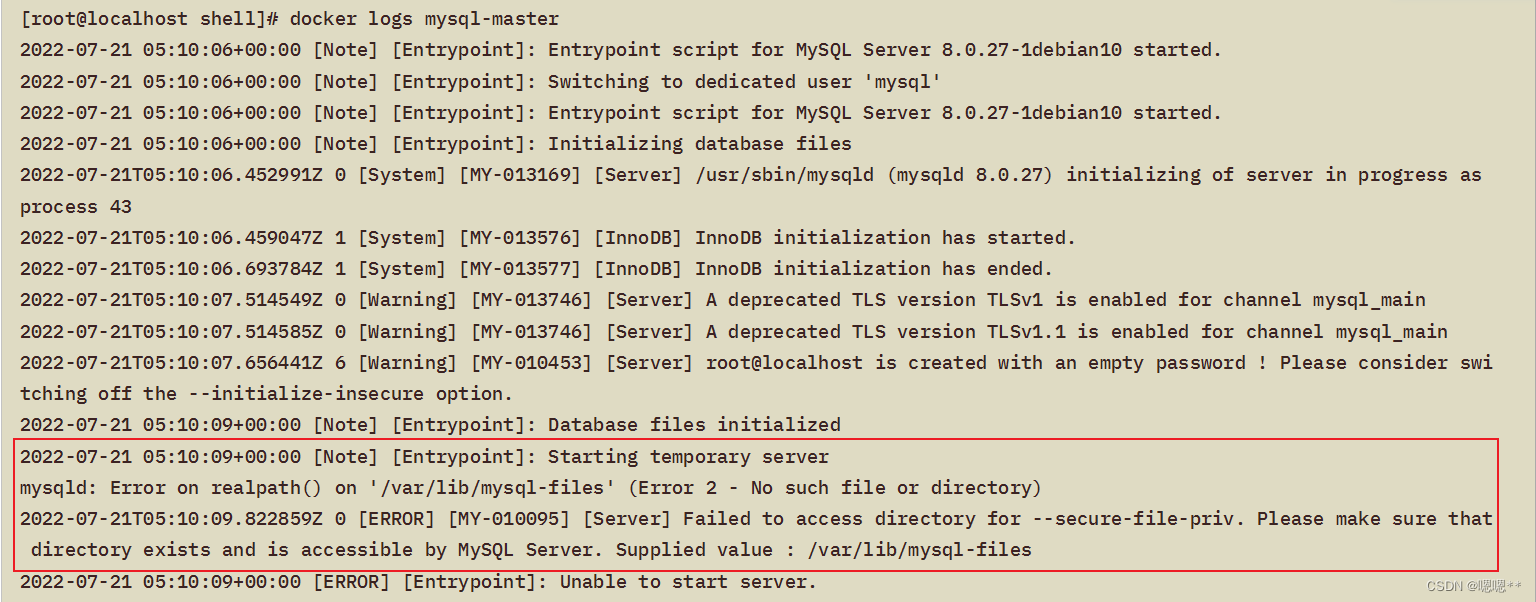
MY-010095 - Boot failure
2022-07-21 05:10:09+00:00 [Note] [Entrypoint]: Starting temporary server
mysqld: Error on realpath() on '/var/lib/mysql-files' (Error 2 - No such file or directory)
2022-07-21T05:10:09.822859Z 0 [ERROR] [MY-010095] [Server] Failed to access directory for --secure-file-priv. Please make sure that directory exists and is accessible by MySQL Server. Supplied value : /var/lib/mysql-files
2022-07-21 05:10:09+00:00 [ERROR] [Entrypoint]: Unable to start server.
Solution - Change run Mapping configuration of configuration file
// Original startup configuration  ==  Encounter the above startup error
docker run --name=mysql-master -p 3308:3306 -v /etc/localtime:/etc/localtim   -v /www/server/mysql_master-slave/master/data:/var/lib/mysql -v /www/server/mysql_master-slave/master/log:/var/log/mysql -v  /www/server/mysql_master-slave/master/conf:/etc/mysql   -e MYSQL_ROOT_PASSWORD=root --privileged=true -d mysql:latest


// Start the configuration after correction  ==  Can be started normally  ==  Change mysql Mapping directory
docker run --name=mysql-master -p 3308:3306 -v /etc/localtime:/etc/localtim   -v /www/server/mysql_master-slave/master/data:/var/lib/mysql -v /www/server/mysql_master-slave/master/log:/var/log/mysql -v  /www/server/mysql_master-slave/master/conf:/etc/mysql/conf.d   -e MYSQL_ROOT_PASSWORD=root --privileged=true -d mysql:latest
Failed to connect from the library to the main library - Not IP、 Account and password problems
Last_IO_Error: error connecting to master 'slave@192.168.80.128:3308' - retry-time: 30 retries: 17 message: Authentication plugin 'caching_sha2_password' reported error: Authentication requires secure connection.
Run from the machine :show slave status
Solution
--  In the main MySQL Run the following in the machine SQL ==  Modify the authorization plug-in
--  There is no need to restart after modification   Lord MySQL、 from MySQL
SELECT plugin FROM `user` where user = 'slave';
ALTER USER 'slave'@'%' IDENTIFIED WITH mysql_native_password BY '123456';
Run from the machine :show slave status
边栏推荐
- Introduction to web security UDP testing and defense
- Docekr学习 - MySQL8主从复制搭建部署
- MySQL remote connection permission error 1045 problem
- 牛客论坛项目部署总结
- word样式和多级列表设置技巧(二)
- 微软提出CodeT:代码生成新SOTA,20个点的性能提升
- 零基础学习CANoe Panel(15)—— 文本输出(CAPL Output View )
- cv2.resize函数报错:error: (-215:Assertion failed) func != 0 in function ‘cv::hal::resize‘
- 【问题解决】ibatis.binding.BindingException: Type interface xxDao is not known to the MapperRegistry.
- [machine learning] experimental notes - emotion recognition
猜你喜欢

【AI4Code】《Contrastive Code Representation Learning》 (EMNLP 2021)

【运维、实施精品】月薪10k+的技术岗位面试技巧

AtCoder Beginner Contest 261E // 按位思考 + dp

【问题解决】org.apache.ibatis.exceptions.PersistenceException: Error building SqlSession.1 字节的 UTF-8 序列的字

A hard journey

【历史上的今天】7 月 25 日:IBM 获得了第一项专利;Verizon 收购雅虎;亚马逊发布 Fire Phone

JS convert pseudo array to array
【Rust】引用和借用,字符串切片 (slice) 类型 (&str)——Rust语言基础12
Clickhouse notes 03-- grafana accesses Clickhouse

7行代码让B站崩溃3小时,竟因“一个诡计多端的0”
随机推荐
[Video] Markov chain Monte Carlo method MCMC principle and R language implementation | data sharing
go : gin 自定义日志输出格式
工业互联网的内涵及其应用
perf 性能调试
[CSDN year-end summary] end and start, always on the way - "2021 summary of" 1+1= Wang "
Docekr学习 - MySQL8主从复制搭建部署
零基础学习CANoe Panel(14)——二极管( LED Control )和液晶屏(LCD Control)
牛客论坛项目部署总结
Simple understanding of flow
Intval MD5 bypass [wustctf2020] plain
7行代码让B站崩溃3小时,竟因“一个诡计多端的0”
JS sorts according to the attributes of the elements in the array
状态(State)模式
如何理解Keras中的指标Metrics
Deep learning MEMC framing paper list
[review SSM framework series] 15 - Summary of SSM series blog posts [SSM kill]
【重温SSM框架系列】15 - SSM系列博文总结【SSM杀青篇】
JS 中根据数组内元素的属性进行排序
2022.07.24 (lc_6124_the first letter that appears twice)
Chapter5 : Deep Learning and Computational Chemistry