当前位置:网站首页>Future & CompletionService
Future & CompletionService
2022-06-27 10:14:00 【InfoQ】
创建线程的方式
- 继承 Thread 类
- 实现 Runable 接口
- 实现 Callable 接口
- 利用线程池
- 不能返回一个返回值
- 不能抛出 checked Exception
public class FutureDemo {

 public static void main(String[] args) throws ExecutionException, InterruptedException {

 new Thread(() -> {
 System.out.println("通过 Runnable 方式执行任务");
 }).start();


 FutureTask task = new FutureTask(new Callable() {
 @Override
 public Object call() throws Exception {
 System.out.println("通过 Callable 方式执行任务");
 // 等待 3s 模拟执行任务
 Thread.sleep(3000);
 return "返回任务结果";
 }
 });

 new Thread(task).start();

 System.out.println("结果:" + task.get());
 }
}
Future
get构造方法
public FutureTask(Callable<V> callable)

public FutureTask(Runnable runnable, V result)
常用方法
boolean cancel (boolean mayInterruptIfRunning)
- 取消任务的执行。参数指定是否立即中断任务执行,或者等等任务结束。
boolean isCancelled ()
- 任务是否已经取消,任务正常完成前将其取消,则返回 true。
boolean isDone ()
- 任务是否已经完成。需要注意的是如果任务正常终止、异常或取消,都将返回 true。
V get () throws InterruptedException, ExecutionException
- 等待任务执行结束,然后获得 V 类型的结果。InterruptedException 线程被中断异常,ExecutionException任务执行异常,如果任务被取消,还会抛出 CancellationException 。
V get(long timeout,TimeUnit unit) throws InterruptedException,ExecutionException, TimeoutException
- 同上面的 get 功能一样,多了设置超时时间。参数 timeout 指定超时时间,uint 指定时间的单位,在枚举类TimeUnit中有相关的定义。如果计算超时,将抛出 TimeoutException。
FutureTask

使用方式
public class FutureTaskDemo {
public static void main(String[] args) throws ExecutionException, InterruptedException {
// 实现 Callable
Task task = new Task();
//构建futureTask
FutureTask<Integer> futureTask = new FutureTask<>(task);
//作为Runnable入参
new Thread(futureTask).start();
System.out.println("task运行结果:" + futureTask.get());
}
static class Task implements Callable<Integer> {
@Override
public Integer call() throws Exception {
System.out.println("子线程正在计算");
int sum = 0;
for (int i = 0; i < 100; i++) {
sum += i;
}
return sum;
}
}
}
使用场景

public class FutureTaskDemo2 {
public static void main(String[] args) throws ExecutionException, InterruptedException {
FutureTask<String> ft1 = new FutureTask<>(new T1Task());
FutureTask<String> ft2 = new FutureTask<>(new T2Task());
FutureTask<String> ft3 = new FutureTask<>(new T3Task());
FutureTask<String> ft4 = new FutureTask<>(new T4Task());
FutureTask<String> ft5 = new FutureTask<>(new T5Task());
//构建线程池
ExecutorService executorService = Executors.newFixedThreadPool(5);
executorService.submit(ft1);
executorService.submit(ft2);
executorService.submit(ft3);
executorService.submit(ft4);
executorService.submit(ft5);
//获取执行结果
System.out.println(ft1.get());
System.out.println(ft2.get());
System.out.println(ft3.get());
System.out.println(ft4.get());
System.out.println(ft5.get());
executorService.shutdown();
}
static class T1Task implements Callable<String> {
@Override
public String call() throws Exception {
System.out.println("T1:查询航班信息...");
TimeUnit.MILLISECONDS.sleep(5000);
return "航班信息查询成功";
}
}
static class T2Task implements Callable<String> {
@Override
public String call() throws Exception {
System.out.println("T2:查询乘机人信息...");
TimeUnit.MILLISECONDS.sleep(50);
return "乘机人信息查询成功";
}
}
static class T3Task implements Callable<String> {
@Override
public String call() throws Exception {
System.out.println("T3:查询联系人信息...");
TimeUnit.MILLISECONDS.sleep(50);
return "联系人信息查询成功";
}
}
static class T4Task implements Callable<String> {
@Override
public String call() throws Exception {
System.out.println("T4:查询退改签信息...");
TimeUnit.MILLISECONDS.sleep(50);
return "退改签信息查询成功";
}
}
static class T5Task implements Callable<String> {
@Override
public String call() throws Exception {
System.out.println("T5:查询其他信息...");
TimeUnit.MILLISECONDS.sleep(50);
return "其他信息查询成功";
}
}
}

Future的局限性
get()- 并发执行多任务
- Future 只提供了 get() 方法来获取结果,并且是阻塞的。所以,除了等待你别无他法。
- 无法对多个任务进行链式调用
- 如果你希望在计算任务完成后执行特定动作,比如发邮件,但 Future 却没有提供这样的能力。
- 无法组合多个任务
- 如果你运行了 10 个任务,并期望在它们全部执行结束后执行特定动作,那么在 Future 中这是无能为力的。
- 没有异常处理
- Future 接口中没有关于异常处理的方法。
CompletionService
构造方法
ExecutorCompletionService(Executor executor)

ExecutorCompletionService(Executor executor, BlockingQueue<Future<V>> completionQueue)
常用方法

submit
- 提交一个 Callable 或者 Runnable 类型的任务,并返回 Future。
take
- 阻塞方法,从结果队列中获取并移除一个已经执行完成的任务的结果,如果没有就会阻塞,直到有任务完成返回结果。
poll
- 从结果队列中获取并移除一个已经执行完成的任务的结果,如果没有就会返回 null,该方法不会阻塞。
使用场景
public class CompletionServiceDemo {
public static void main(String[] args) throws InterruptedException, ExecutionException {
//创建线程池
ExecutorService executor = Executors.newFixedThreadPool(10);
//创建CompletionService
CompletionService<Integer> cs = new ExecutorCompletionService<>(executor);
//异步向电商S1询价
cs.submit(() -> getPriceByS1());
//异步向电商S2询价
cs.submit(() -> getPriceByS2());
//异步向电商S3询价
cs.submit(() -> getPriceByS3());
//将询价结果异步保存到数据库
for (int i = 0; i < 3; i++) {
//从阻塞队列获取futureTask
Integer r = cs.take().get();
executor.execute(() -> save(r));
}
executor.shutdown();
}
private static void save(Integer r) {
System.out.println("保存询价结果:" + r);
}
private static Integer getPriceByS1() throws InterruptedException {
TimeUnit.MILLISECONDS.sleep(5000);
System.out.println("电商S1询价信息1200");
return 1200;
}
private static Integer getPriceByS2() throws InterruptedException {
TimeUnit.MILLISECONDS.sleep(8000);
System.out.println("电商S2询价信息1000");
return 1000;
}
private static Integer getPriceByS3() throws InterruptedException {
TimeUnit.MILLISECONDS.sleep(3000);
System.out.println("电商S3询价信息800");
return 800;
}
}

实现原理
QueueingFuture
QueueingFutureprivate static class QueueingFuture<V> extends FutureTask<Void> {
QueueingFuture(RunnableFuture<V> task,
BlockingQueue<Future<V>> completionQueue) {
super(task, null);
this.task = task;
this.completionQueue = completionQueue;
}
private final Future<V> task;
private final BlockingQueue<Future<V>> completionQueue;
// 改写 FutureTask 的 done 方法,之后把 Executor 执行的计算结果放入 BlockingQueue 中
protected void done() {
completionQueue.add(task);
}
}
ExecutorService和CompletionService
Futureget()get()FutureFutureFuture
性能优化实践
- 分离出需要处理的题目(60~120 个,平均大约 80 个题目左右);
- 解析处理题目,对题目中的图片下载到本地,然后调用第三方工具生成 PDF 文档(耗时大约 3~10 秒);
- 将 PDF 文档上传到 OSS 云空间进行存储(耗时大约 1~3 秒);
- 提供文档地址让用户去下载打印。
4~13s8sfor/**
* 根据需要的待处理文档信息
*/
public class PDFDocVO {
//待处理文档名称
private String docName;
// 省略其他
public String getDocName() {
return docName;
}
public void setDocName(String docName) {
this.docName = docName;
}
}
public class ProduceDocService {

 /**
 * 将待处理文档处理为本地实际文档
 *
 * @param doc
 * @return
 */
 public static String makePDF(PDFDocVO doc) throws InterruptedException {
 // 用 sleep 模拟生成文档额耗时范围 3~10s
 Random r = new Random();
 Thread.sleep(3000 + r.nextInt(7000));
 return "local" + doc.getDocName();
 }
}
public class UploadDocService {

 /**
 * 模拟上传
 *
 * @param localName 实际文档在本地的存储位置
 * @return oss 的文件路径
 * @throws InterruptedException
 */
 public static String upload(String localName) throws InterruptedException {
 // 用 sleep 模拟生成文档额耗时范围 1~3s
 Random r = new Random();
 Thread.sleep(1000 + r.nextInt(2000));
 return "https://aliyun.oss.xxx/file/" + localName;
 }
}
串行
import java.util.ArrayList;
import java.util.List;
public class SerializeModel {
/**
* 符合条件的文档
*
* @param count
* @return
*/
public static List<PDFDocVO> getPDFDocList(int count) {
List<PDFDocVO> list = new ArrayList<>();
for (int i = 0; i < count; i++) {
PDFDocVO doc1 = new PDFDocVO();
list.add(doc1);
}
return list;
}
public static void main(String[] args) throws InterruptedException {
List<PDFDocVO> docList = getPDFDocList(10);
// 开始时间
long start = System.currentTimeMillis();
for (PDFDocVO doc : docList) {
// 生成文档
String localName = ProduceDocService.makePDF(doc);
// 上传文档
UploadDocService.upload(localName);
}
long total = System.currentTimeMillis() - start;
System.out.println("总耗时为:" + total / 1000 + "秒," + total / 1000 / 60 + "分钟");
}
}

82/10=8.2s并行
并行+异步
import java.util.ArrayList;
import java.util.List;
import java.util.concurrent.Callable;
import java.util.concurrent.CompletionService;
import java.util.concurrent.ExecutorCompletionService;
import java.util.concurrent.ExecutorService;
import java.util.concurrent.Executors;
import java.util.concurrent.Future;
/**
* TODO
*
* @date 2022/4/7 22:08
*/
public class ParallelAsyncModel {
// 线程池线程数
public final static int THREAD_COUNT = Runtime.getRuntime().availableProcessors();
// 处理文档生成的线程池 IO密集型任务
private static ExecutorService makeDocService = Executors.newFixedThreadPool(THREAD_COUNT * 2);
// 处理文档上传的线程池
private static ExecutorService uploadDocService = Executors.newFixedThreadPool(THREAD_COUNT * 2);
// 文档生成队列
private static CompletionService<String> makeDocCompletionService = new ExecutorCompletionService(makeDocService);
// 文档上传队列
private static CompletionService<String> uploadDocCompletionService = new ExecutorCompletionService(uploadDocService);
/**
* 符合条件的文档
*
* @param count
* @return
*/
public static List<PDFDocVO> getPDFDocList(int count) {
List<PDFDocVO> list = new ArrayList<>();
for (int i = 0; i < count; i++) {
PDFDocVO doc1 = new PDFDocVO();
list.add(doc1);
}
return list;
}
public static void main(String[] args) throws InterruptedException {
int count = 100;
List<PDFDocVO> docList = getPDFDocList(count);
// 开始时间
long start = System.currentTimeMillis();
// 多线程处理文档生成
for (PDFDocVO doc : docList) {
makeDocCompletionService.submit(new Callable<String>() {
@Override
public String call() throws Exception {
String localName = ProduceDocService.makePDF(doc);
return localName;
}
});
}
// 上传文档
for (int i = 0; i < count; i++) {
Future<String> take = makeDocCompletionService.take();
uploadDocCompletionService.submit(new Callable<String>() {
@Override
public String call() throws Exception {
String uploadUrl = UploadDocService.upload(take.get());
return uploadUrl;
}
});
}
long total = System.currentTimeMillis() - start;
System.out.println("总耗时为:" + total / 1000 + "秒," + total / 1000 / 60 + "分钟");
}
}

32/100=0.32s8.2/0.32 ≈ 25 倍线程数的设置
- IO 密集型任务,线程数为
CPU 核心数*2;
- CPU 密集型任务,线程数为
CPU 核心数+1。
CPU 核心数*2CPU 核心数*41:41:3CPU 核心数*4*3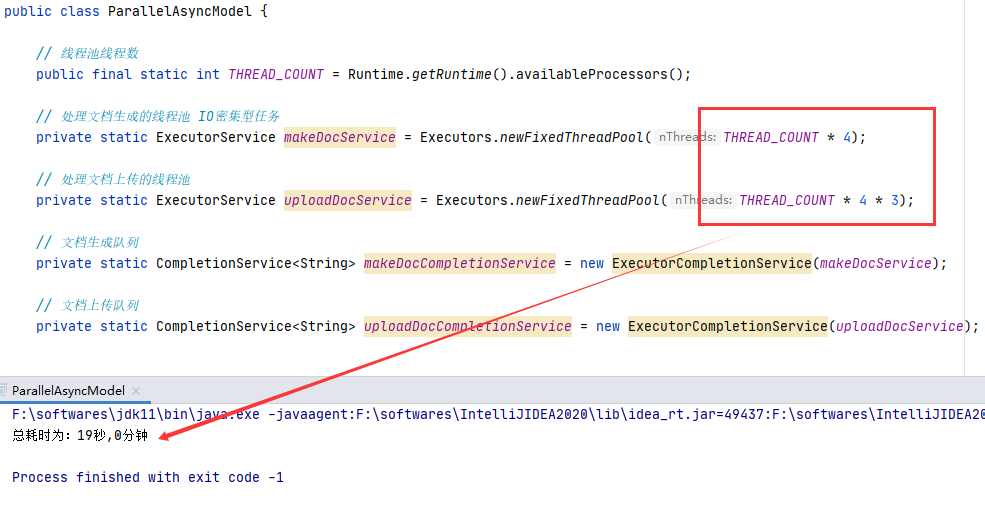
总结
边栏推荐
猜你喜欢

Your brain is learning automatically when you sleep! Here comes the first human experimental evidence: accelerate playback 1-4 times, and the effect of deep sleep stage is the best

【TcaplusDB知识库】Tmonitor后台一键安装介绍(二)

邮件系统(基于SMTP协议和POP3协议-C语言实现)
测试同学怎么参与codereview

Oracle trigger stored procedure writes at the same time

Stop using system Currenttimemillis() takes too long to count. It's too low. Stopwatch is easy to use!

. Net

用户认证技术
C language learning day_ 06

产品力对标海豹/Model 3,长安深蓝SL03预售17.98万起

随机推荐
Xiaobai can also understand how the basic network 03 | OSI model works (classic push)
. Net
[200 opencv routines] 212 Draw a slanted rectangle
Learning notes - data set generation
In the three-tier architecture, at which layer is the database design implemented, not at the data storage layer?
C语言学习-Day_05
手机影像内卷几时休?
上周热点回顾(6.20-6.26)
使用Karmada实现Helm应用的跨集群部署【云原生开源】
leetcode:522. Longest special sequence II [greed + subsequence judgment]
JS file upload and download
[noodle classic] Yunze Technology
Comparison between new and old interfaces
12 necessary tools for network engineers
R语言使用econocharts包创建微观经济或宏观经济图、demand函数可视化需求曲线(demand curve)、自定义配置demand函数的参数丰富可视化效果
torchvision.models._utils.IntermediateLayerGetter使用教程
运维一线工作常用shell脚本再整理
Tcp/ip explanation (version 2) notes / 3 link layer / 3.4 bridge and switch / 3.4.1 spanning tree protocol (STP)
通俗易懂理解朴素贝叶斯分类的拉普拉斯平滑
torchvision. models._ utils. Intermediatelayergetter tutorial