当前位置:网站首页>Configure two databases in master-slave database mode (master and slave)
Configure two databases in master-slave database mode (master and slave)
2022-06-23 20:33:00 【kenvie】
subject
Use VMWare Create two centos7 The system's virtual machine , Install database services , The two databases are configured in the master-slave database mode (master and slave). When the configuration is complete , At the slave node , perform show status slave\G View the replication status of the slave node . Submit the returned result of viewing the service status from the node to the answer box in the form of text .( Database user name root, password 000000; All commands about the database use lowercase )
Node planning
IP | Host name | node |
|---|---|---|
192.168.200.11 | mysql1 | Master database |
192.168.200.12 | mysql2 | From database |
Get ready
Turn off the server firewall 、SELINUX
The network configuration
Host name | Pattern | IP |
|---|---|---|
mysql1 | Host only | 192.168.100.11 |
NAT | 192.168.200.11 | |
mysql2 | Host only | 192.168.100.12 |
NAT | 192.168.200.12 |
Configure host name
1、 Configure the first host name as mysql1
[[email protected] ~]# hostnamectl set-hostname mysql1
[[email protected] ~]# bash
[[email protected] ~]#
2、 Configure the second host name as mysql2
[[email protected] ~]# hostnamectl set-hostname mysql2
[[email protected] ~]# bash
[[email protected] ~]#
add to host
1、 To configure mysql1 Of host, Add the following to /etc/hosts
[[email protected] ~]# vi /etc/hosts
192.168.200.11 mysql1
192.168.200.12 mysql2
2、 Using remote replication will mysql1 Of hosts File replacement mysql2 Medium hosts file
[[email protected] ~]# scp /etc/hosts 192.168.200.12:/etc/hosts
The authenticity of host '192.168.200.12 (192.168.200.12)' can't be established.
ECDSA key fingerprint is 14:57:da:84:0b:98:67:83:88:d7:c4:62:bf:87:60:f6.
Are you sure you want to continue connecting (yes/no)?  #yes
Warning: Permanently added '192.168.200.12' (ECDSA) to the list of known hosts.
[email protected]'s password:  # Input password
hosts                                    100%  202     0.2KB/s   00:00
To configure yum Source (mysql1)
1、 Back up the original yum Source
[[email protected] ~]# mkdir /etc/yumback
[[email protected] ~]# mv /etc/yum.repos.d/* /etc/yumback
2、 Mount the image
[[email protected] ~]# mkdir /opt/centos
[[email protected] ~]# vi /etc/fstab    # Add the following command to the last line
/root/CentOS-7-x86_64-DVD-1511.iso /opt/centos/ iso9660 defaults,loop 0 0
# Don't restart yet , Run the following command to verify that the mount is successful
[[email protected] ~]# mount -a
3、 To configure yum
[[email protected] ~]# vi /etc/yum.repos.d/local.repo
[centos]
name=centos
baseurl=file:///opt/centos
gpgcheck=0
enabled=1
4、 Clean cache , Build cache
[[email protected] ~]# yum clean all
[[email protected] ~]# yum makecache
install FTP(mysql1)
Installation configuration ftp
[[email protected] ~]# yum install -y vsftpd
[[email protected] ~]# vi /etc/vsftpd/vsftpd.conf
# Add the following line in the last line
anon_root=/opt

[[email protected] ~]# systemctl start vsftpd
[[email protected] ~]# systemctl enable vsftpd
Created symlink from /etc/systemd/system/multi-user.target.wants/vsftpd.service to /usr/lib/systemd/system/vsftpd.service.
To configure yum(mysql2)
1、 Back up the original yum Source
[[email protected] ~]# mkdir /opt/yumback
[[email protected] ~]# mv /etc/yum.repos.d/* /opt/yumback
2、 To configure yum
[[email protected] ~]# vi /etc/yum.repos.d/ftp.repo
[mysql1]
name=mysql1
baseurl=ftp://192.168.100.11/centos
gpgcheck=0
enabled=1
3、 Clean cache , Build cache
[[email protected] ~]# yum clean all
[[email protected] ~]# yum makecache
Primary node installation mariadb
install mariadb And mariadb service
[[email protected] ~]# yum install mariadb mariadb-server -y
[[email protected] ~]# systemctl start mariadb
[[email protected] ~]# systemctl enable mariadb
# Initialize database
#!!!!!!!!! Be sure to start mariadb Service reinitialization !!!!!!!!!
[[email protected] ~]# mysql_secure_installation
Install from node mariadb
install mariadb And mariadb service
[[email protected] ~]# yum install mariadb mariadb-server -y
[[email protected] ~]# systemctl start mariadb
[[email protected] ~]# systemctl enable mariadb
# Initialize database
#!!!!!!!!! Be sure to start mariadb Service reinitialization !!!!!!!!!
[[email protected] ~]# mysql_secure_installation
Master node configuration database
1、 Modify the database configuration file
[[email protected] ~]# vi /etc/my.cnf
# stay [mysqld] To add the following ( You don't need to add what you already have ):
[mysqld]
datadir=/var/lib/mysql
socket=/var/lib/mysql/mysql.sock
log_bin = mysql-bin   #  Open the log ( The host needs to be turned on ), This mysql-bin  Customizable , You can also add paths
binlog_ignore_db = mysql   # Libraries that do not give slave synchronization ( Write multiple lines )
server_id = 11
[[email protected] ~]# systemctl restart mariadb
2、 to open up mysql1 Database permissions
[[email protected] ~]# mysql -uroot -p000000
MariaDB [(none)]> grant all privileges on *.* to [email protected]'%' identified by "000000";
MariaDB [(none)]> grant replication slave on *.* to 'user'@'mysql2' identified by '000000';
MariaDB [(none)]> exit
Configure the database from the node
1、 Modify the database configuration file
[[email protected] ~]# vi /etc/my.cnf
 stay [mysqld] To add the following ( You don't need to add what you already have ):
[mysqld]
datadir=/var/lib/mysql
socket=/var/lib/mysql/mysql.sock
log_bin = mysql-bin    #  Open the log ( The host needs to be turned on ), This mysql-bin  Customizable , You can also add paths
binlog_ignore_db = mysql  # Libraries that do not give slave synchronization ( Write multiple lines )
server_id = 12
[[email protected] ~]# systemctl restart mariadb
2、 to open up mysql2 Database permissions
[[email protected] ~]# mysql -uroot -p000000
MariaDB [(none)]> change master to master_host='mysql1',master_user='user',master_password='000000';
MariaDB [(none)]> start slave;
MariaDB [(none)]> show slave status\G;
Submission
MariaDB [(none)]> show slave status\G;
*************************** 1. row ***************************
               Slave_IO_State: Waiting for master to send event
                  Master_Host: mysql1
                  Master_User: user
                  Master_Port: 3306
                Connect_Retry: 60
              Master_Log_File: mysql-bin.000001
          Read_Master_Log_Pos: 529
               Relay_Log_File: mariadb-relay-bin.000002
                Relay_Log_Pos: 813
        Relay_Master_Log_File: mysql-bin.000001
             Slave_IO_Running: Yes
            Slave_SQL_Running: Yes
              Replicate_Do_DB:
          Replicate_Ignore_DB:
           Replicate_Do_Table:
       Replicate_Ignore_Table:
      Replicate_Wild_Do_Table:
  Replicate_Wild_Ignore_Table:
                   Last_Errno: 0
                   Last_Error:
                 Skip_Counter: 0
          Exec_Master_Log_Pos: 529
              Relay_Log_Space: 1109
              Until_Condition: None
               Until_Log_File:
                Until_Log_Pos: 0
           Master_SSL_Allowed: No
           Master_SSL_CA_File:
           Master_SSL_CA_Path:
              Master_SSL_Cert:
            Master_SSL_Cipher:
               Master_SSL_Key:
        Seconds_Behind_Master: 0
Master_SSL_Verify_Server_Cert: No
                Last_IO_Errno: 0
                Last_IO_Error:
               Last_SQL_Errno: 0
               Last_SQL_Error:
  Replicate_Ignore_Server_Ids:
             Master_Server_Id: 11
1 row in set (0.00 sec)边栏推荐
- Logstash start -r parameter
- 同花顺网上开户安全吗,佣金高不高
- 20省市公布元宇宙路线图
- Daily question brushing record (II)
- 技术分享| WVP+ZLMediaKit实现摄像头GB28181推流播放
- 【Golang】快速复习指南QuickReview(十)——goroutine池
- 墨天轮访谈 | IvorySQL王志斌—IvorySQL,一个基于PostgreSQL的兼容Oracle的开源数据库
- Implementation of microblog system based on SSM
- Kubernetes 资源拓扑感知调度优化
- Official announcement. Net 7 preview 5
猜你喜欢

Ugeek's theory 𞓜 application and design of observable hyperfusion storage system
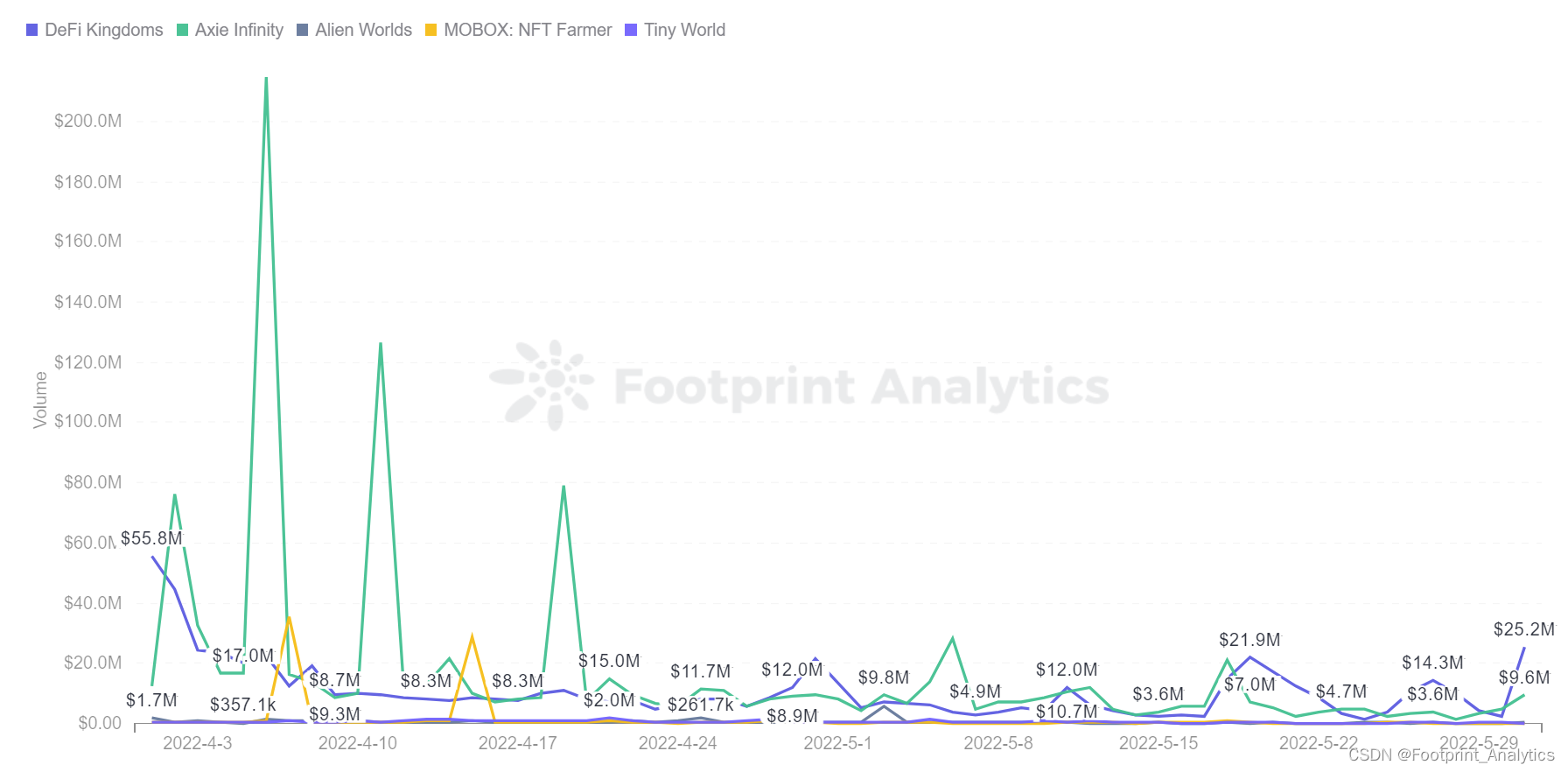
5 月最大的 GameFi 崩溃受害者能否在熊市中生存?| May Monthly Report

35歲危機?內卷成程序員代名詞了…

After the collapse of UST, will the stable currency market pattern usher in new opportunities?

The golden nine silver ten, depends on this detail, the offer obtains the soft hand!
Can the biggest gamefi crash victim survive the bear market in May| May Monthly Report

Rendering of kotlin jetpack compose tab using animatedvisibility
35 year old crisis? It has become a synonym for programmers

Elastricearch's fragmentation principle of the second bullet

Tupu software digital twin intelligent water service, breaking through the development dilemma of sponge City
随机推荐
[golang] how to clear slices gracefully
80% of people will be wrong about the three counter intuitive questions?
Tcp/udp Fundamentals
Is Guoyuan futures trading software formal? How to download safely?
深入理解和把握数字经济的基本特征
Daily question brushing record (II)
[golang] quick review guide quickreview (I) -- string
【Golang】来几道题以加强Slice
Digital procurement transformation solution: SaaS procurement management platform promotes enterprise sunshine procurement
徽商期货交易软件正规吗?如何安全下载?
Kinsoku Jikou Desu Sina stock interface change
@@脚本实现Ishell自动部署
国元期货交易软件正规吗?如何安全下载?
Teach you how to develop desktop applications with web pages
【Golang】快速复习指南QuickReview(六)——struct
力扣每日一练之字符串Day6
LeetCode 1079. movable-type printing
【Golang】快速复习指南QuickReview(七)——interface
20省市公布元宇宙路线图
UGeek大咖说 | 可观测之超融合存储系统的应用与设计