当前位置:网站首页>Data analysis slicer, PivotTable and PivotChart (necessary in the workplace)
Data analysis slicer, PivotTable and PivotChart (necessary in the workplace)
2022-06-26 01:08:00 【Treasure girl's Growth Diary】
When dealing with small amounts of data ,excel What a powerful weapon , When I am free recently, I will review excel Data processing of , Next, let's sort out the slicer 、 The use of PivotTables and PivotCharts is important , If you don't understand anything, you can send me a private letter right away . It will also be updated in the near future, such as powerbi Relevant stuff , Welcome to private communication !
Necessary skills
Practice data :
link :https://pan.baidu.com/s/1l6G-0phBxKQKYo0_pvfg6Q
Extraction code :4nsj
One 、 PivotTable and PivotChart
Take out the picture I made a few months ago , It looks like this , Hahaha, let's explore .
When we get a copy of the data , Click Insert ——> PivotTable ——> Add the corresponding row and column values 
1.1 PivotTable Common key points How to use calculated fields ?
For example, we get a copy of the data , New fields need to be added , And this calculation must be carried out , You can refer to :
PivotTable tools ——> analysis ——> Field 、 Project collection ——> Calculated field 
Then fill in the corresponding name , Write the corresponding formula by yourself , Click ok ( Be careful : If it is not displayed, click to check the name of the calculation field you just added in the PivotTable field )
https://blog.csdn.net/hanhanwanghaha Treasure girl Your attention is welcome !
Welcome to WeChat official account. : Treasure girl's Growth Diary
Let this lovely treasure girl walk with you on the road of hard work !
If reproduced , Please indicate the source ( If not indicated , Whoever steals will be prosecuted )

A useful PivotTable is ready ( If the decimal is too long, it can be converted to a percentage : Select the profit rate column ——> Start ——> Click... In the number column %)
1.2 PivotChart Common key points Use of secondary axes
This is to solve the problem of large numerical difference , The solution to the problem cannot be shown on the diagram , For example, the profit margin and sales volume cannot be displayed at the same time
for example : Click PivotChart ——> Bar charts
The field buttons on the chart can be selected , And then hide ( Be beautiful )
Click design ——> Quick layout , It can automatically generate titles, etc
At this point, we can see that our profit margin is not shown
At this point we will use the secondary axis
Double click on the diagram ——> Format ——> Icon area ——> Change to profit margin ( That is, the column you just added , For example, I am in the column of profit margin , So it's a series “ Summation term : The profit margin ”)——> Select three small bars ( Here's the picture )——> Click on the secondary axis 
On bar chart Inside Right click Click Change Series icon type ——> Change where you want to mark as a polyline ok La 
Then in the design column Design by yourself , Dress our picture , The result is almost like this 
Two 、excel Select artifact in : Slicer
The effect is as shown in the picture 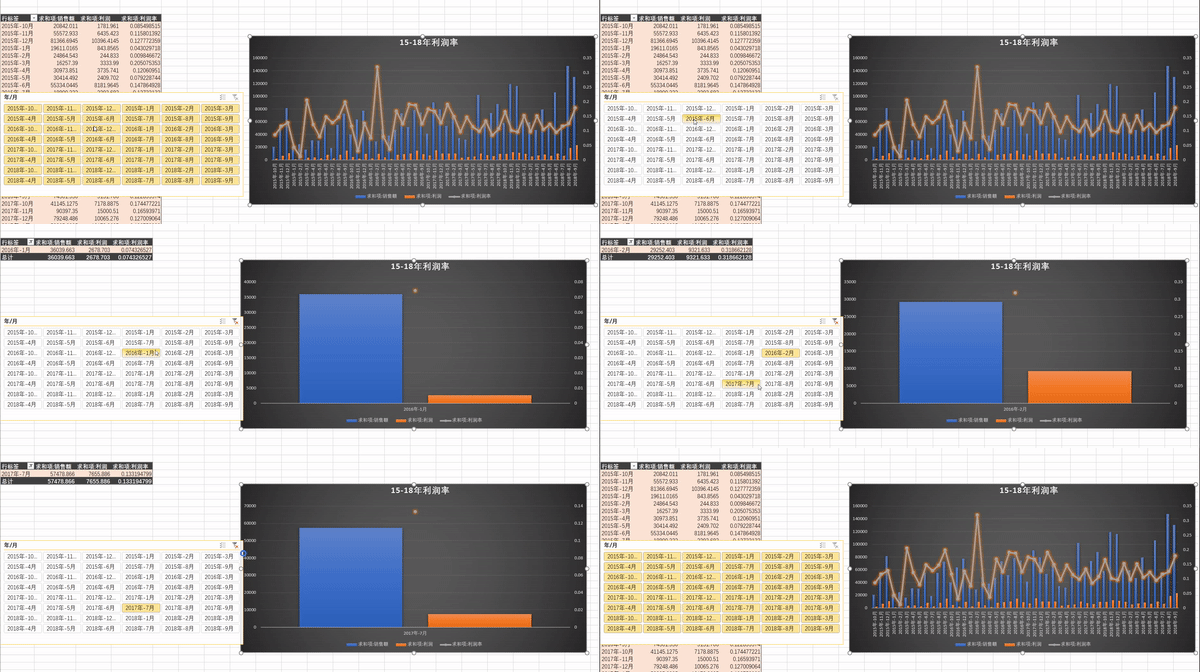
Click on the picture ——> analysis ——> Screening ——> Insert slicer ——> Select the fields you want to filter ——> Slicer generation
To make it look better
It can be found in the slicer tool , Click the options , Set number of columns 、 Slicer style, etc , You can pull the slicer yourself , Pull to the size you want .
The above is all the key content shared today , If you have any questions, please send me a private letter. Haha  [https://blog.csdn.net/hanhanwanghaha]> https://blog.csdn.net/hanhanwanghaha Treasure girl Your attention is welcome !
Welcome to WeChat official account. : Treasure girl's Growth Diary
Let this lovely treasure girl walk with you on the road of hard work !
If reproduced , Please indicate the source ( If not indicated , Whoever steals will be prosecuted )
边栏推荐
- Qt Cmake 纯C 代码调用系统控制台输入scanf 及 中文输出乱码
- 从查询数据库性能优化谈到redis缓存-谈一谈缓存的穿透、雪崩、击穿
- Solve STM32 operation μ Solution to sudden failure of task scheduling in c/os-ii system
- Endnote IEEE Transactions on industrial electronics/tie/tpel reference format template
- Analyze the five root causes of product development failure
- 关于EF翻页查询数据库
- Web學習之TypeScript
- Installation and configuration of gradle environment
- vite打包构建时 @charset utf-8警告问题处理;
- C thread pool control semaphore
猜你喜欢


随机推荐
Musk vs. jobs, who is the greatest entrepreneur in the 21st century
Chapter V exercises (124, 678, 15, 19, 22) [microcomputer principles] [exercises]
返回值为Object型方法调用equals()
Typescript for Web Learning
jarvisoj_level2_x64
计算机网络知识总结(面试)
DPVS fullnat mode kept
ETCD数据库源码分析——集群间网络层服务端接口
Modelsim simulation FFT core cannot be simulated solution (qsys)
Web学习之TypeScript
ASP.NET cache缓存的用法
Binary sort tree
Digital circuit - adder
Qt Cmake 纯C 代码调用系统控制台输入scanf 及 中文输出乱码
How product managers control the progress of product development
在线小工具分享(不定时更新,当前数量:2)
Computer network knowledge summary (interview)
Unknown device ID does not appear on the STM32 st-link utility connection! Causes and Solutions
数组中的第K个最大元素
Stream data