当前位置:网站首页>Section 29 basic configuration case of Tianrongxin topgate firewall
Section 29 basic configuration case of Tianrongxin topgate firewall
2022-06-23 22:46:00 【dare to try @】
Firewall configuration directory
- 1 Experimental topology and experimental requirements
- 2 experiment 1 Demonstration process — Verify firewall zone isolation and policy writing
- 3 experiment 2 Demonstration process — Do source conversion SNAT
- 4 experiment 3 Demonstration process — Do target address conversion DNAT
- 5 experiment 4 Demonstration process — Application layer filtering
- 6 inductive
- Reference article
1 Experimental topology and experimental requirements
1.1 Network topology
The network topology of this experiment is as follows , The roles and functions of the network equipment of each host are as follows :
Real machine : Do not participate in the experiment , Just for remote management firewall , Manage the firewall by opening a web page .
winxp: As the intranet host of the company , You can access servers in the isolation zone and the extranet zone .
win2003: Two sets of , One is in the external network area PC, A web server for the quarantine area .
A firewall : This experiment uses the firewall of Tianrongxin , Working in routing mode , Its interface is ethx, And from eth0 Start .
1.2 experiment 1: Verify firewall zone isolation and policy writing
The configuration steps are as follows :
(1) Build network
(2)PC To configure IP And gateway
(3) Firewall configuration :
- 1) Create area , And divide the interface into areas
- 2) Firewall interface configuration IP, Configure the routing ( No configuration is required for this experiment )
- 3) Write strategy
(4) Experimental verification
The following three issues should be paid attention to during configuration :
(1) The three virtual machines participating in the experiment need to refer to the gateway .
(2) Need to configure PAT? Unwanted , Firewall bears the function of router , The three network segments are all stored in the firewall routing table , You can route directly .
(3) Whether the real machine needs to be configured with a gateway ? Unwanted , The real machine does not participate in the experiment , Its function is to manage firewalls through web pages , As long as the communication between the real machine and the firewall is ensured .
1.3 experiment 2: Do source conversion SNAT
In the experiment 1 On the basis of , take win2003-outside Gateway removal , This is to simulate the real Internet . At this time ,win2003-outside Can only communicate with the same network segment , So as to simulate the situation that private addresses cannot be transmitted on the Internet , Therefore, it is necessary to perform at the firewall interface PAT address translation .
The configuration steps are as follows :
(1) take win2003-outside Gateway removal , At this time, the Internet PC Can't give to intranet PC Return packet , Equivalent to simulating the Internet .
(2) Configure source conversion , Realization inside and DMZ The area can access the Internet .
(3) Experimental verification .
1.4 experiment 3: Target conversion DNAT
In the experiment 1 and 2 On the basis of , The 2003 Deploy as WEB Server and publish , The isolated zone server can be accessed by the external network . among , The server port is mapped to the public IP On (100.1.1.2).
The configuration steps are as follows :
(1) Deploy WEB Server and publish web pages
(2) The WEB The server publishes
- 1) do DNAT
- 2) Write strategy
(3) Use outside Area 2003( Extranet PC) By visiting http://100.1.1.2 To visit WEB The server
1.5 experiment 4: Application layer filtering
In the experiment 1~3 On the basis of , Connect the Internet to 2003 Deploy as Public network Of WEB The server and DNS The server . Verify the internal network and isolation zone at this time PC You can access the Internet website through the domain name . do URL After filtration , Visit the blacklist URL When the failure .
2 experiment 1 Demonstration process — Verify firewall zone isolation and policy writing
2.1 Build a network topology
(1) First installation VMWare Software ,VMWare For software installation, please refer to 《 Deploy virtual machines and common system configurations 》
(2) Build multiple in a virtual machine VMnet The Internet , And shut down DHCP、 Modify the address of each subnet segment . At present, there are only VMnet1 and VMnet8, According to the network topology , Need to add VMnet2 and VMnet3. Add... As follows VMnet2 and VMnet3, Modify the address of each subnet segment .

(3) This experiment uses Tianrongxin firewall , First download the firewall , And installed in VMWare In software ( Or download and install the firewall , And open it in the virtual machine ). stay VMWare Start one in the software winxp, Two sets of win2003, And they are named according to the topological graph for the convenience of distinguishing . For details of virtual machine installation and settings, please refer to 《 Deploy virtual machines and common system configurations 》
(4) According to the network topology, the above PC Bridge to respective VMnet in , And configuration IP And gateway . The virtual machine IP Configuration details refer to 《 IP Address details and related concepts 》
(5) Firewall bridge to VMnet And open . There is... On the equipment 5 Block NIC , Corresponding to interfaces respectively eth0~4, The first three pieces are needed for this experiment , Bridge to VMnet1 to VMnet3 On .
tips:
1) Chinese firewalls leave the factory with eth0 Of IP It's ready , Tianrongxin eth0 Interface IP by 192.168.1.254, Please refer to the manual for details of other firewalls . In addition, the firewall also opens the remote management mode , The firewall can be remotely managed through web pages , The interface is generally 80 or 443, The remote management port of Tianrongxin is 8080.
2) In practice, , Can take consle The cable is inserted into the firewall eth0 port ,PC Of IP It is also configured with the same network segment as the firewall ( If it is Tianrongxin firewall , Then for 192.168.1.0/24 The network segment ), Then open through the browser Webpage To manage firewalls .
2.2 Create zones for firewalls and configure IP
(1) Real machines manage firewalls through web pages . The real machine VMnet1 Enable and configure IP( The real machine does not need to be configured with a gateway )→ With a real machine ping A firewall IP, can ping through → Use the real browser to input https://192.168.1.254:8080/, adopt 8080 Port opens the firewall management page , Enter the default account and password of the firewall to log in .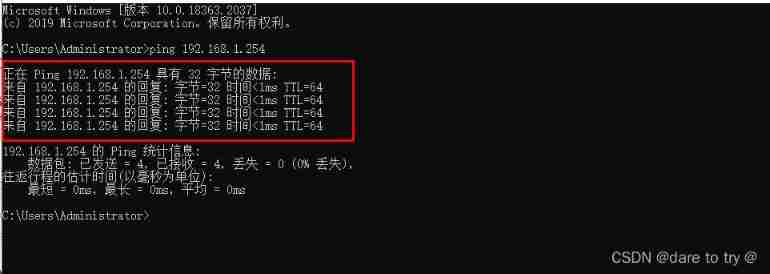

(2) Create area , And divide the interface into corresponding areas . In resource management → In the region , Modify the original area information to an easily recognizable name , Modify permission to prohibit , Set interface . In the same way, add outside and DMN Area .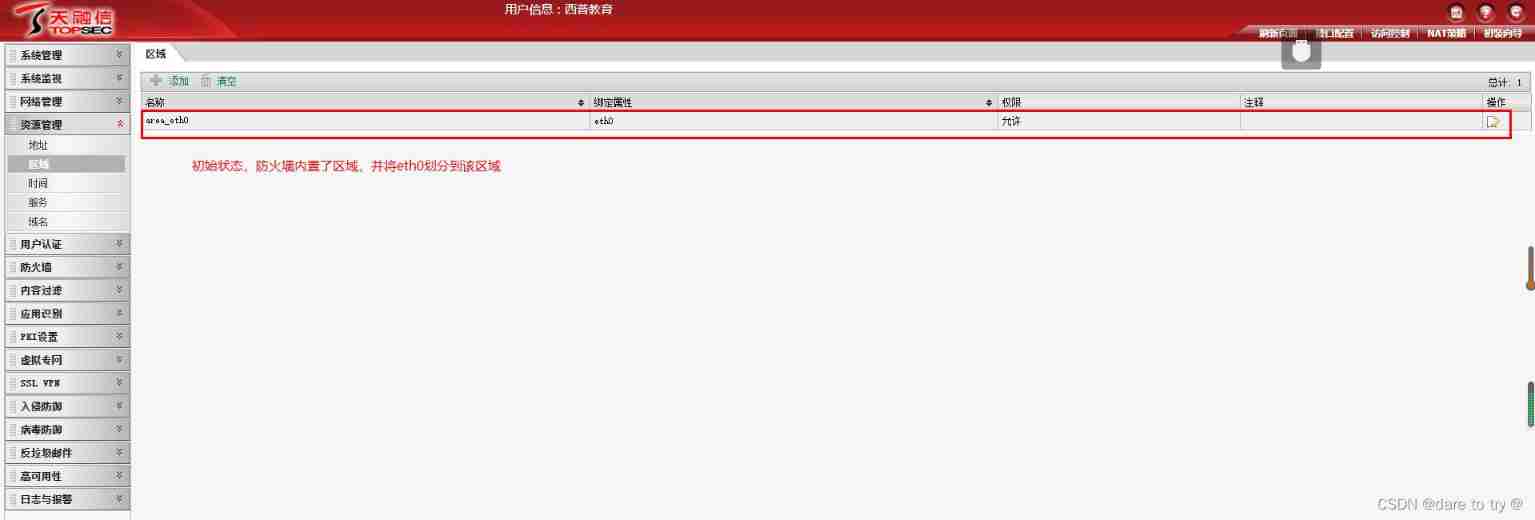
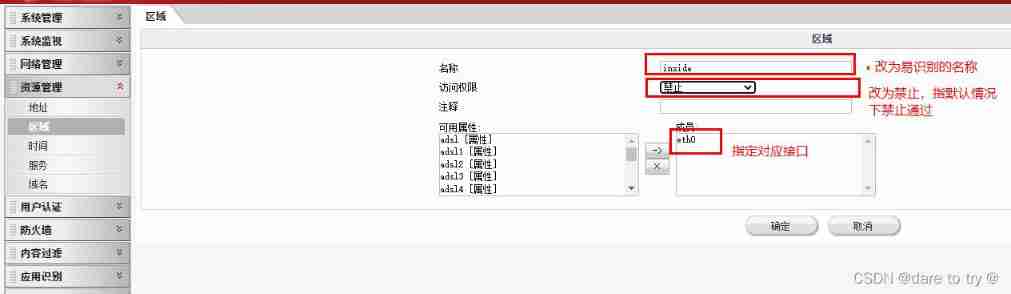

(3) Configure interface IP Address . Click network management → Interface → Click the edit icon , Configure each interface one by one , Including modification description and settings IP Address .
(4) View routing table . This experiment is all direct route , Therefore, there is no need to configure the routing table .
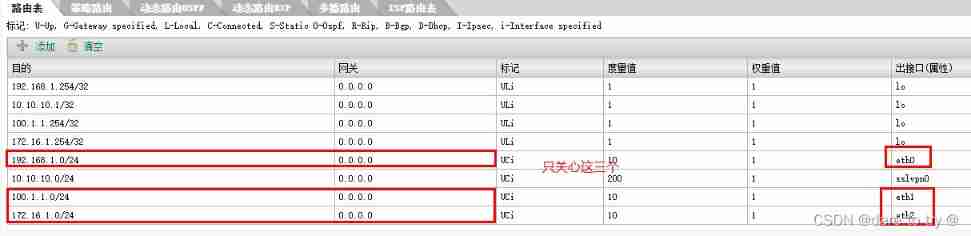
(5) At this time, the network topology and IP The routes have been configured , Try to make use of winXP ping 2 platform win2003, It doesn't work , Because there is no strategy yet , It is forbidden to divide the area .
2.3 Write policies on the firewall
At the firewall → Access control → Add a policy → Fill in a strategy according to the following figure → complete . The content security policy indicates that 5 Layer data for content analysis . Similarly, add from DMZ Area to outside Regional strategy , thus , All the strategies from high to low have been completed .
2.4 Experimental verification
Three virtual hosts interact with each other ping.
(1)winXP-inside can ping through win2003-DMZ, On the contrary, it doesn't work .
(2)winXP-inside can ping through win2003-outside, On the contrary, it doesn't work .
(3)win2003-DMZ can ping through win2003-outside, On the contrary, it doesn't work .
3 experiment 2 Demonstration process — Do source conversion SNAT
(1) take win2003-outside Of IP The gateway in the configuration is deleted . here inside And DMZ None of them ping Internet access . Because the Internet PC Can't give to intranet PC Return packet .
(2) Configure source conversion . A firewall → address translation → add to → Set the conversion rules according to the following figure . This step is to make the intranet PC Internet access , Configured on the router NAT、PAT And so on IP The process of address translation .
(3) Experimental verification : Three virtual hosts interact with each other ping.
- 1)winXP can ping through win2003-DMZ, On the contrary, it doesn't work .
- 2)winXP can ping through win2003-outside, On the contrary, it doesn't work .
- 3)win2003-DMZ can ping through win2003-outside, On the contrary, it doesn't work .
4 experiment 3 Demonstration process — Do target address conversion DNAT
Do target address conversion DNAT The purpose of is to publish the servers in the intranet , Map it to the interface of the public network , So that people on the Internet can access the public network IP, To access the intranet server . Its working principle can be specifically referred to 《NAT( Network address translation )— Implement public IP And private network IP Conversion between 》
4.1 take win2003-DMZ Deploy as a web server
(1) stay win2003-DMZ Installation on WEB Server software , And publish static web pages , The original content of the title bar of the default home page under the default site “ Under construction ” It is amended as follows “ Welcome to the Beijing Winter Olympics ”, Change the content to “ This is the live broadcast of the Beijing Winter Olympic Games ”.WEB Server deployment and Publishing Web page for details 《 IIS And WEB The server — For publishing websites 》.
(2) Local access http://172.16.1.1, Check whether the web page has been modified successfully .
(3) Test the intranet to visit the website , Successful visit .
4.2 The WEB The server publishes
When opening the page of the destination transformation , Both the server address and the mapped address need to be defined in advance , To choose . In addition, the service port number of the server also needs to be defined first , But the default port number used to access the web page , You can choose , There is no need to define in advance . So first define , Then I do DNAT And writing strategies . The advantage of defining an address is :① When the address needs to be referenced in multiple places , Directly select the address name ;② When the address is changed , Just change it at the defined address .
(1) Define the public network used to map the web server IP. A firewall → Resource management → Address → add to → The following add .
(2) Define the private network of the web server IP. Empathy , Add an address , Represents the private of the web server IP Address .
(3) Target address translation . A firewall → address translation → add to → Change the mode to destination conversion , Set the following . The allowable conditions shall be filled in carefully after understanding .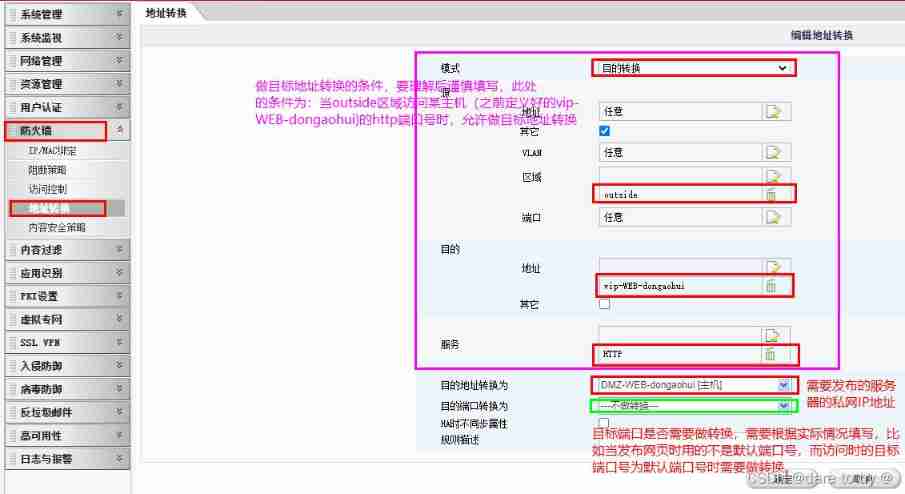
(4) Write strategy , Be careful , When writing the policy, pay attention to that the target address is static PAT Converted private IP. The above steps can provide target address translation for Internet access to the server , But it still needs to be opened outside District to DMZ Access strategy for the exclusion zone . Be careful , After Tianrongxin firewall receives the data frame , Match the status first , Second, do it NAT transformation , To match the strategy ( Unlike Cisco ), This leads to the need to understand the change of the target address of the data frame during subsequent policy configuration . For firewalls of different manufacturers , You need to read the manual carefully .
4.3 outside Area access web server
(1) use win2003-outside Browser access http:\100.1.1.2, Successful visit .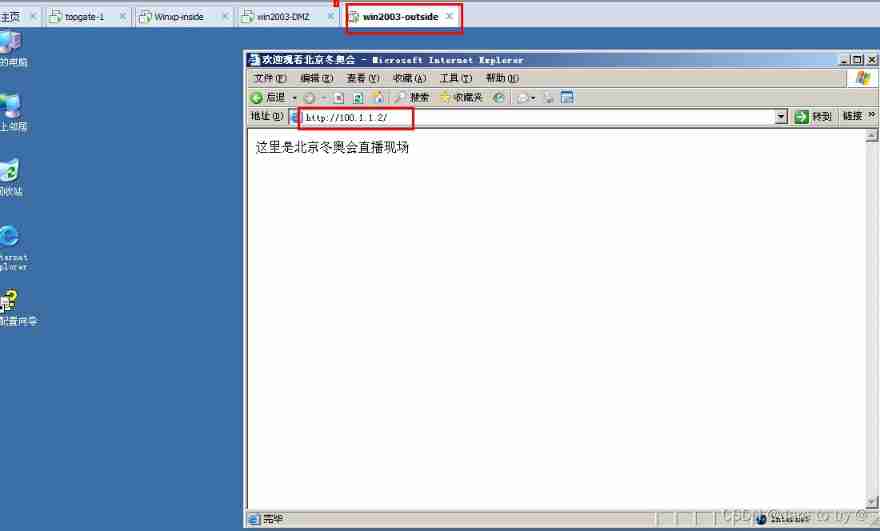
(2) reflection : from win2003-outside Sent data frame , In the segment 100.1.1.0 Internal broadcast target , How to capture 100.1.1.2 It's inside the firewall ? The network card connected to the interface IP The address is 100.1.1.254 ah ?
5 experiment 4 Demonstration process — Application layer filtering
5.1 Connect the Internet to 2003 Deploy as WEB The server and DNS The server
(1) stay win2003-outside Installation on WEB The server and DNS Server software .
(2) stay WEB Publish web pages on server software , You can use the default site , Change the page title bar to “ Baidu server ”, Change the content to “ Welcome to Baidu server ”. At the same time, the bound host header value is www.baidu.com.
(3) stay DNS Domain name resolution records are added to the server software , add to A Record binding www.baidu.com and IP100.1.1.1.DNS For details of server deployment and configuration, please refer to 《DNS Server deployment and security 》.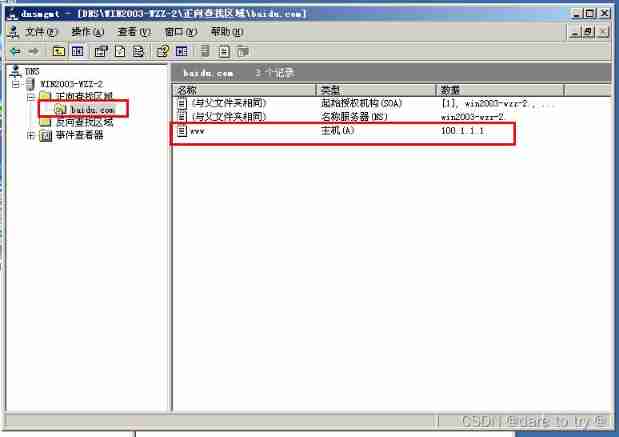
(4) take winXP and win2003-inside Of DNS The server points to the public network 100.1.1.1. You can pass the domain name normally www.baidu.com Visit the Internet server page . When there is no finger DNS when , I will find myself .

5.2 Perfect the firewall policy
(1) The content security policy is supplemented in the policy of internal network access to external network and isolation zone access to external network . A firewall → Access control →inside To DMZ and outside Action icon for → Select new in the content security policy column → Edit content security policy ( Definition name → Fill in notes → choice http Filter → Select the desired filter , Here is URL Filter → Choose new URL)→ edit URL( Definition name → Fill in the conditions and actions )→ I'll be sure . Same reason DMZ To outside The same goes for the policy of .


(2) stay “ A firewall → Content security policy ” You can see the newly created content security policy in , Click the action icon to modify the policy again . In operation , You can also define the content security policy first , And then “ Access control ” The content security policy is referenced in the policy in .
(3) stay “ Content filtering →http Filter →URL Filter ” You can see the new in the content security policy URL Filter , Click the operation icon to modify the URL Filter . In operation , You can also define this first URL Filter , And then “ Content security policy ” The URL Filter .
(4) Similarly, other content filtering items can be used to improve the content security policy . For example, you can define content filtering according to the following figure , And then in “ In the content security policy in-to-out I quote ”, Is in the process of packet repacking , Filter the website content .
5.3 verification
Test use winxp-inside Browser through the domain name www.baidu.com visit win2003-outside The web page of , Failure . When ping This host can ping through , Explain that the content policy only limits url Domain name field in .
6 inductive
(1) Understand the working principle and process of firewall .
(2) Master the configuration method of firewall according to the working principle of firewall .
Reference article
[1] 《 Firewall deployment experiment (IP、 Strategy 、NAT、HA)—— be based on topgate Web page deployment method of firewall 》
[2] Video gate
边栏推荐
- Website construction column setting form which website construction company is better
- Semaphore semaphore details
- 解密抖音春节红包背后的技术设计与实践
- Detailed explanation of flutter exception capture
- Tencent News's practice based on Flink pipeline model
- 应用实践 | Apache Doris 整合 Iceberg + Flink CDC 构建实时湖仓一体的联邦查询分析架构
- In the "Internet +" era, how can the traditional wholesale industry restructure its business model?
- Advantages of micro service registry Nacos over Eureka
- [tutorial] build a personal email system using Tencent lightweight cloud
- sql server常用sql
猜你喜欢

Opengauss Developer Day 2022 was officially launched to build an open source database root community with developers

Pourquoi une seule valeur apparaît - elle sur votre carte de données?

Slsa: accelerator for successful SBOM

【技术干货】蚂蚁办公零信任的技术建设路线与特点

蚂蚁获FinQA竞赛冠军,在长文本数值推理AI技术上取得突破
Hackinglab penetration test question 8:key can't find it again
Why is only one value displayed on your data graph?
为什么你的数据图谱分析图上只显示一个值?

Game security - call analysis - write code

混沌工程,了解一下
随机推荐
How to set the text style as PG in website construction
Why is easycvr cascaded to the parent platform not displayed?
The time deviation is more than 15 hours (54000 seconds), and the time cannot be automatically calibrated
Why is the server fortress machine error code 110? How to solve error code 110?
Why don't people like PHP?
Application practice | Apache Doris integrates iceberg + Flink CDC to build a real-time federated query and analysis architecture integrating lake and warehouse
2021-12-10: which can represent a 64 bit floating point number or a 64 bit signed integer
How to deploy API gateways and split services under multi services?
Batch production of plant hangtag
Method of thread synchronization in kotlin
Usage of cobaltstrike: Part 1 (basic usage, listener, redirector)
How to solve the problem that the GPU VNC has two mice with large deviation
Overall solution for digital transformation of medical supply chain management
Understand the data consistency between MySQL and redis
Website construction is not set to inherit the superior column. How to find a website construction company
Problem solving: inittramfs unpacking failed:decoding failed
Discussion: will low code integrated oa/erp/mes system be an important part of enterprise application ecology?
How to batch output EAN13 code to PDF
Command line enumeration, obtaining and modifying time zones
What are the operation and maintenance advantages of Fortress machine web application publishing server? Two outstanding advantages