当前位置:网站首页>Application practice | Apache Doris integrates iceberg + Flink CDC to build a real-time federated query and analysis architecture integrating lake and warehouse
Application practice | Apache Doris integrates iceberg + Flink CDC to build a real-time federated query and analysis architecture integrating lake and warehouse
2022-06-23 22:20:00 【InfoQ】
Application practice | Apache Doris Integrate Iceberg + Flink CDC Build a real-time federated query and analysis architecture integrating lake and warehouse
1. overview
1.1 Software environment
- Centos7
- Apahce doris 1.1
- Hadoop 3.3.3
- hive 3.1.3
- Fink 1.14.4
- flink-sql-connector-mysql-cdc-2.2.1
- Apache Iceberg 0.13.2
- JDK 1.8.0_311
- MySQL 8.0.29
wget https://archive.apache.org/dist/hadoop/core/hadoop-3.3.3/hadoop-3.3.3.tar.gz
wget https://archive.apache.org/dist/hive/hive-3.1.3/apache-hive-3.1.3-bin.tar.gz
wget https://dlcdn.apache.org/flink/flink-1.14.4/flink-1.14.4-bin-scala_2.12.tgz
wget https://search.maven.org/remotecontent?filepath=org/apache/iceberg/iceberg-flink-runtime-1.14/0.13.2/iceberg-flink-runtime-1.14-0.13.2.jar
wget https://repository.cloudera.com/artifactory/cloudera-repos/org/apache/flink/flink-shaded-hadoop-3-uber/3.1.1.7.2.9.0-173-9.0/flink-shaded-hadoop-3-uber-3.1.1.7.2.9.0-173-9.0.jar
1.2 System architecture

- First we start with Mysql Use in data Flink adopt Binlog Complete real-time data collection
- And then again Flink Created in Iceberg surface ,Iceberg The metadata of is stored in hive in
- Finally, we Doris Created in Iceberg appearance
- Through Doris The unified query entry completes the query of Iceberg Query and analyze the data in , For front-end applications to call , here iceberg The data of appearance can be compared with Doris Internal data or Doris Data from other external data sources are analyzed by association query

- Doris adopt ODBC Mode support :MySQL,Postgresql,Oracle ,SQLServer
- Support at the same time Elasticsearch appearance
- 1.0 Versioning support Hive appearance
- 1.1 Versioning support Iceberg appearance
- 1.2 Versioning support Hudi appearance
2. Environment installation deployment
2.1 install Hadoop、Hive
tar zxvf hadoop-3.3.3.tar.gz
tar zxvf apache-hive-3.1.3-bin.tar.gz
export HADOOP_HOME=/data/hadoop-3.3.3
export HADOOP_CONF_DIR=$HADOOP_HOME/etc/hadoop
export HADOOP_HDFS_HOME=$HADOOP_HOME
export HIVE_HOME=/data/hive-3.1.3
export PATH=$PATH:$HADOOP_HOME/bin:$HIVE_HOME/bin:$HIVE_HOME/conf
2.2 To configure hdfs
2.2.1 core-site.xml
<configuration>
 <property>
 <name>fs.defaultFS</name>
 <value>hdfs://localhost:9000</value>
 </property>
</configuration>
2.2.2 hdfs-site.xml
 <configuration>
 <property>
 <name>dfs.replication</name>
 <value>1</value>
 </property>
 <property>
 <name>dfs.namenode.name.dir</name>
 <value>/data/hdfs/namenode</value>
 </property>
 <property>
 <name>dfs.datanode.data.dir</name>
 <value>/data/hdfs/datanode</value>
 </property>
 </configuration>
2.2.3 modify Hadoop The startup script
HDFS_DATANODE_USER=root
HADOOP_SECURE_DN_USER=hdfs
HDFS_NAMENODE_USER=root
HDFS_SECONDARYNAMENODE_USER=root
YARN_RESOURCEMANAGER_USER=root
HADOOP_SECURE_DN_USER=yarn
YARN_NODEMANAGER_USER=root
2.3 To configure yarn
<property>
 <name>yarn.resourcemanager.address</name>
 <value>jiafeng-test:50056</value>
</property>
<property>
 <name>yarn.resourcemanager.scheduler.address</name>
 <value>jiafeng-test:50057</value>
</property>
<property>
 <name>yarn.resourcemanager.resource-tracker.address</name>
 <value>jiafeng-test:50058</value>
</property>
<property>
 <name>yarn.resourcemanager.admin.address</name>
 <value>jiafeng-test:50059</value>
</property>
<property>
 <name>yarn.resourcemanager.webapp.address</name>
 <value>jiafeng-test:9090</value>
</property>
<property>
 <name>yarn.nodemanager.localizer.address</name>
 <value>0.0.0.0:50060</value>
</property>
<property>
 <name>yarn.nodemanager.webapp.address</name>
 <value>0.0.0.0:50062</value>
</property>
<property>
 <name>mapreduce.jobhistory.address</name>
 <value>0.0.0.0:10020</value>
</property>
<property>
 <name>mapreduce.jobhistory.webapp.address</name>
 <value>0.0.0.0:19888</value>
</property>
<property>
 <name>mapreduce.shuffle.port</name>
 <value>50061</value>
</property>
2.2.4 start-up hadoop
sbin/start-all.sh
2.4 To configure Hive
2.4.1 establish hdfs Catalog
hdfs dfs -mkdir -p /user/hive/warehouse
hdfs dfs -mkdir /tmp
hdfs dfs -chmod g+w /user/hive/warehouse
hdfs dfs -chmod g+w /tmp
2.4.2 To configure hive-site.xml
<?xml version="1.0"?>
<?xml-stylesheet type="text/xsl" href="configuration.xsl"?>
<configuration>
<property>
<name>javax.jdo.option.ConnectionURL</name>
<value>jdbc:mysql://localhost:3306/hive?createDatabaseIfNotExist=true</value>
</property>
<property>
<name>javax.jdo.option.ConnectionDriverName</name>
<value>com.mysql.jdbc.Driver</value>
</property>
<property>
<name>javax.jdo.option.ConnectionUserName</name>
<value>root</value>
</property>
<property>
<name>javax.jdo.option.ConnectionPassword</name>
<value>MyNewPass4!</value>
</property>
<property>
<name>hive.metastore.warehouse.dir</name>
<value>/user/hive/warehouse</value>
<description>location of default database for the warehouse</description>
</property>
<property>
<name>hive.metastore.uris</name>
<value/>
<description>Thrift URI for the remote metastore. Used by metastore client to connect to remote metastore.</description>
</property>
<property>
<name>javax.jdo.PersistenceManagerFactoryClass</name>
<value>org.datanucleus.api.jdo.JDOPersistenceManagerFactory</value>
</property>
<property>
<name>hive.metastore.schema.verification</name>
<value>false</value>
</property>
<property>
<name>datanucleus.schema.autoCreateAll</name>
<value>true</value>
</property>
</configuration>
2.4.3 To configure hive-env.sh
HADOOP_HOME=/data/hadoop-3.3.3
2.4.4 hive Metadata initialization
schematool -initSchema -dbType mysql
2.4.5 start-up hive metaservice
nohup bin/hive --service metaservice 1>/dev/null 2>&1 &
lsof -i:9083
COMMAND PID USER FD TYPE DEVICE SIZE/OFF NODE NAME
java 20700 root 567u IPv6 54605348 0t0 TCP *:emc-pp-mgmtsvc (LISTEN)
2.5 install MySQL
2.5.1 establish MySQL Database tables and initialize data
CREATE DATABASE demo;
USE demo;
CREATE TABLE userinfo (
 id int NOT NULL AUTO_INCREMENT,
 name VARCHAR(255) NOT NULL DEFAULT 'flink',
 address VARCHAR(1024),
 phone_number VARCHAR(512),
 email VARCHAR(255),
 PRIMARY KEY (`id`)
)ENGINE=InnoDB ;
INSERT INTO userinfo VALUES (10001,'user_110','Shanghai','13347420870', NULL);
INSERT INTO userinfo VALUES (10002,'user_111','xian','13347420870', NULL);
INSERT INTO userinfo VALUES (10003,'user_112','beijing','13347420870', NULL);
INSERT INTO userinfo VALUES (10004,'user_113','shenzheng','13347420870', NULL);
INSERT INTO userinfo VALUES (10005,'user_114','hangzhou','13347420870', NULL);
INSERT INTO userinfo VALUES (10006,'user_115','guizhou','13347420870', NULL);
INSERT INTO userinfo VALUES (10007,'user_116','chengdu','13347420870', NULL);
INSERT INTO userinfo VALUES (10008,'user_117','guangzhou','13347420870', NULL);
INSERT INTO userinfo VALUES (10009,'user_118','xian','13347420870', NULL);
2.6 install Flink
tar zxvf flink-1.14.4-bin-scala_2.12.tgz

wget https://repo1.maven.org/maven2/com/ververica/flink-sql-connector-mysql-cdc/2.2.1/flink-sql-connector-mysql-cdc-2.2.1.jar
wget https://repo1.maven.org/maven2/org/apache/thrift/libfb303/0.9.3/libfb303-0.9.3.jar
wget https://search.maven.org/remotecontent?filepath=org/apache/iceberg/iceberg-flink-runtime-1.14/0.13.2/iceberg-flink-runtime-1.14-0.13.2.jar
wget https://repository.cloudera.com/artifactory/cloudera-repos/org/apache/flink/flink-shaded-hadoop-3-uber/3.1.1.7.2.9.0-173-9.0/flink-shaded-hadoop-3-uber-3.1.1.7.2.9.0-173-9.0.jar
hadoop-3.3.3/share/hadoop/common/lib/commons-configuration2-2.1.1.jar
hadoop-3.3.3/share/hadoop/common/lib/commons-logging-1.1.3.jar
hadoop-3.3.3/share/hadoop/tools/lib/hadoop-archive-logs-3.3.3.jar
hadoop-3.3.3/share/hadoop/common/lib/hadoop-auth-3.3.3.jar
hadoop-3.3.3/share/hadoop/common/lib/hadoop-annotations-3.3.3.jar
hadoop-3.3.3/share/hadoop/common/hadoop-common-3.3.3.jar
adoop-3.3.3/share/hadoop/hdfs/hadoop-hdfs-3.3.3.jar
hadoop-3.3.3/share/hadoop/client/hadoop-client-api-3.3.3.jar
hive-3.1.3/lib/hive-exec-3.1.3.jar
hive-3.1.3/lib/hive-metastore-3.1.3.jar
hive-3.1.3/lib/hive-hcatalog-core-3.1.3.jar
2.6.1 start-up Flink
bin/start-cluster.sh

2.6.2 Get into Flink SQL Client
bin/sql-client.sh embedded

Flink SQL> SET execution.checkpointing.interval = 3s;
[INFO] Session property has been set.
2.6.3 establish Iceberg Catalog
CREATE CATALOG hive_catalog WITH (
 'type'='iceberg',
 'catalog-type'='hive',
 'uri'='thrift://localhost:9083',
 'clients'='5',
 'property-version'='1',
 'warehouse'='hdfs://localhost:8020/user/hive/warehouse'
);
Flink SQL> show catalogs;
+-----------------+
| catalog name |
+-----------------+
| default_catalog |
| hive_catalog |
+-----------------+
2 rows in set
2.6.4 establish Mysql CDC surface
 CREATE TABLE user_source (
 database_name STRING METADATA VIRTUAL,
 table_name STRING METADATA VIRTUAL,
 `id` DECIMAL(20, 0) NOT NULL,
 name STRING,
 address STRING,
 phone_number STRING,
 email STRING,
 PRIMARY KEY (`id`) NOT ENFORCED
 ) WITH (
 'connector' = 'mysql-cdc',
 'hostname' = 'localhost',
 'port' = '3306',
 'username' = 'root',
 'password' = 'MyNewPass4!',
 'database-name' = 'demo',
 'table-name' = 'userinfo'
 );
select * from user_source;

2.6.5 establish Iceberg surface
--- see catalog
show catalogs;
--- Use catalog
use catalog hive_catalog;
-- Create database
CREATE DATABASE iceberg_hive;
-- Using a database
use iceberg_hive;
2.6.5.1 Create table
CREATE TABLE all_users_info (
 database_name STRING,
 table_name STRING,
 `id` DECIMAL(20, 0) NOT NULL,
 name STRING,
 address STRING,
 phone_number STRING,
 email STRING,
 PRIMARY KEY (database_name, table_name, `id`) NOT ENFORCED
 ) WITH (
 'catalog-type'='hive'
 );
use catalog default_catalog;
insert into hive_catalog.iceberg_hive.all_users_info select * from user_source;

select * from hive_catalog.iceberg_hive.all_users_info

wget https://repo1.maven.org/maven2/org/apache/iceberg/iceberg-hive-runtime/0.13.2/iceberg-hive-runtime-0.13.2.jar
SET engine.hive.enabled=true;
SET iceberg.engine.hive.enabled=true;
SET iceberg.mr.catalog=hive;
 add jar /path/to/iiceberg-hive-runtime-0.13.2.jar;
CREATE EXTERNAL TABLE iceberg_hive(
 `id` int,
 `name` string)
STORED BY 'org.apache.iceberg.mr.hive.HiveIcebergStorageHandler'
LOCATION 'hdfs://localhost:8020/user/hive/warehouse/iceber_db/iceberg_hive'
TBLPROPERTIES (
 'iceberg.mr.catalog'='hadoop',
'iceberg.mr.catalog.hadoop.warehouse.location'='hdfs://localhost:8020/user/hive/warehouse/iceber_db/iceberg_hive'
 );
INSERT INTO hive_catalog.iceberg_hive.iceberg_hive values(2, 'c');
INSERT INTO hive_catalog.iceberg_hive.iceberg_hive values(3, 'zhangfeng');
select * from hive_catalog.iceberg_hive.iceberg_hive

3. Doris Inquire about Iceberg
- Support Iceberg Data source access Doris
- Support Doris And Iceberg Table union query in data source , Perform more complex analysis operations
3.1 install Doris
3.2 establish Iceberg appearance
CREATE TABLE `all_users_info`
ENGINE = ICEBERG
PROPERTIES (
"iceberg.database" = "iceberg_hive",
"iceberg.table" = "all_users_info",
"iceberg.hive.metastore.uris" = "thrift://localhost:9083",
"iceberg.catalog.type" = "HIVE_CATALOG"
);
Parameter description :
- ENGINE It needs to be specified as ICEBERG
- PROPERTIES attribute :
iceberg.hive.metastore.uris:Hive Metastore Service address
iceberg.database: mount Iceberg Corresponding database name
iceberg.table: mount Iceberg Corresponding table name , mount Iceberg database No need to specify when .
iceberg.catalog.type:Iceberg Used in catalog The way , The default isHIVE_CATALOG, Currently, only this method is supported , More... Will be supported in the future Iceberg catalog Access mode .
mysql> CREATE TABLE `all_users_info`
-> ENGINE = ICEBERG
-> PROPERTIES (
-> "iceberg.database" = "iceberg_hive",
-> "iceberg.table" = "all_users_info",
-> "iceberg.hive.metastore.uris" = "thrift://localhost:9083",
-> "iceberg.catalog.type" = "HIVE_CATALOG"
-> );
Query OK, 0 rows affected (0.23 sec)
mysql> select * from all_users_info;
+---------------+------------+-------+----------+-----------+--------------+-------+
| database_name | table_name | id | name | address | phone_number | email |
+---------------+------------+-------+----------+-----------+--------------+-------+
| demo | userinfo | 10004 | user_113 | shenzheng | 13347420870 | NULL |
| demo | userinfo | 10005 | user_114 | hangzhou | 13347420870 | NULL |
| demo | userinfo | 10002 | user_111 | xian | 13347420870 | NULL |
| demo | userinfo | 10003 | user_112 | beijing | 13347420870 | NULL |
| demo | userinfo | 10001 | user_110 | Shanghai | 13347420870 | NULL |
| demo | userinfo | 10008 | user_117 | guangzhou | 13347420870 | NULL |
| demo | userinfo | 10009 | user_118 | xian | 13347420870 | NULL |
| demo | userinfo | 10006 | user_115 | guizhou | 13347420870 | NULL |
| demo | userinfo | 10007 | user_116 | chengdu | 13347420870 | NULL |
+---------------+------------+-------+----------+-----------+--------------+-------+
9 rows in set (0.18 sec)
3.3 Synchronous mount
REFRESH-- Sync Iceberg surface
REFRESH TABLE t_iceberg;
-- Sync Iceberg database
REFRESH DATABASE iceberg_test_db;
3.4 Doris and Iceberg Data type correspondence
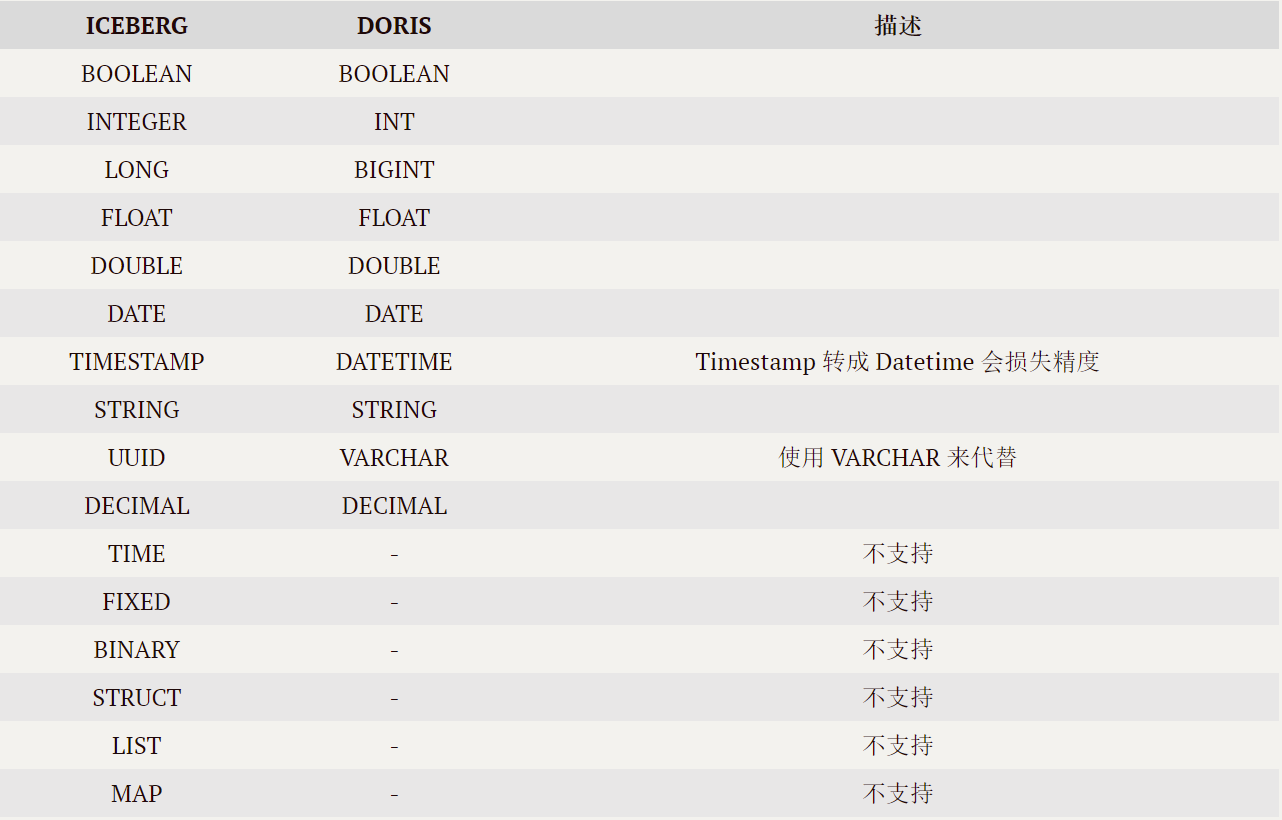
3.5 matters needing attention
- Iceberg surface Schema changeIt won't automatically synchronize, Need to be in Doris Pass through
REFRESHCommand synchronization Iceberg Appearance or database .
- Currently supported by default Iceberg Version is 0.12.0,0.13.x, Not tested in other versions . More versions are supported in the future .
3.6 Doris FE To configure
fe.confADMIN SET CONFIGiceberg_table_creation_strict_mode
- establish Iceberg The table is enabled by default strict mode. strict mode It means right Iceberg The column types of the table are strictly filtered , If there is Doris Currently unsupported data types , Failed to create the appearance .
iceberg_table_creation_interval_second
- Automatically create Iceberg The background task execution interval of the table , The default is 10s.
max_iceberg_table_creation_record_size
- Iceberg Maximum value of table creation record retention , The default is 2000. Only for creating Iceberg Database records .
4. summary



边栏推荐
- Why don't people like PHP?
- How to use the serial port assistant in STC ISP?
- PHP laravel 8.70.1 - cross site scripting (XSS) to cross Site Request Forgery (CSRF)
- Manually push a message platform
- Kubernetes cluster lossless upgrade practice
- The "Star" industry in the small town is escorted by wechat cloud hosting
- How to control the quality of omics research—— Mosein
- How to provide value for banks through customer value Bi analysis
- WordPress plugin smart product review 1.0.4 - upload of any file
- How to build an API gateway and how to maintain an API gateway?
猜你喜欢

Configuring error sets using MySQL for Ubuntu 20.04.4 LTS

Peking University, University of California Berkeley and others jointly | domain adaptive text classification with structured knowledge from unlabeled data (Domain Adaptive Text Classification Based o

Error running PyUIC: Cannot start process, the working directory ‘-m PyQt5. uic. pyuic register. ui -o

Leetcode algorithm interview sprint sorting algorithm theory (32)

Intel openvino tool suite advanced course & experiment operation record and learning summary

脚本之美│VBS 入门交互实战

为什么你的数据图谱分析图上只显示一个值?
北大、加州伯克利大学等联合| Domain-Adaptive Text Classification with Structured Knowledge from Unlabeled Data(基于未标记数据的结构化知识的领域自适应文本分类)
Performance optimization of database 5- database, table and data migration
How to use the serial port assistant in STC ISP?

随机推荐
How do I install the API gateway? What should I pay attention to?
The time deviation is more than 15 hours (54000 seconds), and the time cannot be automatically calibrated
Valid read-only attribute
KnowDA: All-in-One Knowledge Mixture Model for Data Augmentation in Few-Shot NLP(KnowDA:用于 Few-Shot NLP 中数据增强的多合一知识混合模型)
Take you to understand the lazy loading of pictures
Important announcement: Tencent cloud es' response strategy to log4j vulnerability
Text editor GNU nano 6.0 release!
WordPress plugin wpschoolpress 2.1.16 -'multiple'cross site scripting (XSS)
How does the fortress remote login server operate? What is the application value of Fortress machine?
Command line enumeration, obtaining and modifying time zones
Don't let your server run naked -- security configuration after purchasing a new server (Basics)
Usage of cobaltstrike: Part 1 (basic usage, listener, redirector)
Relevant logic of transaction code MICn in SAP mm
How to deploy the API gateway? Is it OK not to use the API gateway?
How to configure Nessus vulnerability scanning policy?
北大、加州伯克利大学等联合| Domain-Adaptive Text Classification with Structured Knowledge from Unlabeled Data(基于未标记数据的结构化知识的领域自适应文本分类)
How to build an API gateway and how to maintain an API gateway?
WordPress plugin smart product review 1.0.4 - upload of any file
万字长文!一文搞懂InheritedWidget 局部刷新机制
H264_ AVC analysis