当前位置:网站首页>【小程序项目开发-- 京东商城】uni-app开发之轮播图
【小程序项目开发-- 京东商城】uni-app开发之轮播图
2022-06-22 15:06:00 【计算机魔术师】

前言
欢迎来到
魔术之家!!该文章收录专栏
— 2022微信小程序京东商城实战 —专栏内容(以下文章食用前强烈建议 先食用文章 )
— uni-app项目搭建 —
— 京东商城uni-app 配置tabBar & 窗口样式 —
— 京东商城uni-app开发之分包配置 —
一、新建tabBar分支(选读*)
之所以为了创建分支,也是养成良好的项目开发习惯,这样在开放项目井井有条
也可以跳过本节内容,不影响阅读观感
在根目录下,右键打开
bash
基于 master 分支在本地创建 home 子分支,用来开发和 home 相关的功能:
git checkout -b home
查看分支(前面有*代表着当前分支)
git branch

二、配置网络请求
由于平台的限制,小程序项目中不支持 axios,而且原生的 wx.request() API 功能较为简单,不支持拦截器等全局定制的功能。因此,建议在 uni-app 项目中使用
@escook/request-miniprogram第三方包发起网络数据请求。
请参考 @escook/request-miniprogram 的官方文档进行安装、配置、使用
官方文档:https://www.npmjs.com/package/@escook/request-miniprogram

按照官方流程,我们首先安装对应包,使用命令行工具cmd进入到项目根目录下 进行初始化一个package.json文件
npm init -y

复制官网的导入命令输入
npm install @escook/request-miniprogram

在入口文件进行相关配置main.js
导入对应包并进行挂载,以及定义 响应拦截器和请求响应器
(在uni-app开发中,尽量都是以uni作为顶级对象)
//导入网络请求包
import {

  $http
} from '@escook/request-miniprogram'
//挂载
uni.$http = $http
//设置请求地址的根路径
$http.baseUrl = 'https://www.uinav.com'
// 请求拦截器
$http.beforeRequest =  function() {

  uni.showLoading({

    title: '数据加载中...',
  });
}
// 响应拦截器
$http.afterRequest = function(){

  uni.hideLoading()
}
三、轮播图区域
请求轮播图的数据
实现步骤:
- 在 data 中定义轮播图的数组
- 在 onLoad 生命周期函数中调用获取轮播图数据的方法
- 在 methods 中定义获取轮播图数据的方法
主页API
获取首页轮播图数据
- 请求路径:https://请求域名/api/public/v1/home/swiperdata
- 请求方法:GET
- 请求参数
| 参数名 | 参数说明 | 备注 |
|---|---|---|
| 无 |
- 响应参数
| 参数名 | 参数说明 | 备注 |
|---|---|---|
| image_src | 图片路径 | |
| open_type | 导航链接类型 | |
| navigator_url | 导航链接路径 |
- 响应数据参考
{
    "message": [
        {
            "image_src": "https://www.zhengzhicheng.cn/pyg/banner1.png",
            "open_type": "navigate",
            "goods_id": 129,
            "navigator_url": "/pages/goods_detail/main?goods_id=129"
        },
        {
            "image_src": "https://www.zhengzhicheng.cn/pyg/banner2.png",
            "open_type": "navigate",
            "goods_id": 395,
            "navigator_url": "/pages/goods_detail/main?goods_id=395"
        },
        {
            "image_src": "https://www.zhengzhicheng.cn/pyg/banner3.png",
            "open_type": "navigate",
            "goods_id": 38,
            "navigator_url": "/pages/goods_detail/main?goods_id=38"
        }
    ],
    "meta": { "msg": "获取成功", "status": 200 }
}
在home.vue 文件 中
<script>
  export default {

    data() {

      return {

      // 定义数据
        swiperList: []
      };
    },
    onLoad() {

      // 调取方法,获取轮播图数据
      this.getSwiperList()
    },
    methods: {

      async getSwiperList() {

        // '/' 根目录即为在main.js的文件配置的 baseUrl
        const res = await uni.$http.get('/api/public/v1/home/swiperdata')
        //输出 数据
        console.log(res.data)
      }
    }
  }
</script>
打印成功(获取数据成功)
通过meta的status属性值判断是否 成功获取数据
 methods: {

   async getSwiperList() {

     // '/' 根目录即为在main.js的文件配置的 baseUrl
     const res = await uni.$http.get('/api/public/v1/home/swiperdata')
     // 调取失败弹出错误提示
     if (res.data.meta.status != 200) {

       uni.showToast({

         title: "数据拉取失败", // 文字显示
         'icon': "error", // 显示错误图标
         "duration": 1500 // 设置停留事件为 1.5s duration - 持续事件
       })
       // 将调用的数据 赋值
       this.swiperList = res.data.message
     }
   }
 }
赋值成功
四、注意事项!:
这里赋值不能像 原生小程序 调用
this.setData({this.swiperList = res.data.message})使用,在小程序中可以使用this.data更新数据不更新视图和thsi.setData({})数据和视图同步更新(会重新加载数据渲染页面),但是在uni-app 是没有
thsi.setData({})方法的,使用this.data直接赋值即可。这是因为在原生小程序开发中,数据节点data是定义为一个字典,而在uni-app中则是以一个函数返回值的形式得到数据,此时对该数据直接赋值即可。
五、渲染轮播图UI结构
uswiper 快速生成 轮播代码块
- 使用 vue-for 动态循环轮播图数组,循环动态绑定需要标签属性节点前都要加上
:(冒号:是v-bind的缩写,即动态绑定数据,后面可以跟变量或者变量表达式,如果没有冒号的则为字符串,此时循环会无法显示效果
<!-- 模板 -->
<template>
  <view>
    <!-- 渲染轮播图UI结构 -->
    <swiper :indicator-dots="true" :autoplay="true" :interval="3000" :duration="1000" :circular="true">
      <!-- 类似python for i,j in object 得到对应项目i以及索引j -->
      <swiper-item v-for="(item,i) in swiperList" :key="i">
        <view class="swiper-item">
          <image :src="item.image_src"></image>
        </view>
      </swiper-item>
    </swiper>
  </view>
</template>

<!-- 样式 -->
<style lang="scss">
  swiper {

    height: 333rpx;
    .swiper-item,
    image {

      width: 100%;
      height: 100%;
    }
  }
</style>
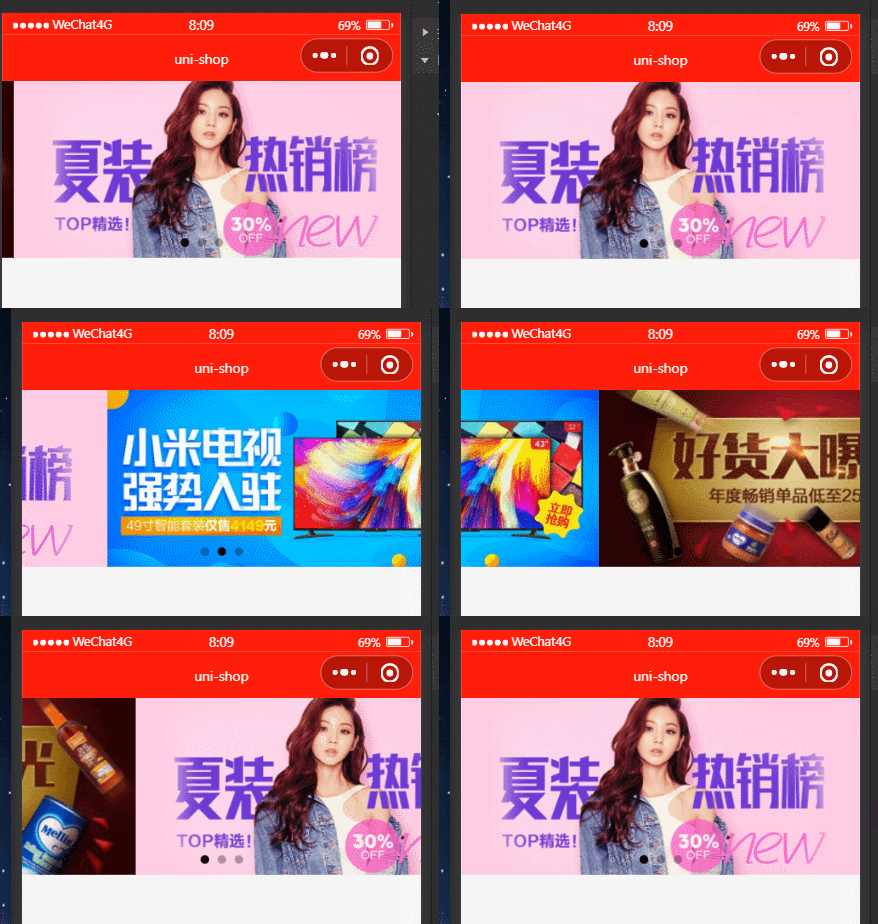
- 效果:
谢谢你的阅读,您的点赞和收藏就是我创造的最大动力!
边栏推荐
- Huawei cloud hcdez special session and Distributed Technology Summit: Huawei cloud distributed cloud native technology and Practice
- SAP价值流程&帮助请求流程-011
- Binary search (integer binary)
- 4. string (reverse order and case conversion)
- 【山大会议】注册页的编写
- Turn to: jackwelch: strategy is to think less and be quick to act
- 知识管理在业务中的价值如何体现
- SAP教程中的ALV报告 - ABAP列表查看器-012
- Uni develops wechat applet to customize automatic camera detection (portrait + ID card)
- Swift -- 保存打印日志到沙盒
猜你喜欢

The odoo system sets priorities for the views independently developed by the original model

webDriver以及Selenium使用总结
Runtime -- explore the nature of classes, objects, and classifications

Focus on creating a net red product. The xinjietu x70s is newly launched, starting from 87900

ArcGIS JS之 4.23之IIS本地部署与问题解决

知识管理在业务中的价值如何体现

C语言贪吃蛇
SAP ABAP 中的用户出口和客户出口-015

wallys/WiFi6 MiniPCIe Module 2T2R 2×2.4GHz 2x5GHz
Process address space
随机推荐
Ironsource Luna offers a limited time discount for Apple search ads and enjoys 3 months of free service upon registration
静态断言 static_assert
【单片机】【让蜂鸣器发声】认识蜂鸣器,让蜂鸣器发出你想要的声音
Navicat Premium 连接Oracle 数据库(图文教程)
#进程地址空间
SAP ABAP 中的 Smart Forms-014
Navicat premium connecting to Oracle database (Graphic tutorial)
3.抽象类(shape)
4. string (reverse order and case conversion)
Runtime -- explore the nature of classes, objects, and classifications
Cmake tutorial series-00-introduction
84.(cesium篇)cesium模型在地形上运动
6.GUI(图形,填充)
ironSource Luna 推出苹果搜索广告限时优惠,注册即享3个月免费服务
Default function control =default and =delete
解决mysql远程登录报权限问题
【山大会议】私人聊天频道 WebRTC 工具类
期货怎么开户?网上期货开户安全吗?
Rosbag use command
Oracle客户端和服务端的区别