当前位置:网站首页>快速学会使用文件的权限
快速学会使用文件的权限
2022-07-23 12:46:00 【我是渣渣辉】
文章目录
4创建文件,并赋予权限611(两种方式,一种guoa,一种nnn)
[[email protected] ~]# touch file1
[[email protected] ~]# ls -l file1
-rw-r--r-- 1 root root 0 Jul 21 20:45 file1
[[email protected] ~]# chmod 000 file
[[email protected] ~]# chmod u+r,w g+x o+x file
chmod: invalid mode: ‘u+r,w’
Try 'chmod --help' for more information.
[[email protected] ~]# chmod u+rw g+x o+x file
chmod: cannot access 'g+x': No such file or directory
chmod: cannot access 'o+x': No such file or directory
[[email protected] ~]# chmod u+rw,g+x,o+x file
[[email protected] ~]# ll file
-rw---x--x 1 root root 13 Jul 20 10:59 file
5.创建目录,并赋予权限755(两种方式,一种guoa,一种nnn)
[[email protected] ~]# mkdir file1
mkdir: cannot create directory ‘file1’: File exists
[[email protected] ~]# mkdir file3
[[email protected] ~]# chmod 755 file3
[[email protected] ~]# ls -l file3
total 0
[[email protected] ~]# ls -ld file3
drwxr-xr-x 2 root root 4096 Jul 22 00:02 file3
[[email protected] ~]#
6.创建文件,并将文件的属主和属组修改其他用户
[[email protected] ~]# ls /home
user1
[[email protected] ~]# chown user:user file
chown: invalid user: ‘user:user’
[[email protected] ~]# chown use1r:user1 file
chown: invalid user: ‘use1r:user1’
[[email protected] ~]# chown user1:user1 file
[[email protected] ~]# ls -l file
-rw---x--x 1 user1 user1 13 Jul 20 10:59 file
[[email protected] ~]#
7.设置suid,为文件设置suid(两种方式 u+s和nnnn)的方式
[[email protected] ~]# ls -ld file3
drwxr-xr-x 2 root root 4096 Jul 22 00:02 file3
[[email protected] ~]# ll file
-rw---x--x 1 user1 user1 13 Jul 20 10:59 file
[[email protected] ~]# chmod 4777 file
[[email protected] ~]# ll file
-rwsrwxrwx 1 user1 user1 13 Jul 20 10:59 file
8.设置sgid, 为文件设置sgid(两种方式 g+s和nnnn)的方式
[[email protected] ~]# chmod g+s file
[[email protected] ~]# ll file
-rwsrwsrwx 1 user1 user1 13 Jul 20 10:59 file
9.设置sbit,为目录设置sbit(两种方式 o+t和nnnn)的方式
[[email protected] ~]# ll -d file3
drwxr-xr-x 2 root root 4096 Jul 22 00:02 file3
[[email protected] ~]# chmod o+t file3
[[email protected] ~]# chmod 1000 file3
[[email protected] ~]# ll -d file3
d--------T 2 root root 4096 Jul 22 00:02 file3
10.创建文件,查询文件的acl
[[email protected] ~]# getfacl file4
# file: file4
# owner: root
# group: root
user::rw-
group::r--
other::r--
为文件设置acl 用户为testuser1 权限为 rwx
[[email protected] ~]# setfacl -m u:testuer:rwx file1
为文件设置acl的mask: 权限为r-x
[[email protected] ~]# setfacl -m m::rx file
边栏推荐
- 20220721挨揍内容
- [2022 freshmen learning] key points of the second week
- Go 接口:深入内部原理
- mysql多表查询之_内连接_显示内连接
- Middle aged crisis, retired at the age of 35, what do migrant workers take to compete with capitalists?
- Memory methods of big end mode and small end mode
- IIS 部署.NetCore
- pytest接口自动化测试框架 | pytest生成简单测试报告
- 锁相环工作原理,比如我们8MHZ晶振如何让MCU工作在48MHZ或者72MHZ呢
- Vrrp+mstp configuration details [Huawei ENSP experiment]
猜你喜欢

MySQL soul 16 ask, how many questions can you hold on to?
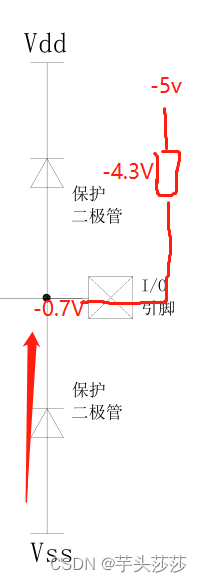
The protection circuit of IO port inside the single chip microcomputer and the electrical characteristics of IO port, and why is there a resistor in series between IO ports with different voltages?

Convert.Calss file to.Jar idea

How to choose fluorescent dyes in laser confocal

Origin of bean validation ----01
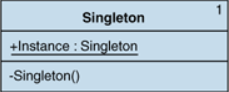
C#中单例模式的实现

《STM32MP1 M4裸机CubeIDE开发指南》第六章 STM32Cube固件包
![[2022 freshmen learning] key points of the second week](/img/5f/87a30e898b4450af5f2eb0cf77e035.png)
[2022 freshmen learning] key points of the second week
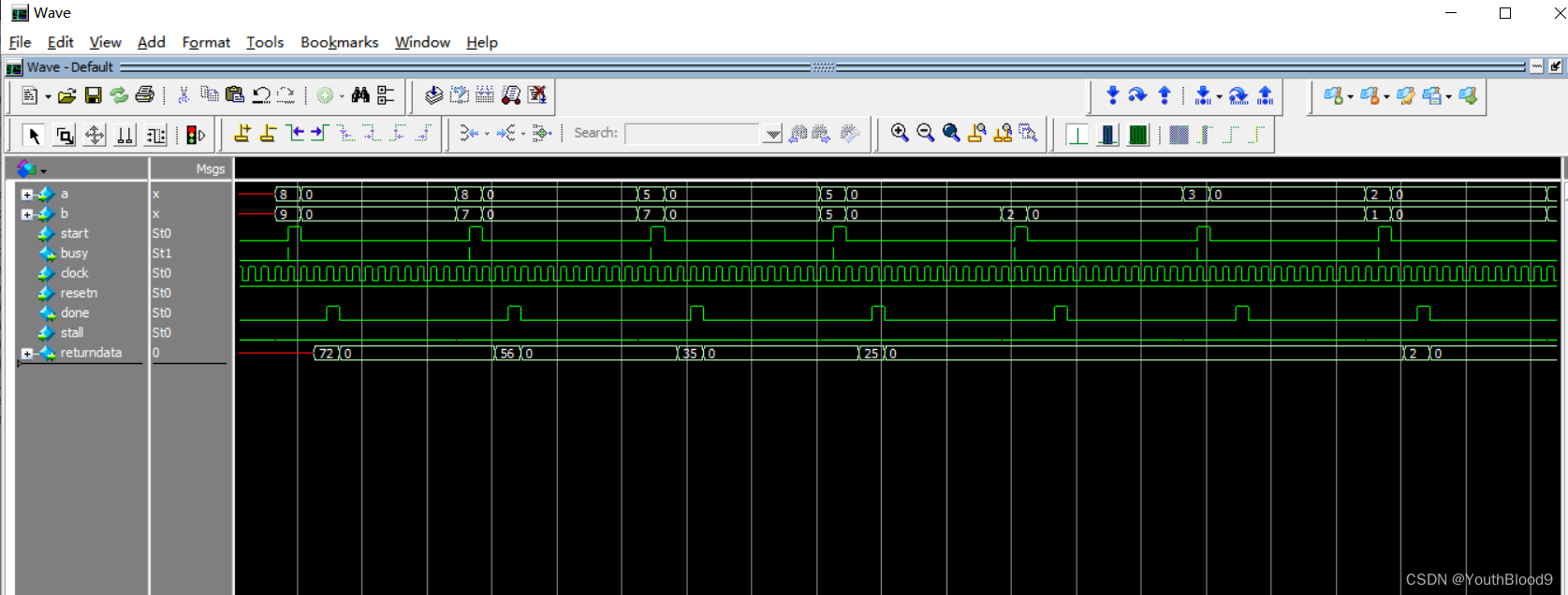
FPGA-HLS-乘法器(流水线对比普通仿真)

Flutter | 给 ListView 添加表头表尾最简单的方式
随机推荐
FPGA HLS multiplier (pipeline vs. ordinary simulation)
Go interface: go deep into internal principles
MySQL multi table query_ Cartesian product_ Inner connection_ Implicit connection
动态规划背包问题之01背包详解
V自P建N_部署使用
UiPath Studio Enterprise 22.4 Crack
【Redis】redis安装与客户端redis-cli的使用(批量操作)
Backup and restore of database
华为新版Datacom认证介绍
反转链表画图演示
Flutter | 指定页面回传值的类型
pytest接口自动化测试框架 | 如何获取帮助
阿里二面:MySQL 啥时候用表锁,啥时候用行锁?
Thermal resistance temperature acquisition based on USB data acquisition card (DAQ) and IO module "suggestions collection"
The new business form of smart civil aviation has emerged, and Tupo digital twin has entered the civil aviation flight network of the Bureau
IIS 部署.NetCore
15001.系统设计方案
数据库的备份和还原
Using mobile phones too much may lose your job
[suctf 2018]multisql (MySQL precompiled)