当前位置:网站首页>Use of hashcat
Use of hashcat
2022-06-25 02:09:00 【seven six nine】
Here's the catalog title
- 1. Introduce
- 2. install
- 3. Use
- Example
- 7 Bit number cracking
- 7 Bits of lowercase letters :
- 1-8 Bit number cracking :
- 1-8 A lowercase letter + Digital cracking
- Specific character set :[email protected]+-
- 1-8 Is a bit set :[email protected]+-
- 1-8 Digit number + Case letters + Special symbols are visible
- Dictionary cracking
- Batch cracking
- Dictionary combination cracking :
- Dictionaries + mask attack
- Mysql4.1/5 Of PASSWORD function
- sha512crypt 6 6 6, SHA512 (Unix) Crack
- Windows NT-hash,LM-hash Crack
- mssql
- wordpress password hash Crack
- discuz User password hash Crack
- Crack RAR Compressed password
- zip Password cracking
- Crack office password
1. Introduce
Hashcat Is a tool for cracking passwords , It is said to be the fastest and most advanced password cracking tool in the world , Support LM Hash 、MD5、SHA And so on , It also supports Linux、Mac、Windows platform .
Tools to address :https://hashcat.net
Project address :https://github.com/hashcat/hashcat
2. install
Mac
Mac Users directly use brew Can be installed
brew install hashcat
Linux
about Debain Of Linux, such as Kali、Ubuntu You can use it directly apt Installation
apt install hashcat
Or download the official binary file for installation
stay https://github.com/hashcat/hashcat/releases Download the latest version of the compressed package , Here we use 6.2.4 Version as an example
tar zxvf hashcat-6.2.4.7zcd hashcat-6.2.4chmod +x hashcat.bin./hashcat.bin
Windows
stay https://github.com/hashcat/hashcat/releases Download the latest version of the compressed package , After decompression, you can see hashcat.exe
3. Use
Common parameters
Here are some common parameters , For more parameters, you can hashcat --help see
-a   Specify the cracking mode to use , Its value refers to the following parameters .“-a 0” Dictionary attack ,“-a 1”  Combined attack ;“-a 3” Mask attacks .
-m   Specify what to crack hash type , If the type is not specified , Default is MD5
-o   Specify... After successful cracking hash And the storage location of the corresponding plaintext password , You can use it to successfully crack hash Write to the specified file
--force  Ignore warnings during cracking , Single track hash You may need to add this option
--show   Show cracked hash And hash Corresponding plaintext
--increment   Enable incremental cracking mode , You can use this mode to make hashcat Perform the cracking process within the specified password length
--increment-min   Minimum password length , It can be directly equal to an integer , To configure increment Use patterns together
--increment-max   Maximum password length , ditto
--outfile-format  Specify the output format of the cracking result id, The default is 3
--username    Ignore hash The specified user name in the file , It's cracking linux System user password hash May be used
--remove      Delete the successfully cracked hash
-r        Use custom cracking rules
Attack mode :
   #| Mode
 ===+======
  0 | Straight( Field cracking )
  1 | Combination( Combined cracking )
  3 | Brute-force( Mask brute force cracking )
  6 | Hybrid Wordlist + Mask( Dictionaries + mask attack )
  7 | Hybrid Mask + Wordlist( Mask + Dictionary cracking )
Output format
1 = hash[:salt]
2 = plain
3 = hash[:salt]:plain
4 = hex_plain
5 = hash[:salt]:hex_plain
6 = plain:hex_plain
7 = hash[:salt]:plain:hex_plain
8 = crackpos
9 = hash[:salt]:crackpos
10 = plain:crackpos
11 = hash[:salt]:plain:crackpos
12 = hex_plain:crackpos
13 = hash[:salt]:hex_plain:crackpos
14 = plain:hex_plain:crackpos
15 = hash[:salt]:plain:hex_plain:crackpos
Hash id Comparison table
Because there are so many , Just post some common hash type , To understand all the parameters, go to hashcat Of Wiki Look up , Or directly hashcat --help see hash Comparison table
- [ Hash modes ] -

      # | Name                                             | Category
  ======+==================================================+======================================
    900 | MD4                                              | Raw Hash
      0 | MD5                                              | Raw Hash
   5100 | Half MD5                                         | Raw Hash
    100 | SHA1                                             | Raw Hash
   1300 | SHA2-224                                         | Raw Hash
   1400 | SHA2-256                                         | Raw Hash
  10800 | SHA2-384                                         | Raw Hash
   1700 | SHA2-512                                         | Raw Hash
  17300 | SHA3-224                                         | Raw Hash
  17400 | SHA3-256                                         | Raw Hash
  17500 | SHA3-384                                         | Raw Hash
  17600 | SHA3-512                                         | Raw Hash
     10 | md5($pass.$salt)                                 | Raw Hash, Salted and/or Iterated
     20 | md5($salt.$pass)                                 | Raw Hash, Salted and/or Iterated
     30 | md5(utf16le($pass).$salt)                        | Raw Hash, Salted and/or Iterated
     40 | md5($salt.utf16le($pass))                        | Raw Hash, Salted and/or Iterated
   3800 | md5($salt.$pass.$salt)                           | Raw Hash, Salted and/or Iterated
   3710 | md5($salt.md5($pass))                            | Raw Hash, Salted and/or Iterated
   4010 | md5($salt.md5($salt.$pass))                      | Raw Hash, Salted and/or Iterated
   4110 | md5($salt.md5($pass.$salt))                      | Raw Hash, Salted and/or Iterated
   2600 | md5(md5($pass))                                  | Raw Hash, Salted and/or Iterated
   3910 | md5(md5($pass).md5($salt))                       | Raw Hash, Salted and/or Iterated
   4300 | md5(strtoupper(md5($pass)))                      | Raw Hash, Salted and/or Iterated
   4400 | md5(sha1($pass))                                 | Raw Hash, Salted and/or Iterated
    110 | sha1($pass.$salt)                                | Raw Hash, Salted and/or Iterated
    120 | sha1($salt.$pass)                                | Raw Hash, Salted and/or Iterated
    130 | sha1(utf16le($pass).$salt)                       | Raw Hash, Salted and/or Iterated
    140 | sha1($salt.utf16le($pass))                       | Raw Hash, Salted and/or Iterated
   4500 | sha1(sha1($pass))                                | Raw Hash, Salted and/or Iterated
   4520 | sha1($salt.sha1($pass))                          | Raw Hash, Salted and/or Iterated
   4700 | sha1(md5($pass))                                 | Raw Hash, Salted and/or Iterated
   4900 | sha1($salt.$pass.$salt)                          | Raw Hash, Salted and/or Iterated
  14400 | sha1(CX)                                         | Raw Hash, Salted and/or Iterated
   1410 | sha256($pass.$salt)                              | Raw Hash, Salted and/or Iterated
   1420 | sha256($salt.$pass)                              | Raw Hash, Salted and/or Iterated
   1430 | sha256(utf16le($pass).$salt)                     | Raw Hash, Salted and/or Iterated
   1440 | sha256($salt.utf16le($pass))                     | Raw Hash, Salted and/or Iterated
   1710 | sha512($pass.$salt)                              | Raw Hash, Salted and/or Iterated
   1720 | sha512($salt.$pass)                              | Raw Hash, Salted and/or Iterated
   1730 | sha512(utf16le($pass).$salt)                     | Raw Hash, Salted and/or Iterated
   1740 | sha512($salt.utf16le($pass))                     | Raw Hash, Salted and/or Iterated
  14000 | DES (PT = $salt, key = $pass)                    | Raw Cipher, Known-Plaintext attack
  14100 | 3DES (PT = $salt, key = $pass)                   | Raw Cipher, Known-Plaintext attack
  14900 | Skip32 (PT = $salt, key = $pass)                 | Raw Cipher, Known-Plaintext attack
  15400 | ChaCha20                                         | Raw Cipher, Known-Plaintext attack
   2500 | WPA-EAPOL-PBKDF2                                 | Network Protocols
   2501 | WPA-EAPOL-PMK                                    | Network Protocols
  16800 | WPA-PMKID-PBKDF2                                 | Network Protocols
  16801 | WPA-PMKID-PMK                                    | Network Protocols
   7300 | IPMI2 RAKP HMAC-SHA1                             | Network Protocols
   7500 | Kerberos 5 AS-REQ Pre-Auth etype 23              | Network Protocols
   8300 | DNSSEC (NSEC3)                                   | Network Protocols
  10200 | CRAM-MD5                                         | Network Protocols
  11100 | PostgreSQL CRAM (MD5)                            | Network Protocols
  11200 | MySQL CRAM (SHA1)                                | Network Protocols
  16100 | TACACS+                                          | Network Protocols
  16500 | JWT (JSON Web Token)                             | Network Protocols
    121 | SMF (Simple Machines Forum) > v1.1               | Forums, CMS, E-Commerce, Frameworks
    400 | phpBB3 (MD5)                                     | Forums, CMS, E-Commerce, Frameworks
   2811 | MyBB 1.2+                                        | Forums, CMS, E-Commerce, Frameworks
   2811 | IPB2+ (Invision Power Board)                     | Forums, CMS, E-Commerce, Frameworks
   8400 | WBB3 (Woltlab Burning Board)                     | Forums, CMS, E-Commerce, Frameworks
     11 | Joomla < 2.5.18                                  | Forums, CMS, E-Commerce, Frameworks
    400 | Joomla >= 2.5.18 (MD5)                           | Forums, CMS, E-Commerce, Frameworks
    400 | WordPress (MD5)                                  | Forums, CMS, E-Commerce, Frameworks
   2612 | PHPS                                             | Forums, CMS, E-Commerce, Frameworks
   7900 | Drupal7                                          | Forums, CMS, E-Commerce, Frameworks
     21 | osCommerce                                       | Forums, CMS, E-Commerce, Frameworks
     21 | xt:Commerce                                      | Forums, CMS, E-Commerce, Frameworks
  11000 | PrestaShop                                       | Forums, CMS, E-Commerce, Frameworks
    124 | Django (SHA-1)                                   | Forums, CMS, E-Commerce, Frameworks
  10000 | Django (PBKDF2-SHA256)                           | Forums, CMS, E-Commerce, Frameworks
     12 | PostgreSQL                                       | Database Server
    131 | MSSQL (2000)                                     | Database Server
    132 | MSSQL (2005)                                     | Database Server
   1731 | MSSQL (2012, 2014)                               | Database Server
    200 | MySQL323                                         | Database Server
    300 | MySQL4.1/MySQL5                                  | Database Server
   3100 | Oracle H: Type (Oracle 7+)                       | Database Server
    112 | Oracle S: Type (Oracle 11+)                      | Database Server
  12300 | Oracle T: Type (Oracle 12+)                      | Database Server
   8000 | Sybase ASE                                       | Database Server
  15000 | FileZilla Server >= 0.9.55                       | FTP Server
  11500 | CRC32                                            | Checksums
   3000 | LM                                               | Operating Systems
   1000 | NTLM                                             | Operating Systems
    500 | md5crypt, MD5 (Unix), Cisco-IOS $1$ (MD5)        | Operating Systems
   3200 | bcrypt $2*$, Blowfish (Unix)                     | Operating Systems
   7400 | sha256crypt $5$, SHA256 (Unix)                   | Operating Systems
   1800 | sha512crypt $6$, SHA512 (Unix)                   | Operating Systems
    122 | macOS v10.4, MacOS v10.5, MacOS v10.6            | Operating Systems
   1722 | macOS v10.7                                      | Operating Systems
   7100 | macOS v10.8+ (PBKDF2-SHA512)                     | Operating Systems
  11600 | 7-Zip                                            | Archives
  12500 | RAR3-hp                                          | Archives
  13000 | RAR5                                             | Archives
  13600 | WinZip                                           | Archives
   9700 | MS Office <= 2003 $0/$1, MD5 + RC4               | Documents
   9710 | MS Office <= 2003 $0/$1, MD5 + RC4, collider #1  | Documents
   9720 | MS Office <= 2003 $0/$1, MD5 + RC4, collider #2  | Documents
   9800 | MS Office <= 2003 $3/$4, SHA1 + RC4              | Documents
   9810 | MS Office <= 2003 $3, SHA1 + RC4, collider #1    | Documents
   9820 | MS Office <= 2003 $3, SHA1 + RC4, collider #2    | Documents
   9400 | MS Office 2007                                   | Documents
   9500 | MS Office 2010                                   | Documents
   9600 | MS Office 2013                                   | Documents
  10400 | PDF 1.1 - 1.3 (Acrobat 2 - 4)                    | Documents
  10410 | PDF 1.1 - 1.3 (Acrobat 2 - 4), collider #1       | Documents
  10420 | PDF 1.1 - 1.3 (Acrobat 2 - 4), collider #2       | Documents
  10500 | PDF 1.4 - 1.6 (Acrobat 5 - 8)                    | Documents
  10600 | PDF 1.7 Level 3 (Acrobat 9)                      | Documents
  10700 | PDF 1.7 Level 8 (Acrobat 10 - 11)                | Documents
  99999 | Plaintext                                        | Plaintext
Mask settings
Here are some common mask character sets
l | abcdefghijklmnopqrstuvwxyz           All lowercase letters
u | ABCDEFGHIJKLMNOPQRSTUVWXYZ           Pure capital letters
d | 0123456789                   Pure number
h | 0123456789abcdef                 Common lower case subdirectories and numbers
H | 0123456789ABCDEF                 Common capital letters and numbers
s |  !"#$%&'()*+,-./:;<=>[email protected][\]^_`{|}~        Special characters
a | ?l?u?d?s                     All visible characters on the keyboard
b | 0x00 - 0xff                  May be used to match passwords like spaces
Here are a few simple examples to learn about the mask settings
 Eight digit code :?d?d?d?d?d?d?d?d
 Eight unknown passwords :?a?a?a?a?a?a?a?a
 The first four digits are capital letters , The last four digits are numbers :?u?u?u?u?d?d?d?d
 The first four digits are numbers or lowercase letters , The last four digits are capital letters or numbers :?h?h?h?h?H?H?H?H
 The first three characters are unknown , In the middle admin, The last three are unknown :?a?a?aadmin?a?a?a
6-8 Digit code :--increment --increment-min 6 --increment-max 8 ?l?l?l?l?l?l?l?l
6-8 Digit number + Lowercase password :--increment --increment-min 6 --increment-max 8 ?h?h?h?h?h?h?h?h
If we want to set the character set to :[email protected]+, What should I do . This requires the user-defined character set parameter ,hashcat Users can define at most 4 Group character set
--custom-charset1 [chars] Equivalent to  -1
--custom-charset2 [chars] Equivalent to  -2
--custom-charset3 [chars] Equivalent to  -3
--custom-charset4 [chars] Equivalent to  -4
 Use in mask ?1、?2、?3、?4 To express .
Let me give you a few more examples :
--custom-charset1 [email protected]+. Then we can use "?1" To represent this character set
--custom-charset2 ?l?d, Here and ?2 It is equivalent to ?h
-1 ?d?l?u,?1 It means numbers + Lowercase letters + Capital
-3 abcdef -4 123456  that ?3?3?3?3?4?4?4?4 The top four may be “abcdef”, The last four may be “123456”
Example
7 Bit number cracking
hashcat64.exe -a 3 -m 0 --force 25c3e88f81b4853f2a8faacad4c871b6 ?d?d?d?d?d?d?d

7 Bits of lowercase letters :
hashcat64.exe -a 3 -m 0 --force 7a47c6db227df60a6d67245d7d8063f3 ?l?l?l?l?l?l?l
1-8 Bit number cracking :
hashcat64.exe -a 3 -m 0 --force 4488cec2aea535179e085367d8a17d75 --increment --increment-min 1 --increment-max 8 ?d?d?d?d?d?d?d?d
1-8 A lowercase letter + Digital cracking
hashcat64.exe -a 3 -m 0 --force ab65d749cba1656ca11dfa1cc2383102 --increment --increment-min 1 --increment-max 8 ?h?h?h?h?h?h?h?h
Specific character set :[email protected]±
hashcat64.exe -a 3 -1 123456abcdf!@+- 8b78ba5089b11326290bc15cf0b9a07d ?1?1?1?1?1
 Pay attention to the : there -1 and ?1 It's the number. 1, It's not a letter l
1-8 Is a bit set :[email protected]±
hashcat64.exe -a 3 -1 123456abcdf!@+- 9054fa315ce16f7f0955b4af06d1aa1b --increment --increment-min 1 --increment-max 8 ?1?1?1?1?1?1?1?1
1-8 Digit number + Case letters + Special symbols are visible
hashcat64.exe -a 3 -1 ?d?u?l?s d37fc9ee39dd45a7717e3e3e9415f65d --increment --increment-min 1 --increment-max 8 ?1?1?1?1?1?1?1?1
 perhaps :
hashcat64.exe -a 3 d37fc9ee39dd45a7717e3e3e9415f65d --increment --increment-min 1 --increment-max 8 ?a?a?a?a?a?a?a?a
Dictionary cracking
-a 0 Is to specify the dictionary cracking mode ,-o Is to output the results to a file
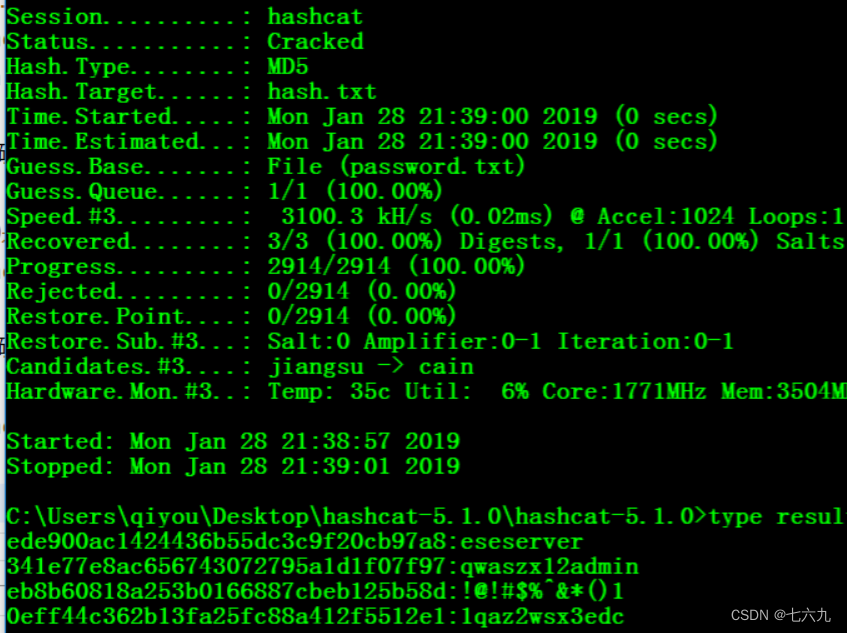
hashcat64.exe -a 0 ede900ac1424436b55dc3c9f20cb97a8 password.txt -o result.txt
Batch cracking
hashcat64.exe -a 0 hash.txt password.txt -o result.txt
Dictionary combination cracking :
hashcat64.exe -a 1 25f9e794323b453885f5181f1b624d0b pwd1.txt pwd2.txt
Dictionaries + mask attack
hashcat64.exe -a 6 9dc9d5ed5031367d42543763423c24ee password.txt ?l?l?l?l?l
Mysql4.1/5 Of PASSWORD function

hashcat64.exe -a 3 -m 300 --force 6BB4837EB74329105EE4568DDA7DC67ED2CA2AD9 ?d?d?d?d?d?d
sha512crypt 6 6 6, SHA512 (Unix) Crack
Sure cat /etc/shadow obtain
hashcat64.exe -a 3 -m 1800 --force $6$mxuA5cdy$XZRk0CvnPFqOgVopqiPEFAFK72SogKVwwwp7gWaUOb7b6tVwfCpcSUsCEk64ktLLYmzyew/xd0O0hPG/yrm2X. ?l?l?l?l
No need to sort out user names , Use –username
hashcat64.exe -a 3 -m 1800 --force qiyou:$6$QDq75ki3$jsKm7qTDHz/xBob0kF1Lp170Cgg0i5Tslf3JW/sm9k9Q9
Windows NT-hash,LM-hash Crack
It can be used saminside obtain NT-hash,LM-hash Value

NT-hash:
hashcat64.exe -a 3 -m 1000 209C6174DA490CAEB422F3FA5A7AE634 ?l?l?l?l?l
LM-hash:
hashcat64.exe -a 3 -m 3000 F0D412BD764FFE81AAD3B435B51404EE ?l?l?l?l?l
mssql
hashcat64.exe -a 3 -m 132 --force 0x01008c8006c224f71f6bf0036f78d863c3c4ff53f8c3c48edafb ?l?l?l?l?l?d?d?d
wordpress password hash Crack
The specific encryption script is in ./wp-includes/class-phpass.php Of HashPassword function
hashcat64.exe -a 3 -m 400 --force $P$BYEYcHEj3vDhV1lwGBv6rpxurKOEWY/ ?d?d?d?d?d?d
discuz User password hash Crack
Its password encryption method md5(md5($pass).$salt)
hashcat64.exe -a 3 -m 2611 --force 14e1b600b1fd579f47433b88e8d85291: ?d?d?d?d?d?d
Crack RAR Compressed password
First rar2john obtain rar file hash value Download address
 obtain rar Of documents hash value :rar2john.exe 1.rar
 result :
1.rar:$rar5$16$639e9ce8344c680da12e8bdd4346a6a3$15$a2b056a21a9836d8d48c2844d171b73d$8$04a52d2224a

hashcat64.exe -a 3 -m 13000 --force $rar5$16$639e9ce8344c680da12e8bdd4346a6a3$15$a2b056a21a9836d8d48c2844d171b73d$8$04a52d2224ad082e ?d?d?d?d?d?d

Be careful :
hashcat  Support  RAR3-hp  and  RAR5, The official example is as follows :

-m Parameters      type        Example  hash
12500    RAR3-hp    $RAR3$*0*45109af8ab5f297a*adbf6c5385d7a40373e8f77d7b89d317
13000    RAR5       $rar5$16$74575567518807622265582327032280$15$f8b4064de34ac02ecabfe
zip Password cracking
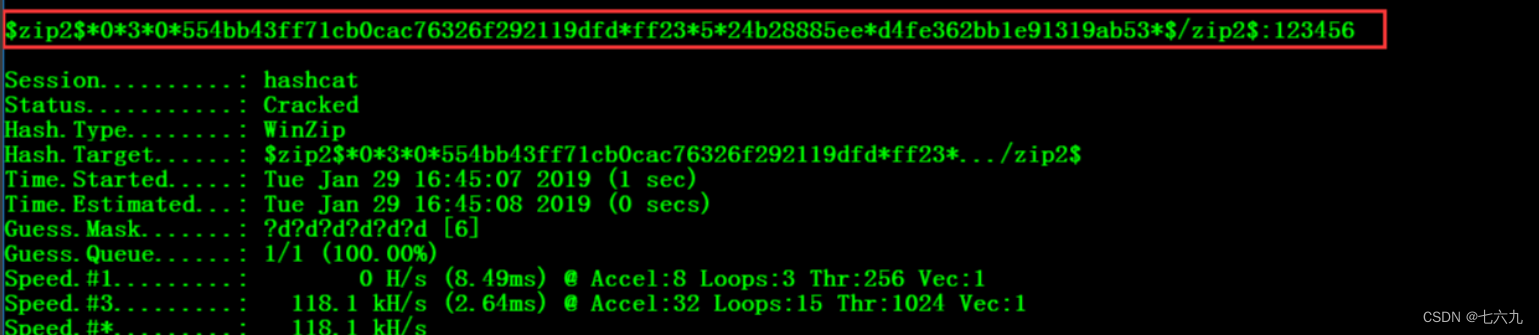
 use zip2john retrievable hash value :zip2john.exe 1.zip
 result :1.zip:$zip2$*0*3*0*554bb43ff71cb0cac76326f292119dfd*ff23*5*24b28885ee*d4fe362bb1e91319ab53*$/zip2$:::::1.zip-1.txt

hashcat64.exe -a 3 -m 13600 $zip2$*0*3*0*554bb43ff71cb0cac76326f292119dfd*ff23*5*24b28885ee*d4fe362bb1e91319ab53*$/zip2$ --force ?d?d?d?d?d?d
Crack office password
 obtain office Of hash value :python office2john.py 11.docx
 result :11.docx:$office$*2013*100000*256*16*e4a3eb62e8d3576f861f9eded75e0525*9eeb35f0849a7800d48113440b4bbb9c*577f8d8b2e1c5f60fed76e62327b38d28f25230f6c7dfd66588d9ca8097aabb9

hashcat64.exe -a 3 -m 9600 $office$*2013*100000*256*16*e4a3eb62e8d3576f861f9eded75e0525*9eeb35f0849a7800d48113440b4bbb9c*577f8d8b2e1c5f60fed76e62327b38d28f25230f6c7dfd66588d9ca8097aabb9 --force ?d?d?d?d?d?d

边栏推荐
- 【移动端】手机界面的设计尺寸
- An Chaoyun: "one cloud with multiple cores" supports the implementation of the national information innovation government cloud
- Deoxyribonuclease I instructions in Chinese and English
- How to open a stock account? Is it safe to open a mobile account?
- 疫情防控,居家办公,网上授课之心得 | 社区征文
- [leetcode] 11. Container with the most water
- Stocking but not completely stocking (daily question 2 in spring)
- 左手梦想 右手责任 广汽本田不光关注销量 还有儿童安全
- Google browser console F12 how to set the Chinese / English switching method, we must see the last!!!
- (CVPR 2020) Learning Object Bounding Boxes for 3D Instance Segmentation on Point Clouds
猜你喜欢
![Full arrangement ii[duplicate removal of the same elements + standard backtracking]](/img/d3/93ddb49e580be60be4f056f141b782.png)
Full arrangement ii[duplicate removal of the same elements + standard backtracking]

谷歌浏览器控制台 f12怎么设置成中文/英文 切换方法,一定要看到最后!!!
![Longest continuous sequence [diffusion method + space for time]](/img/db/7b0d1b0db7015e887340723505153a.png)
Longest continuous sequence [diffusion method + space for time]

Application session coverage solutions with different ports on the same server

How to quickly familiarize yourself with the code when you join a new company?

如何通过EasyCVR接口监测日志观察平台拉流情况?

Sumati GameFi生态纵览,神奇世界中的元素设计

ICML2022 | 用神经控制微分方程建立反事实结果的连续时间模型

常用的软件测试工具清单,请查收。

多模态数据也能进行MAE?伯克利&谷歌提出M3AE,在图像和文本数据上进行MAE!最优掩蔽率可达75%,显著高于BERT的15%
随机推荐
FTP协议讲解
年已过半,年终立的Flag实现了几个?
How can Huatai Securities open an account to achieve one in ten thousand? Are securities accounts safe and reliable
Full arrangement ii[duplicate removal of the same elements + standard backtracking]
Build and train your own dataset for pig face recognition
Longest continuous sequence [diffusion method + space for time]
探索C语言程序奥秘——C语言程序编译与预处理
‘distutils‘ has no attribute ‘version
谈谈飞书对开发工作的优势 | 社区征文
测试/开发程序员,30而立,你是否觉得迷茫?又当何去何从......
创新药二级市场审饼疲劳:三期临床成功、产品获批也不管用了
Please run IDA with elevated permissons for local debugging.
MeterSphere开源持续测试平台与阿里云云效DevOps的集成
How to choose a regular and safe foreign exchange trading platform?
MOS管相关知识
MCN机构遍地开花:博主和作者要谨慎签约、行业水很深
What are the reasons for the abnormal playback of the online channel of the channel accessed by easycvr national standard protocol?
Deoxyribonuclease I instructions in Chinese and English
Explanation of FTP protocol
LogMiner 数据库日志挖掘