当前位置:网站首页>Wechat applet new version prompt update
Wechat applet new version prompt update
2022-06-25 04:48:00 【Oglie's magic slippers~】
Wechat applet new version prompt update
The company's small program project goes online , There will be small version iterations later . In order to enable users to use the functions of the latest version in time after our version iteration . Do the following optimization …
Knowledge point 1: When the user clicks the upper left corner to close , Or press the device Home Key to leave wechat , The applet was not destroyed directly , It's backstage ;
When you enter wechat again or open the applet again , It will enter the front desk from the backstage , Only when the applet enters the background for a certain time , Or the system resources are too high , Will be really destroyed .
Knowledge point 2: The startup of small programs is divided into " Cold start " and “ Hot start ”.
Hot start means : After the applet opens , Over a period of time ( at present :5 minute ) Opened again , The applet in the background will be switched to the foreground .
Cold start means : After the applet is first opened or destroyed, it is opened again
Knowledge point 3: An updated version
Cold start , If a new version is found , The new version of the code package will be downloaded asynchronously , At the same time, it starts with the local package of the client , That is, the new version of the applet will not be applied until the next cold start .
If you want to apply the latest version right away , Use wx.getUpdateManager API To deal with .
The code is as follows :
//  stay app.js Write the following code in
  onLaunch () {
    if (wx.canIUse('getUpdateManager')) {
      const updateManager = wx.getUpdateManager()
      updateManager.onCheckForUpdate(function (res) {
        console.log('onCheckForUpdate====', res)
        //  Call back after requesting new version information
        if (res.hasUpdate) {
          console.log('res.hasUpdate====')
          updateManager.onUpdateReady(function () {
            wx.showModal({
              title: ' Update hints ',
              content: ' The new version is ready , Restart application or not ?',
              success: function (res) {
                console.log('success====', res)
                // res: {errMsg: "showModal: ok", cancel: false, confirm: true}
                if (res.confirm) {
                  //  The new version has been downloaded , call  applyUpdate  Apply new version and restart
                  updateManager.applyUpdate()
                }
              }
            })
          })
          updateManager.onUpdateFailed(function () {
            //  New version download failed
            wx.showModal({
              title: ' There is a new version ~',
              content: ' The new version is online ~, Please delete the current applet , Search again open ~'
            })
          })
        }
      })
    }
  }
Knowledge point 4: When the applet is reinitialized, it will trigger onLaunch event . onLaunch The event will be triggered on the page onShow Before the incident . The updated version of the applet can be written in onLaunch in .
Knowledge point 5:
The version update cannot be tested in the development and experience version
It needs to be in the developer tool , Select... At compile time " Simulation update compilation "

Click ok :
Console display :
Knowledge point 6: With the continuous updating of small programs , Some functions may require the latest version of wechat client to use . At this time, you can pop up a window to prompt the user to update to the latest version of wechat
if (wx.canIUse('getUpdateManager')) {
  ...
} else {
  // can't use getUpdateManager
  wx.showModal({
        title: ' Tips ',
        content: ' Current wechat version is too low , This feature is not available , Please upgrade to the latest wechat version and try again .'
   })
Full version :
onLaunch () {
    if (wx.canIUse('getUpdateManager')) {
      const updateManager = wx.getUpdateManager()
      updateManager.onCheckForUpdate(function (res) {
        if (res.hasUpdate) {
          updateManager.onUpdateReady(function () {
            wx.showModal({
              title: ' Update hints ',
              content: ' The new version is ready , Restart application or not ?',
              success: function (res) {
                if (res.confirm) {
                  updateManager.applyUpdate()
                }
              }
            })
          })
          updateManager.onUpdateFailed(function () {
            wx.showModal({
              title: ' There is a new version ~',
              content: ' The new version is online ~, Please delete the current applet , Search again open ~'
            })
          })
        }
      })
    } else {
      wx.showModal({
        title: ' Tips ',
        content: ' Current wechat version is too low , This feature is not available , Please upgrade to the latest wechat version and try again .'
      })
    }
  }
Knowledge point 7: If in onLaunch In order to make a request , This is an asynchronous request . If there are requirements for interaction sequence , Such as : Version update – Retrieve data -- User presentation , Then it needs to be considered in callback To retrieve the data in .
Knowledge point 8:
When the applet starts , Normally, it will be hot updated , Download the new version of the package , The next boot will use the new package . However, it is found that the update is unsuccessful .
The official answer is : The effectiveness of the policy is related to the network environment, release time and other factors , Will let the applet update as quickly as possible , But there is no guarantee that every hot update will succeed .
Knowledge point 9:
Asynchronous updates of applets occur during cold start . Hot updates are not officially recommended . reason :
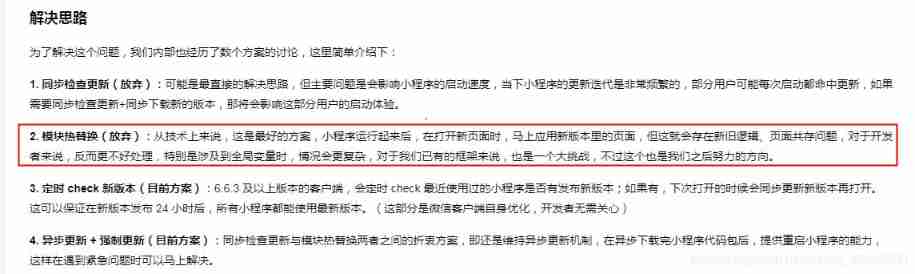
Official documents – to update
Reprinted from : Simple books
The original author : Little devil Fairy
link :https://www.jianshu.com/p/4f5e3faaf483
边栏推荐
- 大话云原生数据库中的存算分离
- 两小时带你进入软件测试行业风口(附全套软件测试学习路线)
- What if the desktop computer is not connected to WiFi
- Record the problem of C # print size once
- 初识 Flutter 的绘图组件 — CustomPaint
- 【Keil】ADuCM4050官方库的GPIO输出宏定义
- 高效的NoSQL数据库服务Amozon DynamoDB体验分享
- Why PHP is not safe
- JDBC (IV)
- Machine learning deep learning -- Vectorization
猜你喜欢

我的IC之旅——资深芯片设计验证工程师成长——“胡”说IC工程师完美进阶

【图像融合】基于matlab方向离散余弦变换和主成分分析图像融合【含Matlab源码 1907期】

WPF 使用 MAUI 的自绘制逻辑

电脑的dwg文件怎么打开

高效的NoSQL数据库服务Amozon DynamoDB体验分享

ROS2/DDS/QoS/主题的记录

Gbase 8s index b+ tree

win11蓝牙无法连接怎么办?win11蓝牙无法连接的解决方法
魔法猪系统重装大师怎么使用
Upgrade PHP to php7 The impact of X (2), the obsolescence of mcrypt decryption
随机推荐
OOP栈类模板(模板+DS)
Package for gbase 8s
Gbase 8s memory management
DMA double buffer mode of stm32
File upload vulnerability shooting range upload labs learning (pass1-pass5)
How do the defi protocols perform under this round of stress test?
华为鸿蒙开发第四课
Web3 DApp用户体验最佳实践
2.0SpingMVC使用RESTful
Immutable學習之路----告別傳統拷貝
Cnpm: unable to load file c:\users\administrator\appdata\roaming\npm\cnpm PS1 because running scripts is prohibited on this system.
Gbase 8s stored procedure syntax structure
Join() in JSZ
JS arguments
jsz中的join()
Sleep more, you can lose weight. According to the latest research from the University of Chicago, sleeping more than 1 hour a day is equivalent to eating less than one fried chicken leg
STM32的DMA双缓冲模式详解
OOP stack class template (template +ds)
本轮压力测试下,DeFi协议们表现如何?
JS call() and apply()