当前位置:网站首页>Yolo7 mask recognition practice
Yolo7 mask recognition practice
2022-07-23 22:02:00 【maerdym】
List of articles
1. Make datasets
1.1 Install the dataset creation tool
Execute the following command to install the dataset creation tool labelimg
pip install labelimg
1.2 Run the dataset creation tool
Carry out orders labelimg, Run the dataset creation tool 
labelimg The tool interface is as follows :
1.3 Make datasets
Click on Open Dir Button , Open the picture file to be made ( Try to place the picture in images Under the table of contents , It is convenient to split the data set later )

Click the mode switch button on the left , Change the data pattern from PascalVOC Switch to YOLO Pattern

draw box box , And indicate the label
Click on createBox Button , Draw a rectangular border , And set the label text ( No mask ).
Click on Save Button , Save the sample label information ( Try to place the label file in labels Under the folder , Facilitate data segmentation later )

Click on Next Image Button , Process the next image ( With mask )

After clicking on save Button , Save the sample label information ( Try to save the label information in labels Under the folder )Process the pictures one by one , You can complete the data set production
2. Using data sets
2.1 Download the mask data set
If you don't want to make data sets , You can download the mask data set ( Click to download , password :sv74), And extract the data set to the root directory of the project (mask Catalog data sets ).
2.2 Split the dataset
Download dataset segmentation code ( Click to download ), Put it on mask Under the table of contents , perform data_split.py, Divide the data set into training data set and verification data set . After split , The data set directory structure is as follows :
You can adjust data_split.py Medium TRAIN_RATIO = 80, To indicate the proportion of training data set and validation data .
2.3 Dataset configuration
Copy data In the catalog coco.yaml, Save as mask.yaml, And modify the content . The revised content is as follows :
train: ./mask/train.txt
val: ./mask/val.txt

nc: 2

names: [ 'no-mask', 'mask' ]

3. Training models
3.1 Download pre training model
Download pre training model ( Click to download ), Put it in the project root directory .
3.2 Modify the training code
A copy of train.py, And rename to train_mask.py.
open train_mask.py, Modify the following configurations :
- Pre training model name
parser.add_argument(‘–weights’, type=str, default=‘yolov7_training.pt’, help=‘initial weights path’)
- Dataset path
parser.add_argument(‘–data’, type=str, default=‘data/mask.yaml’, help=‘data.yaml path’)
- Number of training rounds ( Default 300, It took a long time , It may take hours or even days )
parser.add_argument(‘–epochs’, type=int, default=100)
- Modify the model output path
parser.add_argument(‘–project’, default=‘runs/train/mask’, help=‘save to project/name’)
- Adjust the number of pictures processed in each batch ( If the memory of the graphics card is small , It is recommended to change the value to 2 perhaps 4)
parser.add_argument(‘–batch-size’, type=int, default=2, help=‘total batch size for all GPUs’)
3.3 Training models
function train_mask.py, Model training . About 20 Round left and right , The accuracy of model recognition can reach 95% above .
runs\train\mask\exp11\weights\best.pt It is the best model parameter .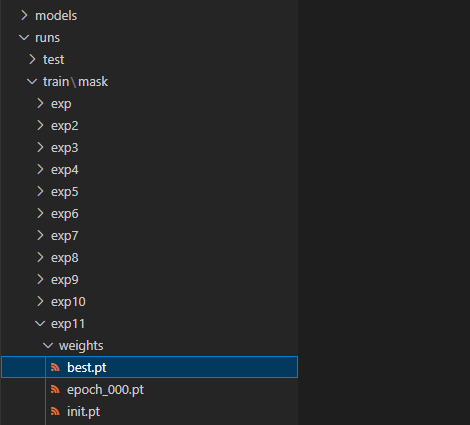
Can be best.pt Copy to the project root directory , And rename to yolov7_mask.pt, Convenient for later use .
4. Model test
4.1 Copy test code
Copy the test code file test.py, And rename to test_mask.py
4.2 Modify the test code
Modify the model parameter file
parser.add_argument(‘–weights’, nargs=‘+’, type=str, default=‘yolov7_mask.pt’, help=‘model.pt path(s)’)
Modify dataset path
parser.add_argument(‘–data’, type=str, default=‘data/mask.yaml’, help=‘*.data path’)
Modify the test item name
parser.add_argument(‘–project’, default=‘runs/test/mask’, help=‘save to project/name’)
4.3 Run test code
Run code test_mask.py, The running log is as follows :
The operation results are as follows ( stay runs/test/mask/exp Under the table of contents ):

5. problem
5.1 error :FileNotFoundError: [Errno 2] No such file or directory
If pip install When installing the software , Tips FileNotFoundError: [Errno 2] No such file or directory error , You need to execute the following command to update pip And installation tools .
pip install --upgrade setuptools
python -m pip install --upgrade pip
5.2 error :ModuleNotFoundError: No module named ‘tensorboard’
If something goes wrong :ModuleNotFoundError: No module named ‘tensorboard’, execute pip install tensorboard Install this class library .
5.3 error :If reserved memory is >> allocated memory
If you run out of memory , adjustment batch-size that will do , The adjustment method is detailed in 3.2 section .
边栏推荐
- 【数学建模暑期培训】配送中心选址问题
- 大淘营批量采集商品,如何将未上传的宝贝保存下来等后面再导入采集上传
- 【学习笔记】树的直径,重心
- Distributed transaction scheme: best effort notification scheme
- ADB 命令结合 monkey 的简单使用,超详细
- Openlayers instance accessible map accessible map
- prime_ series_ level-1
- Comment forcer complètement le meurtre de processus indépendants de l'arrière - plan?
- MySQL的JDBC編程
- Golang invalid argument to INTN
猜你喜欢

欧氏聚类(API)及其单木分割

淘宝助理停用,用大淘营导入数据包上传宝贝提示“主图为必填项,不能为空”是什么原因?如何解决?

Construction and application progress of ten billion level knowledge map of meituan brain

U++ events
![[hiflow] Tencent cloud's new generation of automation assistant, which I used to complete the enterprise epidemic prompt (no code)](/img/8a/52ef97e43c4b06e08ab826f4e46501.png)
[hiflow] Tencent cloud's new generation of automation assistant, which I used to complete the enterprise epidemic prompt (no code)

ADB 命令结合 monkey 的简单使用,超详细
![[create birthday card application]](/img/56/e04a9a20e181ad7b68b0f2d1d118bc.png)
[create birthday card application]

性能测试知识应用于实战

初探POC编写

Neo4j应用
随机推荐
还在为XShell破解烦恼,试试tabby
TreeMap
Neo4j应用
LeetCode高频题62. 不同路径:机器人从左上角到右下角的路径有多少条?纯概率排列组合问题,而不是动态规划题
10道面试基础笔试题,你能对几题?
Use Gaode map JS API 2.0 to load the starting and ending path tracks
Taoying collects goods in batches. How to save the babies that have not been uploaded and then import them later
JS object array de duplication
Leetcode high frequency question 62. different paths: how many paths does the robot have from the upper left corner to the lower right corner? Pure probability permutation and combination problem, not
Yushu A1 robot dog gesture control
Cesium keyboard and mouse control camera roaming (source code + principle explanation)
Mqtt connection, subscription and publishing can be realized without mqtt C library
为了一劳永逸而写的数独
Payment products and their usage scenarios
Apprentissage Lambda (utilisation du comparateur après tri, regroupement après collecte avec collectors.groupingby)
众邦科技又一潜心力作 —— 陀螺匠 OA 系统
JMeter performance comprehensive practice - sign in and batch sign in
05_ UE4 advanced_ Material UV scaling
Union and union all of Hana SQL
What is Kai Niu? Excuse me, is it safe to open a stock account by mobile phone?