当前位置:网站首页>Spark项目打包优化实践
Spark项目打包优化实践
2022-06-24 06:39:00 【Angryshark_128】
问题描述
在使用Scala/Java进行Spark项目开发过程中,常涉及项目构建和打包上传,因项目依赖Spark基础相关类包一般较大,打包后若涉及远程开发调试,每次打包都消耗多很多时间,因此需对此过程进行优化。
优化方案
方案1:一次全量上传jar包,后续增量更新class
POM文件配置(Maven)
  <dependencies>
    <dependency>
      <groupId>org.apache.spark</groupId>
      <artifactId>spark-core_2.11</artifactId>
      <version>${spark.version}</version>
    </dependency>

    ........

    <dependency>
      <groupId>junit</groupId>
      <artifactId>junit</artifactId>
      <version>4.4</version>
      <scope>test</scope>
    </dependency>
  </dependencies>

  <!-- 构建配置 -->
  <build>
    <resources>
      <resource>
        <directory>src/main/resources</directory>
      </resource>
    </resources>
    <plugins>
      <plugin>
        <groupId>net.alchim31.maven</groupId>
        <artifactId>scala-maven-plugin</artifactId>
        <version>3.2.2</version>
        <configuration>
          <recompileMode>incremental</recompileMode>
        </configuration>
        <executions>
          <execution>
            <goals>
              <goal>compile</goal>
              <goal>testCompile</goal>
            </goals>
          </execution>
        </executions>
      </plugin>
      <plugin>
        <groupId>org.apache.maven.plugins</groupId>
        <artifactId>maven-assembly-plugin</artifactId>
        <version>2.4.1</version>
        <configuration>
          <!-- get all project dependencies -->
          <descriptorRefs>
            <descriptorRef>jar-with-dependencies</descriptorRef>
          </descriptorRefs>
        </configuration>
        <executions>
          <execution>
            <id>make-assembly</id>
            <!-- bind to the packaging phase -->
            <phase>package</phase>
            <goals>
              <goal>single</goal>
            </goals>
          </execution>
        </executions>
      </plugin>
    </plugins>
  </build>
按照如上配置进行打包,会得到*-1.0-SNAPSHOT.jar和*-1.0-SNAPSHOT-jar-with-dependencies.jar两个jar包,后者是可单独执行的jar包,但因打包进去很多无用依赖,导致即便一个很简单的项目,也要一两百M。
原理须知:jar包其实只是一个普通的rar压缩包,解压后内部由相关jar包和编译后的class文件、静态资源文件等组成。也就是说,我们每次修改代码重新打包后,只是更新了其中个别class或静态资源文件,因而后续更新只需替换更新代码后的class文件即可。
例:
写一个简单的sparktest项目,打包后会出现sparktest-1.0-SNAPSHOT.jar和sparktest-1.0-SNAPSHOT-jar-with-dependencies.jar两个jar包。

其中sparktest-1.0-SNAPSHOT-jar-with-dependencies.jar为单独可执行jar包,上传至服务器即可执行,使用解压软件打开该jar可看到目录结构。

其中,App*.class文件即为主代码对应的编译文件,

修改App.scala代码后,执行重新compile一下,在target/classes目录下即可看到新的App*.class
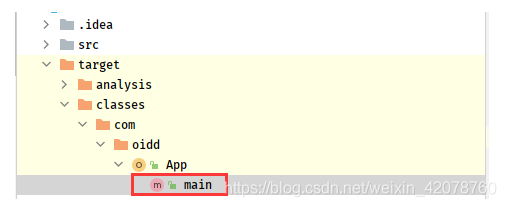
将更新后的class文件,上传至服务器jar包同目录下,替换即可
jar uvf sparktest-1.0-SNAPSHOT-jar-with-dependencies.jar App*.class
注:若该class文件不在jar包根目录下,则创建相同目录,然后替换,如
jar uvf sparktest-1.0-SNAPSHOT-jar-with-dependencies.jar com/example/App*.class
方案2:依赖与项目分开上传,后续单独更新项目jar包
POM文件配置(Maven)
<dependencies>
        <dependency>
            <groupId>org.scala-lang</groupId>
            <artifactId>scala-library</artifactId>
            <version>${scala.version}</version>
        </dependency>
        <dependency>
            <groupId>org.apache.spark</groupId>
            <artifactId>spark-core_2.11</artifactId>
            <version>${spark.version}</version>
        </dependency>
        ......
        <dependency>
            <groupId>junit</groupId>
            <artifactId>junit</artifactId>
            <version>4.4</version>
            <scope>test</scope>
        </dependency>
    </dependencies>

    <build>
    <plugins>
        <plugin>
            <groupId>org.apache.maven.plugins</groupId>
            <artifactId>maven-dependency-plugin</artifactId>
            <executions>
                <execution>
                    <id>copy-dependencies</id>
                    <phase>package</phase>
                    <goals>
                        <goal>copy-dependencies</goal>
                    </goals>
                    <configuration>
                        <outputDirectory>target/lib</outputDirectory>
                        <excludeTransitive>false</excludeTransitive>
                        <stripVersion>true</stripVersion>
                    </configuration>
                </execution>
            </executions>
        </plugin>
        <!--scala打包插件-->
        <plugin>
            <groupId>net.alchim31.maven</groupId>
            <artifactId>scala-maven-plugin</artifactId>
            <version>3.3.1</version>
            <executions>
                <execution>
                    <goals>
                        <goal>compile</goal>
                        <goal>testCompile</goal>
                    </goals>
                    <configuration>
                        <args>
                            <arg>-dependencyfile</arg>
                            <arg>${project.build.directory}/.scala_dependencies</arg>
                        </args>
                    </configuration>
                </execution>
            </executions>
        </plugin>
        <!--java代码打包插件,不会将依赖也打包-->
        <plugin>
            <groupId>org.apache.maven.plugins</groupId>
            <artifactId>maven-jar-plugin</artifactId>
            <configuration>
                <archive>
                    <manifest>
                        <!-- <addClasspath>true</addClasspath> -->
                        <mainClass>com.oidd.App</mainClass>
                    </manifest>
                </archive>
            </configuration>
        </plugin>
    </plugins>
打包完成后,会出现单独jar包和lib目录

上传jar包和lib文件夹至服务器,后续更新只需要替换jar包即可,执行spark-submit时,只需要添加–jars *\lib*.jar目录即可。
边栏推荐
- File system notes
- 面渣逆袭:MySQL六十六问,两万字+五十图详解
- Centos7 deploying mysql-5.7
- On BOM and DOM (1): overview of BOM and DOM
- Let's talk about BOM and DOM (5): dom of all large Rovers and the pits in BOM compatibility
- leetcode:1856. 子数组最小乘积的最大值
- How to send SMS in groups? What are the reasons for the poor effect of SMS in groups?
- What is the role of domain name websites? How to query domain name websites
- MAUI使用Masa blazor组件库
- Go excel export tool encapsulation
猜你喜欢




随机推荐
About Stacked Generalization
基于三维GIS系统的智慧水库管理应用
Challenges brought by maker education to teacher development
File system notes
应用配置管理,基础原理分析
[JUC series] completionfuture of executor framework
Come on, it's not easy for big factories to do projects!
Free and easy-to-use screen recording and video cutting tool sharing
Kubernets traifik proxy WS WSS application
Easy car Interviewer: talk about MySQL memory structure, index, cluster and underlying principle!
机器人迷雾之算力与智能
程序员使用个性壁纸
mysql中的 ON UPDATE CURRENT_TIMESTAMP
Produce kubeconfig with permission control
Cloudcompare & PCL point cloud clipping (based on clipping box)
.NET7之MiniAPI(特别篇) :Preview5优化了JWT验证(上)
数据库 存储过程 begin end
The data synchronization tool dataX has officially supported reading and writing tdengine
Le système de surveillance du nuage hertzbeat v1.1.0 a été publié, une commande pour démarrer le voyage de surveillance!
Typora收费?搭建VS Code MarkDown写作环境