当前位置:网站首页>MAUI使用Masa blazor组件库
MAUI使用Masa blazor组件库
2022-06-24 06:39:00 【dotNET跨平台】
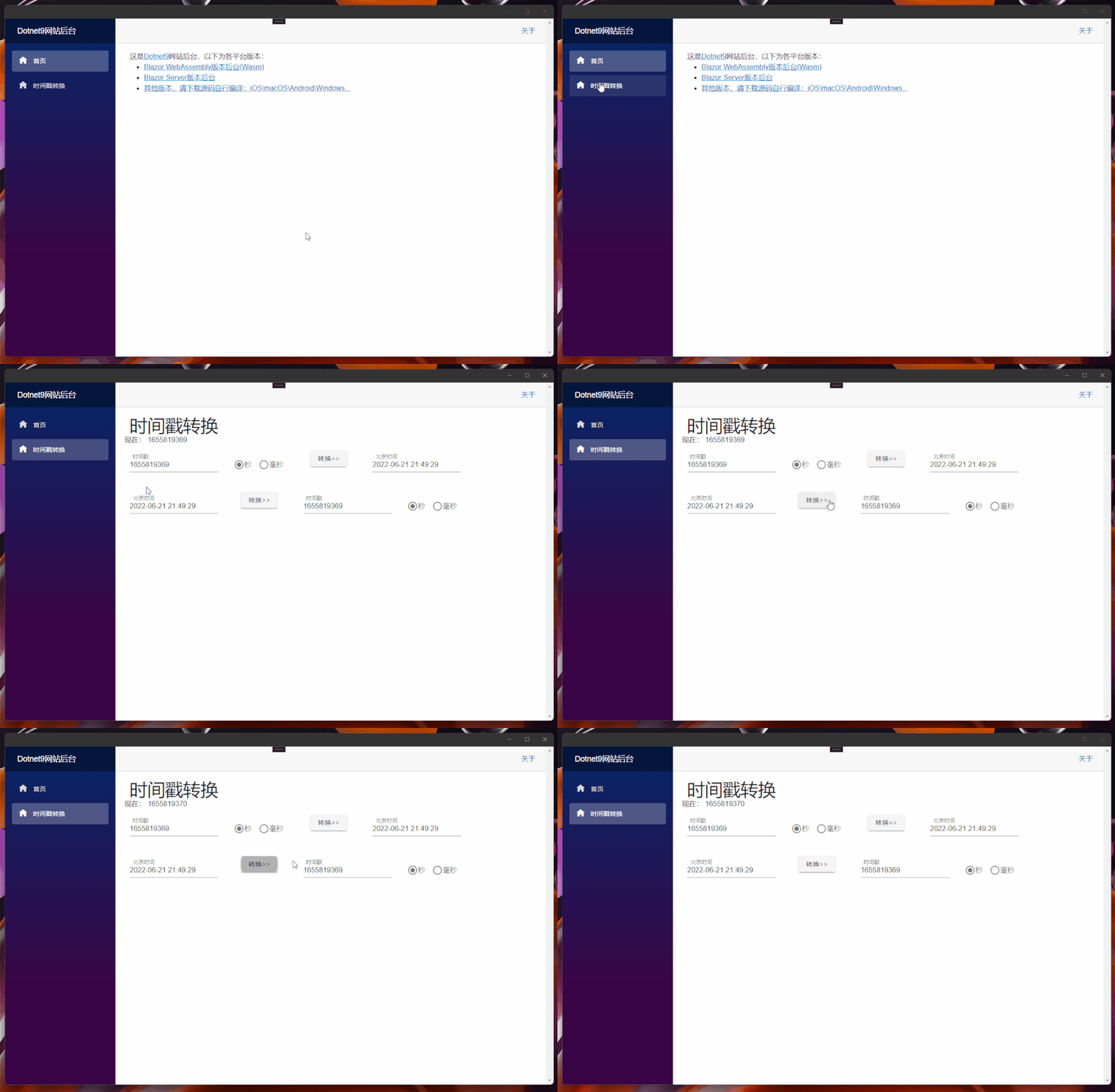
上一篇(点击阅读)我们实现了UI在Web端(Blazor Server/Wasm)和客户端(Windows/macOS/Android/iOS)共享,这篇我加上 Masa Blazor[2]组件库的引用,并把前几个月写的时间戳转换[3]工具加上。
1. 前置知识
关于Masa Blazor请点击Masa Blazor官网[4]了解:
MASA Blazor
基于Material Design和BlazorComponent的交互能力提供标准的基础组件库。提供如布局、弹框标准、Loading、全局异常处理等标准场景的预置组件。
2. 组件库的引用
组件库的添加参考Masa官网[5],这里写下Dotnet9后台[6]添加记录:
2.1 UI共享库的修改-Dotnet9.WebApp
UI共享库
Dotnet9.WebApp添加Maas.Blazor包,刚好今天(21号)Masa发布了0.5.0-preview.3版本,我们下载使用:
Install-Package Masa.Blazor -Version 0.5.0-preview.3
封装
Maas.Blazor组件引用
添加文件./MasaExtensions/MasaSetup.cs,代码如下:
using Microsoft.Extensions.DependencyInjection;

namespace Dotnet9.WebApp.MasaExtensions;

public static class MasaSetup
{
    public static void AddMasaSetup(this IServiceCollection services)
    {
        if (services == null) throw new ArgumentNullException(nameof(services));

        services.AddMasaBlazor();   // 这句关键代码
    }
}关键代码只有一行services.AddMasaBlazor();,添加扩展类是为了功能扩展,为了其他项目方便使用...
_Imports.razor引入Masa.Blazor命名空间
@using Masa.Blazor就这3步对 Dotnet9.WebApp的修改。
2.2 跨平台项目修改-Dotnet9.MAUI
修改
MauiProgram.cs文件,添加上面封装的扩展方法AddMasaSetup():
using Dotnet9.WebApp.MasaExtensions;    // 第1处:添加这个命名空间

namespace Dotnet9.MAUI;

public static class MauiProgram
{
    public static MauiApp CreateMauiApp()
    {
        var builder = MauiApp.CreateBuilder();
        builder
            .UseMauiApp<App>()
            .ConfigureFonts(fonts => { fonts.AddFont("OpenSans-Regular.ttf", "OpenSansRegular"); });

        builder.Services.AddMauiBlazorWebView();
#if DEBUG
        builder.Services.AddBlazorWebViewDeveloperTools();
#endif
        builder.Services.AddMasaSetup();    // 第2外:添加扩展方法引入Masa Blazor

        return builder.Build();
    }
}
添加
Masa.Blazor资源文件
修改wwwwroot/index.html文件,添加以下样式(直接复制 Masa.Blazor[7]Blazor WebAssembly使用的资源文件)
<link href="_content/Masa.Blazor/css/masa-blazor.css" rel="stylesheet" />
<link href="_content/Masa.Blazor/css/masa-extend-blazor.css" rel="stylesheet" />

<link href="https://cdn.masastack.com/npm/@mdi/[email protected]/css/materialdesignicons.min.css" rel="stylesheet">
<link href="https://cdn.masastack.com/npm/materialicons/materialicons.css" rel="stylesheet">
<link href="https://cdn.masastack.com/npm/fontawesome/v5.0.13/css/all.css" rel="stylesheet">

<script src="_content/BlazorComponent/js/blazor-component.js"></script>
2.3 Blazor WebAssembly项目修改-Dotnet9.Wasm
修改
Program.cs文件,添加上面封装的扩展方法AddMasaSetup():
using Dotnet9.WebApp;
using Dotnet9.WebApp.MasaExtensions;        // 第1处:添加这个命名空间
using Microsoft.AspNetCore.Components.Web;
using Microsoft.AspNetCore.Components.WebAssembly.Hosting;

var builder = WebAssemblyHostBuilder.CreateDefault(args);
builder.RootComponents.Add<Main>("#app");
builder.RootComponents.Add<HeadOutlet>("head::after");

builder.Services.AddMasaSetup();            // 第2外:添加扩展方法引入Masa Blazor
builder.Services.AddScoped(sp => new HttpClient { BaseAddress = new Uri(builder.HostEnvironment.BaseAddress) });

await builder.Build().RunAsync();
添加
Masa.Blazor资源文件
同Dotnet9.MAUI
2.4 Blazor Server项目修改-Dotnet9.Server
修改
Program.cs文件,添加上面封装的扩展方法AddMasaSetup():
using Dotnet9.WebApp.MasaExtensions;        // 第1处:添加这个命名空间

var builder = WebApplication.CreateBuilder(args);

// Add services to the container.
builder.Services.AddRazorPages();
builder.Services.AddServerSideBlazor();
builder.Services.AddMasaSetup();            // 第2外:添加扩展方法引入Masa Blazor

var app = builder.Build();

// Configure the HTTP request pipeline.
if (!app.Environment.IsDevelopment())
{
    app.UseExceptionHandler("/Error");
    // The default HSTS value is 30 days. You may want to change this for production scenarios, see https://aka.ms/aspnetcore-hsts.
    app.UseHsts();
}

app.UseHttpsRedirection();

app.UseStaticFiles();

app.UseRouting();

app.MapBlazorHub();
app.MapFallbackToPage("/_Host");

app.Run();
添加
Masa.Blazor资源文件
修改Pages/_Layout.cshtml文件,添加以下样式(复制 Masa.Blazor[8]Blazor Server使用的资源文件)
<!-- masa blazor css style -->
<link href="_content/Masa.Blazor/css/masa-blazor.css" rel="stylesheet" />
<link href="_content/Masa.Blazor/css/masa-extend-blazor.css" rel="stylesheet" />

<!--icon file,import need to use-->
<link href="https://cdn.masastack.com/npm/@("@mdi")/[email protected]/css/materialdesignicons.min.css" rel="stylesheet">
<link href="https://cdn.masastack.com/npm/materialicons/materialicons.css" rel="stylesheet">
<link href="https://cdn.masastack.com/npm/fontawesome/v5.0.13/css/all.css" rel="stylesheet">

<!--js(should lay the end of file)-->
<script src="_content/BlazorComponent/js/blazor-component.js"></script>注意:MAUI Blazor和Blazor WebAssembly两个项目引入Masa Blazor资源文件的代码一样,Blazor Server和前两者主要区别是materialdesignicons.min.css文件:

这里关于Masa.Blazor的引入就介绍完了,总结下关键三步:
添加
Masa.BlazorNuget包:Install-Package Masa.Blazor;Masa.Blazor组件注册使用:services.AddMasaBlazor();;添加
Masa.Blazor资源文件:Wasm是wwwwroot/index.html, blazor server是_Layout.cshtml,注意两者添加资源文件的区别。
3. 时间戳功能的添加
在做Blazor Server版本网站时,有过一次时间戳功能开发的介绍(点击阅读[9]),代码很简单,这里不再细说,不能再水了....
4. 总结
Masa.Blazor组件库已经添加,并恢复了时间戳功能,下一步,就是继续搭建网站后台了,使用Masa.Blazor搭建框架喽。
本文Blazor Server站点预览:https://server.dotnet9.com/
本文Blazor Wasm站点预览:https://wasm.dotnet9.com/
MAUI(Android\Windows\macOS\iOS)预览:https://github.com/dotnet9/Dotnet9/tree/develop/src/Dotnet9.MAUI(未做发布文件,需要您源码自行编译)
参考资料
[1]
点击阅读: https://dotnet9.com/2022/06/Share-razor-library-between-maui-and-blazor-server-or-client
[2]Masa Blazor: https://masa-blazor-docs-dev.lonsid.cn/
[3]时间戳转换: https://dotnet9.com/2022/02/Use-Blazor-to-be-a-simple-online-timestamp-conversion-tool
[4]Masa Blazor官网: https://masa-blazor-docs-dev.lonsid.cn/
[5]Masa官网: https://masa-blazor-docs-dev.lonsid.cn/
[6]Dotnet9后台: https://github.com/dotnet9/Dotnet9
[7]Masa.Blazor: https://masa-blazor-docs-dev.lonsid.cn/getting-started/installation
[8]Masa.Blazor: https://masa-blazor-docs-dev.lonsid.cn/getting-started/installation
[9]点击阅读: https://dotnet9.com/2022/02/Use-Blazor-to-be-a-simple-online-timestamp-conversion-tool
边栏推荐
- On BOM and DOM (4): dom0/dom2 event handling analysis
- 潞晨科技获邀加入NVIDIA初创加速计划
- Centos7 deploying mysql-5.7
- Implementation of code rate and frame rate statistics in easyplayer RTSP player
- Oracle SQL comprehensive application exercises
- Brief introduction of domain name registration
- Actual combat | how to deploy flask project using wechat cloud hosting
- 基于三维GIS系统的智慧水库管理应用
- 开源与创新
- 十年
猜你喜欢

目标5000万日活,Pwnk欲打造下一代年轻人的“迪士尼乐园”

Virtual file system

leetcode:85. 最大矩形

Rockscache schematic diagram of cache operation
![[binary number learning] - Introduction to trees](/img/7d/c01bb58bc7ec9c88f857d21ed07a2d.png)
[binary number learning] - Introduction to trees
Leetcode: Sword finger offer 26: judge whether T1 contains all topologies of T2

智能视觉组A4纸识别样例

C language student management system - can check the legitimacy of user input, two-way leading circular linked list

About Stacked Generalization

FreeRTOS MPU使系统更健壮!
随机推荐
数据同步工具 DataX 已经正式支持读写 TDengine
Easy car Interviewer: talk about MySQL memory structure, index, cluster and underlying principle!
Centos7 deploying mysql-5.7
你有一个机会,这里有一个舞台
RealNetworks vs. 微软:早期流媒体行业之争
Record of waic 2021 round table conference 𞓜 cross border dialogue: current situation and future of AI and sustainable development
记录--关于JSP前台传参数到后台出现乱码的问题
Nine unique skills of Huawei cloud low latency Technology
oracle sql综合运用 习题
Come on, it's not easy for big factories to do projects!
Record -- about the problem of garbled code when JSP foreground passes parameters to the background
【二叉树】——二叉树中序遍历
The cloud monitoring system hertzbeat V1.1.0 is released, and a command starts the monitoring journey!
decade
Cloudcompare & PCL point cloud clipping (based on clipping box)
Oceanus kudu sink summary
Deploy DNS server using dnsmasq
Arduino融资3200万美元,进军企业市场
typescript vscode /bin/sh: ts-node: command not found
Game website making tutorial and correct view of games