当前位置:网站首页>[microservices sentinel] sentinel quick start | building an image | starting the console
[microservices sentinel] sentinel quick start | building an image | starting the console
2022-06-25 00:45:00 【Bulst】
List of articles
brief introduction
Sentinel Distributed oriented 、 Traffic management component of multilingual isomerization service architecture , The main pointcut is traffic , Route from traffic 、 flow control 、 Traffic shaping 、 Fusing the drop 、 System adaptive overload protection 、 Hotspot traffic protection and other dimensions help developers ensure the stability of microservices .
Timeline
2019 year ,Sentinel Explore the direction of multilingual expansion , Introduction C++ Native version , Also aim at Service Mesh The scene also came out Envoy Cluster traffic control support , To solve the problem Service Mesh The problem of multi language flow restriction under the framework .
2021 year ,Sentinel It's heading towards 2.0 Evolution of cloud native high availability decision center components ; At the same time, it launched Sentinel Rust Native version .
2022 year ,Sentinel The brand is upgraded to traffic management , The field covers traffic routing / Dispatch 、 Flow dyeing 、 Flow control degradation 、 Overload protection / Instance removal, etc ; At the same time, the community draws out the relevant standards of flow management to OpenSergo In the standard ,Sentinel Implemented as a traffic governance standard .
Two modules
Sentinel The use of can be divided into two parts :
Console (Dashboard): The console is mainly responsible for managing push rules 、 monitor 、 Cluster current limiting distribution management 、 Machine discovery, etc .
Core library (Java client ): Don't rely on any framework / library , Can run on Java 7 And above , At the same time Dubbo / Spring Cloud And other frameworks also have better support .
Work flow chart
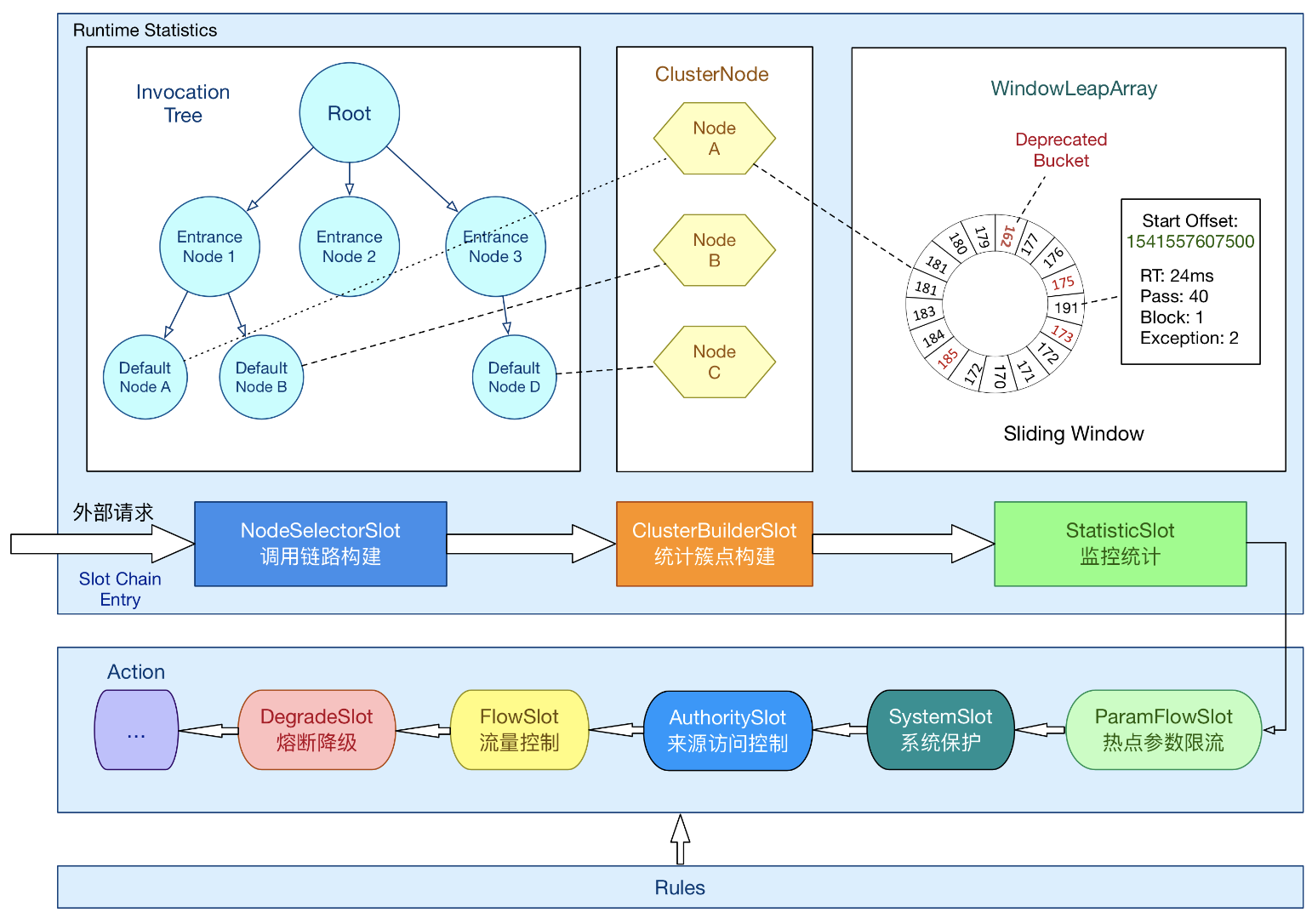
sentinel-dashboard-1.8.1 Mirror image
Dockerfile
FROM java:8
LABEL maintainer="issa <[email protected]>"
ADD sentinel-dashboard-1.8.1.jar app.jar
EXPOSE 80
ENTRYPOINT ["java" ,"-Dserver.port=80","-Dcsp.sentinel.dashboard.server=localhost:80","-Dproject.name=mysentinel","-jar", "app.jar"]
Prerequisite : Need to put sentinel-dashboard-1.8.1.jar Upload to the current directory .
Execute the following command to complete the creation of the image docker build -t mysentinel:1.8.1 .
function docker run -d -p 80:80 mysentinel:1.8.1
Console
Sentinel Provide a lightweight open source console , It provides machine discovery and health management 、 monitor ( Stand alone and cluster ), The function of rule management and push .
Sentinel The console contains the following functions :
Check the list of machines and their health : collect Sentinel Heartbeat packets sent by the client , Used to determine if the machine is online .
monitor ( Single machine and cluster aggregation ): adopt Sentinel Monitoring of client exposure API, Pull and aggregate application monitoring information regularly , Finally, it can realize real-time monitoring in seconds .
Rule management and push : Unified management of push rules .
authentication : Authentication is very important in the production environment . Here, each developer needs to customize according to their own actual situation .
Be careful :Sentinel The console currently only supports stand-alone deployment .Sentinel The console project provides Sentinel
Complete set of functions , Not used as a production environment console out of the box , If you want to use it in the production environment, please customize and transform it according to the documents .
sentinel Console access code
rely on
        <dependency>
            <groupId>com.alibaba.cloud</groupId>
            <artifactId>spring-cloud-starter-alibaba-sentinel</artifactId>
        </dependency>
        <dependency>
            <groupId>org.springframework.boot</groupId>
            <artifactId>spring-boot-starter-actuator</artifactId>
        </dependency>
The configuration file :
spring:
  cloud:
    sentinel:
      transport:
        dashboard: localhost
#        port: 8719
#        client-ip: localhost
      eager: true
management:
  endpoints:
    web:
      exposure:
        include: '*'
Successful startup

边栏推荐
- Network request -volley
- adb shell sendevent
- 【微服务|Sentinel】Sentinel快速入门|构建镜像|启动控制台
- Creative SVG ring clock JS effect
- Transition from digitalization to intelligent manufacturing
- Meta & Berkeley proposed a universal multi-scale visual transformer based on pooled self attention mechanism. The classification accuracy in Imagenet reached 88.8%! Open source
- 2021-04-18
- Only positive integers can be entered in the text box
- D manual destruction may violate memory security
- 无人驾驶: 对多传感器融合的一些思考
猜你喜欢

Creative SVG ring clock JS effect

ros(24):error: invalid initialization of reference of type ‘xx’ from expression of type ‘xx’
5-minute NLP: summary of 3 pre training libraries for rapid realization of NER

在企业级开发过程中我发现有位同事用select * from where 条件 for update

Adding, deleting, modifying and checking in low build code

UE4 WebBrowser chart cannot display problems

Kubernetes 架构核心组件工作原理解析

无需显示屏的VNC Viewer远程连接树莓派
Paper review: U2 net, u-net composed of u-net
Databinding quick start (still using findviewbyid?)


随机推荐
Paint rounded rectangle
移动安全工具-jarsigner
Common redis commands in Linux system
不重要的token可以提前停止计算!英伟达提出自适应token的高效视觉Transformer网络A-ViT,提高模型的吞吐量!...
百公里加速仅5.92秒,威兰达高性能版以高能产品实力领跑
Input series
redis + lua实现分布式接口限流实现方案
Single blind box removal, social blind box and friend blind box program source code
软件测试与游戏测试文章合集录
傳輸層 以字節為單比特的滑動窗口技術
What is test development? Can you find a job at this stage?
Zed acquisition
The basic principle and application of iterator and enhanced for
【微服务|Sentinel】簇点链路|微服务集群环境搭建
A small crawler program written by beginners
Microsoft won the title of "leader" in the magic quadrant of Gartner industrial Internet of things platform again!
MySQL log management
Wallpaper applet wechat applet
【Redis实现秒杀业务④】一人一单,不可重复购买
Go crawler framework -colly actual combat (4) -- Zhihu answer crawl (2) -- visual word cloud