当前位置:网站首页>AOSP ~ WIFI架构总览
AOSP ~ WIFI架构总览
2022-06-24 23:32:00 【南柯好萌】
Android WiFi 架构总览
本文介绍Android源码项目(AOSP)中WiFi功能的软件架构及各个模块(可执行文件、动态链接库)间的接口。
SDK API
Android SDK为开发者提供了WiFi编程接口,使用起来非常方便。
相关包:
android.net.wifi(写App时只需import该包,即可使用WiFi相关功能)
主要相关类:
- WifiManager WIFI编程入口,WIFI的多数功能都以该类的方法的形式提供
- WifiInfo 用于描述WIFI连接的状态
- ScanResult 用于描述一个AP,如SSID,信号强度,安全方式等
Overview
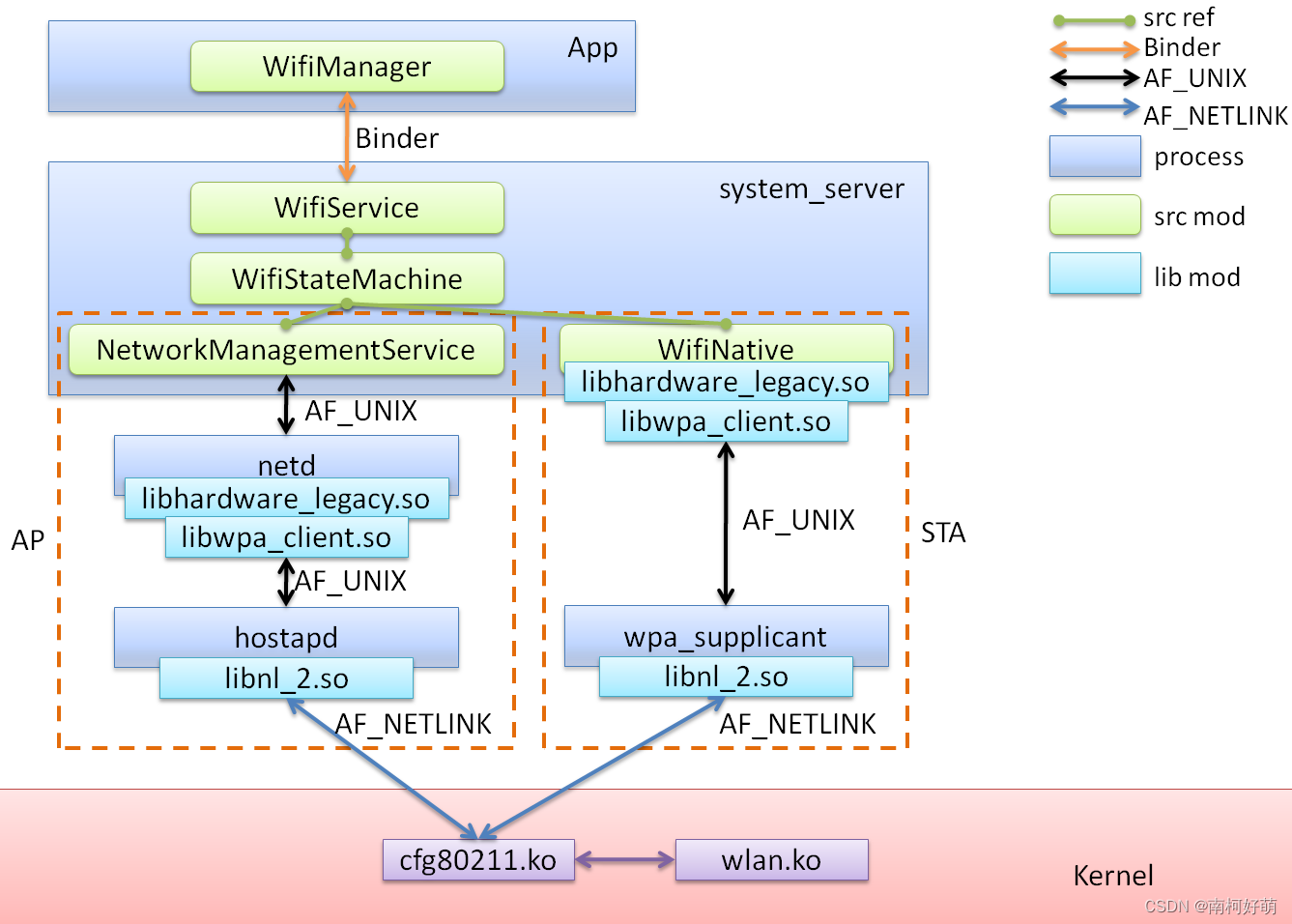
WifiManager 是管理所有Wifi连接的基本API,可以通过:
android.content.Context.getSystemService(Context.WIFI_SERVICE)
得到它的实例。
具体 IPC(Inter-Process communication)
App & system_server(WifiManager & WifiService)
如果说Binder是连接 App 和 system_server 的桥梁,那么WifiManager和WiFiService就是桥梁的两头。
framework代码上和wifi相关的package位于:
frameworks/base/wifi/java (WIFI相关的一些包)
frameworks/base/services/java (各种Service,WIFI相关包为:com.android.server.wifi )
frameworks代码中,和wifi相关的几个类的关系如下:
- WifiService继承自IWifiManager.Stub;
- IWifiManager.Stub又继承自Binder,同时实现了IWifiManager接口;
- WifiManager.Stu.proxy也实现了IWifiManager接口;
如图:
其中,IWifiManager, IWifiManager.Stub, IWifiManager.Stub.Proxy都由IWifiManger.aidl生成;
aidl自动生成相关的java代码,简化了用Binder实现RPC的过程。
IWifiManager.Stub.Proxy,WifiManager,BinberProxy用于客户端(App进程);
而IWifiManager.Stub,WifiService,Binder用于服务端(SystemServer进程)。
App 与 system_server 通过Binder通信,但Binder本身只实现了IPC,即类似socket通信的能力。而App端的WifiManager和system_server端的WifiService及Binder等类共同实现了RPC(remote procedure call)。
WifiManager只是系统为app提供的接口。Context.getSystemService(Context.WIFI_SERVICE)
返回的实际对象类型是IWifiManager.Stub.Proxy。
IWifiManager.Stub.Proxy的实例是位于App端的一个代理,代理象IWifiManager.Stub.Proxy
将WifiManager方法的参数序列化到Parcel,再经Binder发送给system_server进程。
system_server内的WifiService收App传来的WifiManager调用,完成实际工作。
这样,实际和下层通信的工作就由App转移到了system_server进程(WifiService对象)。
WifiStateMachine
另外,可以看到 WifiStateMachine 是wifi功能的枢纽,几种不同模式下的控制流程都经它流下。
当WIFI处在STA模式(或P2P模式)时,通过WifiNative与wpa_supplicant交互。
WifiNative定义了几个Native方法:
    public native static boolean setMaxTxPower(int txpower, boolean sapRunning);

    public native static boolean loadDriver();

    public native static boolean isDriverLoaded();

    public native static boolean unloadDriver();

    public native static boolean startSupplicant(boolean p2pSupported, int firstScanDelay);

    /* Sends a kill signal to supplicant. To be used when we have lost connection or when the supplicant is hung */
    public native static boolean killSupplicant(boolean p2pSupported);

    private native boolean connectToSupplicantNative();

    private native void closeSupplicantConnectionNative();

    /** * Wait for the supplicant to send an event, returning the event string. * @return the event string sent by the supplicant. */
    private native String waitForEventNative();

    private native boolean doBooleanCommandNative(String command);

    private native int doIntCommandNative(String command);

    private native String doStringCommandNative(String command);
当WIFI处在AP模式。通过NetworkManagementService与netd交互,具体是通过LocalSocket(Framework封装的UNIX域socket)与netd进程通信。
比如,NetworkManagementService.startAccessPoint方法:
    @Override
    public void startAccessPoint(
            WifiConfiguration wifiConfig, String wlanIface) {

        mContext.enforceCallingOrSelfPermission(CONNECTIVITY_INTERNAL, TAG);
        try {

            wifiFirmwareReload(wlanIface, "AP");
            if (wifiConfig == null) {

                mConnector.execute("softap", "set", wlanIface); // 向 netd 发送控制命令
            } else {

                mConnector.execute("softap", "set", wlanIface, wifiConfig.SSID,
                                   wifiConfig.hiddenSSID ? "hidden" : "broadcast",
                                   "1", getSecurityType(wifiConfig),
                                   new SensitiveArg(wifiConfig.preSharedKey));
            }
            mConnector.execute("softap", "startap");
        } catch (NativeDaemonConnectorException e) {

            throw e.rethrowAsParcelableException();
        }
    }
WifiNative
从功能上来说,WifiNative是system_server 和 wpa_supplicant 对话的窗口,实际上主要依靠wpa_supplicant项目编译出来的动态库libwpa_client.so。
WifiNative的几个native方法的具体实现在:
frameworks/base/core/jni/android_net_wifi_WifiNative.cpp
WifiNative的native方法的实现:
static JNINativeMethod gWifiMethods[] = {

    /* name, signature, funcPtr */
    {
     "loadDriver", "()Z",  (void *)android_net_wifi_loadDriver },
    {
     "isDriverLoaded", "()Z",  (void *)android_net_wifi_isDriverLoaded },
    {
     "unloadDriver", "()Z",  (void *)android_net_wifi_unloadDriver },
    {
     "startSupplicant", "(ZI)Z",  (void *)android_net_wifi_startSupplicant },
    {
     "killSupplicant", "(Z)Z",  (void *)android_net_wifi_killSupplicant },
    {
     "connectToSupplicantNative", "()Z", (void *)android_net_wifi_connectToSupplicant },
    {
     "closeSupplicantConnectionNative", "()V", (void *)android_net_wifi_closeSupplicantConnection },
    {
     "waitForEventNative", "()Ljava/lang/String;", (void*)android_net_wifi_waitForEvent },
    {
     "doBooleanCommandNative", "(Ljava/lang/String;)Z", (void*)android_net_wifi_doBooleanCommand },
    {
     "doIntCommandNative", "(Ljava/lang/String;)I", (void*)android_net_wifi_doIntCommand },
    {
     "doStringCommandNative", "(Ljava/lang/String;)Ljava/lang/String;", (void*) android_net_wifi_doStringCommand },
    {
     "setMaxTxPower", "(IZ)Z",  (void *)android_net_wifi_setMaxTxPower },
};
android_net_wifi_WifiNative.cpp 并没有做多少实际工作,大多是直接调用 wifi.h wifi_maxtxpower.h 定义的函数:
wifi.h 的具体实现在 hardware/libhardware_legacy/wifi/wifi.c (会被编译为 libhardware_legacy.so)
wifi_maxtxpower.h 的具体实现在 hardware/qcom/wlan/libmaxtxpower/wifi_maxtxpower.c (会被编译为 libmaxtxpower.so)
所以native代码依赖libhardware_legacy.so模块、libmaxtxpower.so模块。
WIFI HAL
实现SystemServer与wpa_supplicant(hostapd)通信的,即Wifi HAL。
Wifi HAL封装了UNIX域socket,SystemServer通过UNIX域socket与wpa_supplicant(hostapd)
通信;SystemServer发送的消息和wpa_supplicant响应的消息都是为ASCII字符串。
Wifi HAL代码主要分布在:
hardware/libhardware_legacy/wifi
hardware/qcom/wlan/libmaxtxpower
分别被编译为:
hardware/libhardware_legacy/wifi -> libhardware_legacy.so
hardware/qcom/wlan/libmaxtxpower -> libmaxtxpower.so
wifi.h定义了WIFI HAL的接口,具体函数有:
// 驱动相关:
int wifi_load_driver();
int wifi_unload_driver();
int is_wifi_driver_loaded();

// supplicant相关:
int wifi_start_supplicant(int p2pSupported, int first_scan_delay);
int wifi_stop_supplicant(int p2pSupported);
int wifi_connect_to_supplicant();
void wifi_close_supplicant_connection();

// 等待WIFI事发生,该函数会阻塞当前调用,直到有wifi事件发生时,返回一个表示wifi事件的字符
int wifi_wait_for_event(char *buf, size_t len);

// 向wifi驱动发一个命,(多数功能经该函数向下层发命令)
int wifi_command(const char *command, char *reply, size_t *reply_len);

// 发起一dhcp请求
int do_dhcp_request(int *ipaddr, int *gateway, int *mask,
                   int *dns1, int *dns2, int *server, int *lease);

// 返回一个do_dhcp_request()的错误字符串
const char *get_dhcp_error_string();

#define WIFI_GET_FW_PATH_STA 0
#define WIFI_GET_FW_PATH_AP 1
#define WIFI_GET_FW_PATH_P2P 2

// 返一个请的firmware路径
const char *wifi_get_fw_path(int fw_type);

// 为wlan驱动改变firmware路径
int wifi_change_fw_path(const char *fwpath);

#define WIFI_ENTROPY_FILE "/data/misc/wifi/entropy.bin"

int ensure_entropy_file_exists();
wifi_maxtxpower.h 只定义了一个函数:
int set_max_tx_power(int power, int sap_running);
android_net_wifi_WifiNative.cpp 调用了这些函数。
wifi.c调用了wpa_ctrl.h定义的一些函数,而wpa_ctrl.h中的函数
在external/wpa_supplicant_8 项目实现,并被编译为libwpa_client.so,
详见external/wpa_supplicant_8/Android.mk。
wpa_supplicant(hostapd)
代码位于:
external/wpa_supplicant_8
该项目内包含两个互相相关的开源项目wpa_supplicant和hostapd,它们将会生成两个可执行文件:
wpa_supplicant和hostapd,分别为STA模式和AP模式时的守护进程。
除此之外,还会生成用于测试的wpa_cli,hostapd_cli,
以及WIFI HAL依赖的wpa_client.so,具体可以到Android.mk中找到。
wpa_supplicant源码结构和hostapd类似,下面只介绍wpa_supplicant。
wpa_ctrl.h 定义了与wpa_supplicant(或hostapd)进程通信的接口:
struct wpa_ctrl * wpa_ctrl_open(const char *ctrl_path);

// Close a control interface to wpa_supplicant/hostapd
void wpa_ctrl_close(struct wpa_ctrl *ctrl);

// Send a command to wpa_supplicant/hostapd
int wpa_ctrl_request(struct wpa_ctrl *ctrl, const char *cmd, size_t cmd_len,
             char *reply, size_t *reply_len,
             void (*msg_cb)(char *msg, size_t len));

// Register as an event monitor for the control interface
int wpa_ctrl_attach(struct wpa_ctrl *ctrl);

// Unregister event monitor from the control interface
int wpa_ctrl_detach(struct wpa_ctrl *ctrl);

// Receive a pending control interface message
int wpa_ctrl_recv(struct wpa_ctrl *ctrl, char *reply, size_t *reply_len);

// Check whether there are pending event messages
int wpa_ctrl_pending(struct wpa_ctrl *ctrl);

// Get file descriptor used by the control interface
int wpa_ctrl_get_fd(struct wpa_ctrl *ctrl);

char * wpa_ctrl_get_remote_ifname(struct wpa_ctrl *ctrl);
wpa_ctrl_open 创建一个UNIX域socket 与 wpa_supplicant(或hostapd)进程相连,
wpa_ctrl_close 用于关闭wpa_ctrl_open创建的连接,
wpa_ctrl_request 用于向wpa_supplicant/hostapd发送控制命令,并阻塞,
直到wpa_supplicant/hostapd返回命令响应。控制命令和相应都是ASCII字符串。
wpa_ctrl.h除了声明了这些函数外,还定义了wpa_supplicant/hostapd的一些消息,这里没有详细列出。
源码中wpa_supplicant_global_ctrl_iface_receive
负责分派上层发来的控制命令,进而调用具体处理函数:
 "ATTACH" -> wpa_supplicant_ctrl_iface_attach
 "DETACH" -> wpa_supplicant_ctrl_iface_detach
  else -> wpa_supplicant_global_ctrl_iface_process:
    "IFNAME="(prefix) // 多数控制命令以IFNAME=开头
        -> wpas_global_ctrl_iface_ifname
            -> wpa_supplicant_ctrl_iface_process # "IFNAME="开头的命令的处理
    wpas_global_ctrl_iface_redir
        -> wpas_global_ctrl_iface_redir_p2p
            -> wpa_supplicant_ctrl_iface_process # "IFNAME="开头的命令的处理
        -> wpas_global_ctrl_iface_redir_wfd
            -> wpa_supplicant_ctrl_iface_process # "IFNAME="开头的命令的处理
    "PING" -> "PONG"
    "INTERFACE_ADD" -> wpa_supplicant_global_iface_add
    "INTERFACE_REMOVE" -> wpa_supplicant_global_iface_remove
    "INTERFACE_LIST" -> wpa_supplicant_global_iface_list
    "INTERFACES" -> wpa_supplicant_global_iface_interfaces
    "TERMINATE" -> wpa_supplicant_terminate_proc
    "SUSPEND" -> wpas_notify_suspend
    "RESUME" -> wpas_notify_resume
    "SET" -> wpas_global_ctrl_iface_set
    "SAVE_CONFIG" -> wpas_global_ctrl_iface_save_config
    "STATUS" -> wpas_global_ctrl_iface_status
该函数在wpa_supplicant目录下的
ctrl_iface_unix.c和ctrl_iface_udp.c内都有实现,可由该目录下的android.config切换
(android.config被Android.mk包含,具体参见Android.mk)
wpa_supplicant与内核通信
wpa_supplicant的运行模型是单进程单线程的 Reactor(IO multiplexing)。wpa_supplicant通过NETLINK socket与内核通信。
wpa_supplicant项目支持多种驱动编程接口,在Android上使用的是nl80211;
nl80211是新的802.11netlink接口公共头,与cfg80211一同组成了Wireless-Extensions的替代方案。
cfg80211是Linux 802.11配置API, nl80211用于配置cfg80211设备,同时用于内核到用户空间的通信。
实际使用nl80211时,只需要在程序中包含头文件
wireless module(in kernel)
代码位于:
kernel/net/wireless
nl80211.c 中的 nl80211_init 使用genl_register_family_with_ops 注册了响应应用程序的
struct genl_ops nl80211_ops[], 该数组定义了响应NETLINK消息的函数。
而 nl80211_init 在 cfg80211_init 内被调用,cfg80211_init是被subsys_initcall注册的
子系统初始化程序,被编译为cfg80211.ko。
nl80211_ops[] 节选:
static struct genl_ops nl80211_ops[] = {

    // ...
    {

        .cmd = NL80211_CMD_TRIGGER_SCAN,
        .doit = nl80211_trigger_scan,
        .policy = nl80211_policy,
        .flags = GENL_ADMIN_PERM,
        .internal_flags = NL80211_FLAG_NEED_NETDEV_UP |
                  NL80211_FLAG_NEED_RTNL,
    },
    {

        .cmd = NL80211_CMD_GET_SCAN,
        .policy = nl80211_policy,
        .dumpit = nl80211_dump_scan,
    },
    {

        .cmd = NL80211_CMD_START_SCHED_SCAN,
        .doit = nl80211_start_sched_scan,
        .policy = nl80211_policy,
        .flags = GENL_ADMIN_PERM,
        .internal_flags = NL80211_FLAG_NEED_NETDEV_UP |
                  NL80211_FLAG_NEED_RTNL,
    },
    {

        .cmd = NL80211_CMD_STOP_SCHED_SCAN,
        .doit = nl80211_stop_sched_scan,
        .policy = nl80211_policy,
        .flags = GENL_ADMIN_PERM,
        .internal_flags = NL80211_FLAG_NEED_NETDEV_UP |
                  NL80211_FLAG_NEED_RTNL,
    },

    // ...
};
wlan driver
代码位于:
vendor/qcom/opensource/wlan/prima
模块初始化(module_init),模块退出(module_exit):
CORE/HDD/src/wlan_hdd_main.c
模型:
多线程 + 队列
创建内核线程:
CORE/VOSS/src/vos_sched.c 的 vos_sched_open()
线程任务(vos_sched.c):
- VosMcThread() - The VOSS Main Controller thread
- VosWdThread() - The VOSS Watchdog thread
- VosTXThread() - The VOSS Main Tx thread
- VosRXThread() - The VOSS Main Rx thread
线程环境(context) (vos_sched.h):
typedef struct _VosSchedContext
{

  /* Place holder to the VOSS Context */
   v_PVOID_t           pVContext;

  /* WDA Message queue on the Main thread*/
   VosMqType           wdaMcMq;

   /* PE Message queue on the Main thread*/
   VosMqType           peMcMq;

   /* SME Message queue on the Main thread*/
   VosMqType           smeMcMq;

   /* TL Message queue on the Main thread */
   VosMqType           tlMcMq;

   /* SYS Message queue on the Main thread */
   VosMqType           sysMcMq;

  /* WDI Message queue on the Main thread*/
   VosMqType           wdiMcMq;

   /* WDI Message queue on the Tx Thread*/
   VosMqType           wdiTxMq;

   /* WDI Message queue on the Rx Thread*/
   VosMqType           wdiRxMq;

   /* TL Message queue on the Tx thread */
   VosMqType           tlTxMq;

   /* TL Message queue on the Rx thread */
   VosMqType           tlRxMq;

   /* SYS Message queue on the Tx thread */
   VosMqType           sysTxMq;

   VosMqType           sysRxMq;

    // ...

   struct task_struct* McThread;

   /* TX Thread handle */

   struct task_struct*   TxThread;

   /* RX Thread handle */
   struct task_struct*   RxThread;

    // ...
} VosSchedContext, *pVosSchedContext;
高通资料:
80-Y0513-1_G_QCA_WCN36x0_Software_Architecture.pdf
chapter: Android WLAN Host Software Architecture
SCAN过程跟踪
App
WifiManager wifiManager = (WifiManager)Context.getService(Contex.WIFI_SERVICE);
wifiManager.startScan();

//wifiManager --> IWifiManager.Stub.Proxy

IWifiManager.Stub.Proxy implements android.net.wifi.IWifiManager

wifiManager.startScan()
-> IWifiManager.Stub.Proxy.startScan(WorkSource=null);
-> BinderProxy.transact(Stub.TRANSACTION_startScan, _data, _reply, 0);
systerm_server
wifi –> WifiService
WifiService extends IWifiManager.Stub

IWifiManager.Stub extends android.os.Binder
    implements android.net.wifi.IWifiManager

-> IWifiManager.Stub.onTransact(int code, Parcel data, Parcel reply, int flags);
    case TRANSACTION_startScan:
-> WifiService.startScan(WorkSource workSource);
-> WifiStateMachine.startScan(int callingUid, WorkSource workSource);
-> StateMachine.sendMessage(CMD_START_SCAN, callingUid, 0, workSource);
    case CMD_START_SCAN:
->  handleScanRequest(WifiNative.SCAN_WITHOUT_CONNECTION_SETUP, message);
->  startScanNative(type, freqs)
-> WifiNative.scan(type, freqs)
->  doBooleanCommand("SCAN ..."); // AF_UNIX socket, send to wpa_supplicant
wpa_supplicant
external/wpa_supplicant_8/wpa_supplicant$ grep -nr "\"SCAN " .
./ChangeLog:197:      - "SCAN freq=<freq list>" can be used to specify which channels are
./ChangeLog:199:      - "SCAN passive=1" can be used to request a passive scan (no Probe
./ChangeLog:201:      - "SCAN use_id" can be used to request a scan id to be returned and
./ChangeLog:203:      - "SCAN only_new=1" can be used to request the driver/cfg80211 to
./ctrl_iface.c:6986:    } else if (os_strncmp(buf, "SCAN ", 5) == 0) {

./src/drivers/driver_test.c:1289:   ret = os_snprintf(pos, end - pos, "SCAN " MACSTR,
./src/drivers/driver_test.c:1994:   } else if (os_strncmp(buf, "SCAN ", 5) == 0) {

./ctrl_iface.c:6986:    } else if (os_strncmp(buf, "SCAN ", 5) == 0) {
refer to ./ctrl_iface.c:6986
    } else if (os_strcmp(buf, "SCAN") == 0) {

        wpas_ctrl_scan(wpa_s, NULL, reply, reply_size, &reply_len);
    } else if (os_strncmp(buf, "SCAN ", 5) == 0) {

        wpas_ctrl_scan(wpa_s, buf + 5, reply, reply_size, &reply_len);
wpas_ctrl_scan -> wpa_supplicant_req_scan
    int res = eloop_deplete_timeout(sec, usec, wpa_supplicant_scan, wpa_s,
                    NULL);
    if (res == 1) {

        wpa_dbg(wpa_s, MSG_DEBUG, "Rescheduling scan request: %d.%06d sec",
            sec, usec);
    }
wpa_supplicant_scan -> wpa_supplicant_trigger_scan
-> radio_add_work(wpa_s, 0, "scan", 0, wpas_trigger_scan_cb, ctx)
wpas_trigger_scan_cb -> wpa_drv_scan
static inline int wpa_drv_scan(struct wpa_supplicant *wpa_s,
                   struct wpa_driver_scan_params *params)
{

    if (wpa_s->driver->scan2) // callback
        return wpa_s->driver->scan2(wpa_s->drv_priv, params);
    return -1;
}
grep scan2 callback
external/wpa_supplicant_8/wpa_supplicant$ grep -nr "scan2\s*=" .
./src/drivers/driver_wext.c:2401:   .scan2 = wpa_driver_wext_scan,
./src/drivers/driver_privsep.c:726: .scan2 = wpa_driver_privsep_scan,
./src/drivers/driver_test.c:2677:   .scan2 = wpa_driver_test_scan,
./src/drivers/driver_bsd.c:1618:    .scan2          = wpa_driver_bsd_scan,
./src/drivers/driver_nl80211.c:12612:   .scan2 = driver_nl80211_scan2,
./src/drivers/driver_ndis.c:3217:   wpa_driver_ndis_ops.scan2 = wpa_driver_ndis_scan;
refer to ./src/drivers/driver_nl80211.c:12612
driver_nl80211_scan2 -> wpa_driver_nl80211_scan
    msg = nl80211_scan_common(drv, NL80211_CMD_TRIGGER_SCAN, params,
                  bss->wdev_id_set ? &bss->wdev_id : NULL);
    if (!msg)
        return -1;
use NL80211_CMD_TRIGGER_SCAN talk with kernel(cfg80211.ko)
kernel
grep NL80211_CMD_TRIGGER_SCAN in kernel source:
kernel$ cgrep NL80211_CMD_TRIGGER_SCAN
./net/wireless/nl80211.c:9053:      .cmd = NL80211_CMD_TRIGGER_SCAN,
./net/wireless/nl80211.c:9605:                NL80211_CMD_TRIGGER_SCAN) < 0) {

./include/uapi/linux/nl80211.h:255: *   option to specify additional IEs in NL80211_CMD_TRIGGER_SCAN,
./include/uapi/linux/nl80211.h:260: * @NL80211_CMD_TRIGGER_SCAN: trigger a new scan with the given parameters
./include/uapi/linux/nl80211.h:759: NL80211_CMD_TRIGGER_SCAN,
./include/uapi/linux/nl80211.h:1362: *  This attribute is used with %NL80211_CMD_TRIGGER_SCAN and
./include/uapi/linux/nl80211.h:3863: * of NL80211_CMD_TRIGGER_SCAN and NL80211_CMD_START_SCHED_SCAN
refer to net/wireless/nl80211.c:9053
static struct genl_ops nl80211_ops[] = {


// ... ...

    {

        .cmd = NL80211_CMD_TRIGGER_SCAN,
        .doit = nl80211_trigger_scan,
        .policy = nl80211_policy,
        .flags = GENL_ADMIN_PERM,
        .internal_flags = NL80211_FLAG_NEED_WDEV_UP |
                  NL80211_FLAG_NEED_RTNL,
    },

// ... ...
};
nl80211_trigger_scan -> rdev_scan(rdev, request);
static inline int rdev_scan(struct cfg80211_registered_device *rdev,
                struct cfg80211_scan_request *request)
{

    int ret;
    trace_rdev_scan(&rdev->wiphy, request);
    ret = rdev->ops->scan(&rdev->wiphy, request); // callback
    trace_rdev_return_int(&rdev->wiphy, ret);
    return ret;
}
边栏推荐
- Intranet learning notes (5)
- Jetson nano from introduction to practice (cases: opencv configuration, face detection, QR code detection)
- 数据库系统概论必背知识
- 中信证券手机开户是靠谱的吗?安全吗
- Mall project pc--- product details page
- QT package the EXE file to solve the problem that "the program input point \u zdapvj cannot be located in the dynamic link library qt5cored.dll"
- It's 2022, and you still don't know what performance testing is?
- F - spices (linear basis)
- Kaggle 专利匹配比赛赛后总结
- ACL access control of squid proxy server
猜你喜欢

保险也能拼购?个人可以凑够人数组团购买医疗保险的4大风险

LeetCode 210:课程表 II (拓扑排序)

QT package the EXE file to solve the problem that "the program input point \u zdapvj cannot be located in the dynamic link library qt5cored.dll"
Leetcode 210: curriculum II (topological sorting)
![Network planning | [four network layers] knowledge points and examples](/img/c3/d7f382409e99eeee4dcf4f50f1a259.png)
Network planning | [four network layers] knowledge points and examples

背了八股文,六月赢麻了……

Leecode learning notes - the shortest path for a robot to reach its destination
After reciting the eight part essay, I won the hemp in June

Detailed explanation of cache (for the postgraduate entrance examination of XD)

DDD concept is complex and difficult to understand. How to design code implementation model in practice?
随机推荐
请问polarDB数据库可以通过mysql进行数据源连接吗
对进程内存的实践和思考
[STL source code analysis] configurator (to be supplemented)
Computing service network: a systematic revolution of multi integration
F - Spices(线性基)
[I.MX6UL] U-Boot移植(六) 网络驱动修改 LAN8720A
Planification du réseau | [quatre couches de réseau] points de connaissance et exemples
The role of software security testing, how to find a software security testing company to issue a report?
Summary of stack frame in arm assembly
Use of hashcat
PE文件基础结构梳理
It is said that Yijia will soon update the product line of TWS earplugs, smart watches and bracelets
yarn : 无法加载文件 C:\Users\xxx\AppData\Roaming\npm\yarn.ps1,因为在此系统上禁止运行脚本
jwt
数组-一口气冲完快慢指针
保险也能拼购?个人可以凑够人数组团购买医疗保险的4大风险
1-6搭建Win7虚拟机环境
AI服装生成,帮你完成服装设计的最后一步
E - average and median
一线城市软件测试工资——你拖后腿了吗