当前位置:网站首页>Web technology sharing | [Gaode map] to realize customized track playback
Web technology sharing | [Gaode map] to realize customized track playback
2022-06-22 16:44:00 【InfoQ】
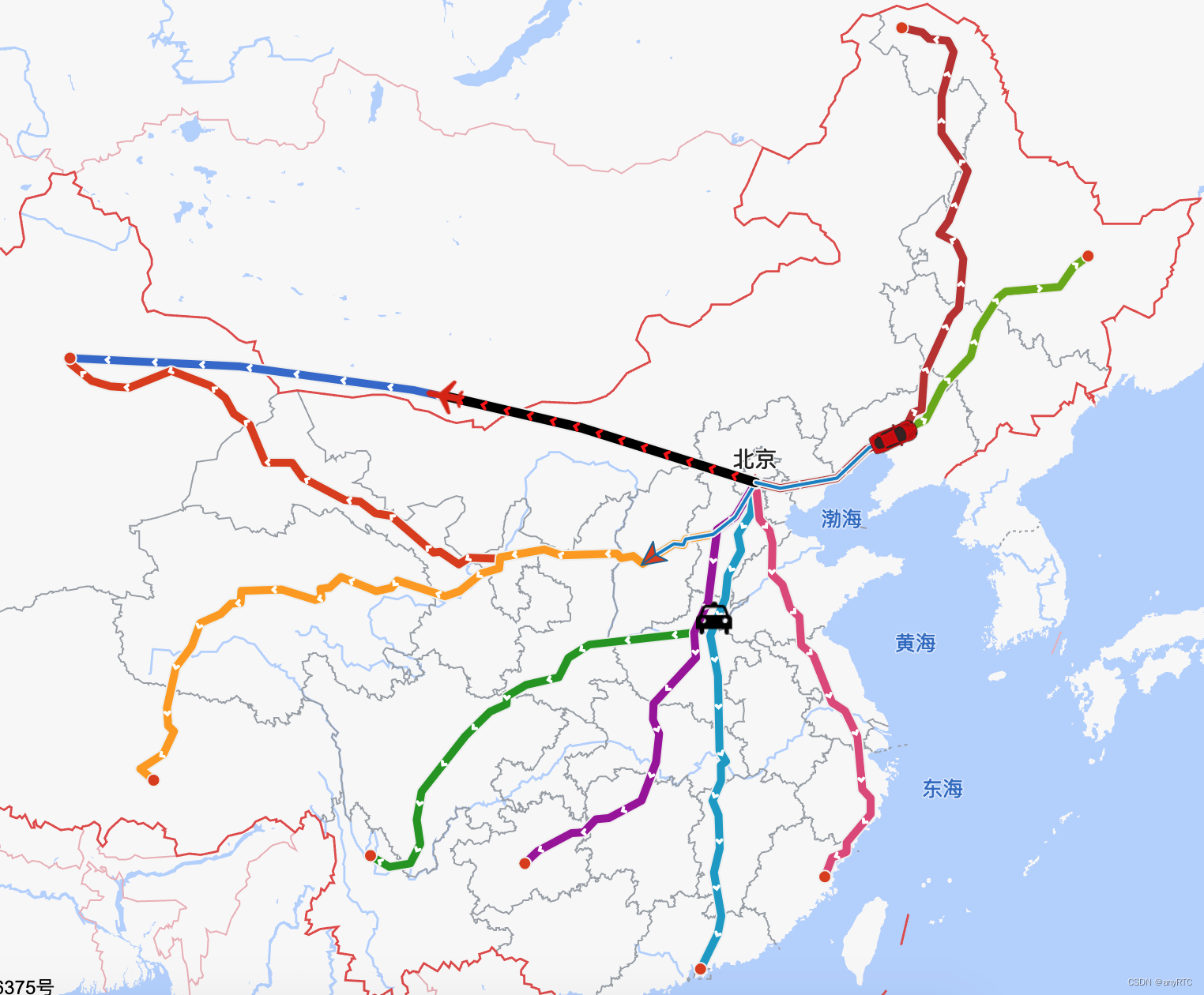
Realization ( Track playback ) There are two ways :
- The first is to use
JS APIandAMap.PolyLine( Broken line ) And so on .
- The second is to use
JS APIandAMapUI Component libraryIn combination with , utilizePathSimplifier(Trajectory displayComponents ) Draw the trajectory of action .
Options
Implementation process
- The client presses ( Time ) Periodically report geographic information and customized information .
- The server stores the information reported by the customer according to the time axis .
- Press ( Time and so on ) Query the user's track by conditions , And some nodes are removed by simplified algorithm ( for example , The node distance is very small 、 Or multiple points are in the same straight line 、3 Between points , There is a slight deviation in one point, which can not be drawn into a straight line, etc ), Finally, the path suitable for drawing ( Array ).
- Draw the user's action track according to the path .
Path simplification algorithm ( Optional )
APoint andBspot , The distance between the two is less than1Pixels , You can get rid ofBspot , Just stayAspot .
A,B,CThree points in a straight line , perhaps ,BThe point deviates only slightlyAPoint andCA line segment composed of points , thatBPoint can be removed .
simplify.jsImplementation example
Vehicle track playback
JS APIAMap.PolyLine
Realization principle :
- Draw... On a mapVehicle markings(
AMap.Marker).
- utilize
AMap.PolyLineDraw two tracks :The track of historyandTrack of driving path, Distinguish by color .
- Drive the vehicle forward at a certain speed , And monitor
MakerMobile Events , In event callback , Put the vehicle (Marker) The location is set as the center point of the map , Give the user a subjective visual sense that the vehicle is moving forward , At the same time, extendTrack of driving path.
- For complex implementation scenarios , For example :
- View the data of each node, We can plot each node , When a node is clicked, the data of the node will be displayed .
- Mobile multipliers, First, play according to the reported time interval , After selecting double speed , change
MarKerThe mobileduration.
- Other customizations .
Customize API
- Start moving
- Pause move
- Resume move
- Stop moving
Code example
AMap.plugin('AMap.MoveAnimation', function(){
 var marker, lineArr = [[116.478935,39.997761],[116.478939,39.997825],[116.478912,39.998549],[116.478912,39.998549],[116.478998,39.998555],[116.478998,39.998555],[116.479282,39.99856],[116.479658,39.998528],[116.480151,39.998453],[116.480784,39.998302],[116.480784,39.998302],[116.481149,39.998184],[116.481573,39.997997],[116.481863,39.997846],[116.482072,39.997718],[116.482362,39.997718],[116.483633,39.998935],[116.48367,39.998968],[116.484648,39.999861]];

 var map = new AMap.Map("container", {
 resizeEnable: true,
 center: [116.397428, 39.90923],
 zoom: 17
 });

 marker = new AMap.Marker({
 map: map,
 position: [116.478935,39.997761],
 icon: "https://a.amap.com/jsapi_demos/static/demo-center-v2/car.png",
 offset: new AMap.Pixel(-13, -26),
 });

 //  Draw historical tracks
 var polyline = new AMap.Polyline({
 map: map,
 path: lineArr,
 showDir:true,
 strokeColor: "#28F", // Line color
 // strokeOpacity: 1, // Line transparency
 strokeWeight: 6, // Line width
 // strokeStyle: "solid" // Line style
 });
 //  Track of driving path
 var passedPolyline = new AMap.Polyline({
 map: map,
 strokeColor: "#AF5", // Line color
 strokeWeight: 6, // Line width
 });

 //  Listen for vehicle movement events
 marker.on('moving', function (e) {
 //  Extend the track of the driving path
 passedPolyline.setPath(e.passedPath);
 //  Set the vehicle position as the center point of the map
 map.setCenter(e.target.getPosition(),true)
 });

 map.setFitView();

 //  Start moving
 window.startAnimation = function startAnimation () {
 marker.moveAlong(lineArr, {
 //  The length of each segment
 duration: 500,// It can be set according to the actual acquisition time interval
 // JSAPI2.0  Whether to automatically set the angle along the road  moveAlong  Set in the
 autoRotation: true,
 });
 };
 //  Pause move
 window.pauseAnimation = function () {
 marker.pauseMove();
 };
 //  Resume move
 window.resumeAnimation = function () {
 marker.resumeMove();
 };
 //  Stop moving
 window.stopAnimation = function () {
 marker.stopMove();
 };
});
Playback of flight track
JS APIAMapUI Component library PathSimplifierRealization principle :
- Draw... On a mapAircraft marking(
AMap.Marker).
- utilize
AMap.PolyLineDraw two tracks :The track of historyandTrack of driving path, Distinguish by color .
- Configure the color of the track , Animation speed and so on .
- For complex implementation scenarios , Which need to be customized , Can be in
PathSimplifierConfiguration and processing in the callback provided .
Sample code
// load PathSimplifier,loadUI The path parameter of is in the module name  'ui/'  The next part
AMapUI.load(['ui/misc/PathSimplifier'], function(PathSimplifier) {

 if (!PathSimplifier.supportCanvas) {
 alert(' The current environment does not support  Canvas!');
 return;
 }

 // Launch page
 initPage(PathSimplifier);
});

function initPage(PathSimplifier) {
 // Create a component instance
 var pathSimplifierIns = new PathSimplifier({
 zIndex: 100,
 map: map, // The map instance to which it belongs
 getPath: function(pathData, pathIndex) {
 // Returns the node coordinate information in the track data ,[AMap.LngLat, AMap.LngLat...]  perhaps  [[lng|number,lat|number],...]
 return pathData.path;
 },
 getHoverTitle: function(pathData, pathIndex, pointIndex) {
 // Returns the information displayed when the mouse hovers
 if (pointIndex >= 0) {
 // Hover over a track node
 return pathData.name + ', spot :' + pointIndex + '/' + pathData.path.length;
 }
 // Hover over the connection between nodes
 return pathData.name + ', Number of points ' + pathData.path.length;
 },
 renderOptions: {
 // Track line style
 pathLineStyle: {
 strokeStyle: 'red',
 lineWidth: 6,
 dirArrowStyle: true
 }
 }
 });

 // Here we build two simple tracks , For example only
 pathSimplifierIns.setData([{
 name: ' The trajectory 0',
 path: [
 [100.340417, 27.376994],
 [108.426354, 37.827452],
 [113.392174, 31.208439],
 [124.905846, 42.232876]
 ]
 }, {
 name: ' Ground wire ',
 // Create a message that includes 500 A geodesic line of interpolation points
 path: PathSimplifier.getGeodesicPath([116.405289, 39.904987], [87.61792, 43.793308], 500)
 }]);

 // Create a cruiser
 var navg0 = pathSimplifierIns.createPathNavigator(0, // Related to chapter 1 Tracks
 {
 loop: true, // Loop Playback
 speed: 1000000
 });

 navg0.start();
}

边栏推荐
- MYSQL_ERRNO : 1292 Truncated incorrect date value At add_num :1
- 【小程序项目开发-- 京东商城】uni-app开发之配置tabBar & 窗口样式
- What is the difference between "img" and "ALT" in the interview question
- SAP script tutorial: se71, se78, SCC1, vf03, so10-013
- nio使用可写事件处理一次性写不完情况
- 毕业季·本科毕业感想——机械er的自救之路
- MYSQL_ERRNO : 1205 MESSAGE :Lock wait timeout exceeded; try restarting transacti
- Iterators and generators
- 【C语言深度解剖】关键字if&&else&&bool类型
- win10桌面图标消失,工具栏变黑
猜你喜欢

shell学习

让代码优雅起来(学会调试+代码风格)

如何为政企移动办公加上一道“安全锁”?

CUMT study diary - quick notes of digital image processing examination
SAP ABAP dialog programming tutorial: module pool in -09

SAP ABAP data types, operators and editors-02

SAP ABAP BAPI-016

jsp学习之(一)---------jsp概述

二叉树练习第二弹
User exit and customer exit in SAP ABAP -015
随机推荐
shell学习
Prometheus监控之Consul监控 [consul-exporter]
浙江创投圈的“半壁江山”,还得是国资
【C语言】深度剖析整型和浮点型在内存中的存储
scala-for推导:能够在for表达式中的最初部分定义值,并在(外面)后面的表达式中使用该值
[C language] deeply analyze the relationship between pointer and array
Modularity in SAP ABAP: macros, subroutines and function modules -04
vs2017 在调试状态不显示QString值的解决方法
Learning about ABAP program tuning (IV) loop where key
双向数据绑定v-model与v-decorator
Summary of JS methods for obtaining data types
【微信小程序自定义底部tabbar】
Interface idempotent design
SAP ABAP report programming-08
spark常用 算子小总结
nio编程service
IDEA安装总结
CUMT study diary - quick notes of digital image processing examination
6.gui (graphics, filling)
如何为政企移动办公加上一道“安全锁”?