当前位置:网站首页>【微信小程序自定义底部tabbar】
【微信小程序自定义底部tabbar】
2022-06-22 15:22:00 【常安cc】
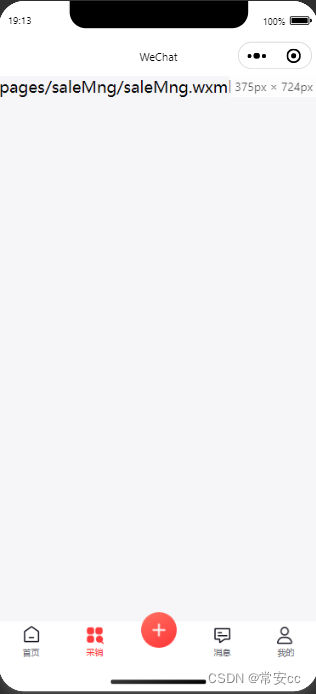

app.js
{

    "pages": [
        "pages/index/index",
        "pages/saleMng/saleMng",
        "pages/newsMng/newsMng",
        "pages/my/my"
    ],
    "tabBar": {

        "custom": true,
        "color": "#6b6c75",
        "selectedColor": "#FF3B3B",
        "borderStyle": "black",
        "backgroundColor": "#ffffff",
        "list": [
            {

                "pagePath": "pages/index/index",
                "iconPath": "/img/icon/tabIcon1.png",
                "selectedIconPath":   "/img/icon/tabIcon1-.png",
                "text": "首页"
            },
            {

                "pagePath": "pages/saleMng/saleMng",
                "iconPath": "/img/icon/tabIcon2.png",
                "selectedIconPath":   "/img/icon/tabIcon2-.png",
                "text": "采销"
            },
            {

                "pagePath": "pages/newsMng/newsMng",
                "iconPath": "/img/icon/tabIcon4.png",
                "selectedIconPath":   "/img/icon/tabIcon4-.png",
                "text": "消息"
            },
            {

                "pagePath": "pages/my/my",
                "iconPath": "/img/icon/tabIcon5.png",
                "selectedIconPath":   "/img/icon/tabIcon5-.png",
                "text": "我的"
            }
        ]
    },
    "window": {

        "backgroundTextStyle": "light",
        "navigationBarBackgroundColor": "#fff",
        "navigationBarTitleText": "WeChat",
        "navigationBarTextStyle": "black"
    },
    "sitemapLocation": "sitemap.json"
}
custom-tab-bar/index.wxml
<!--custom-tab-bar/index.wxml-->
<view class="tab-bar">
  <!-- <view class="tab-bar-border"></view> -->
  <!--  -->

  <block wx:for="{
    {list}}" wx:key="index">
    <div wx:if="{
    {item.isSpecial == true}}" class="tabbar_nav" hover-class="none" style="color:{
    {tabbar.selectedColor}}" open-type="navigate">
      <view class='special-wrapper'>
        <image class="tabbar_icon" src="{
    {item.iconPath}}"></image>
      </view>
      <image class='special-text-wrapper'></image>
      <text>{
    {
    item.text}}</text>
    </div>

    <view wx:else class="tab-bar-item" data-path="{
    {item.pagePath}}" data-index="{
    {index}}" bindtap="switchTab">
      <!-- <view wx:for="{
    {list}}" wx:key="index" class="tab-bar-item" data-path="{
    {item.pagePath}}" data-index="{
    {index}}" bindtap="switchTab"> -->
      <image src="{
    {selected === index ? item.selectedIconPath : item.iconPath}}" class="tabIcon"></image>
      <view style="color: {
    {selected === index ? selectedColor : color}}">{
    {
    item.text}}</view>
    </view>
  </block>
</view>
custom-tab-bar/index.js
Component({

  data: {

    selected: 0,
    color: "#6b6c75",
    selectedColor: "#FF3B3B",
    list: [{

        pagePath: "/pages/index/index",
        iconPath: "/img/icon/tabIcon1.png",
        selectedIconPath: "/img/icon/tabIcon1-.png",
        text: "首页"
      },
      {

        pagePath: "/pages/saleMng/saleMng",
        iconPath: "/img/icon/tabIcon2.png",
        selectedIconPath: "/img/icon/tabIcon2-.png",
        text: "采销"
      },
      {

        // pagePath: "/pages/index1/index1",
        iconPath: "/img/icon/tabIcon3.png",
        isSpecial: true,
        text: ""
      },
      {

        pagePath: "/pages/newsMng/newsMng",
        iconPath: "/img/icon/tabIcon4.png",
        selectedIconPath: "/img/icon/tabIcon4-.png",
        text: "消息"
      },
      {

        pagePath: "/pages/my/my",
        iconPath: "/img/icon/tabIcon5.png",
        selectedIconPath: "/img/icon/tabIcon5-.png",
        text: "我的"
      }
    ]
  },
  attached() {
    },
  methods: {

    switchTab(e) {

      const data = e.currentTarget.dataset
      const url = data.path
      wx.switchTab({

        url
      })
      // this.setData({

      // selected: data.index
      // })
    }
  }
})
custom-tab-bar/index.json
{

  "component": true
}
custom-tab-bar/index.wxss
.tab-bar {

  font-size: 10px;
  position: fixed;
  bottom: 0;
  left: 0;
  right: 0;
  height: 48px;
  background: white;
  display: flex;
  padding-bottom: env(safe-area-inset-bottom);
}

.tab-bar-border {

  background-color: rgba(0, 0, 0, 0.33);
  position: absolute;
  left: 0;
  top: 0;
  width: 100%;
  height: 1px;
  transform: scaleY(0.5);
}

.tab-bar-item {

  flex: 1;
  text-align: center;
  display: flex;
  justify-content: center;
  align-items: center;
  flex-direction: column;
}

.tabIcon {

  width:44rpx;
  height:44rpx;
  margin-bottom: 4rpx;
}


.tabbar_box {

  display: flex;
  flex-direction: row;
  justify-content: space-around;
  position: fixed;
  bottom: 0;
  left: 0;
  z-index: 999;
  width: 100%;
  height: 98rpx;
  box-shadow: 0 0 2px rgba(0, 0, 0, 0.1);
}

.tabbar_box.iphoneX-height {

  padding-bottom: 66rpx;
}

.middle-wrapper {

  position: absolute;
  right: 310rpx;
  bottom: 0;
  background-color: #fff;
  width: 120rpx;
  height: 120rpx;
  border-radius: 50%;
  border-top: 2rpx solid #f2f2f3;
}

.middle-wrapper.iphoneX-height {

  bottom: 66rpx;
}

.tabbar_nav {

  flex: 1;
  display: flex;
  flex-direction: column;
  justify-content: center;
  align-items: center;
  font-size: 20rpx;
  height: 100%;
  position: relative;
}

.tabbar_icon {

  width: 56rpx;
  height: 56rpx;
}

.special-wrapper {

  position: absolute;
  top: -28rpx;
  width: 96rpx;
  height: 96rpx;
  border-radius: 50%;
  /* border-top: 2rpx solid #f2f2f3; background-color: #fff; */
  text-align: center;
  box-sizing: border-box;
  padding: 6rpx;
}

.special-wrapper .tabbar_icon {

  width: 84rpx;
  height: 84rpx;
}

.special-text-wrapper {

  width: 56rpx;
  height: 56rpx;
}
关键的步骤:
在tabbar页面内的onshow里面:
 onShow: function () {

        if (typeof this.getTabBar === 'function' &&
        this.getTabBar()) {

        this.getTabBar().setData({

          selected: 4
        })
      }
    },
selected: 4(对应的是下标顺序)
// pages/my/my.js
Page({


    /** * 页面的初始数据 */
    data: {


    },

    /** * 生命周期函数--监听页面加载 */
    onLoad: function (options) {


    },

    /** * 生命周期函数--监听页面初次渲染完成 */
    onReady: function () {


    },

    /** * 生命周期函数--监听页面显示 */
    onShow: function () {

        if (typeof this.getTabBar === 'function' &&
        this.getTabBar()) {

        this.getTabBar().setData({

          selected: 4
        })
      }
    },

    /** * 生命周期函数--监听页面隐藏 */
    onHide: function () {


    },

    /** * 生命周期函数--监听页面卸载 */
    onUnload: function () {


    },

    /** * 页面相关事件处理函数--监听用户下拉动作 */
    onPullDownRefresh: function () {


    },

    /** * 页面上拉触底事件的处理函数 */
    onReachBottom: function () {


    },

    /** * 用户点击右上角分享 */
    onShareAppMessage: function () {


    }
})
边栏推荐
- 【C语言】深度剖析指针和数组的关系
- wallys/WiFi6 MiniPCIe Module 2T2R 2×2.4GHz 2x5GHz
- [Shanda conference] software performance optimization and bug repair
- 机器学习笔记 - HaGRID—手势识别图像数据集简介
- SAP ABAP data types, operators and editors-02
- Turn to: jackwelch: strategy is to think less and be quick to act
- 数睿数据荣获第二届ISIG中国产业智能大会两项年度大奖
- Gd32f4xx MCU drives MCP2515 to expand can interface
- Ironsource Luna offers a limited time discount for Apple search ads and enjoys 3 months of free service upon registration
- 十九、Xv6上下文切换(上下文切换的实现;状态机的封装与恢复)
猜你喜欢

实现一个Container全局组件步骤(给还不会使用组件的新手一个思路,大佬绕道)

ironSource Luna 推出苹果搜索广告限时优惠,注册即享3个月免费服务

'不敢去怀疑代码,又不得不怀疑代码'记一次网络请求超时分析

SAP 中的 ABAP 查询教程:SQ01、SQ02、SQ03-017

SLAM十四讲之第6讲--非线性优化

买网红雪糕的我,成了大冤种

Adding an unknown type of MCU to jflash

What is SAP ABAP? Type, ABAP full form and meaning

Alibaba cloud middleware's open source past

SAP ABAP 表控制与示例-07
随机推荐
使用stream api替代sql
SAP ABAP internal tables: create, read, populate, copy and delete-06
使用枚举实现工厂模式
[Shanda conference] establishment of webrtc tools for multi person video call
二叉树练习第二弹
Lecture 6 of slam Lecture 14 -- nonlinear optimization
NiO uses writable events to handle the situation of one-time write incompleteness
Conversion between numeric types and strings
C语言贪吃蛇
SAP ABAP 中 OpenSQL和Native SQL-05 本教程的目的不是教您 SQL 或数据库概念
[Shanda conference] use typescript to reconstruct the project
shell学习
SAP ABAP 子屏幕教程:在 SAP 中调用子屏幕-010
安全信得过!天翼云数据安全管理平台通过评测
SAP ABAP BAPI-016
短视频源码开发,优质的短视频源码需要做好哪几点?
Default function control =default and =delete
Safari兼容性问题总结
Swift -- save print log to sandbox
学习量子纠缠的可解释表示,该深度生成模型可直接应用于其他物理系统