当前位置:网站首页>Transition effect
Transition effect
2022-07-24 06:29:00 【PS notes】
transition-property Over attribute ( for example transform)
transition-duration Excessive duration ( for example 1s)
transition-timing-function Transition function
transition-delay Excessive delay time
Abbreviation :transition: attribute Second speed function Delay
The transition function :transition-timing-function Multiple values :
ease: Slow start and end, fast in the middle , The default value is .
linear: Average speed
ease-in: It started slow
ease-out: End slow
ease-in-out: and ease similar , But more than ease It's a big one .
Debugging tool demonstration

<style>
    .box{
      width: 100px;
      height: 100px;
      border:1px  solid red;
      margin:100px auto;
      /* border-radius: 30%; */
      /* transition-property: transform;
      transition-duration: 1s;*/
      /*  It can be abbreviated as follows    eaes 1s   It means delay  */
      transition: transform  1s  ease 1s;

    }
    .box:hover{
      transform:rotate(360deg);

    }
  </style>
</head>
<body>
  <div class="box">hello</div>
</body>
</html>
demand : The mouse in width is set by 100px become 200px The effect of
<style>
    .box{
      width: 100px;
      height: 100px;
      border:1px  solid red;
      margin:100px auto;
      transition: transform  1s ;

    }
    .box:hover{
      transform:rotate(360deg);
      /*  When the mouse is moved in, the width is changed from the original 100px become 200px */
      width: 200px;
    }
  </style>
</head>
<body>
  <div class="box">hello</div>
</body>
</html>


<head>
  <meta name="viewport" content="width=device-width, initial-scale=1" />
  <style>
    .box{
      width: 100px;
      height: 100px;
      border:1px  solid red;
      margin:100px auto;
      /*  You can set the origin of rotation , Rotate around the central dot , If you want to give values separately 0  0;  Take the upper left corner as the center */
      transform-origin:0 0 ;
      /*  The width here should be separated by commas   Otherwise, it will cover the front width  */
      transition: transform  1s , width 1s , height 1s;
        }
    .box:hover{
      transform:rotate(360deg);
      /*  When the mouse is moved in, the width is changed from the original 100px become 200px */
      width: 200px;
      height: 200px;
    }
  </style>
</head>
<body>
  <div class="box">hello</div>
</body>
</html> 
Get to know overflow attribute .
overflow: hidden Will hide the excess
overflow: auto There is a scroll bar
<style>
    .box{
        width: 100px;
        height: 100px;
        border:1px solid red;
        /* overflow: hidden  Will hide the excess  */
        overflow: hidden;
        /* overflow: auto There is a scroll bar  */
        overflow: auto;
    }
</style>
<body>
 <div class="box">
    123454856456465
    456565655655
    464654444
    54646465565
    54646565
    56556565656656
 </div>
Drop down menu case :
 <style>
      *{
          margin: 0px;
          padding:0px;
      }
    /* .menu>li  Add... Here > This expression will not get descendants , Then floating float:left */
      .menu>li{
        float:left;
        border:1px  solid  red;
      }
      li{
        /*  Remove the dots  */
        list-style: none;
      }
      .sub-menu>li{
        height: 0px;
        overflow: hidden;
        background-color: rgb(14, 7, 212);
        transition: height 0.5s;
        color: white;
      }
      .menu > li:hover > .sub-menu > li {
        height: 30px;
      }
  </style>
<body>
  <ul class="menu">
    <li> Books
      <ul class="sub-menu">
        <li>js Advanced design </li>
        <li>js Advanced design </li>
        <li>js Advanced design </li>
      </ul>
    </li>
    <li> Books
      <ul class="sub-menu">
        <li>js Advanced design </li>
        <li>js Advanced design </li>
        <li>js Advanced design </li>
      </ul>
    </li>
    <li> Books
      <ul class="sub-menu">
        <li>js Advanced design </li>
        <li>js Advanced design </li>
        <li>js Advanced design </li>
      </ul>
    </li>
      </ul>
</body>

</html>
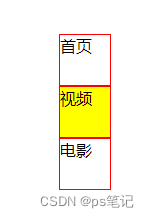
Case scroll menu :
<style>
      *{
          margin: 0px;
          padding:0px;
      }
      /*  If you don't want to post , If you want to be more intuitive, you can do it alone .menu Set up margin-top Value  */
      .menu{
        margin-top: 100px;
      }
      .menu>li{
        float:left;
        list-style: none;
        width: 80px;
        height: 30px;
        background-color: aquamarine;
        overflow: hidden;

      }
      .show{
        width: 80px;
        height: 30px;
        background-color: red;
        text-align: center;
        line-height: 30px;
        transition: margin 0.5s;
      }
      .click{
        width: 80px;
        height: 30px;
        background-color: yellow;
        text-align: center;
        line-height: 30px;
        transition: margin 0.5s;
      }
      .menu > li:hover > .show{
        margin-top: -30px;

      }

  </style>
  </head>
<body>
  <ul class="menu">
    <li>
      <p class="show"> home page </p>
      <p class="click"> home page </p>
    </li>
    <li>
      <p class="show"> video </p>
      <p class="click"> video </p>
    </li>
    <li>
      <p class="show"> The movie </p>
      <p class="click"> The movie </p>
    </li>
  </ul>
</body>

The case mouse moves into a layer
<style>
      *{
          margin: 0px;
          padding:0px;
      }
      .menu{
        position: fixed;
        right:100px;
        bottom: 100px;
      }
      .menu>li{
        list-style:none;
        width: 50px;
        height: 50px;
        border: 1px solid red ;
        position: relative;
        overflow: hidden;

      }
      .show{
        width: 50px;
        right: 50px;

      }
      .click{
        width: 50px;
        height: 50px;
        background-color: yellow;
        position: absolute;
        top:0px;
        left:0px;
        transform: rotate(45deg);
        transform-origin: -50px  50px;
        transition: transform 0.5s;
      }
      .menu>li:hover>.click{
        transform: rotate(0deg);

      }

  </style>
  </head>
<body>
  <ul class="menu">
    <li>
      <p class="show"> home page </p>
      <p class="click"> home page </p>
    </li>
    <li>
      <p class="show"> video </p>
      <p class="click"> video </p>
    </li>
    <li>
      <p class="show"> The movie </p>
      <p class="click"> The movie </p>
    </li>
  </ul>
</body>

</html>
边栏推荐
- Leetcode does not add, subtract, multiply, divide, and calculate the number of 1 in binary
- Leetcode refers to the duplicate number in the offer jz3 array
- [test tool]
- IP notes (12)
- Work summary of a test Manager / Test Supervisor / test director
- IP课笔记(4)
- grep与正则的搭配使用
- 日志收集分析平台
- How to build a website full of ritual sense and publish it on the public website 1-2
- The public network uses Microsoft Remote Desktop remote desktop to work remotely at any time
猜你喜欢
![[226] instructions for Wireshark parameters](/img/47/0d3fd221695920e02b1f690a2a21c1.png)





随机推荐
Tensorflow GPU installation -- 056
General paging 01
测试经理/测试组长/测试主管面试题
Remember to get the password of college student account once, from scratch
Leetcode sword finger offer jz73 flip word sequence
迭代器与生成器
Ia note 1
Flink state use
服务器硬件及RAID配置实战
Wasm vs EVM, Boca's choice predicts the future of the public chain
IP notes (7)
Heap overflow of kernel PWN basic tutorial
DHCP原理与配置
Life warning Maxim
leetcode剑指offer JZ42 连续子数组的最大和
三分钟记住20道性能测试经典面试题
项目上复盘引导问题清单
Simple three-step fast intranet penetration
Flink restart policy
leetcode剑指offer JZ25 合并两个排序的链表