当前位置:网站首页>Day_ 01 smart communication health project - project overview and environmental construction
Day_ 01 smart communication health project - project overview and environmental construction
2022-06-23 06:21:00 【fat ۣۖ tiger ۣۖ】
The first 1 Chapter Project overview and environment construction
1. Description of project
1.1 Project introduction
Chuanzhi health management system is a business system applied to health management institutions , Realize the visualization of the work content of the health management organization 、 Member management specialization 、 Digital health assessment 、 Health intervention process 、 Knowledge base integration , So as to improve the work efficiency of health managers , Strengthen interaction with members , Enhance managers' understanding of the operation of health management institutions .
See : Communication health in the data PRD file .docx
1.2 Prototype display
See the static prototype in the material .
1.3 Technology Architecture

1.4 Functional architecture 
1.5 Software development process
Software development generally goes through the following stages , The whole process is unfolded in sequence , So it is usually called Waterfall Model .

2. Environment building
2.1 Project structure
This project adopts maven Module development mode , That is, the whole project is divided into several maven engineering , Every maven The project stores a specific type of code , As follows :

Responsibilities of each module :
health_parent: The parent project , The packing method is pom, Uniformly lock the dependent version , At the same time, other sub modules are aggregated to facilitate unified implementation maven command
health_common: General module , The packing method is jar, Store some tool classes used in the project 、 Entity class 、 Return results and constant classes
health_interface: The packing method is jar, Store the service interface
health_service_provider:Dubbo Service module , The packing method is war, Store service implementation class 、Dao Interface 、Mapper Mapping files, etc , As a service provider , It needs to be deployed to tomcat function
health_backend: Chuanzhi health management background , The packing method is war, As Dubbo Service consumer , Deposit Controller、HTML page 、js、css、spring Configuration files, etc , It needs to be deployed to tomcat function
health_mobile: Mobile front desk , The packing method is war, As Dubbo Service consumer , Deposit Controller、HTML page 、js、css、spring Configuration files, etc , It needs to be deployed to tomcat function
2.2 maven Project structures,
According to the functional architecture of the previous project, the project is divided into CIIC health management background and CIIC health front desk ( Wechat end )
2.2.1 health_parent
establish health_parent, The parent project , The packing method is pom, Used for unified management of dependent versions
pom.xml
<?xml version="1.0" encoding="UTF-8"?>
<project xmlns="http://maven.apache.org/POM/4.0.0" xmlns:xsi="http://www.w3.org/2001/XMLSchema-instance" xsi:schemaLocation="http://maven.apache.org/POM/4.0.0 http://maven.apache.org/xsd/maven-4.0.0.xsd">
    <modelVersion>4.0.0</modelVersion>
    <groupId>com.itheima</groupId>
    <artifactId>health_parent</artifactId>
    <version>1.0-SNAPSHOT</version>
    <packaging>pom</packaging>
    <!--  A dependency version number is defined centrally  -->
    <properties>
        <junit.version>4.12</junit.version>
        <spring.version>5.0.5.RELEASE</spring.version>
        <pagehelper.version>4.1.4</pagehelper.version>
        <servlet-api.version>2.5</servlet-api.version>
        <dubbo.version>2.6.0</dubbo.version>
        <zookeeper.version>3.4.7</zookeeper.version>
        <zkclient.version>0.1</zkclient.version>
        <mybatis.version>3.4.5</mybatis.version>
        <mybatis.spring.version>1.3.1</mybatis.spring.version>
        <mybatis.paginator.version>1.2.15</mybatis.paginator.version>
        <mysql.version>5.1.32</mysql.version>
        <druid.version>1.0.9</druid.version>
        <commons-fileupload.version>1.3.1</commons-fileupload.version>
        <spring.security.version>5.0.5.RELEASE</spring.security.version>
        <poi.version>3.14</poi.version>
        <jedis.version>2.9.0</jedis.version>
        <quartz.version>2.2.1</quartz.version>
    </properties>
    <!--  Dependency management tab   Must be added  -->
    <dependencyManagement>
        <dependencies>
            <!-- Spring -->
            <dependency>
                <groupId>org.springframework</groupId>
                <artifactId>spring-context</artifactId>
                <version>${spring.version}</version>
            </dependency>
            <dependency>
                <groupId>org.springframework</groupId>
                <artifactId>spring-beans</artifactId>
                <version>${spring.version}</version>
            </dependency>
            <dependency>
                <groupId>org.springframework</groupId>
                <artifactId>spring-web</artifactId>
                <version>${spring.version}</version>
            </dependency>
            <dependency>
                <groupId>org.springframework</groupId>
                <artifactId>spring-webmvc</artifactId>
                <version>${spring.version}</version>
            </dependency>
            <dependency>
                <groupId>org.springframework</groupId>
                <artifactId>spring-jdbc</artifactId>
                <version>${spring.version}</version>
            </dependency>
            <dependency>
                <groupId>org.springframework</groupId>
                <artifactId>spring-aspects</artifactId>
                <version>${spring.version}</version>
            </dependency>
            <dependency>
                <groupId>org.springframework</groupId>
                <artifactId>spring-jms</artifactId>
                <version>${spring.version}</version>
            </dependency>
            <dependency>
                <groupId>org.springframework</groupId>
                <artifactId>spring-context-support</artifactId>
                <version>${spring.version}</version>
            </dependency>
            <dependency>
                <groupId>org.springframework</groupId>
                <artifactId>spring-test</artifactId>
                <version>${spring.version}</version>
            </dependency>
            <!-- dubbo relevant  -->
            <dependency>
                <groupId>com.alibaba</groupId>
                <artifactId>dubbo</artifactId>
                <version>${dubbo.version}</version>
            </dependency>
            <dependency>
                <groupId>org.apache.zookeeper</groupId>
                <artifactId>zookeeper</artifactId>
                <version>${zookeeper.version}</version>
            </dependency>
            <dependency>
                <groupId>com.github.sgroschupf</groupId>
                <artifactId>zkclient</artifactId>
                <version>${zkclient.version}</version>
            </dependency>
            <dependency>
                <groupId>junit</groupId>
                <artifactId>junit</artifactId>
                <version>4.12</version>
            </dependency>
            <dependency>
                <groupId>com.alibaba</groupId>
                <artifactId>fastjson</artifactId>
                <version>1.2.47</version>
            </dependency>
            <dependency>
                <groupId>javassist</groupId>
                <artifactId>javassist</artifactId>
                <version>3.12.1.GA</version>
            </dependency>
            <dependency>
                <groupId>commons-codec</groupId>
                <artifactId>commons-codec</artifactId>
                <version>1.10</version>
            </dependency>
            <dependency>
                <groupId>com.github.pagehelper</groupId>
                <artifactId>pagehelper</artifactId>
                <version>${pagehelper.version}</version>
            </dependency>
            <!-- Mybatis -->
            <dependency>
                <groupId>org.mybatis</groupId>
                <artifactId>mybatis</artifactId>
                <version>${mybatis.version}</version>
            </dependency>
            <dependency>
                <groupId>org.mybatis</groupId>
                <artifactId>mybatis-spring</artifactId>
                <version>${mybatis.spring.version}</version>
            </dependency>
            <dependency>
                <groupId>com.github.miemiedev</groupId>
                <artifactId>mybatis-paginator</artifactId>
                <version>${mybatis.paginator.version}</version>
            </dependency>
            <!-- MySql -->
            <dependency>
                <groupId>mysql</groupId>
                <artifactId>mysql-connector-java</artifactId>
                <version>${mysql.version}</version>
            </dependency>
            <!--  Connection pool  -->
            <dependency>
                <groupId>com.alibaba</groupId>
                <artifactId>druid</artifactId>
                <version>${druid.version}</version>
            </dependency>
            <!--  File upload component  -->
            <dependency>
                <groupId>commons-fileupload</groupId>
                <artifactId>commons-fileupload</artifactId>
                <version>${commons-fileupload.version}</version>
            </dependency>
            <dependency>
                <groupId>org.quartz-scheduler</groupId>
                <artifactId>quartz</artifactId>
                <version>${quartz.version}</version>
            </dependency>
            <dependency>
                <groupId>org.quartz-scheduler</groupId>
                <artifactId>quartz-jobs</artifactId>
                <version>${quartz.version}</version>
            </dependency>
            <dependency>
                <groupId>com.sun.jersey</groupId>
                <artifactId>jersey-client</artifactId>
                <version>1.18.1</version>
            </dependency>
            <dependency>
                <groupId>com.qiniu</groupId>
                <artifactId>qiniu-java-sdk</artifactId>
                <version>7.2.0</version>
            </dependency>
            <!--POI report form -->
            <dependency>
                <groupId>org.apache.poi</groupId>
                <artifactId>poi</artifactId>
                <version>${poi.version}</version>
            </dependency>
            <dependency>
                <groupId>org.apache.poi</groupId>
                <artifactId>poi-ooxml</artifactId>
                <version>${poi.version}</version>
            </dependency>
            <dependency>
                <groupId>redis.clients</groupId>
                <artifactId>jedis</artifactId>
                <version>${jedis.version}</version>
            </dependency>
            <!--  Security framework  -->
            <dependency>
                <groupId>org.springframework.security</groupId>
                <artifactId>spring-security-web</artifactId>
                <version>${spring.security.version}</version>
            </dependency>
            <dependency>
                <groupId>org.springframework.security</groupId>
                <artifactId>spring-security-config</artifactId>
                <version>${spring.security.version}</version>
            </dependency>
            <dependency>
                <groupId>org.springframework.security</groupId>
                <artifactId>spring-security-taglibs</artifactId>
                <version>${spring.security.version}</version>
            </dependency>
            <dependency>
                <groupId>com.github.penggle</groupId>
                <artifactId>kaptcha</artifactId>
                <version>2.3.2</version>
                <exclusions>
                    <exclusion>
                        <groupId>javax.servlet</groupId>
                        <artifactId>javax.servlet-api</artifactId>
                    </exclusion>
                </exclusions>
            </dependency>
            <dependency>
                <groupId>dom4j</groupId>
                <artifactId>dom4j</artifactId>
                <version>1.6.1</version>
            </dependency>
            <dependency>
                <groupId>xml-apis</groupId>
                <artifactId>xml-apis</artifactId>
                <version>1.4.01</version>
            </dependency>
        </dependencies>
    </dependencyManagement>
    <dependencies>
        <dependency>
            <groupId>javax.servlet</groupId>
            <artifactId>servlet-api</artifactId>
            <version>${servlet-api.version}</version>
            <scope>provided</scope>
        </dependency>
    </dependencies>
    <build>
        <plugins>
            <!-- java Compile the plug-in  -->
            <plugin>
                <groupId>org.apache.maven.plugins</groupId>
                <artifactId>maven-compiler-plugin</artifactId>
                <version>3.2</version>
                <configuration>
                    <source>1.8</source>
                    <target>1.8</target>
                    <encoding>UTF-8</encoding>
                </configuration>
            </plugin>
        </plugins>
    </build>
</project>
2.2.2 health_common
establish health_common, Sub project , The packing method is jar, Store common components , For example, tools 、 Entity class, etc
pom.xml
<?xml version="1.0" encoding="UTF-8"?>
<project xmlns="http://maven.apache.org/POM/4.0.0" xmlns:xsi="http://www.w3.org/2001/XMLSchema-instance" xsi:schemaLocation="http://maven.apache.org/POM/4.0.0 http://maven.apache.org/xsd/maven-4.0.0.xsd">
    <parent>
        <artifactId>health_parent</artifactId>
        <groupId>com.itheima</groupId>
        <version>1.0-SNAPSHOT</version>
    </parent>
    <modelVersion>4.0.0</modelVersion>
    <artifactId>health_common</artifactId>
    <packaging>jar</packaging>
    <dependencies>
        <dependency>
            <groupId>com.github.pagehelper</groupId>
            <artifactId>pagehelper</artifactId>
        </dependency>
        <!-- Mybatis -->
        <dependency>
            <groupId>org.mybatis</groupId>
            <artifactId>mybatis</artifactId>
        </dependency>
        <dependency>
            <groupId>org.mybatis</groupId>
            <artifactId>mybatis-spring</artifactId>
        </dependency>
        <dependency>
            <groupId>com.github.miemiedev</groupId>
            <artifactId>mybatis-paginator</artifactId>
        </dependency>
        <!-- MySql -->
        <dependency>
            <groupId>mysql</groupId>
            <artifactId>mysql-connector-java</artifactId>
        </dependency>
        <!--  Connection pool  -->
        <dependency>
            <groupId>com.alibaba</groupId>
            <artifactId>druid</artifactId>
        </dependency>
        <dependency>
            <groupId>commons-fileupload</groupId>
            <artifactId>commons-fileupload</artifactId>
        </dependency>
        <!-- Spring -->
        <dependency>
            <groupId>org.springframework</groupId>
            <artifactId>spring-context</artifactId>
        </dependency>
        <dependency>
            <groupId>org.springframework</groupId>
            <artifactId>spring-beans</artifactId>
        </dependency>
        <dependency>
            <groupId>org.springframework</groupId>
            <artifactId>spring-web</artifactId>
        </dependency>
        <dependency>
            <groupId>org.springframework</groupId>
            <artifactId>spring-webmvc</artifactId>
        </dependency>
        <dependency>
            <groupId>org.springframework</groupId>
            <artifactId>spring-jdbc</artifactId>
        </dependency>
        <dependency>
            <groupId>org.springframework</groupId>
            <artifactId>spring-aspects</artifactId>
        </dependency>
        <dependency>
            <groupId>org.springframework</groupId>
            <artifactId>spring-jms</artifactId>
        </dependency>
        <dependency>
            <groupId>org.springframework</groupId>
            <artifactId>spring-context-support</artifactId>
        </dependency>
        <dependency>
            <groupId>org.springframework</groupId>
            <artifactId>spring-test</artifactId>
        </dependency>
        <!-- dubbo relevant  -->
        <dependency>
            <groupId>com.alibaba</groupId>
            <artifactId>dubbo</artifactId>
        </dependency>
        <dependency>
            <groupId>org.apache.zookeeper</groupId>
            <artifactId>zookeeper</artifactId>
        </dependency>
        <dependency>
            <groupId>com.github.sgroschupf</groupId>
            <artifactId>zkclient</artifactId>
        </dependency>
        <dependency>
            <groupId>junit</groupId>
            <artifactId>junit</artifactId>
        </dependency>
        <dependency>
            <groupId>com.alibaba</groupId>
            <artifactId>fastjson</artifactId>
        </dependency>
        <dependency>
            <groupId>javassist</groupId>
            <artifactId>javassist</artifactId>
        </dependency>
        <dependency>
            <groupId>commons-codec</groupId>
            <artifactId>commons-codec</artifactId>
        </dependency>
        <dependency>
            <groupId>org.apache.poi</groupId>
            <artifactId>poi</artifactId>
        </dependency>
        <dependency>
            <groupId>redis.clients</groupId>
            <artifactId>jedis</artifactId>
        </dependency>
        <dependency>
            <groupId>com.qiniu</groupId>
            <artifactId>qiniu-java-sdk</artifactId>
        </dependency>
        <dependency>
            <groupId>com.sun.jersey</groupId>
            <artifactId>jersey-client</artifactId>
        </dependency>
        <dependency>
            <groupId>org.apache.poi</groupId>
            <artifactId>poi-ooxml</artifactId>
        </dependency>
        <dependency>
            <groupId>org.springframework.security</groupId>
            <artifactId>spring-security-web</artifactId>
        </dependency>
        <dependency>
            <groupId>org.springframework.security</groupId>
            <artifactId>spring-security-config</artifactId>
        </dependency>
        <dependency>
            <groupId>org.springframework.security</groupId>
            <artifactId>spring-security-taglibs</artifactId>
        </dependency>
    </dependencies>
</project>
2.2.5 health_interface
establish health_interface, Sub project , The packing method is jar, Store the service interface
pom.xml
<?xml version="1.0" encoding="UTF-8"?>
<project xmlns="http://maven.apache.org/POM/4.0.0" xmlns:xsi="http://www.w3.org/2001/XMLSchema-instance" xsi:schemaLocation="http://maven.apache.org/POM/4.0.0 http://maven.apache.org/xsd/maven-4.0.0.xsd">
    <parent>
        <artifactId>health_parent</artifactId>
        <groupId>com.itheima</groupId>
        <version>1.0-SNAPSHOT</version>
    </parent>
    <modelVersion>4.0.0</modelVersion>
    <artifactId>health_interface</artifactId>
    <packaging>jar</packaging>
    <dependencies>
        <dependency>
            <groupId>com.itheima</groupId>
            <artifactId>health_common</artifactId>
            <version>1.0-SNAPSHOT</version>
        </dependency>
    </dependencies>
</project>
2.2.6 health_service_provider
establish health_service_provider, Sub project , The packing method is war, Deployed separately as a service , Store service classes 、Dao Interface and Mapper Mapping files, etc
pom.xml
<?xml version="1.0" encoding="UTF-8"?>
<project xmlns="http://maven.apache.org/POM/4.0.0" xmlns:xsi="http://www.w3.org/2001/XMLSchema-instance" xsi:schemaLocation="http://maven.apache.org/POM/4.0.0 http://maven.apache.org/xsd/maven-4.0.0.xsd">
    <parent>
        <groupId>com.itheima</groupId>
        <artifactId>health_parent</artifactId>
        <version>1.0-SNAPSHOT</version>
    </parent>
    <modelVersion>4.0.0</modelVersion>
    <artifactId>health_service_provider</artifactId>
    <packaging>war</packaging>
    <dependencies>
        <dependency>
            <groupId>com.itheima</groupId>
            <artifactId>health_interface</artifactId>
            <version>1.0-SNAPSHOT</version>
        </dependency>
    </dependencies>
    <build>
        <plugins>
            <plugin>
                <groupId>org.apache.tomcat.maven</groupId>
                <artifactId>tomcat7-maven-plugin</artifactId>
                <configuration>
                    <!--  Designated port  -->
                    <port>81</port>
                    <!--  Request path  -->
                    <path>/</path>
                </configuration>
            </plugin>
        </plugins>
    </build>
</project>
log4j.properties
### direct log messages to stdout ###
log4j.appender.stdout=org.apache.log4j.ConsoleAppender
log4j.appender.stdout.Target=System.err
log4j.appender.stdout.layout=org.apache.log4j.PatternLayout
log4j.appender.stdout.layout.ConversionPattern=%d{ABSOLUTE} %5p %c{1}:%L - %m%n

### direct messages to file mylog.log ###
log4j.appender.file=org.apache.log4j.FileAppender
log4j.appender.file.File=c:\\mylog.log
log4j.appender.file.layout=org.apache.log4j.PatternLayout
log4j.appender.file.layout.ConversionPattern=%d{ABSOLUTE} %5p %c{1}:%L - %m%n

### set log levels - for more verbose logging change 'info' to 'debug' ###

log4j.rootLogger=debug, stdout
SqlMapConfig.xml
<?xml version="1.0" encoding="UTF-8" ?>
<!DOCTYPE configuration PUBLIC "-//mybatis.org//DTD Config 3.0//EN" "http://mybatis.org/dtd/mybatis-3-config.dtd">
<configuration>
	<plugins>
		<!-- com.github.pagehelper  by  PageHelper  The package name of the class  -->
		<plugin interceptor="com.github.pagehelper.PageHelper">
			<!--  Set database type  Oracle,Mysql,MariaDB,SQLite,Hsqldb,PostgreSQL  Six databases -->
			<property name="dialect" value="mysql"/>
		</plugin>
	</plugins>
</configuration>
spring-dao.xml
<?xml version="1.0" encoding="UTF-8"?>
<beans xmlns="http://www.springframework.org/schema/beans" xmlns:context="http://www.springframework.org/schema/context" xmlns:p="http://www.springframework.org/schema/p" xmlns:aop="http://www.springframework.org/schema/aop" xmlns:tx="http://www.springframework.org/schema/tx" xmlns:xsi="http://www.w3.org/2001/XMLSchema-instance" xsi:schemaLocation="http://www.springframework.org/schema/beans http://www.springframework.org/schema/beans/spring-beans-4.2.xsd http://www.springframework.org/schema/context http://www.springframework.org/schema/context/spring-context.xsd http://www.springframework.org/schema/aop http://www.springframework.org/schema/aop/spring-aop.xsd http://www.springframework.org/schema/tx http://www.springframework.org/schema/tx/spring-tx.xsd http://www.springframework.org/schema/util http://www.springframework.org/schema/util/spring-util.xsd">

	<!-- data source -->
	<bean id="dataSource" class="com.alibaba.druid.pool.DruidDataSource" destroy-method="close">
		<property name="username" value="root" />
		<property name="password" value="root" />
		<property name="driverClassName" value="com.mysql.jdbc.Driver" />
		<property name="url" value="jdbc:mysql://localhost:3306/health" />
	</bean>
	<!--spring and mybatis Integrated factory bean-->
	<bean id="sqlSessionFactory" class="org.mybatis.spring.SqlSessionFactoryBean">
		<property name="dataSource" ref="dataSource" />
		<property name="configLocation" value="classpath:SqlMapConfig.xml" />
	</bean>
	<!-- The batch scan interface generates proxy objects -->
	<bean class="org.mybatis.spring.mapper.MapperScannerConfigurer">
		<!-- Specify the package where the interface is located -->
		<property name="basePackage" value="com.itheima.dao" />
	</bean>
</beans>
spring-tx.xml
<?xml version="1.0" encoding="UTF-8"?>
<beans xmlns="http://www.springframework.org/schema/beans" xmlns:xsi="http://www.w3.org/2001/XMLSchema-instance" xmlns:context="http://www.springframework.org/schema/context" xmlns:tx="http://www.springframework.org/schema/tx" xmlns:mvc="http://www.springframework.org/schema/mvc" xsi:schemaLocation="http://www.springframework.org/schema/beans http://www.springframework.org/schema/beans/spring-beans.xsd http://www.springframework.org/schema/mvc http://www.springframework.org/schema/mvc/spring-mvc.xsd http://www.springframework.org/schema/tx http://www.springframework.org/schema/tx/spring-tx.xsd http://www.springframework.org/schema/context http://www.springframework.org/schema/context/spring-context.xsd">
    <!--  Transaction manager  -->
    <bean id="transactionManager" class="org.springframework.jdbc.datasource.DataSourceTransactionManager">
        <property name="dataSource" ref="dataSource"/>
    </bean>
    <!--  Enable annotation support for transaction control   Be careful : You must add... Here proxy-target-class="true",  Transaction control is required , Will be Spring The framework generates proxy objects , Dubbo Need to put Service Publish as service , Be required to use cglib Create proxy object . -->
    <tx:annotation-driven transaction-manager="transactionManager" proxy-target-class="true"/>
</beans>
spring-service.xml
<?xml version="1.0" encoding="UTF-8"?>
<beans xmlns="http://www.springframework.org/schema/beans" xmlns:xsi="http://www.w3.org/2001/XMLSchema-instance" xmlns:context="http://www.springframework.org/schema/context" xmlns:dubbo="http://code.alibabatech.com/schema/dubbo" xmlns:mvc="http://www.springframework.org/schema/mvc" xsi:schemaLocation="http://www.springframework.org/schema/beans http://www.springframework.org/schema/beans/spring-beans.xsd http://www.springframework.org/schema/mvc http://www.springframework.org/schema/mvc/spring-mvc.xsd http://code.alibabatech.com/schema/dubbo http://code.alibabatech.com/schema/dubbo/dubbo.xsd http://www.springframework.org/schema/context http://www.springframework.org/schema/context/spring-context.xsd">
    <!--  Specify the application name  -->
    <dubbo:application name="health_service_provider"/>
    <!-- Specify the port that exposes the service , If you do not specify a default of 20880-->
    <dubbo:protocol name="dubbo" port="20887"/>
    <!-- Specify service registry address -->
    <dubbo:registry address="zookeeper://127.0.0.1:2181"/>
    <!-- Batch scan , Publishing services -->
    <dubbo:annotation package="com.itheima.service"/>
</beans>
web.xml
<!DOCTYPE web-app PUBLIC "-//Sun Microsystems, Inc.//DTD Web Application 2.3//EN" "http://java.sun.com/dtd/web-app_2_3.dtd" >
<web-app>
  <display-name>Archetype Created Web Application</display-name>
  <!--  load spring Containers  -->
  <context-param>
    <param-name>contextConfigLocation</param-name>
    <param-value>classpath*:applicationContext*.xml</param-value>
  </context-param>
  <listener>
    <listener-class>org.springframework.web.context.ContextLoaderListener</listener-class>
  </listener>
</web-app>
2.2.7 health_backend
establish health_backend, Sub project , The packing method is war, Separate deployment , Deposit Controller、 Page etc.
pom.xml
<?xml version="1.0" encoding="UTF-8"?>
<project xmlns="http://maven.apache.org/POM/4.0.0" xmlns:xsi="http://www.w3.org/2001/XMLSchema-instance" xsi:schemaLocation="http://maven.apache.org/POM/4.0.0 http://maven.apache.org/xsd/maven-4.0.0.xsd">
    <parent>
        <artifactId>health_parent</artifactId>
        <groupId>com.itheima</groupId>
        <version>1.0-SNAPSHOT</version>
    </parent>
    <modelVersion>4.0.0</modelVersion>
    <artifactId>health_backend</artifactId>
    <packaging>war</packaging>
    <dependencies>
        <dependency>
            <groupId>com.itheima</groupId>
            <artifactId>health_interface</artifactId>
            <version>1.0-SNAPSHOT</version>
        </dependency>
    </dependencies>
    <build>
        <plugins>
            <plugin>
                <groupId>org.apache.tomcat.maven</groupId>
                <artifactId>tomcat7-maven-plugin</artifactId>
                <configuration>
                    <!--  Designated port  -->
                    <port>82</port>
                    <!--  Request path  -->
                    <path>/</path>
                </configuration>
            </plugin>
        </plugins>
    </build>
</project>
log4j.properties
### direct log messages to stdout ###
log4j.appender.stdout=org.apache.log4j.ConsoleAppender
log4j.appender.stdout.Target=System.err
log4j.appender.stdout.layout=org.apache.log4j.PatternLayout
log4j.appender.stdout.layout.ConversionPattern=%d{ABSOLUTE} %5p %c{1}:%L - %m%n

### direct messages to file mylog.log ###
log4j.appender.file=org.apache.log4j.FileAppender
log4j.appender.file.File=c:\\mylog.log
log4j.appender.file.layout=org.apache.log4j.PatternLayout
log4j.appender.file.layout.ConversionPattern=%d{ABSOLUTE} %5p %c{1}:%L - %m%n

### set log levels - for more verbose logging change 'info' to 'debug' ###

log4j.rootLogger=info, stdout
springmvc.xml
<?xml version="1.0" encoding="UTF-8"?>
<beans xmlns="http://www.springframework.org/schema/beans" xmlns:xsi="http://www.w3.org/2001/XMLSchema-instance" xmlns:context="http://www.springframework.org/schema/context" xmlns:dubbo="http://code.alibabatech.com/schema/dubbo" xmlns:mvc="http://www.springframework.org/schema/mvc" xsi:schemaLocation="http://www.springframework.org/schema/beans http://www.springframework.org/schema/beans/spring-beans.xsd http://www.springframework.org/schema/mvc http://www.springframework.org/schema/mvc/spring-mvc.xsd http://code.alibabatech.com/schema/dubbo http://code.alibabatech.com/schema/dubbo/dubbo.xsd http://www.springframework.org/schema/context http://www.springframework.org/schema/context/spring-context.xsd">
	<mvc:annotation-driven>
	  <mvc:message-converters register-defaults="true">
	    <bean class="com.alibaba.fastjson.support.spring.FastJsonHttpMessageConverter">
	      <property name="supportedMediaTypes" value="application/json"/>
	      <property name="features">
	        <list>
	          <value>WriteMapNullValue</value>
	          <value>WriteDateUseDateFormat</value>
	        </list>
	      </property>
	    </bean>
	  </mvc:message-converters>
	</mvc:annotation-driven>
	<!--  Specify the application name  -->
	<dubbo:application name="health_backend" />
	<!-- Specify service registry address -->
	<dubbo:registry address="zookeeper://127.0.0.1:2181"/>
	<!-- Batch scan -->
	<dubbo:annotation package="com.itheima.controller" />
	<!--  Timeout global settings  10 minute  check=false  Do not check the service provider , It is recommended to set the development stage to false check=true  Check the service provider at startup , If the service provider does not start, an error is reported  -->
	<dubbo:consumer timeout="600000" check="false"/>
	<!-- File upload component -->
	<bean id="multipartResolver" class="org.springframework.web.multipart.commons.CommonsMultipartResolver">
		<property name="maxUploadSize" value="104857600" />
		<property name="maxInMemorySize" value="4096" />
		<property name="defaultEncoding" value="UTF-8"/>
	</bean>
</beans>
web.xml
<!DOCTYPE web-app PUBLIC "-//Sun Microsystems, Inc.//DTD Web Application 2.3//EN" "http://java.sun.com/dtd/web-app_2_3.dtd">
<web-app>
  <display-name>Archetype Created Web Application</display-name>
  <!--  solve post The statement  -->
  <filter>
    <filter-name>CharacterEncodingFilter</filter-name>
    <filter-class>org.springframework.web.filter.CharacterEncodingFilter</filter-class>
    <init-param>
      <param-name>encoding</param-name>
      <param-value>utf-8</param-value>
    </init-param>
    <init-param>
      <param-name>forceEncoding</param-name>
      <param-value>true</param-value>
    </init-param>
  </filter>
  <filter-mapping>
    <filter-name>CharacterEncodingFilter</filter-name>
    <url-pattern>/*</url-pattern>
  </filter-mapping>
  <servlet>
    <servlet-name>springmvc</servlet-name>
    <servlet-class>org.springframework.web.servlet.DispatcherServlet</servlet-class>
    <!--  Specify the loaded profile  , Through parameters contextConfigLocation load  -->
    <init-param>
      <param-name>contextConfigLocation</param-name>
      <param-value>classpath:springmvc.xml</param-value>
    </init-param>
    <load-on-startup>1</load-on-startup>
  </servlet>
  <servlet-mapping>
    <servlet-name>springmvc</servlet-name>
    <url-pattern>*.do</url-pattern>
  </servlet-mapping>
</web-app>
3. Power Designer
3.1 Power Designer Introduce
PowerDesigner yes Sybase A software of the company , It is convenient to analyze and design the system , His database design process is almost complete . utilize PowerDesigner You can make a data flow chart 、 Conceptual data model 、 Physical data model 、 Object oriented model .
In the project design phase, we usually use PowerDesigner Database design . Use PowerDesigner It can more intuitively show the relationship between tables in the database , And you can directly export the corresponding table creation statements .
3.2 Power Designer Use
3.2.1 Create a physical data model
Operation steps :
(1) Creating a data model PDM

(2) Select the database type 
(3) Create tables and fields

Specified table name 
Create fields

Set a field property , Right click the field
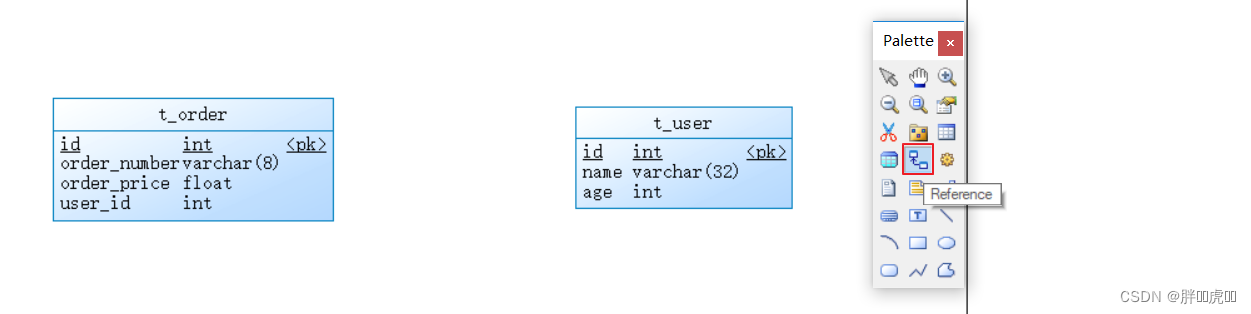
Add a foreign key constraint 
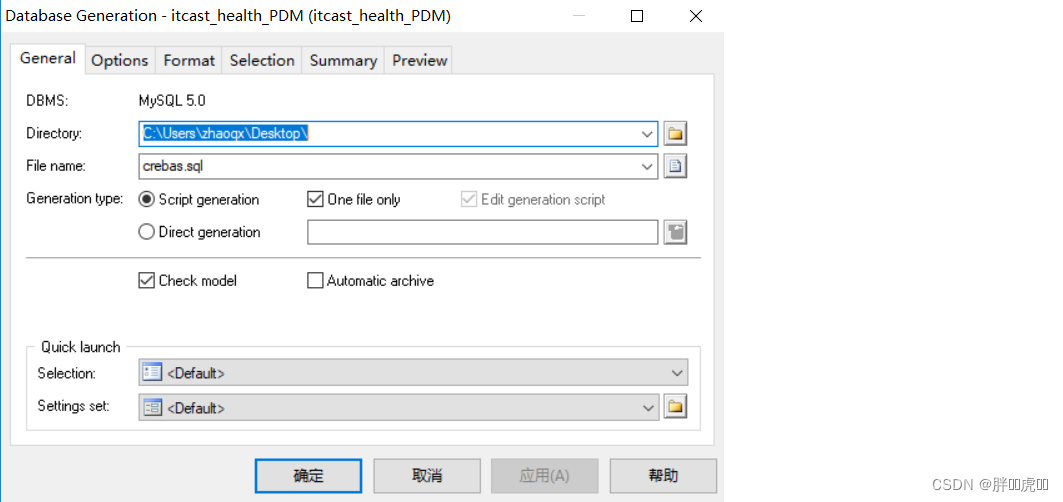
3.2.2 from PDM export SQL Script
Can pass PowerDesigner The design of the PDM The model is exported as SQL Script , as follows :

3.2.3 Reverse engineering
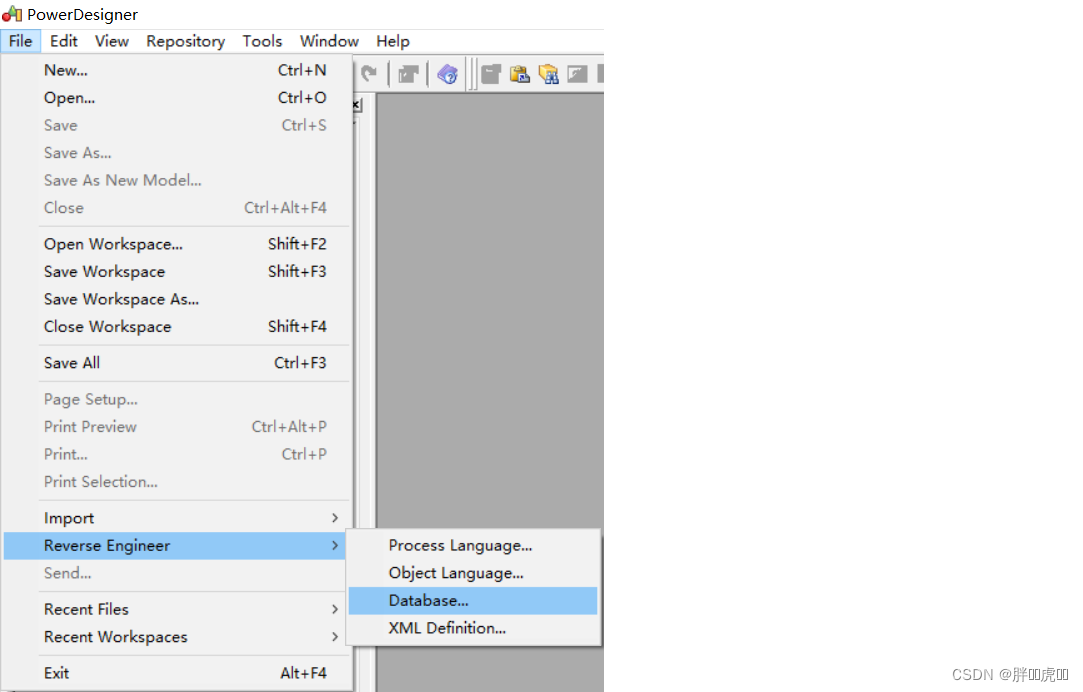
Above we are the first to create PDM Model , And then through PowerDesigner The functions provided are exported SQL Script . In fact, this process can also be reversed , That is, we can go through SQL Script reverse generation PDM Model , This is called reverse engineering , The operation is as follows :

3.2.4 Generate database report file
adopt PowerDesigner Features provided , Can be PDM Model generation report file , The specific operation is as follows :
(1) Open the report wizard window 
(2) Specify the report name and language

(3) Select report format and style


(4) Select the object type

(5) Perform the build operation

4. ElementUI
4.1 ElementUI Introduce
ElementUI It's a set of bases VUE2.0 The desktop component library ,ElementUI It provides a wealth of components to help developers build powerful software quickly 、 A uniform style page .
Official website address :http://element-cn.eleme.io/#/zh-CN
The background system of Chuanzhi health project is to use ElementUI To build the page , Introduce... On the page js and css The file is ready to use , as follows :
<!--  introduce ElementUI style  -->
<link rel="stylesheet" href="https://unpkg.com/element-ui/lib/theme-chalk/index.css">
<script src="https://unpkg.com/vue/dist/vue.js"></script>
<!--  introduce ElementUI Component library  -->
<script src="https://unpkg.com/element-ui/lib/index.js"></script>
4.2 Common components
4.2.1 Container Layout container
Container components for layout , Easy to quickly build the basic structure of the page :
<el-container>: Outer container . When a child element contains <el-header> or <el-footer> when , All child elements will be arranged vertically up and down , Otherwise, it will be arranged horizontally to the left and right
<el-header>: Top rail container
<el-aside>: Sidebar container
<el-main>: Main area container
<el-footer>: Bottom rail container
<body>
  <div id="app">
    <el-container>
      <el-header>Header</el-header>
      <el-container>
        <el-aside width="200px">Aside</el-aside>
        <el-container>
          <el-main>Main</el-main>
          <el-footer>Footer</el-footer>
        </el-container>
      </el-container>
    </el-container>
  </div>
  <style> .el-header, .el-footer {
       background-color: #B3C0D1; color: #333; text-align: left; line-height: 60px; } .el-aside {
       background-color: #D3DCE6; color: #333; text-align: center; line-height: 200px; } .el-main {
       background-color: #E9EEF3; color: #333; text-align: center; line-height: 590px; } </style>
</body>
<script> new Vue({
       el:'#app' }); </script>
4.2.2 Dropdown The drop-down menu
Collapse an action or menu into a drop-down menu .
<el-dropdown split-button size="small" trigger="click">
   Personal center
  <el-dropdown-menu>
    <el-dropdown-item > Exit the system </el-dropdown-item>
    <el-dropdown-item divided> Change Password </el-dropdown-item>
    <el-dropdown-item divided> Contact administrator </el-dropdown-item>
  </el-dropdown-menu>
</el-dropdown>
4.2.3 NavMenu Navigation menu
A menu that provides navigation for the site .
<el-menu>
  <el-submenu index="1">
    <template slot="title">
      <i class="el-icon-location"></i>
      <span slot="title"> Navigation one </span>
    </template>
    <el-menu-item> Options 1</el-menu-item>
    <el-menu-item> Options 2</el-menu-item>
    <el-menu-item> Options 3</el-menu-item>
  </el-submenu>
  <el-submenu index="2">
    <template slot="title">
      <i class="el-icon-menu"></i>
      <span slot="title"> Navigation two </span>
    </template>
    <el-menu-item> Options 1</el-menu-item>
    <el-menu-item> Options 2</el-menu-item>
    <el-menu-item> Options 3</el-menu-item>
  </el-submenu>
</el-menu>
4.2.4 Table form
Used to display multiple data with similar structure , You can sort the data 、 Screening 、 Contrast or other custom actions .
<el-table :data="tableData" stripe>
  <el-table-column prop="date" label=" date "></el-table-column>
  <el-table-column prop="name" label=" full name "></el-table-column>
  <el-table-column prop="address" label=" Address "></el-table-column>
  <el-table-column label=" operation " align="center">
    <!-- slot-scope: Scope slot , You can get table data  scope: Represents tabular data , Can pass scope.row To get the data of the current row of the table ,scope It's not fixed  -->
    <template slot-scope="scope">
      <el-button type="primary" size="mini" @click="handleUpdate(scope.row)"> edit </el-button>
      <el-button type="danger" size="mini" @click="handleDelete(scope.row)"> Delete </el-button>
    </template>
  </el-table-column>
</el-table>
<script> new Vue({
       el:'#app', data:{
       tableData: [{
       date: '2016-05-02', name: ' X.h. ', address: ' Jinshajiang road, putuo district, Shanghai  1518  get ' }, {
       date: '2016-05-04', name: ' X.h. ', address: ' Jinshajiang road, putuo district, Shanghai  1517  get ' }, {
       date: '2016-05-01', name: ' X.h. ', address: ' Jinshajiang road, putuo district, Shanghai  1519  get ' }] }, methods:{
       handleUpdate(row){
       alert(row.date); }, handleDelete(row){
       alert(row.date); } } }); </script>
4.2.5 Pagination Pagination
When there's too much data , Use paging to break down data .
<!-- current-change: Built in events , When the current page number changes, it will trigger , You can get the changed page number  -->
<el-pagination @current-change="handleCurrentChange" current-page="5" page-size="10" layout="total, prev, pager, next, jumper" :total="305">
</el-pagination>
<script> new Vue({
       el:'#app', methods:{
       handleCurrentChange(page){
       alert(page); } } }); </script>
4.2.6 Message Message tip
Often used for feedback after active operation .
<el-button :plain="true" @click="open1"> news </el-button>
<el-button :plain="true" @click="open2"> success </el-button>
<el-button :plain="true" @click="open3"> Warning </el-button>
<el-button :plain="true" @click="open4"> error </el-button>
<script> new Vue({
       el: '#app', methods: {
       open1() {
       this.$message(' This is a message '); }, open2() {
       this.$message({
       message: ' congratulations , This is a piece of success ', type: 'success' }); }, open3() {
       this.$message({
       message: ' Warning , This is a warning message ', type: 'warning' }); }, open4() {
       this.$message.error(' Wrong , This is an error message '); } } }) </script>
4.2.7 Tabs TAB
Separate data sets that are related in content but belong to different categories .
<h3> The basis of 、 Simple tabs </h3>
<!--  adopt value Property to specify the currently selected tab  -->
<el-tabs value="first">
  <el-tab-pane label=" User management " name="first"> User management </el-tab-pane>
  <el-tab-pane label=" Configuration Management " name="second"> Configuration Management </el-tab-pane>
  <el-tab-pane label=" Role management " name="third"> Role management </el-tab-pane>
  <el-tab-pane label=" Timed task compensation " name="fourth"> Timed task compensation </el-tab-pane>
</el-tabs>
<h3> Tab style tabs </h3>
<el-tabs value="first" type="card">
  <el-tab-pane label=" User management " name="first"> User management </el-tab-pane>
  <el-tab-pane label=" Configuration Management " name="second"> Configuration Management </el-tab-pane>
  <el-tab-pane label=" Role management " name="third"> Role management </el-tab-pane>
  <el-tab-pane label=" Timed task compensation " name="fourth"> Timed task compensation </el-tab-pane>
</el-tabs>
<h3> Card tabs </h3>
<el-tabs value="first" type="border-card">
  <el-tab-pane label=" User management " name="first"> User management </el-tab-pane>
  <el-tab-pane label=" Configuration Management " name="second"> Configuration Management </el-tab-pane>
  <el-tab-pane label=" Role management " name="third"> Role management </el-tab-pane>
  <el-tab-pane label=" Timed task compensation " name="fourth"> Timed task compensation </el-tab-pane>
</el-tabs>
<script> new Vue({
       el: '#app' }) </script>
4.2.8 Form Forms
By the input box 、 Selectors 、 Radio buttons 、 Multi selection box and other controls , To collect 、 check 、 Submit data . stay Form In the component , Each form field consists of a Form-Item Components , Various types of form controls can be placed in the form field , Include Input、Select、Checkbox、Radio、Switch、DatePicker、TimePicker.
<!-- rules: Form validation rules  -->
<el-form ref="form" :model="form" :rules="rules" label-width="80px">
  <!-- prop: Form field  model  Field , In the use of  validate、resetFields  In the case of method , This attribute is required  -->
  <el-form-item label=" The name of the event " prop="name">
    <el-input v-model="form.name"></el-input>
  </el-form-item>
  <el-form-item label=" Activity area " prop="region">
    <el-select v-model="form.region" placeholder=" Please select the activity area ">
      <el-option label=" Zone one " value="shanghai"></el-option>
      <el-option label=" Area two " value="beijing"></el-option>
    </el-select>
  </el-form-item>
  <el-form-item label=" Activity time ">
    <el-col :span="11">
      <el-date-picker type="date" placeholder=" Select date " v-model="form.date1" style="width: 100%;"></el-date-picker>
    </el-col>
    <el-col class="line" :span="2">-</el-col>
    <el-col :span="11">
      <el-time-picker type="fixed-time" placeholder=" Selection time " v-model="form.date2" style="width: 100%;"></el-time-picker>
    </el-col>
  </el-form-item>
  <el-form-item label=" Instant delivery ">
    <el-switch v-model="form.delivery"></el-switch>
  </el-form-item>
  <el-form-item label=" The nature of the activity ">
    <el-checkbox-group v-model="form.type">
      <el-checkbox label=" food / Restaurant online activities " name="type"></el-checkbox>
      <el-checkbox label=" Earth pushing activity " name="type"></el-checkbox>
      <el-checkbox label=" Offline theme activities " name="type"></el-checkbox>
      <el-checkbox label=" Pure brand exposure " name="type"></el-checkbox>
    </el-checkbox-group>
  </el-form-item>
  <el-form-item label=" Special resources ">
    <el-radio-group v-model="form.resource">
      <el-radio label=" Online brands sponsor "></el-radio>
      <el-radio label=" Offline venues are free "></el-radio>
    </el-radio-group>
  </el-form-item>
  <el-form-item label=" Form of activity ">
    <el-input type="textarea" v-model="form.desc"></el-input>
  </el-form-item>
  <el-form-item>
    <el-button type="primary" @click="onSubmit"> Create... Now </el-button>
  </el-form-item>
</el-form>
<script> new Vue({
       el: '#app', data:{
       form: {
       name: '', region: '', date1: '', date2: '', delivery: false, type: [], resource: '', desc: '' }, // Define validation rules  rules: {
       name: [ {
       required: true, message: ' Please enter the activity name ', trigger: 'blur' }, {
       min: 3, max: 5, message: ' The length is in  3  To  5  Characters ', trigger: 'blur' } ], region: [ {
       required: true, message: ' Please select the activity area ', trigger: 'change' } ] } }, methods:{
       onSubmit() {
       console.log(this.form); //validate: Check the whole form , Parameter is a callback function . // The callback function will be called after the end of verification , And pass in two parameters : Whether to verify the successful and failed fields . this.$refs['form'].validate((valid) => {
       if (valid) {
       alert('submit!'); } else {
       console.log('error submit!!'); return false; } }); } } }) </script>




边栏推荐
- App SHA1 acquisition program Baidu map Gaode map simple program for acquiring SHA1 value
- Day_01 传智健康项目-项目概述和环境搭建
- How to specify the output path of pig register Project Log
- Cryptography series: certificate format representation of PKI X.509
- Day_13 傳智健康項目-第13章
- Dora's Google SEO tutorial (1) SEO novice guide: establishment of preliminary optimization thinking
- Kotlin interface
- Pat class B 1013 C language
- Leetcode topic resolution valid Sudoku
- SQL表名与函数名相同导致SQL语句错误。
猜你喜欢
![[cocos2d-x] erasable layer:erasablelayer](/img/6e/1ee750854dfbe6a0260ca12a4a5680.png)
[cocos2d-x] erasable layer:erasablelayer

sklearn sklearn中的模型调参利器 gridSearchCV(网格搜索)

Machine learning 3-ridge regression, Lasso, variable selection technique

Memory analysis and memory leak detection

Centos7 deploy radius service -freeradius-3.0.13-15 EL7 integrating MySQL

Infotnews | which Postcard will you receive from the universe?

Detailed explanation of redis persistence, master-slave and sentry architecture

射频基础理论(dB)

Summary of ant usage (I): using ant to automatically package apk
Redis sentry
随机推荐
Tencent security 2021 report white paper collection (download attached)
Causes and methods of exe flash back
ant使用总结(一):使用ant自动打包apk
Vite learning (I) - Introduction
Pyinstaller sklearn报错的问题
jvm-04. Object's memory layout
【DaVinci Developer专题】-41-APP SWC如何读取写入NVM Block数据
Memory analysis and memory leak detection
Cryptography series: certificate format representation of PKI X.509
Ant Usage Summary (III): batch packaging apk
Pat class B 1022 d-ary a+b
Day_13 传智健康项目-第13章
Vant web app calendar component performance optimization calendar add min date the minimum date page loads slowly
Given a node of a binary tree, return the successor node of the node
【DaVinci Developer专题】-42-如何生成APP SWC的Template和Header文件
matplotlib savefig多个图片叠加问题
jvm-05. garbage collection
mysql以逗号分隔的字段作为查询条件怎么查——find_in_set()函数
Sorting out common problems after crawler deployment
mongodb 4.x绑定多个ip启动报错