当前位置:网站首页>Jenkins - Copy Artifact 插件 Build 之间数据共享传递
Jenkins - Copy Artifact 插件 Build 之间数据共享传递
2022-06-28 00:15:00 【wumingxiaoyao】
引言
实现 CICD 的过程中,Jenkins Pipeline Job Build 之间需要传递共享数据,比如,有一个 Test Job 用来跑测试用例,跑完后会生成一个测试结果文件,另外一个 Report Job 是用于邮件通知测试结果,需要测试结果文件,那么就需要从 Test Job 中 拷贝测试结果文件。或则为了统计历史数据,本次 Build 的结果需要基于上次 Build 的数据添加新的数据,那么就需要拷贝上一个 Build 的结果文件。Copy Artifact Plugin 可以满足这个需求,本文就来介绍一下这个插件。
内容提要:
- Copy Artifact Plugin 简介和安装
- Copy Artifact Plugin 应用
Copy Artifact Plugin 简介和安装
Copy Artifact 应用于 Jenkins Job 拷贝 Archive the artifacts 归档文件,可以指定具体哪个 Build (例如:the last successful/stable build, by build number, or by a build parameter),也可以过滤控制拷贝哪些文件及拷贝到哪个目标文件夹。还可以从 workspace 目录拷贝文件。
这个插件不在 Jenkins 建议安装的插件列表中,所以想使用该插件,需要单独安装。
Manage Jenkins -> Plugin Manger
安装成功后,打开 Job Configure, Add build step 选项中可以看到 Copy artifacts from another project
Copy Artifact Plugin 应用
文件归档 Archive the artifacts
应用这个 Plugin 之前,需要将共享的文件进行归档处理。通过 Post-build Actions 添加 Archive the artifacts 选项。

将 workspace 目录下的文件进行归档,归档成功后的文件可以通过 URL 来访问:JenkinsURL/…JobPath/BuildNo/artifact/
Copy artifacts from another project 应用
文件归档后,就可以访问拷贝了
例如下面的配置,从目标 job 最后一个 build 归档目录中拷贝所有归档的 csv 文件到当前 Job 的 workspace 根目录下。

Build 成功后,workspace 就看到拷贝的文件了。

这里需要提醒一下,默认 Job Configure 中,会删除 workspace,如果需要保留 workspace 就不要勾选。为了节约存储空间,建议还是勾选,可通过 Arhicve the artifacts 归档一些需要的文件。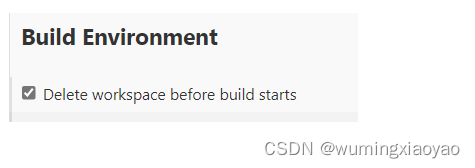
Copy artifacts from another project 详细设置
对目标 Build,有很多个选项,有些从名字就能看出来,可根据需要选择。
Specific build 选项
举个指定具体 Build No 的例子,可通过变量访问动态获取。
当然也可以通过 Pipeline Groovy 脚本设置变量。
举例:一个 Jenkins Pipeline Job,并行触发 Smoke 和 Regression Job,最后触发 Report job 邮件通知,之间参数互相传递。
#!groovy

pipeline {


    options {

        buildDiscarder(logRotator(numToKeepStr: '15', daysToKeepStr: '15'))
    }

    agent {
     label "Linux1" }

    parameters {

        string(name: 'branch', defaultValue: 'master', description: 'example : master')
        string(name: 'env', defaultValue: 'dev', description: 'example : dev')
		string(name: 'project_name', defaultValue: 'Project XXX', description: 'example : Project XXX')
        string(name: 'email_list', defaultValue: '[email protected]',
                description: 'example : [email protected]')

    }

    stages{

		stage('Testing'){

			parallel{

				stage('Smoke') {

					agent {
     label "Linux1" }
					steps {

						script {

							def smoke_build = build job: 'Smoke-Job',
								propagate: false,
								parameters: [
									string(name: 'branch', value: "${params.branch}"),
									string(name: "env", value: "${params.env}")
								]
							smoke_full_project_name = smoke_build.getFullProjectName()
							smoke_build_num = smoke_build.getNumber()
						}
					}
				}
				stage('Regression') {

					agent {
     label "Linux1" }
					steps {

						script {

							def regression_build = build job: 'Reg-Job',
								propagate: false,
								parameters: [
                                    string(name: 'branch', value: "${params.branch}"),
                                    string(name: "env", value: "${params.env}")
								]
							regression_full_project_name = regression_build.getFullProjectName()
							regression_build_num = regression_build.getNumber()
						}
					}
				}
			}
		}
	}
  post {

        always {

            build job: '../Report-JOB',
                    parameters: [
                            string(name: 'smoke_job', value: "${smoke_full_project_name}"),
							string(name: 'smoke_build_num', value: "${smoke_build_num}"),
							string(name: 'regression_job', value: "${regression_full_project_name}"),
							string(name: 'regression_build_num', value: "${regression_build_num}"),
							string(name: 'branch', value: "${params.branch}"),
                            string(name: 'env', value: "${params.env}"),
                            string(name: 'project_name', value: "${params.project_name}"),
                            string(name: 'email_list', value: "${params.email_list}")
                    ]
			}
	}
}
Specified by a build parameter 选项
先添加一个 Build selector for Copy Artifact 参数
Copy arfifacts from another project,选择 Specified by a build parameter 选项, Parameter Name 直接填上前面添加的 Build selector for Copy Artifact 参数名即可。
有关 Project Name 和 Permalink 参数,均可以从 Job 首页获取。
Project Name 就是 Full project name,可以避免 Job 之间识别问题。
Permalink 参数之前一直很困惑,后面才发现其实就是基于 Job 的固定 URL,当前 Job 首页就能看到这些信息。
例如:lastBuild 的 Permalinks
https://jenkinsURL/projectURL/lastBuild/

边栏推荐
- Review of drug discovery-02-prediction of molecular properties
- 药物发现综述-03-分子设计与优化
- What is digitalization? What is digital transformation? Why do enterprises choose digital transformation?
- Google Earth engine (GEE) -- an error caused by the imagecollection (error) traversing the image collection
- Chapitre 4: redis
- 【永艺XY椅】试用体验
- Supervised, unsupervised and semi supervised learning
- 声网 VQA:将实时互动中未知的视频画质用户主观体验变可知
- Solon 1.8.3 release, cloud native microservice development framework
- Cesium 多边形增加文字标签(polygon 加 label)多边形中心点偏移问题解决
猜你喜欢

Adobe Premiere Basics - common video effects (cropping, black and white, clip speed, mirroring, lens halo) (XV)
Jenkins - Groovy Postbuild 插件丰富 Build History 信息

Cesium Click to draw polygons (dynamically draw polygons)

Numpy----np. Tile() function parsing

Original | 2025 to achieve the "five ones" goal! The four products of Jiefang power are officially released
![[embedded foundation] serial port communication](/img/b7/18fec20e2d5fa5f226c6f8bb1e93d2.png)
[embedded foundation] serial port communication

Raspberry pie realizes intelligent cooling by temperature control fan

766. 托普利茨矩阵

Réseau neuronal pour la solution détaillée Multi - diagrammes de fondation zéro
Cesium 点击绘制多边形(动态绘制多边形)
随机推荐
Coscon'22 lecturer solicitation order
[Niuke discussion area] Chapter 4: redis
Evaluation - rank sum ratio comprehensive evaluation
1382. balancing binary search tree - General method
外盘期货哪里可以开户?哪个平台出入金比较安全?
Scala 基础 (三):运算符和流程控制
9. Openfeign service interface call
对比学习中的4种经典训练模式
[elt.zip] openharmony paper Club - memory compression for data intensive applications
205. isomorphic string
[embedded foundation] serial port communication
Prometeus 2.35.0 新特性
JS 数组随机取值(随机数组取值)
Web3 technology initial experience and related learning materials
Lmsoc: a socially sensitive pre training method
What is digitalization? What is digital transformation? Why do enterprises choose digital transformation?
I/o limit process and CPU limit process
利用redis bitmap实现人员在线情况监控
解决ionic4 使用hammerjs手势 press 事件,页面无法滚动问题
Database query optimization: master-slave read-write separation and common problems