当前位置:网站首页>Improvement of wechat applet 28 hot search list ①
Improvement of wechat applet 28 hot search list ①
2022-07-25 19:13:00 【Mu Quanyu [dark cat]】
28.1 Hot search list 、placeholder Dynamic data
Interface http://localhost:3000/search/default
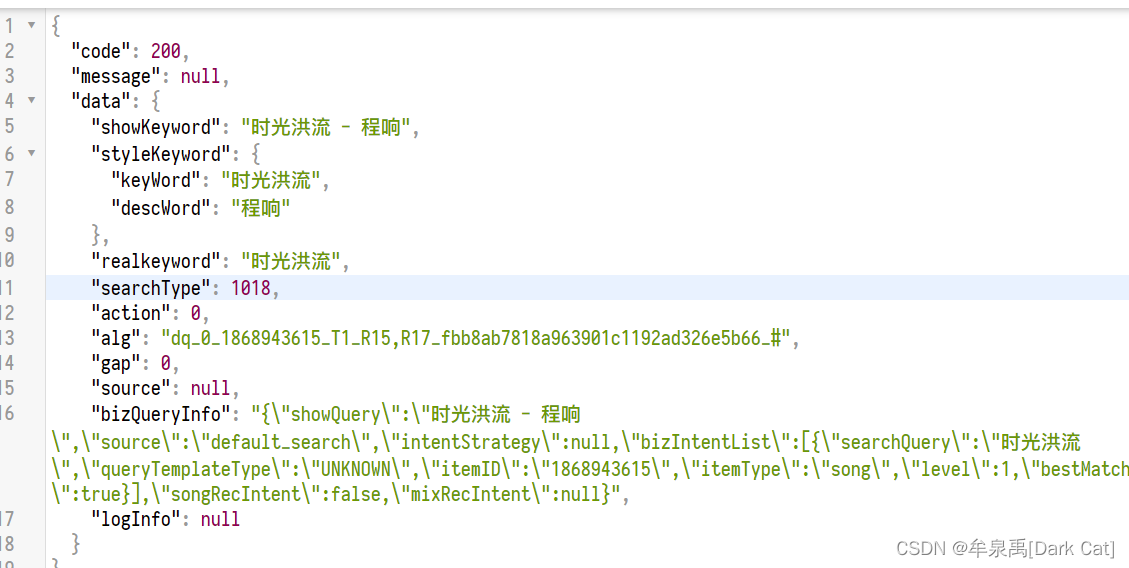
onLoad(options) {

        this.getInitData();
    },

    //  Get initialized data
    async getInitData() {

        let placeholderData = await request("search/default",{
    });
        this.setData({

            placeholderContent: placeholderData.data.showKeyword
        });
    },
<input type="text" placeholder="{
     {placeholderContent}}" placeholder-class="placeholder"></input>

Interface http://localhost:3000/search/hot/detail

    onLoad(options) {

        this.getInitData();
    },

    //  Get initialized data
    async getInitData() {

        let placeholderData = await request("search/default",{
    });
        let hotListData = await request("search/hot/detail");
        this.setData({

            placeholderContent: placeholderData.data.showKeyword,
            hotList: hotListData.data
        });
    },
<view class="searchContainer">
<!--  Head -->
    <view class="header">
        <view class="searchInput">
            <text class="iconfont icon-search searchIcon"></text>
            <input type="text" placeholder="{
     {placeholderContent}}" placeholder-class="placeholder"></input>
        </view>
        <text class="cancel"> Cancel </text>
    </view>
<!-- Hot search list -->
    <view class="hotContainer">
        <view class="title"> Hot search list </view>
<!--  Hot search list -->
        <view class="hotList">
            <view class="hotItem" wx:for="{
     {hotList}}" wx:key="score">
                <text class="order">{
   {index + 1}}</text>
                <text>{
   {item.searchWord}}</text>
                <image class="iconImg" wx:if="{
     {item.iconUrl}}" src="{
     {item.iconUrl}}"></image>
            </view>
        </view>
    </view>

</view>

28.2 Fuzzy matching search data
bindinput event : Whether or not you lose focus , Just change the content , All trigger .
bindcheck event : You need to lose focus to trigger this event .
Interface http://localhost:3000/search?keywords=fade&limit=10

<input bindinput="handelInputChange" type="text" input placeholder="{
     {placeholderContent}}" placeholder-class="placeholder"></input>
    data: {

        placeholderContent: '', // placeholder  Content
        hotList: [], //  Hot search list data
        searchContent: '', //  Form item data entered by the user
        searchList: [], //  Keyword fuzzy matching data
    },

//  obtain   Function of searching data

    async getSearchList(){

        let searchListData = await request("search", {
    keywords: this.data.searchContent, limit: 10});
        this.setData({

            searchList: searchListData.result.songs
        })
    },

    //  The event that the content of the form changes
    handelInputChange(event) {

        console.log(event);
        this.setData({

            searchContent: event.detail.value.trim()
        });

        //  Function throttling
        if (isSend) {

            return;
        }
        isSend = true;

        setTimeout(() => {

            isSend = false;
            this.getSearchList();
        }, 1000);

    },

28.3 Search content display
Write it html General structure
<view class="searchContainer">
<!--  Head -->
    <view class="header">
        <view class="searchInput">
            <text class="iconfont icon-search searchIcon"></text>
            <input bindinput="handelInputChange" type="text" input placeholder="{
     {placeholderContent}}" placeholder-class="placeholder"></input>
        </view>
        <text class="cancel"> Cancel </text>
    </view>
    <block wx:if="{
     {searchList.length}}">
        <!--  Search content display -->
        <view class="showSearchContent">
            <view class="searchContent"> Search content :{
   {searchContent}}</view>
            <view class="searchList">
                <view class="searchItem" wx:for="{
     {searchList}}" wx:key="id">
                    <text class="iconfont icon-search"></text>
                    <text>{
   {item.name}}</text>
                </view>
            </view>
        </view>
    </block>

    <block wx:else>
        <!-- Hot search list -->
        <view class="hotContainer">
            <view class="title"> Hot search list </view>
            <!--  Hot search list -->
            <view class="hotList">
                <view class="hotItem" wx:for="{
     {hotList}}" wx:key="score">
                    <text class="order">{
   {index + 1}}</text>
                    <text>{
   {item.searchWord}}</text>
                    <image class="iconImg" wx:if="{
     {item.iconUrl}}" src="{
     {item.iconUrl}}"></image>
                </view>
            </view>
        </view>
    </block>

</view>
/* pages/search/search.wxss */

.searchContainer {

    padding: 0 20rpx;
}

.header {

    display: flex;
    height: 60rpx;
    line-height: 60rpx;
    padding: 10rpx 0;
}

.searchInput {

    position: relative;
    flex: 1;
    background: rgba(237,237,237,0.3);
    border-right: 30rpx;
}

.cancel {

    width: 100rpx;
    text-align: center;
}

.searchIcon {

    position: absolute;
    left: 15rpx;
}

.searchInput input{

    margin-left: 50rpx;
    height: 60rpx;
}

/*h5  One of the new features , Can be  placeholder  Set up  class  and   style */
.placeholder {

    color: #d43c33;
    font-size: 28rpx;
}

/* Hot search list */
.hotContainer .title {

    font-size: 28rpx;
    height: 80rpx;
    line-height: 80rpx;
    border-bottom: 1rpx solid #eee;
}

.hotList {

    display: flex;
    flex-wrap: wrap;
}

.hotItem {

    width: 50%;
    height: 80rpx;
    line-height: 80rpx;
    font-size: 26rpx;
}

.hotItem .order {

    margin: 0 10rpx;
}

.hotItem .iconImg {

    width: 35rpx;
    height: 20rpx;
    margin-left: 10rpx;
}

/* Search content display */

.searchContent {

    color: rgba(107, 100, 238, 0.96);
    height: 80rpx;
    line-height: 82rpx;
    font-size: 24rpx;
    border-bottom: 1rpx solid #d43c33;
}

.searchItem {

    height: 80rpx;
    line-height: 80rpx;
    display: flex;
}

.searchItem .content {

    flex: 1;
    margin-left: 20rpx;
    border-bottom: 1rpx solid #eee;
    font-size: 26rpx;
}
// pages/search/search.js
import request from "../../utils/request";
let isSend = false; //  be used for   function   Throttling use
Page({


    /** *  Initial data of the page  */
    data: {

        placeholderContent: '', // placeholder  Content
        hotList: [], //  Hot search list data
        searchContent: '', //  Form item data entered by the user
        searchList: [], //  Keyword fuzzy matching data
    },

    /** *  Life cycle function -- Monitor page loading  */
    onLoad(options) {

        this.getInitData();
    },

    //  Get initialized data
    async getInitData() {

        let placeholderData = await request("search/default",{
    });
        let hotListData = await request("search/hot/detail");
        this.setData({

            placeholderContent: placeholderData.data.showKeyword,
            hotList: hotListData.data
        });
    },

    //  obtain   Function of searching data

    async getSearchList(){

        if(!this.data.searchContent){

            this.setData({

                searchList: []
            });
            return;
        }
        let searchListData = await request("search", {
    keywords: this.data.searchContent, limit: 10});
        this.setData({

            searchList: searchListData.result.songs
        })
    },

    //  The event that the content of the form changes
    handelInputChange(event) {

        console.log(event);
        this.setData({

            searchContent: event.detail.value.trim()
        });

        //  Function throttling
        if (isSend) {

            return;
        }
        isSend = true;

        setTimeout(() => {

            isSend = false;
            this.getSearchList();
        }, 500);

    },

    /** *  Life cycle function -- Listening page first rendering completed  */
    onReady() {


    },

    /** *  Life cycle function -- Monitor page display  */
    onShow() {


    },

    /** *  Life cycle function -- Monitor page hidden  */
    onHide() {


    },

    /** *  Life cycle function -- Monitor page uninstall  */
    onUnload() {


    },

    /** *  Page related event handler -- Monitor user pull-down action  */
    onPullDownRefresh() {


    },

    /** *  Handling function of page pull bottom event  */
    onReachBottom() {


    },

    /** *  Users click the upper right corner to share  */
    onShareAppMessage() {


    }
})


边栏推荐
- 小程序毕设作品之微信校园维修报修小程序毕业设计成品(3)后台功能
- Youfu network was invited to attend the 2022 national CIO conference and won the title of "CIO trusted brand"
- 房地产行业大洗牌
- 【云原生之kubernetes】kubernetes集群下Secret存储对象的管理
- Pymoo学习 (8):Gradients
- InTouch advanced alarm (alarm filtering)
- 鸿蒙-大喵计算画板-简介
- Huawei switch system software upgrade and security vulnerability repair tutorial
- Swift 基础 Codable(JSONEncoder JSONDecoder)的使用
- How to create an effective help document?
猜你喜欢

Everyone can participate in the official launch of open source activities. We sincerely invite you to experience!

Wechat campus maintenance and repair application applet graduation design finished product of applet completion work (6) opening defense ppt

Have you ever seen this kind of dynamic programming -- the stock problem of state machine dynamic programming (Part 1)

基于Mysql-Exporter监控Mysql

微信小程序 26 播放音乐页的完善②

HTTP cache tongtianpian, there may be something you want

微信小程序 27 进度条的动态实现和搜索框、热搜榜的静态搭建
Basic mode of music theory

How to design product help center? The following points cannot be ignored
![[encryption weekly] has the encryption market recovered? The cold winter has not thawed yet! Check the major events in the encryption market last week!](/img/6d/b037208996ce52016d014062deaa1f.jpg)
[encryption weekly] has the encryption market recovered? The cold winter has not thawed yet! Check the major events in the encryption market last week!
随机推荐
微信小程序 26 播放音乐页的完善②
Yarn installation and use tutorial [easy to understand]
Wechat campus maintenance application applet graduation design finished product of applet completion work (3) background function
网上商城系统MySql数据库设计项目实战
微信小程序 28 热搜榜的完善①
In the first half of the year, the shipment volume has exceeded that of the whole year of last year, and centritec millimeter wave radar has "captured" the international giant
房地产行业大洗牌
Talk about 11 tips for interface performance optimization
telnet安装以及telnet(密码正确)无法登录!
FPGA based 1080p 60Hz bt1120 interface debugging process record
qt exec和show的区别
How many lines of code is appropriate for a function? Clean Code
HTTP缓存通天篇,可能有你想要的
SQL realizes 10 common functions of Excel, with original interview questions attached
房企打响“保交战”
Common development software download addresses
Youwei low code: use resolutions
[applet development] detailed explanation of host environment
Virtual machine VMware installation steps (how to install software in virtual machine)
Talk about 15 tips of SQL optimization