当前位置:网站首页>用OpenPose进行单个或多个人体姿态估计
用OpenPose进行单个或多个人体姿态估计
2022-07-25 15:07:00 【weixin_42709563】
在计算机视觉中,人体姿态估计(关键点检测)是一个很常见的问题,在体育健身、动作采集、3D试衣、舆情监测等领域具有广阔的应用前景,本文要使用的检测方法就是基于OpenPose的人体姿态估计方法。
一、OpenPose简介
OpenPose人体姿态识别项目是美国卡耐基梅隆大学(CMU)基于卷积神经网络(CNN)和监督学习(SL)并以Caffe为框架开发的开源库。可以实现人体动作、面部表情、手指运动等姿态估计。适用于单人或者多人,具有非常好的鲁棒性,是世界上首个基于深度学习的实时多人二维姿态估计应用。
二、实现原理
OpenPose 网络VGGNet的前10层用于为输入图像创建特征映射,然后将这些特征输入到卷积层的两个并行分支中。第一个分支预测了一组置信图(18 个),每个置信图表示人体姿态骨架图的特定部件,第二个分支预测另外一组 Part Affinity Field (PAF,38个),PAF 表示部件之间的关联程度。下图展示的是OpenPose网络模型架构图和检测实例图像的流程图。

三、OpenPose实现代码
import cv2
import time
import numpy as np
from random import randint

image1 = cv2.imread("znl112.jpg")#根据自己的路径添加
protoFile = "pose_deploy_linevec.prototxt"
weightsFile = "pose_iter_440000.caffemodel"
nPoints = 18
# COCO Output Format
keypointsMapping = ['Nose', 'Neck', 'R-Sho', 'R-Elb', 'R-Wr', 'L-Sho', 'L-Elb', 'L-Wr', 'R-Hip',
                    'R-Knee', 'R-Ank', 'L-Hip', 'L-Knee', 'L-Ank', 'R-Eye', 'L-Eye', 'R-Ear', 'L-Ear']
POSE_PAIRS = [[1,2],[1,5],[2,3],[3,4],[5,6],[6,7],
              [1,8],[8,9],[9,10],[1,11],[11,12],[12,13],
              [1,0],[0,14],[14,16],[0,15],[15,17],[2,17],[5,16]]
# index of pafs correspoding to the POSE_PAIRS
# e.g for POSE_PAIR(1,2), the PAFs are located at indices (31,32) of output, Similarly, (1,5) -> (39,40) and so on.
mapIdx = [[31,32], [39,40], [33,34], [35,36], [41,42], [43,44],
          [19,20], [21,22], [23,24], [25,26], [27,28], [29,30],
          [47,48], [49,50], [53,54], [51,52], [55,56], [37,38], [45,46]]
colors = [[0,100,255], [0,100,255], [0,255,255], [0,100,255], [0,255,255], [0,100,255],
         [0,255,0], [255,200,100], [255,0,255], [0,255,0], [255,200,100], [255,0,255],
         [0,0,255], [255,0,0], [200,200,0], [255,0,0], [200,200,0], [0,0,0]]

def getKeypoints(probMap, threshold=0.1):
    mapSmooth = cv2.GaussianBlur(probMap,(3,3),0,0)
    mapMask = np.uint8(mapSmooth>threshold)
    keypoints = []
    #find the blobs
    _, contours, _ = cv2.findContours(mapMask, cv2.RETR_TREE, cv2.CHAIN_APPROX_SIMPLE)
    #for each blob find the maxima
    for cnt in contours:
        blobMask = np.zeros(mapMask.shape)
        blobMask = cv2.fillConvexPoly(blobMask, cnt, 1)
        maskedProbMap = mapSmooth * blobMask
        _, maxVal, _, maxLoc = cv2.minMaxLoc(maskedProbMap)
        keypoints.append(maxLoc + (probMap[maxLoc[1], maxLoc[0]],))
    return keypoints
# Find valid connections between the different joints of a all persons present
def getValidPairs(output):
    valid_pairs = []
    invalid_pairs = []
    n_interp_samples = 10
    paf_score_th = 0.1
    conf_th = 0.7
    # loop for every POSE_PAIR
    for k in range(len(mapIdx)):
        # A->B constitute a limb
        pafA = output[0, mapIdx[k][0], :, :]
        pafB = output[0, mapIdx[k][1], :, :]
        pafA = cv2.resize(pafA,(frameWidth, frameHeight))
        pafB = cv2.resize(pafB,(frameWidth, frameHeight))
        # Find the keypoints for the first and second limb
        candA = detected_keypoints[POSE_PAIRS[k][0]]
        candB = detected_keypoints[POSE_PAIRS[k][1]]
        nA = len(candA)
        nB = len(candB)
        # If keypoints for the joint-pair is detected
        # check every joint in candA with every joint in candB
        # Calculate the distance vector between the two joints
        # Find the PAF values at a set of interpolated points between the joints
        # Use the above formula to compute a score to mark the connection valid
        if(nA != 0 and nB != 0):
            valid_pair = np.zeros((0,3))
            for i in range(nA):
                max_j=-1
                maxScore = -1
                found = 0
                for j in range(nB):
                    # Find d_ij
                    d_ij = np.subtract(candB[j][:2], candA[i][:2])
                    norm = np.linalg.norm(d_ij)
                    if norm:
                        d_ij = d_ij / norm
                    else:
                        continue
                    # Find p(u)
                    interp_coord = list(zip(np.linspace(candA[i][0], candB[j][0], num=n_interp_samples),
                                            np.linspace(candA[i][1], candB[j][1], num=n_interp_samples)))
                    # Find L(p(u))
                    paf_interp = []
                    for k in range(len(interp_coord)):
                        paf_interp.append([pafA[int(round(interp_coord[k][1])), int(round(interp_coord[k][0]))],
                                           pafB[int(round(interp_coord[k][1])), int(round(interp_coord[k][0]))] ])
                    # Find E
                    paf_scores = np.dot(paf_interp, d_ij)
                    avg_paf_score = sum(paf_scores)/len(paf_scores)
                    # Check if the connection is valid
                    # If the fraction of interpolated vectors aligned with PAF is higher then threshold -> Valid Pair
                    if(len(np.where(paf_scores>paf_score_th)[0])/n_interp_samples)>conf_th:
                        if avg_paf_score > maxScore:
                            max_j = j
                            maxScore = avg_paf_score
                            found = 1
                # Append the connection to the list
                if found:
                    valid_pair = np.append(valid_pair, [[candA[i][3], candB[max_j][3], maxScore]], axis=0)
            # Append the detected connections to the global list
            valid_pairs.append(valid_pair)
        else: # If no keypoints are detected
            #print("No Connection : k = {}".format(k))
            invalid_pairs.append(k)
            valid_pairs.append([])
    return valid_pairs, invalid_pairs
# This function creates a list of keypoints belonging to each person
# For each detected valid pair, it assigns the joint(s) to a person
def getPersonwiseKeypoints(valid_pairs, invalid_pairs):
    # the last number in each row is the overall score
    personwiseKeypoints = -1 * np.ones((0, 19))
    for k in range(len(mapIdx)):
        if k not in invalid_pairs:
            partAs = valid_pairs[k][:,0]
            partBs = valid_pairs[k][:,1]
            indexA, indexB = np.array(POSE_PAIRS[k])
            for i in range(len(valid_pairs[k])):
                found = 0
                person_idx = -1
                for j in range(len(personwiseKeypoints)):
                    if personwiseKeypoints[j][indexA] == partAs[i]:
                        person_idx = j
                        found = 1
                        break
                if found:
                    personwiseKeypoints[person_idx][indexB] = partBs[i]
                    personwiseKeypoints[person_idx][-1] += keypoints_list[partBs[i].astype(int),2]+valid_pairs[k][i][2]
                # if find no partA in the subset, create a new subset
                elif not found and k < 17:
                    row = -1 * np.ones(19)
                    row[indexA] = partAs[i]
                    row[indexB] = partBs[i]
                    # add the keypoint_scores for the two keypoints and the paf_score
                    row[-1] = sum(keypoints_list[valid_pairs[k][i,:2].astype(int),2])+valid_pairs[k][i][2]
                    personwiseKeypoints = np.vstack([personwiseKeypoints,row])
    return personwiseKeypoints
frameWidth = image1.shape[1]
frameHeight = image1.shape[0]
t = time.time()
net = cv2.dnn.readNetFromCaffe(protoFile, weightsFile)
# Fix the input Height and get the width according to the Aspect Ratio
inHeight = 368
inWidth = int((inHeight/frameHeight)*frameWidth)
inpBlob = cv2.dnn.blobFromImage(image1,1.0/255,(inWidth,inHeight),(0,0,0),swapRB=False,crop=False)
net.setInput(inpBlob)
output = net.forward()
print("Time Taken in forward pass = {}".format(time.time() - t))
detected_keypoints = []
keypoints_list = np.zeros((0,3))
keypoint_id = 0
threshold = 0.1
for part in range(nPoints):
    probMap = output[0,part,:,:]
    probMap = cv2.resize(probMap, (image1.shape[1], image1.shape[0]))
    keypoints = getKeypoints(probMap, threshold)
    #print("Keypoints - {} : {}".format(keypointsMapping[part], keypoints))
    if keypointsMapping[part]=='Nose':
        print(len(keypoints))
    keypoints_with_id = []
    for i in range(len(keypoints)):
        keypoints_with_id.append(keypoints[i] + (keypoint_id,))
        keypoints_list = np.vstack([keypoints_list, keypoints[i]])
        keypoint_id += 1
    detected_keypoints.append(keypoints_with_id)
#print(len(keypoints))
frameClone = image1.copy()
for i in range(nPoints):
    for j in range(len(detected_keypoints[i])):
        cv2.circle(frameClone, detected_keypoints[i][j][0:2], 5, colors[i], -1, cv2.LINE_AA)
#cv2.imshow("Keypoints",frameClone)
valid_pairs, invalid_pairs = getValidPairs(output)
personwiseKeypoints = getPersonwiseKeypoints(valid_pairs, invalid_pairs)
for i in range(17):
    for n in range(len(personwiseKeypoints)):
        index = personwiseKeypoints[n][np.array(POSE_PAIRS[i])]
        if -1 in index:
            continue
        B = np.int32(keypoints_list[index.astype(int), 0])
        A = np.int32(keypoints_list[index.astype(int), 1])
        cv2.line(frameClone, (B[0], A[0]), (B[1], A[1]), colors[i], 3, cv2.LINE_AA)
cv2.imshow("Detected Pose",frameClone)
cv2.waitKey(0)
找一张单人的测试图片,测试效果如下:
如果想要在运行结果显示出检测到的人物数目,可以通过选择人体中的一个或者几个关键点作为判断依据,读者可根据自己的情况进行调整,在本文中使用检测到人体鼻子(Nose)的数量作为判断人数的依据,其运行时间和检测到的人数如下所示:
分别再找三张不同的包含多个人物图片进行测试,检测到的人数分别是2,2,5,运行结果如下所示:
图片1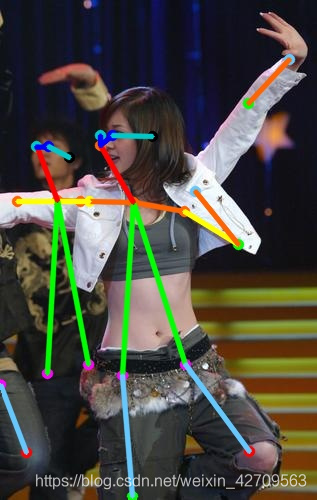

图片2

图片3

以上就是文章的所有内容,如果本文对你有帮助,可以给我点个赞,加个关注,谢谢!
边栏推荐
- 43 box model
- Reprint ---- how to read the code?
- bridge-nf-call-ip6tables is an unknown key异常处理
- As methods for viewing and excluding dependencies
- [comprehensive pen test] difficulty 4/5, classic application of line segment tree for character processing
- Login of MySQL [database system]
- EDA chip design solution based on AMD epyc server
- Log4j2 basic configuration
- Implementation of redis distributed lock
- 图片的懒加载
猜你喜欢

Realsense ROS installation configuration introduction and problem solving

39 简洁版小米侧边栏练习

bridge-nf-call-ip6tables is an unknown key异常处理

图片裁剪cropper 示例

防抖(debounce)和节流(throttle)

Award winning interaction | 7.19 database upgrade plan practical Summit: industry leaders gather, why do they come?

oracle_12505错误解决方法

EDA chip design solution based on AMD epyc server

Unable to start web server when Nacos starts

瀑布流布局
随机推荐
Visual Studio 2022 查看类关系图
6线SPI传输模式探索
35 quick format code
32 use of chrome debugging tools
37 element mode (inline element, block element, inline block element)
27 classification of selectors
ice 100G 网卡分片报文 hash 问题
Leo-sam: tightly coupled laser inertial odometer with smoothing and mapping
Sudo rosdep init error ROS installation problem solution
pkg_ Resources dynamic loading plug-in
转载----如何阅读代码?
C语言函数复习(传值传址【二分查找】,递归【阶乘,汉诺塔等】)
Raft of distributed consistency protocol
Scala111-map、flatten、flatMap
About RDBMS and non RDBMS [database system]
45padding won't open the box
PHP 通过原生CURL实现非阻塞(并发)请求模式
[C题目]力扣876. 链表的中间结点
"How to use" decorator mode
The solution to the problem that the progress bar of ros2 installation connext RMW is stuck at 13%