当前位置:网站首页>通过QT的拖拽事件来操作文件
通过QT的拖拽事件来操作文件
2022-06-21 22:11:00 【码农飞飞】
为了提升用户的交互友好性,在QT应用中有些时候我们需要通过拖拽事件来实现文件的快捷操作。这里就介绍一下如何通过拖拽事件实现文件的快捷操作,首先我们需要在对应的界面实现中开启拖拽事件,对应的配置如下:
setAcceptDrops(true);
开启了拖拽事件之后我们就可以在dragEnterEvent事件中判断拖拽对象中有没有文件。可以通过判断mimeData中是否包含text/uri-list格式的数据来判定拖拽对象中有没有文件。如果拖拽的对象中包含文件,我们就可以继续后续的事件了:
class ImageLoader : public QWidget
{

    Q_OBJECT
...
protected:
    //拖动进入事件
    void dragEnterEvent(QDragEnterEvent* event) override;
...
}
void ImageLoader::dragEnterEvent(QDragEnterEvent *event)
{

    //每次拖拽文件到控件上会触发该事件
    //我们通过拖拽的数据格式来判断是否有对应的文件
    //有文件的时候才接受后续操作
    if(event->mimeData()->hasFormat("text/uri-list")){

        event->acceptProposedAction();
    }
}
控件接受了拖拽事件之后,我们就可以在drop释放的时候对文件进行处理了,处理流程如下所示,示例中我们主要对文本文件和图片文件进行了处理,在实际业务中我们可以根据自己的业务实现不同格式文件的处理。
class ImageLoader : public QWidget
{

    Q_OBJECT
...
protected:
    //放开拖动的事件
    void dropEvent(QDropEvent* event) override;
...
}
void ImageLoader::dropEvent(QDropEvent *event)
{

    //如果没有文件不做任何操作
    const QMimeData* mimeData = event->mimeData();
    if (!mimeData->hasUrls()) {

        return;
    }
    //根据文件类型执行不同的操作
    const QUrl url = mimeData->urls().first();
    QMimeType mime = QMimeDatabase().mimeTypeForUrl(url);
    //打印文件类型
    qDebug() << mime.name();
    if (mime.inherits("audio/wav")) {

        m_image_label->setText("音频文件");
    }
    else if(mime.inherits("text/plain"))
    {

        QString file_path = url.toLocalFile();
        QFile file(file_path);
        file.open(QIODevice::ReadOnly);
        QByteArray array = file.readAll();
        m_image_label->setText(array);
        file.close();
    }
    else if(mime.inherits("image/png"))
    {

        QString file_path = url.toLocalFile();
        QPixmap pixmap(file_path);
        m_image_label->setPixmap(pixmap);
    }
}
拖拽操作文件的整个调用流程的实例代码如下所示,欢迎参考:
//imageloader.h
#ifndef IMAGELOADER_H
#define IMAGELOADER_H

#include <QWidget>
#include <QLabel>

namespace Ui {

class ImageLoader;
}

class ImageLoader : public QWidget
{

    Q_OBJECT

public:
    explicit ImageLoader(QWidget *parent = 0);
    ~ImageLoader();


protected:
    //拖动进入事件
    void dragEnterEvent(QDragEnterEvent* event) override;

    //放开拖动的事件
    void dropEvent(QDropEvent* event) override;

private:
    QLabel* m_image_label = nullptr;
};
#endif // IMAGELOADER_H
//imageloader.cpp
#include "imageloader.h"
#include "ui_imageloader.h"
#include <QDropEvent>
#include <QMimeData>
#include <QMimeDatabase>
#include <QMimeType>
#include <QHBoxLayout>
#include <QDebug>

ImageLoader::ImageLoader(QWidget *parent) :
    QWidget(parent)
{


    m_image_label = new QLabel(this);
    QHBoxLayout* main_layout = new QHBoxLayout(this);
    main_layout->addWidget(m_image_label);
    this->setLayout(main_layout);
    m_image_label->setText("将文件拖动到此处");
    //设置控件接收拖拽事件
    setAcceptDrops(true);
}

ImageLoader::~ImageLoader()
{

}

void ImageLoader::dragEnterEvent(QDragEnterEvent *event)
{

    //每次拖拽文件到控件上会触发该事件
    //我们通过拖拽的数据格式来判断是否有对应的文件
    //有文件的时候才接受后续操作
    if(event->mimeData()->hasFormat("text/uri-list")){

        event->acceptProposedAction();
    }
}

void ImageLoader::dropEvent(QDropEvent *event)
{

    //如果没有文件不做任何操作
    const QMimeData* mimeData = event->mimeData();
    if (!mimeData->hasUrls()) {

        return;
    }
    //根据文件类型执行不同的操作
    const QUrl url = mimeData->urls().first();
    QMimeType mime = QMimeDatabase().mimeTypeForUrl(url);
    //打印文件类型
    qDebug() << mime.name();
    if (mime.inherits("audio/wav")) {

        m_image_label->setText("音频文件");
    }
    else if(mime.inherits("text/plain"))
    {

        QString file_path = url.toLocalFile();
        QFile file(file_path);
        file.open(QIODevice::ReadOnly);
        QByteArray array = file.readAll();
        m_image_label->setText(array);
        file.close();
    }
    else if(mime.inherits("image/png"))
    {

        QString file_path = url.toLocalFile();
        QPixmap pixmap(file_path);
        m_image_label->setPixmap(pixmap);
    }
}
使用效果如下所示: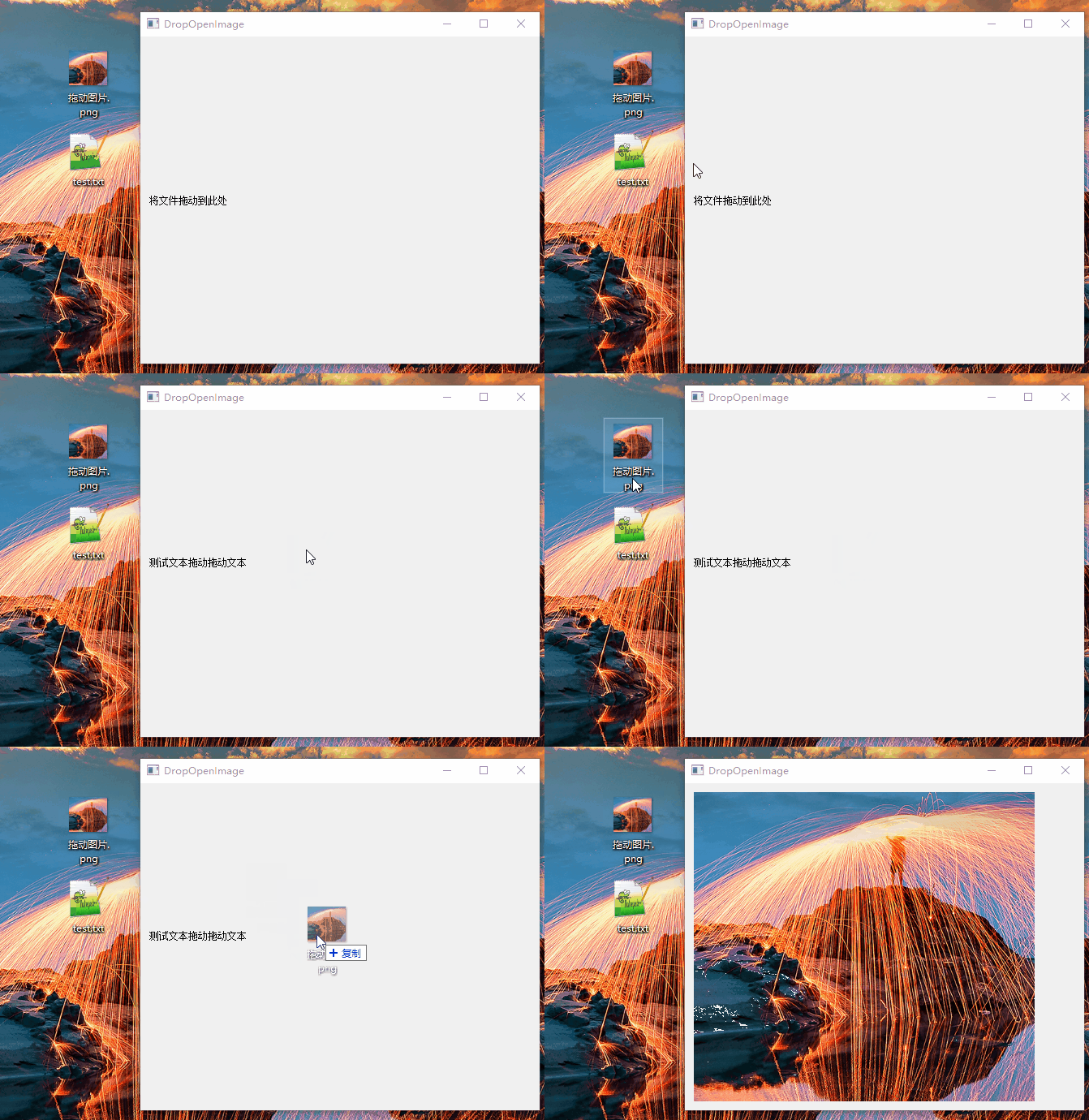
边栏推荐
- Why applets and the industrial Internet can complement each other
- 编程干货│PHP 常见方法封装
- Fork join thread pool
- 请问东方财富期货正规吗?这家平台安全靠谱么?
- Nuxt SSR packaging and deployment
- 盤點常見的漏洞利用方式
- [技术杂谈][转载]ffmpeg压缩视频几个参数解析
- JUnit VS TestNG
- Is Oriental Fortune futures regular? Is this platform safe and reliable?
- RK3568开发笔记(三):RK3568虚拟机基础环境搭建之更新源、安装网络工具、串口调试、网络连接、文件传输、安装vscode和samba共享服务
猜你喜欢

洞見數據價值,啟迪數字未來,《數字化的力量》問世

What if the program input point cannot be located in the dynamic link library

Rk3568 Development Notes (III): update source, installation of network tools, serial port debugging, network connection, file transfer, installation of vscode and Samba shared services for rk3568 virt

Xiuno修罗轻论坛仿知乎蓝简约响应式主题模板1.7+自适应PC+WAP端

软件项目律师尽职调查白皮书-全文19页,请与作者联系

Uniapp encapsulates the request function to achieve unique login. One account can only log in to one device at the same time

redis主从复制(九)

redis主从复制(九)

Sigir2022 | modélisation des préférences des utilisateurs dans le système de recommandation dialogique

ERP is dead, the management background is cold, and seckill system is king!
随机推荐
项目变更管理
Prediction of enzyme activity parameters by deep learning construction of enzyme binding model
Uniapp version update hot update and natural update
布局路线图,空间布局与数据可视化的完美结合
Ah ah ah ah ah ah
QT scrollarea qscrollarea
Produced by Ali! Graphical ant script - idea plug-in cloudtoolkit
Unity-网络开发(一)
Native applet application applet - publishing process
2022年云计算的趋势有哪些?
About the solution to "the application cannot start normally 0xc00000022" after qt5.15.2 is installed and qtcreator is started
JS listening and removing listening events
Contracting of development environment and test environment (and request encapsulation of uniapp)
IPD chip shipments exceeded 1billion, and chips and semiconductors appeared in ims2022
Fork join thread pool
leetcode1337. Row K with the weakest combat effectiveness in the matrix
盘点常见的漏洞利用方式
ERP is dead, the management background is cold, and seckill system is king!
ERP已死,管理后台已凉,秒杀系统称王!
[highly recommended] markdown grammar