当前位置:网站首页>[Architect (Part 41)] installation of server development and connection to redis database
[Architect (Part 41)] installation of server development and connection to redis database
2022-06-24 11:29:00 【A tailed Warbler】
Keep creating , Accelerate growth ! This is my participation 「 Nuggets day new plan · 6 Yuegengwen challenge 」 Of the 24 God , Click to see the event details
Local installation Redis
download
Go to the download address , I downloaded this

Local installation
I unzip it here to D Dish up , That's all the files .
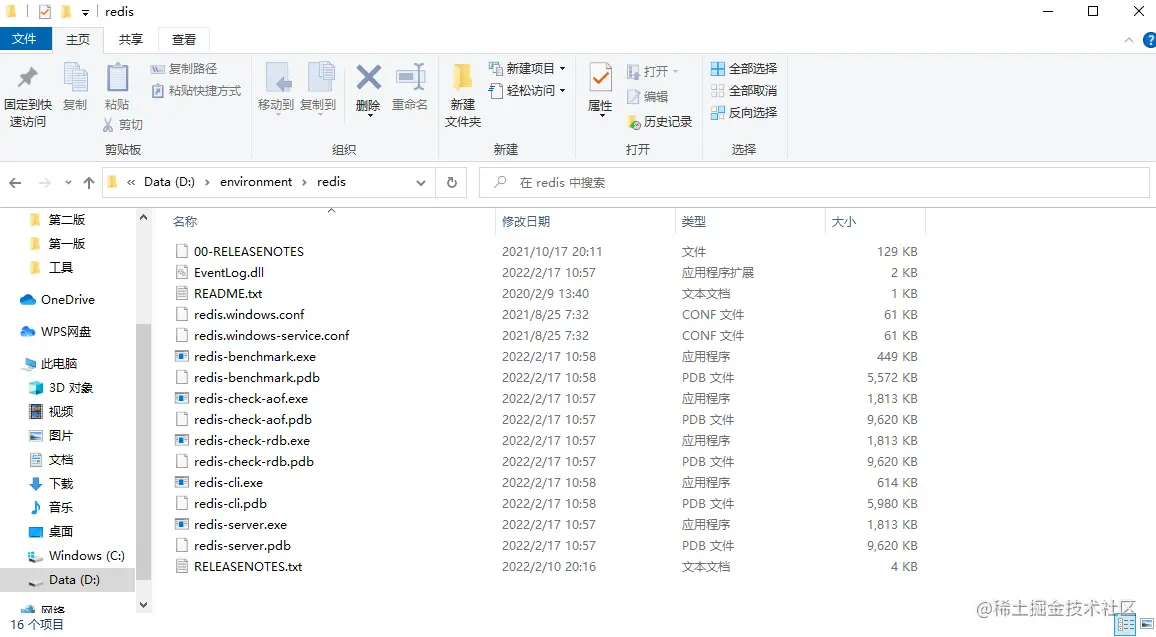
Use vscode Open this file

find requirepass foobared, Copy to a new line , Ahead of # Delete , And clear the space , Otherwise, the password will not be set successfully .
And then foobared Change it to the password you need , Then save , If the identity is not enough, open it as an administrator .

stay redis The folder is open cmd, perform redis-server.exe redis.windows.conf, At this time, the interface shows redis Information , Indicates that the service is on normally .
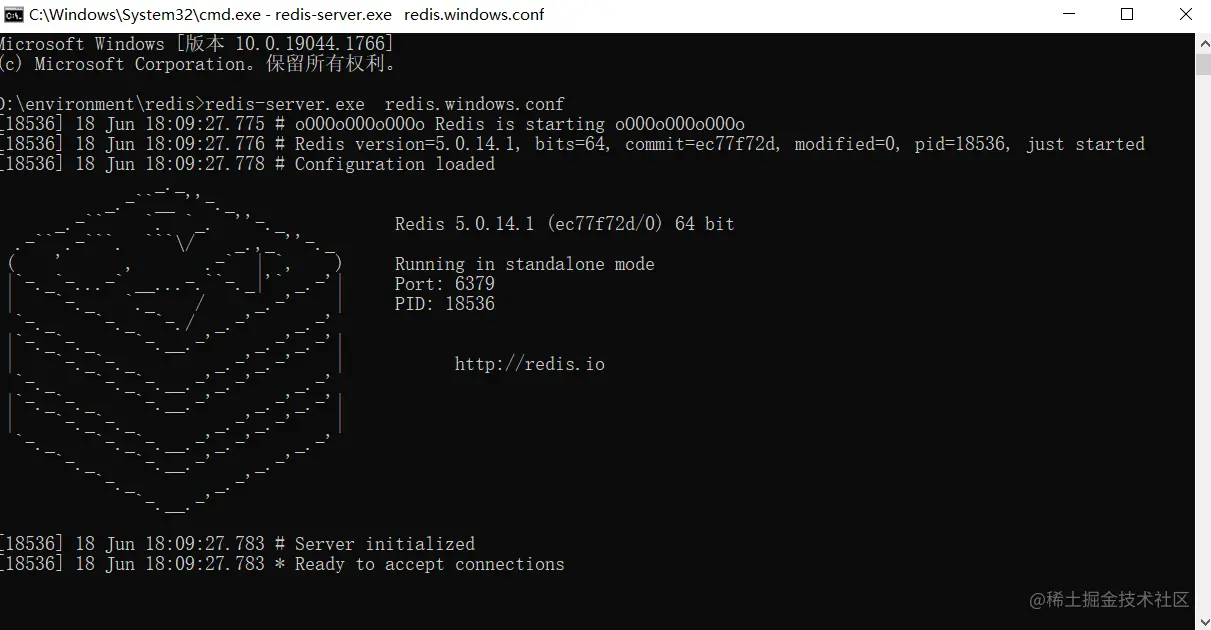
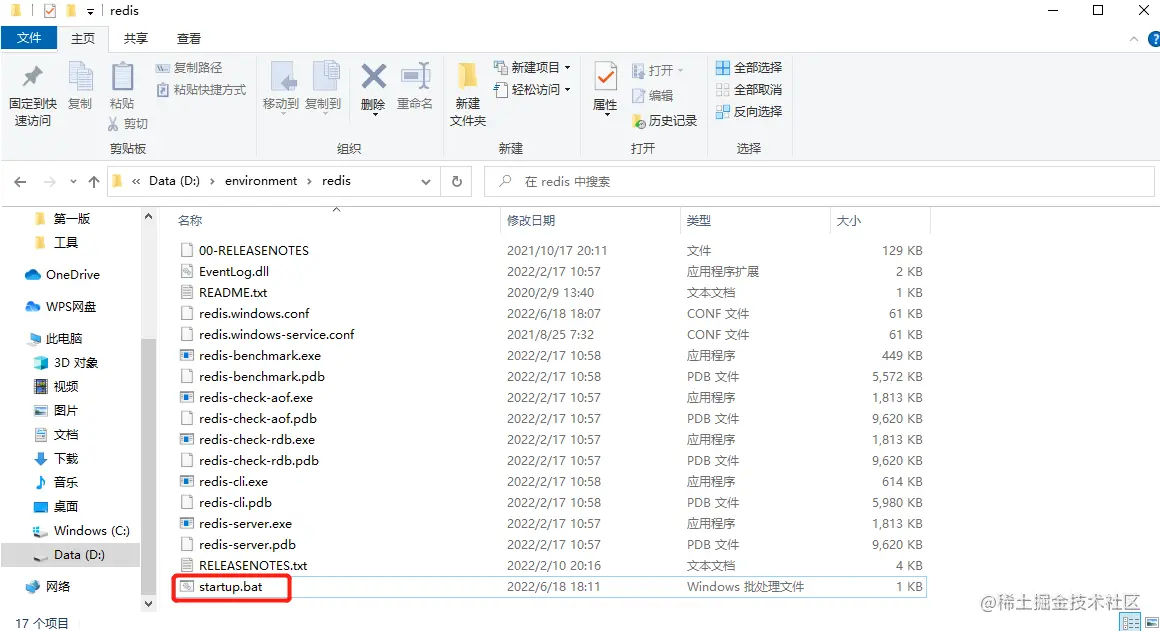
In order to facilitate the next startup , stay redis Create a new folder under the folder startup.bat file , The content is redis-server.exe redis.windows.conf.
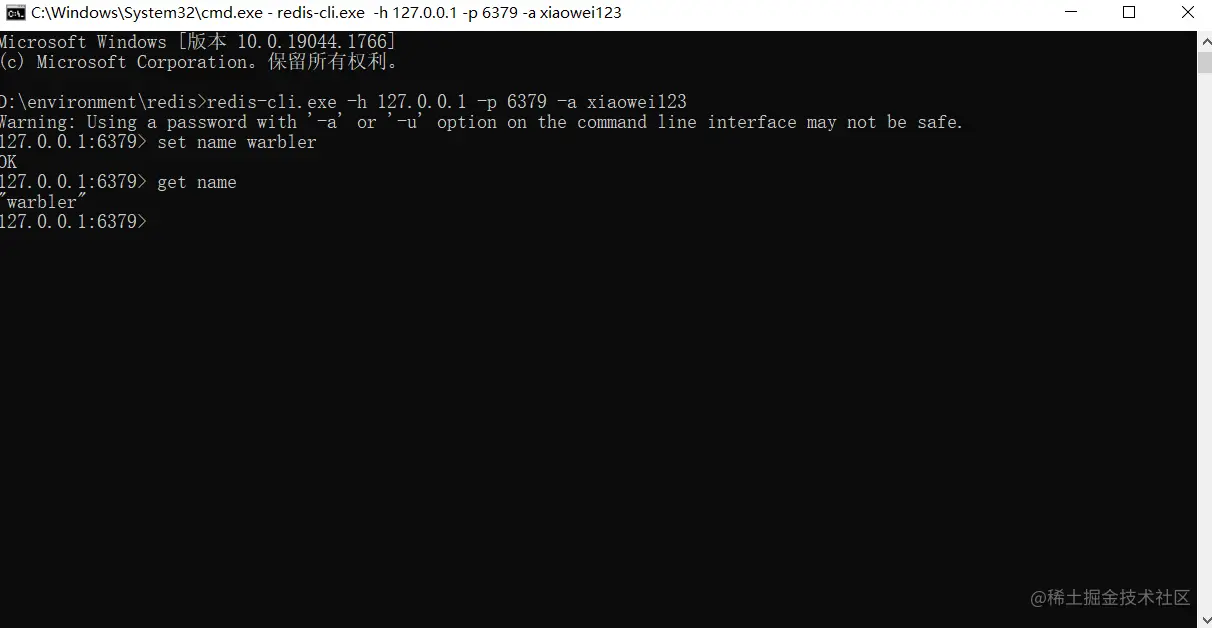
Don't close this window , Continue opening one cmd, perform redis-cli.exe -h 127.0.0.1 -p 6379 -a xiaowei123 enter
among xiaowei123 That's the password you set up before .
And then use set key value Set the cache , Use get key Read cache , The following interface shows that the local installation is successful .
Connect Redis
Install... In the project Redis
Here in order to follow the teacher to learn , Specify the installation version , Different syntax in the new version will lead to errors .
npm i [email protected]3.0.2 -S
To configure Redis
// src\config\envs\dev.js

module.exports = {
  // redis  Connection configuration
  redisConf: {
    port: '6379',
    host: '127.0.0.1',
    password: 'xiaowei123'
  },
}
Package settings / Access to the cache
// src\cache\index.js

const redisClient = require('../db/redis')

/** * redis set * @param {string} key key * @param {string|Object} val val * @param {number} timeout  Expiration time , Company  s , Default  1h */
function cacheSet(key, val, timeout = 60 * 60) {
  let formatVal
  if (typeof val === 'object') {
    formatVal = JSON.stringify(val)
  } else {
    formatVal = val
  }
  redisClient.set(key, formatVal)
  redisClient.expire(key, timeout)
}

/** * redis get * @param {string} key key */
function cacheGet(key) {
  const promise = new Promise((resolve, reject) => {
    redisClient.get(key, (err, val) => {
      if (err) {
        reject(err)
        return
      }
      if (val == null) {
        resolve(null)
        return
      }

      try {
        resolve(JSON.parse(val))
      } catch (ex) {
        resolve(val)
      }
    })
  })
  return promise
}

module.exports = {
  cacheSet,
  cacheGet,
}
Test connection Redis database
// src\db\redis.js

const redis = require('redis')
const { redisConf } = require('../config/index')

//  Create client
const { port, host, password } = redisConf
const opt = {}
if (password) {
  opt.password = password // prd  The environment requires a password
}
const redisClient = redis.createClient(port, host, opt)
redisClient.on('error', err => {
  console.error('redis connect error', err)
})
//  function  node src/db/redis.js  Make a test connection
redisClient.on('connect', () => {
  console.log('redis connect success')
  redisClient.set('foo', 'bar', redis.print) // => "Reply: OK"
  redisClient.get('foo', redis.print) // => "Reply: bar"
  redisClient.quit()
})

module.exports = redisClient
Console execution node src/db/redis.js, appear success It means the connection is successful .
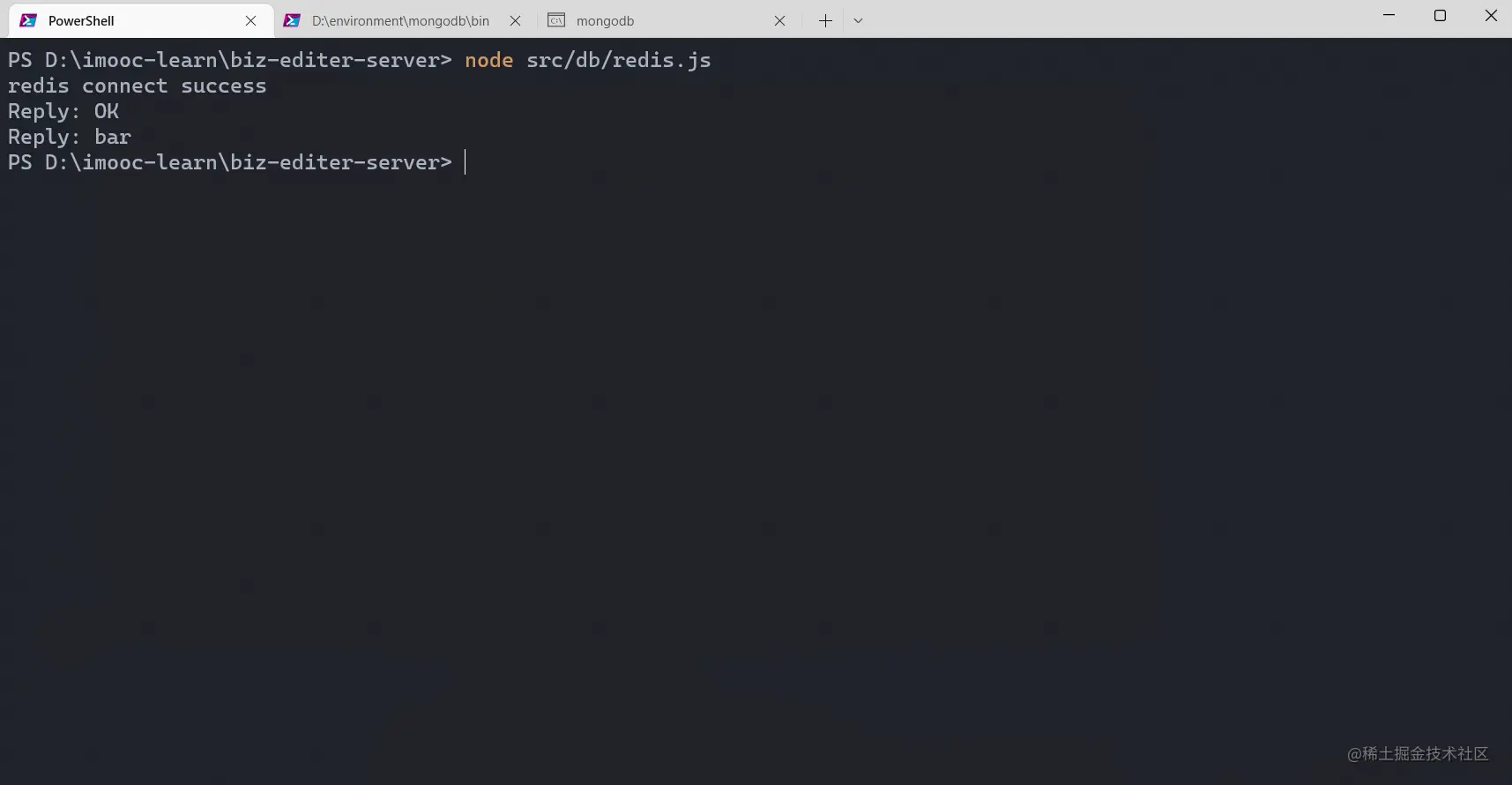
Further test the database connection
// src\routes\index.js
const router = require('koa-router')()
const packageInfo = require('../../package.json')
const testMysqlConn = require('../db/mysql2')
const ENV = require('../utils/env')
const { WorkModel } = require('../models/WorksModel')
const { cacheGet, cacheSet } = require('../cache/index')

//  Test database connection
router.get('/api/db-check', async (ctx) => {
  //  test  mysql  Database connection
  const mysqlRes = await testMysqlConn()

  //  test  mongodb  Database connection
  let mongodbConn
  try {
    mongodbConn = true
    await WorkModel.findOne()
  } catch (error) {
    mongodbConn = false
  }

  //  test  Redis  Connect
  cacheSet('name', 'biz editor sever OK - by redis')
  const redisTestVal = await cacheGet('name')

  ctx.body = {
    errno: 0,
    data: {
      name: 'biz editor server',
      version: packageInfo.version,
      ENV,
      mysqlConn: mysqlRes.length > 0,
      mongodbConn,
      redisConn: redisTestVal != null,
    }
  }
})

module.exports = router
visit http://localhost:3000/api/db-check,redisConn As the result of the true, It also further proves that Redis Database connection succeeded .

边栏推荐
- "One good programmer is worth five ordinary programmers!"
- 夜晚读书 -- 关于微服务和容器
- What is the bin file for? How to open the file correctly
- 保险APP适老化服务评测分析2022第06期
- [latest - lightweight cloud servers - hot sales] new lightweight application server optimization scheme, 1-core 2g5m time limit as low as 99 yuan / year
- [206] use PHP language to generate the code of go language
- @RequestBody注解
- 《opencv学习笔记》-- 分离颜色通道、多通道混合
- I want 18K. Can I pass it?
- Step 3: access the API interface for inquiry of SF express doc No. [express 100api interface]
猜你喜欢
Visual presentation of pictures effectively enhances the attraction of large screen

Any and typevar make the automatic completion of IDE better

Understanding of homogeneous coordinates

【数字IC/FPGA】Booth乘法器

Tencent's open source project "Yinglong" has become a top-level project of Apache: the former long-term service wechat payment can hold a million billion level of data stream processing

如何开发短信通知和语音功能医院信息系统(HIS系统)

程序员大部分时间不是写代码,而是。。。

PHP SMS notification + voice broadcast automatic double call

“一个优秀程序员可抵五个普通程序员!”

Tools and methods - use code formatting tools in source insight
随机推荐
Opencv optical flow prediction and remap remapping function usage
Coinbase将推出首个针对零售交易员的加密衍生产品
PPT绘图相关,快捷键,美观度
Maui的学习之路 -- 开篇
What code did the full stack programmer write this month?
Moving Tencent to the cloud cured their technical anxiety
“一个优秀程序员可抵五个普通程序员!”
What is the function of the graphics card driver? Do you want to update the graphics card driver
Oxylabs live online: website capture demo
How to use arbitrarygen code generator what are the characteristics of this generator
Using the collaboration database query of Poole in laravel5.6
Programmers spend most of their time not writing code, but...
《opencv学习笔记》-- 离散傅里叶变换
Istio best practice: graceful termination
【数字IC/FPGA】Booth乘法器
Cook a delicious cli
[net action!] Cos data escort helps SMEs avoid content security risks!
[latest - lightweight cloud servers - hot sales] new lightweight application server optimization scheme, 1-core 2g5m time limit as low as 99 yuan / year
math_ Summation and derivation of proportional series & derivation of sum and difference of equal powers / difference between two nth power numbers/
Self cleaning Manual of mining Trojan horse