当前位置:网站首页>微服务系统设计——接口文档管理设计
微服务系统设计——接口文档管理设计
2022-06-24 18:32:00 【庄小焱】
摘要
整个系统是多个应用一起构建,由于服务不会单独存在,服务开发团队必然与其他服务团队进行服务调用,暴露出对外接口势在必行。早期做开发的时候,大家习惯于以 word 或 excel 的形式,但弊端显而易见,一旦接口发生变动,文档需要同步更新,遗憾的是很多接口已经更新,但文档都没有跟上,相信你也有过痛苦的经历。本文带领你认识几款接口文档管理工具,并实现本案例实践中用到的在线接口文档管理。
我们迫切需要一个接口文档工具,能实时与系统接口保持同步,无须额外付出成本(资金成本、时间成本)最好。这里介绍几个开源的 API 工具,可以选择使用。
一、RAP2
官方地址:RAP接口管理平台,早期称为 RAP ,阿里妈妈 MUX 团队出品,后面项目停止维护,转移至 RAP2 项目。可以在线使用,也可以本地部署使用,本地部署有详细的步骤介绍,从部署手册来看,产品还是比较重的,环境依赖也比较多。部署后,同样存在要花时间保持与代码同步的问题,针对提供比较稳定接口的项目而言,是个不错的选择。

二、APIDOC
官方地址:apiDoc - Inline Documentation for RESTful web APIs,通过代码中的相当格式的注释来生成 API 接口文档,依赖 Node.js 环境。使用比较简单,弊端:接口发生变动时,需要花时间来同步文档。针对比较稳定的接口系统而言,可以做个备选。

三、Spring REST Docs
Spring 全家桶中很多 API 文档,都是基于此组件生成,据官方提供的使用方法需要编写相应的代码片断,还有相应的语法规范,再通过项目构建的方式生成离线文档。操作起来比较繁琐,这里不推荐使用。生成的文档形如下面截图中所示:

四、Swagger
官网地址:https://swagger.io , 是一款 RESTFU L 接口的文档在线自动生成+功能测试功能软件,是一个规范和完整的框架,标准的,语言无关,用于生成、描述、调用和可视化 RESTful 风格的 Web 服务。总体目标是使客户端和文件系统作为服务器以同样的速度来更新。文件的方法,参数和模型紧密集成到服务器端的代码,允许 API 来始终保持同步。Swagger 让部署管理和使用功能强大的 API 从未如此简单。本实战案例中采用 Swagger 来进行的 API 的管理。

五、Spring Boot 整合 Swagger2
5.1 引入依赖
加入 Swagger 相关的 jar 依赖,由于各个子模块都有用到,这里将 Swagger 在根 pom.xml 中进行统一的版本管理
<properties>
        <swagger.version>2.8.0</swagger.version>
</properties>
<!--swagger2 -->
<dependency>
        <groupId>io.springfox</groupId>
        <artifactId>springfox-swagger2</artifactId>
        <version>${swagger.version}</version>
</dependency>
<dependency>
        <groupId>io.springfox</groupId>
        <artifactId>springfox-swagger-ui</artifactId>
        <version>${swagger.version}</version>
</dependency>
子模块中无须配置 version,直接引入即可,如果需要变更 version,直接在根 pom.xml 中修改,所有依赖子模块的版本也会一同发生变更。
<!--swagger2 -->
<dependency>
        <groupId>io.springfox</groupId>
        <artifactId>springfox-swagger2</artifactId>
</dependency>
<dependency>
        <groupId>io.springfox</groupId>
        <artifactId>springfox-swagger-ui</artifactId>
</dependency>
5.2 Swagger2 配置
建立 config 包,新增 Swagger 配置类。通过@EnableSwagger2注解启用 Swagger2 ,然后配置一个 Docket Bean ,配置映射路径和要扫描的接口的位置,在 apiInfo 中,主要配置一下 Swagger2 文档网站的信息,例如网站的 title ,网站的描述,联系人的信息,使用的协议、接口的版本等等。
@EnableSwagger2
@Configuration
public class Swagger2Config {

    @Bean
    public Docket createRestApi() {
        return new Docket(DocumentationType.SWAGGER_2).apiInfo(apiInfo()).select()
                .apis(RequestHandlerSelectors.any()).paths(PathSelectors.any()).build();
    }

    private ApiInfo apiInfo() {
        return new ApiInfoBuilder()
                .title("Member 会员模块接口层(基于 SpringBoot2+Swagger2).")
                .contact(new Contact("growithus", "https://backkoms.github.io/", "[email protected]"))
                .version("1.0")
                .description("").build();
    }
}
由于采用的是较高版本,相应的 Controller 类中无须再编写 Swagger 相应的代码注解,代码侵入性进一步降低。旧版本相关的注解,如 @Api、@ApiOperation、@ApiImplicitParams、@ApiImplicitParam,@ApiModel等,如果是旧版本,必须要在相关代码中增加以上相应的注解,对代码有一定侵入性。经过以上两个步骤,Swagger2 就算配置成功了,非常简捷。启动项目,输入 http://localhost:10060/swagger-ui.html,能够看到如下 UI,说明已经配置成功了。


5.3 API 验证测试
编写测试类,启动项目
@RestController
@RequestMapping("test")
public class APITestController {

    @PostMapping("/hello")//只支持 POST 请求
  //@RequestMapping(name = "hello", method = { RequestMethod.POST })//同样只支持 POST 请求
    public String hello(String name) {
        return "hello " + name;
    }

}
Request 方法有 8 种请求类型:POST \ GET \ OPTIONS \ HEAD \ PUT \ DELETE \ TRACE \ PATCH,为确保不必要的请求造成的潜在威胁,案例建议中直接采用 POST 方式一种,禁用其它请求方式。 @PostMapping("/hello") 功能等同于@RequestMapping(name= "hello", method = { RequestMethod.POST })
直接使用 Shell 脚本进行请求测试:
appledeMacBook-Air:~ apple$ curl -X POST "http://localhost:10060/test?name=world" hello world.

可以看到正常输出结果,再测试一下其它请求方式能否正常请求数据:

    appledeMacBook-Air:~ apple$ curl -X GET "http://localhost:10060/test?name=world" {"timestamp":"2020-02-01T12:59:09.508+0000","status":405,"error":"Method Not Allowed","message":"Request method 'GET' not supported","path":"/test"}
未使用 Swagger 时,可以采用 Postman 测试工具进行接口调试。

现在已经集成Swagger 功能,打开http://localhost:10060/swagger-ui.html,找到 api-test-controller 下对应的方法,点击" try it out ",输入参数,执行" Execute "功能。查看正常输出结果:
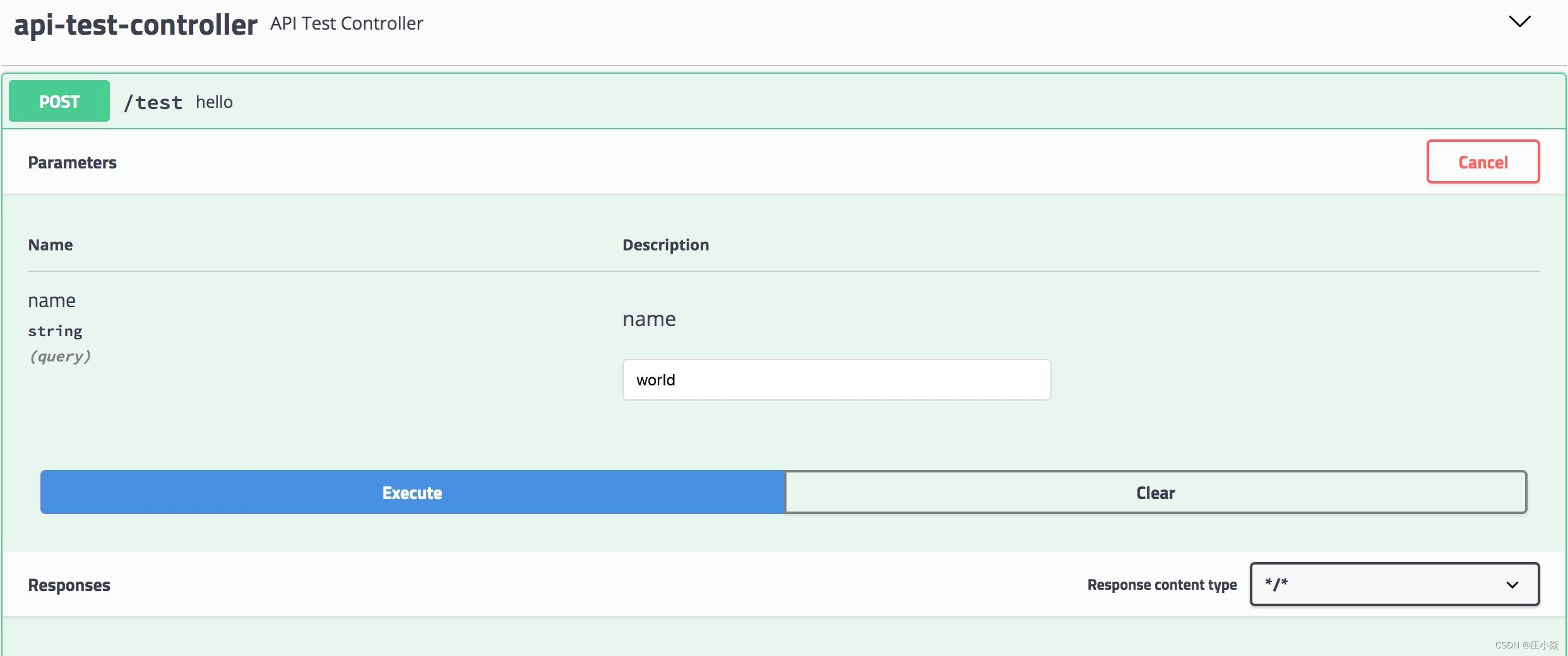

使用 Swagger 即可在直接在线感知接口变更,还能在 UI 上直接进行接口测试,不再依赖第三方组件。
5.4 生产环境屏蔽
使用 Swagger 大大提高接口的开发测试效率,如果不加以限制,暴露在生产环境中,那就是一个潜在的安全风险,所以在开发、测试环节正常使用,但要在生产环境中屏蔽 Swagger 的功能。上一篇中提及到多环境配置的问题,这里可以利用它来做文章。
实现方式很简单,在 Swagger 配置类增加注解 @Profile({ "dev", "test" }) ,标记只有在 dev 或 test 环境下才能正常使用 swagger 的接口调试功能,在生产环境下这个类是不会加载的,也就达到了生产环境下屏蔽的目标。启动后测试发现,swagger-ui.html 页面已不能正常加载接口进行测试。
@EnableSwagger2
@Configuration
@Profile({ "dev", "test" })
public class Swagger2Config {
}
注意:任何@Componen t或@Configuration注解的类都可以使用@Profile注解。
5.5 增加 token 统一参数
不少内部服务是需要用户登陆后才能正常使用的,比如用户签到领取积分,必须登陆后才正常使用,如果在每个接口中增加 token 参数,重复度太高,设计也不够优雅,一般情况下将 token 放到请求头中较为合适, Swagger 页面中如何显性增加输入 token 的位置就变成了我们的目标。
在 Swagger 配置类修改配置,完成后如下:
@EnableSwagger2
@Configuration
@Profile({ "dev", "test" })
public class Swagger2Config {

    @Bean
    public Docket createRestApi() {
        ParameterBuilder parameterBuilder = new ParameterBuilder();
        List<Parameter> parameters = new ArrayList<>();
        parameterBuilder.modelRef(new ModelRef("String")).name("token").parameterType("header").description("token").defaultValue("").
        //考虑到有些请求是不需要 token 的,此处不能置必填
        required(false).build();
        parameters.add(parameterBuilder.build());

        return new Docket(DocumentationType.SWAGGER_2).apiInfo(apiInfo()).select()
                .apis(RequestHandlerSelectors.any()).paths(PathSelectors.any()).build().globalOperationParameters(parameters).securitySchemes(getSecuritySchemes());
    }

    private ApiInfo apiInfo() {
        return new ApiInfoBuilder()
                .title("Member 会员模块接口层(基于 SpringBoot2+Swagger2).")
                .contact(new Contact("growithus", "https://backkoms.github.io/", "[email protected]"))
                .version("1.0")
                .description("").build();
    }

    private List<ApiKey> getSecuritySchemes() {
        List<ApiKey> keys = new ArrayList<>();
        ApiKey key  = new ApiKey("token", "token", "header");
        keys.add(key);
        return keys;
    }
}
启动项目后,打开 swagger-ui.html 页面,会发现多出一个 Authorize 的按钮,打开后输入有效 token 就实现登陆,其它接口直接使用即可,无须多次再输入 token (此时并未实现 token 验证,后续可通过 AOP 编程来验证 token 的有效性)。

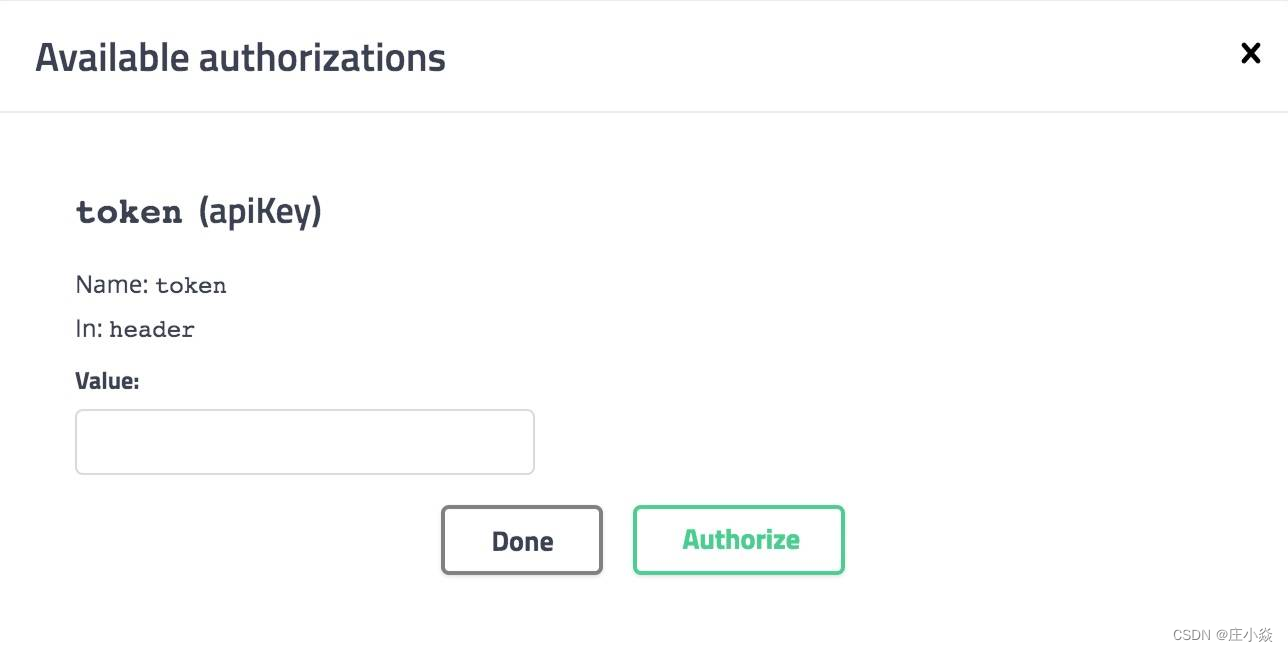
到此,Swagger 已经可以正常应用在项目中,后续直接 Copy 本示例的配置即可复用。
每个子服务模块都会对外暴露接口,如果调用服务很多,将不得不面对接口页面来回切换的繁琐,有没有什么办法简化一下呢?
博文参考
边栏推荐
- Common MySQL commands of installation free version
- Redis learning -- list of redis operations
- EasyGBS视频平台TCP主动模式拉流异常情况修复
- Application service access configuration parameters
- Seven strategies for successfully integrating digital transformation
- Selection (030) - what is the output of the following code?
- Easygbs video platform TCP active mode streaming exception repair
- [JS Framework] Failed to execute the callback function:
- Leetcode topic [array] -216- combined sum III
- About swagger
猜你喜欢

"2022" plans to change jobs and raise salary. It is necessary to ask interview questions and answers - browser
[North Asia data recovery]_ mdb_ catalog. Mongodb database data recovery case in case of WT file corruption

Vite+web3:报错出现ReferenceError: process is not defined
SQL basic tutorial (learning notes)

如何在 R 中使用 Fisher 的最小显着性差异 (LSD)
An analysis of the comments on the TV series Douban by procedural apes

国家出手了!对知网启动网络安全审查

13 skills necessary for a competent QA Manager
What if the database table structure changes? Smartbi products support one click synchronization

Mcu-08 interrupt system and external interrupt application
![[North Asia data recovery]_ mdb_ catalog. Mongodb database data recovery case in case of WT file corruption](/img/fa/d5a4d7cbadc0897935fa633f7ed04e)


随机推荐
Flutter dart regular regexp special characters $, () (IV)
How to decompile APK files
Business leaders compete for CIO roles
Three indicators to help you measure the effectiveness of digital transformation
Constantly changing the emergency dialing of harmonyos ETS during the new year
Selection (032) - what is the output of the following code?
Does the wave of layoffs in Chinese enterprises in 2021 need to be "judged" by morality?
Using flex to implement common layouts
Considerations for it project demand analysis
Specification for self test requirements of program developers
Six configuration management tools that administrators must know
Noi Mathematics: solution of quadratic congruence equation
Four security issues of low code and no code development
Usage of typedef enum (enumeration)
Leetcode question 136 [single number]
Ten software development indicators for project managers
Easynvr fails to use onvif to detect the device. What is the reason why "no data" is displayed?
Rapidssl getting started SSL certificate
基于BGP实现纯三层容器网络方案
"2022" plans to change jobs and raise salary. It is necessary to ask interview questions and answers - browser