当前位置:网站首页>The migration of arm architecture to alsa lib and alsa utils is smooth
The migration of arm architecture to alsa lib and alsa utils is smooth
2022-07-25 13:17:00 【Jiang Lin】
Catalog
introduction
- Basically transplant alsa-lib and alsa-utils The problem of transplantation can be found in this blog , If not found in the text , Please look at the difficult and miscellaneous diseases in the catalogue
- First of all, this article defaults that your root file system is guided by the network
Access to the source code
Download at https://www.alsa-project.org/main/index.php/Main_Page
The latest version is 1.2.7.2, The version used in this article is 1.2.2
Compile trial and error
- notes : There was no success here , Just slowly reproduce the pit I encountered yesterday , Tell readers how I solved these mistakes , If you want to succeed at one time, please skip the step of compiling trial and error
New folder ( The default is in the downloaded source directory )
First, you need to create some new folders , To provide our compilation results directory .
sudo mkdir /usr/share/arm-alsa
mkdir alsa-lib
mkdir alsa-utils
Decompress the package ( The default is in the downloaded source directory )
tar -xvjf alsa-lib-1.2.2.tar.bz2
tar -xvjf alsa-utils-1.2.2.tar.bz2
compile alsa-lib
cd alsa-lib-1.2.2/
/*  Notice the alsa-lib Folder is what we do when we create a new folder  */
./configure --host=arm-linux-gnueabihf --prefix= Source code storage directory /alsa-lib --with-configdir=/usr/share/arm-alsa
 make
 sudo make install

If this error occurs , Because sudo Will switch to the root Under the user , But this
when root There is no cross compiler path in the environment variable under the user , Therefore, you will be prompted that you cannot find “arm-linux-gnueabihf-gcc”, Which leads to libatopology.la Compile failed , Do as follows
sudo -s // Switch to  root  user
source /etc/profile // perform /etc/profile
make install // install , At this time, I have been working in  root  Next , So there is no need to add “sudo”
su zuozhongkai // After compilation, return to the original user
compile alsa-utils
 cd alsa-utils-1.2.2/
 /*
 	--prefix= Appoint alsa-utils Which folder is the output file in
 	--with-alsa-inc-prefix= because alsa-utils rely on alsa-lib, So specified alsa-lib The header directory of
 	--with-alsa-prefix= because alsa-utils rely on alsa-lib, So specified alsa-lib The Library Directory of
  */
./configure --host=arm-linux-gnueabihf --prefix= Source code storage directory /alsa-utils --with-alsa-inc-prefix= Source code storage directory /alsa-lib/include/ --with-alsa-prefix= Source code storage directory /alsa-lib/lib/ --disable-alsamixer --disable-xmlto
make
sudo make install
Copy alsa-lab and alsa-utils Go to the root directory of the development board
Copy alsa-lab
cd alsa-lib // Get into  alsa-lib
sudo cp lib/*  Root file system directory /rootfs/lib/ -af
cd /usr/share/arm-alsa // Get into  arm-alsa  Catalog , Copy configuration file
mkdir  Root file system directory /rootfs/usr/share/arm-alsa/
sudo cp *  Root file system directory /rootfs/usr/share/arm-alsa/ -raf
Copy alsa-utils
cd alsa-utils
sudo cp bin/*  Root file system directory /rootfs/bin/ -rfa
sudo cp sbin/* Root file system directory //rootfs/sbin/ -rfa
sudo cp share/*  Root file system directory //rootfs/usr/share/ -rfa
Open... In the root file system of the development board /etc/profile file , Add the following
export ALSA_CONFIG_PATH=/usr/share/arm-alsa/alsa.conf
Run it on the development board amixer Tool testing
amixer --help

It seems to be 32 Bit system running 64 Bit program , And the architecture is incompatible , Let's check the properties of the compiled file
cd  Source code storage directory /alsa-utils/bin
file amixer
This document is for x86 Architecture compiled ?
stay ubuntu Try it on , Sure enough
./amixer --help

Get into makefile See whether the cross compilation chain is successfully configured
 cd alsa-utils-1.2.2/
 vi Makefile
It doesn't seem to be a problem ,host Specify normal 
Let's think about it , When we perform the installation, we use sudo make install, Because some of the generated files need to be generated in the directory protected by the system , So it must be added sudo,sudo It runs in administrator mode , Then whether our administrator mode specifies the cross compilation chain directory ? Test it
Compile successfully
sudo -s
arm-linux-gnueabihf-gcc -v
As expected, there is no , Then let's add a directory
export PATH=$PATH: Cross compile chain directory /bin
Clear the file directory just compiled
rm -rf alsa-lib/*
rm -rf alsa-utils/*
rm -rf /usr/share/arm-alsa/*
recompile alsa-lib
cd alsa-lib-1.2.2/
make clean

/*  Notice the alsa-lib Folder is what we do when we create a new folder  */
./configure --host=arm-linux-gnueabihf --prefix= Source code storage directory /alsa-lib --with-configdir=/usr/share/arm-alsa
 make
make install
Check any output file , Sure enough ,arm framework ,32 Yes. 
compile alsa-utils
 cd alsa-utils-1.2.2/
 make clean
 /*

 	--prefix= Appoint alsa-utils Which folder is the output file in
 	--with-alsa-inc-prefix= because alsa-utils rely on alsa-lib, So specified alsa-lib The header directory of
 	--with-alsa-prefix= because alsa-utils rely on alsa-lib, So specified alsa-lib The Library Directory of

  */
./configure --host=arm-linux-gnueabihf --prefix= Source code storage directory /alsa-utils --with-alsa-inc-prefix= Source code storage directory /alsa-lib/include/ --with-alsa-prefix= Source code storage directory /alsa-lib/lib/ --disable-alsamixer --disable-xmlto
make
make install

according to Copy alsa-lab and alsa-utils Go to the root directory of the development board This step copies the file , You can succeed .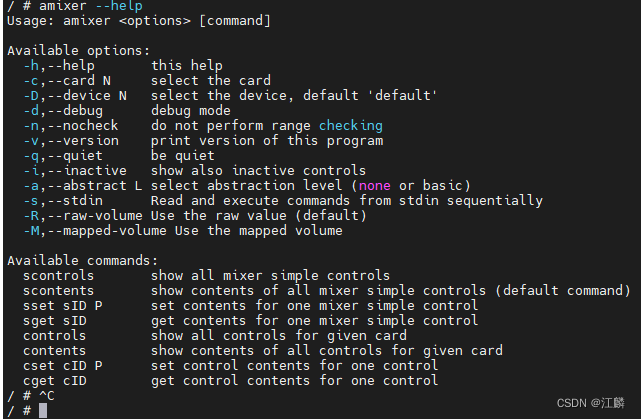
Difficult miscellaneous diseases
About configure: error: No linkable libasound was found
1. If the above errors occur , First check the directory 、 Whether the command is correct
2.alsa-lib and alsa-utils Not compiled by the same user , I stepped on this pit last night , If lib It's compiled x86 Running , that alsa-utils Configuration is ok , If lib It compiles arm Architecture operation , that alsa-utils The configuration will cause this error , Keep compiling in the same user , Because the output folder may need super user mode , So keep root Compile below , And in root The user configures the cross compilation chain , For details, please refer to Compile successfully
About the board running unsuccessfully
/bin/amixer: line 1:ELF: not found
/bin/amixer: line 2: H
                      : not found
/bin/amixer: line 3: P: not found
/bin/amixer: line 4: syntax error: unexpected ")"
If this error is reported , There's only one possibility , The files you compile are not used by the board, but x86 The use of , stay ubuntu Found this file on ,file once , Directory is alsa-utils Compile target directory /bin/amixer, You must be the following :
Refer to Compilation success section Can solve
边栏推荐
- Word style and multi-level list setting skills (II)
- Shell common script: check whether a domain name and IP address are connected
- How to understand metrics in keras
- Cv2.resize function reports an error: error: (-215:assertion failed) func= 0 in function ‘cv::hal::resize‘
- 详解浮点数的精度问题
- Simple understanding of flow
- 【AI4Code】《IntelliCode Compose: Code Generation using Transformer》 ESEC/FSE 2020
- 面试官问我:Mysql的存储引擎你了解多少?
- arm架构移植alsa-lib和alsa-utils一路畅通
- 【重温SSM框架系列】15 - SSM系列博文总结【SSM杀青篇】
猜你喜欢
![[today in history] July 25: IBM obtained the first patent; Verizon acquires Yahoo; Amazon releases fire phone](/img/f6/d422367483542a0351923f2df27347.jpg)
[today in history] July 25: IBM obtained the first patent; Verizon acquires Yahoo; Amazon releases fire phone

Word style and multi-level list setting skills (II)

卷积神经网络模型之——LeNet网络结构与代码实现
TCP的拥塞控制

【GCN-RS】Towards Representation Alignment and Uniformity in Collaborative Filtering (KDD‘22)
【AI4Code】CodeX:《Evaluating Large Language Models Trained on Code》(OpenAI)

VIM tip: always show line numbers

Cyberspace Security penetration attack and defense 9 (PKI)

深度学习的训练、预测过程详解【以LeNet模型和CIFAR10数据集为例】

Business visualization - make your flowchart'run'(3. Branch selection & cross language distributed operation node)

随机推荐
【AI4Code】《IntelliCode Compose: Code Generation using Transformer》 ESEC/FSE 2020
Machine learning strong foundation program 0-4: popular understanding of Occam razor and no free lunch theorem
为提高效率使用ParallelStream竟出现各种问题
Django 2 ----- 数据库与Admin
[Video] visual interpretation of Markov chain principle and Mrs example of R language region conversion | data sharing
Arrays常用方法
Docker学习 - Redis集群-3主3从-扩容-缩容搭建
【GCN-CTR】DC-GNN: Decoupled GNN for Improving and Accelerating Large-Scale E-commerce Retrieval WWW22
Convolutional neural network model -- alexnet network structure and code implementation
Redis visualizer RDM installation package sharing
Migrate PaloAlto ha high availability firewall to panorama
【GCN-RS】Learning Explicit User Interest Boundary for Recommendation (WWW‘22)
Brpc source code analysis (III) -- the mechanism of requesting other servers and writing data to sockets
Design and principle of thread pool
Mu Changchun, data Research Institute of the central bank: controllable anonymity of digital RMB is an objective need to safeguard public interests and financial security
How to realize the configuration method of user password free login?
ECCV 2022 | climb to the top semantickitti! Semantic segmentation of LIDAR point cloud based on two-dimensional prior assistance
[today in history] July 25: IBM obtained the first patent; Verizon acquires Yahoo; Amazon releases fire phone
Redis可视化工具RDM安装包分享
[300 opencv routines] 239. accurate positioning of Harris corner detection (cornersubpix)