当前位置:网站首页>Network file storage system (III) practice of fastdfs distributed file system
Network file storage system (III) practice of fastdfs distributed file system
2022-07-25 07:43:00 【xueshanfeitian】
introduction
FastDFS It is a lightweight developed by Yuqing, the code God of Alibaba 、 High performance open source distributed file system . The system is made of pure c Language development , It manages files , Features include : File store 、 File synchronization 、 File access ( Upload files 、 File download ) etc. , The problem of large capacity storage and load balancing is solved . Especially suitable for file - based online services , Such as photo album website 、 Video websites and so on .
working principle
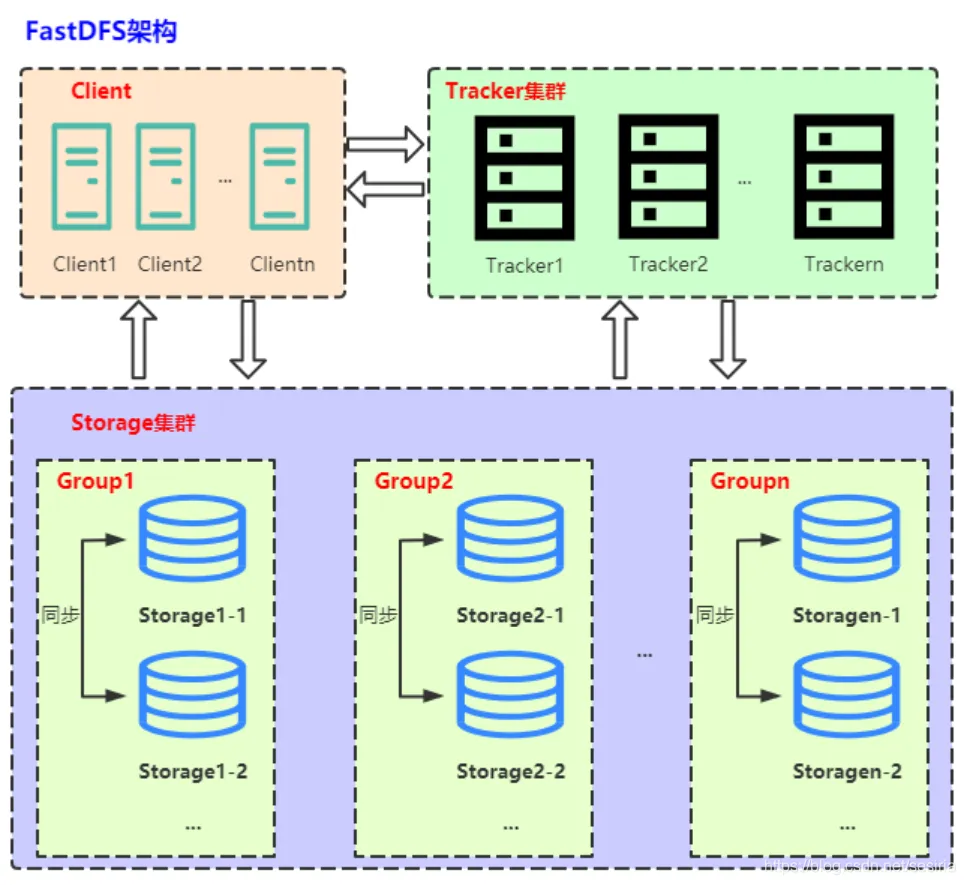
Conceptual explanation
Client: client . Use java The project written in language belongs to the client .
Tracker Server: Tracking server , Mainly do scheduling work , Load balancing on access . In memory logging cluster group and storage server Status information , Is the connection Client and Storage server The hub of .
Storage Server: Storage server , File and file properties (meta data) All saved to the storage server
Upload process
- client inquiry tracker Uploaded to storage, No additional parameters are required ;
- tracker Return to an available storage;
- client Direct sum storage Communication complete file upload
Download process
- client inquiry tracker Download the file storage, Parameter is the file ID ( Volume name and file name );
- tracker Return to an available storage;
- client Direct sum storage Communication complete file download .
It should be noted that ,client For the use of FastDFS The caller of the service ,client It should also be a server , It's right tracker and storage All of the calls are between servers .
fastdfs Dependent installation
download libfastcommon
wget https://github.com/happyfish100/libfastcommon/archive/V1.0.7.tar.gz
Unpack the installation
tar -xvf V1.0.7.tar.gz`
cd libfastcommon-1.0.7
./make.sh
./make.sh install

Create a soft connection
ln -s /usr/lib64/libfastcommon.so /usr/local/lib/libfastcommon.so
ln -s /usr/lib64/libfastcommon.so /usr/lib/libfastcommon.so
ln -s /usr/lib64/libfdfsclient.so /usr/local/lib/libfdfsclient.so
ln -s /usr/lib64/libfdfsclient.so /usr/lib/libfdfsclient.so

fastdfs server install
download fastdfs
wget https://github.com/happyfish100/fastdfs/archive/V5.05.tar.gz
Unzip and install fastdfs
tar -zxvf fastdfs_v5.05.tar.gz
cd  fastdfs_v5.05/
./make.sh
./make.sh install
To configure Tracker server service
After the above installation is successful , stay /etc/ There will be a fdfs The catalog of , Enter it . You'll see three .sample Postfix file , This is the sample file given to us by the author , We need to put some of them tracker.conf.sample Change the document to tracker.conf Configure the file and modify it :
cd /etc/fdfs/
cp tracker.conf.sample tracker.conf
vim tracker.conf
Edit the following
#  Whether the configuration file does not take effect ,false  Effective for
disabled=false
#  The port that provides the service
port=22122
# Tracker  Data and log directory address
base_path=/home/data/fastdfs
# HTTP  Service port
http.server_port=8080
establish tracker Folder
mkdir -p /home/data/fastdfs
Be sure to create , Otherwise, we will report the error later
establish tracker server Soft link
ln -s /usr/bin/fdfs_trackerd /usr/local/bin
ln -s /usr/bin/stop.sh /usr/local/bin
ln -s /usr/bin/restart.sh /usr/local/bin
start-up tracker server
systemctl start fdfs_trackerd
systemctl stop fdfs_trackerd
systemctl restart fdfs_trackerd
See if it starts tracker server
netstat -unltp|grep fdfs

tracker server Catalog
tracker server Directory and file structure Tracker After the service starts successfully , Will be in base_path Create data、logs Two directories . The directory structure is as follows :
${base_path}
  |__data
  |   |__storage_groups.dat: Store group information
  |   |__storage_servers.dat: Storage server list
  |__logs
  |   |__trackerd.log: tracker server  Log files
To configure Storage service
# cd /etc/fdfs
# cp storage.conf.sample storage.conf
# vim storage.conf
Set up storage.conf file
#  Whether the configuration file does not take effect ,false  Effective for
disabled=false
#  Designate this  storage server  Where   Group ( volume )
group_name=group1
# storage server  Service port
port=23000
#  Heartbeat interval , The unit is in seconds  ( This means to take the initiative to  tracker server  Send a heartbeat )
heart_beat_interval=30
# Storage  Data and log directory address ( Root must exist , Subdirectories are automatically generated )
base_path=/home/data/fastdfs/storage
#  When storing documents  storage server  Support multiple paths . The number of basic paths for storing files is configured here , Usually only one directory is provided .
store_path_count=1
#  One by one  store_path_count  A path , Index numbers are based on  0.
#  If you don't configure  store_path0, Then it's like  base_path  The corresponding path is the same .
store_path0=/home/data/fastdfs/storage
# FastDFS  When storing files , A two-level catalog is used . The number of directories where files are stored is configured .
#  If this parameter is only  N( Such as : 256), that  storage server  In the first operation , Will be in  store_path  Automatically create  N * N  Subdirectories for files .
subdir_count_per_path=256
# tracker_server  A list of  , Will actively connect  tracker_server
#  There are many.  tracker server  when , Every  tracker server  Write a line   Public network access requires configuration of public network IP
tracker_server=10.0.12.9:22122
#  Time period allowed for system synchronization  ( The default is all day ) . It is generally used to avoid some problems caused by peak synchronization .
sync_start_time=00:00
sync_end_time=23:59
establish storage Folder
mkdir -p /home/data/fastdfs/storage
Create a soft connection
ln -s /usr/bin/fdfs_storaged /usr/local/bin
start-up fdfs_storaged service
systemctl start fdfs_storaged
systemctl stop fdfs_storaged
systemctl restart fdfs_storaged
testing storage Start service
netstat -unltp|grep fdfs

It is worth noting that base_path Folders must be established in advance , If you install all under the same machine fastdfs Components , Configured ip Can't write 127.0.0.1, To write this machine eth0 Of ip.
Check storage and tracker signal communication
/usr/bin/fdfs_monitor /etc/fdfs/storage.conf

install fastdfs-nginx-module
tar -zxvf  fastdfs-nginx-module_v1.16.tar.gz
cd  /home/fastdfs/fastdfs-nginx-module/src
vim mod_fastdfs.conf
To configure mod_fastdfs.conf
#  Connection timeout
connect_timeout=10
# Tracker Server
tracker_server=10.0.12.9:22122
# StorageServer  Default port
storage_server_port=23000
#  If the file ID Of uri Contained in the /group**, Set to true
url_have_group_name = true
# Storage  Configured store_path0 route , It has to be with storage.conf In the same
store_path0=/home/data/fastdfs/storage
Put in etc
cp mod_fastdfs.conf /etc/fdfs/
modify fastdfs-nginx-module The configuration file
cd  /home/fastdfs/fastdfs-nginx-module/src
vim config
ngx_module_incs="/usr/include/fastdfs /usr/include/fastcommon/"
CORE_INCS="$CORE_INCS /usr/include/fastdfs /usr/include/fastcommon/"

Copy FastDFS Part of the configuration file to /etc/fdfs Catalog
cd  /home/fastdfs/fastdfs_v5.05/conf
cp http.conf /etc/fdfs/
cp mime.types /etc/fdfs/
To configure fastdfs client
# the base path to store log files
base_path=/home/data/fastdfs

# tracker_server can ocur more than once, and tracker_server format is
# "host:port", host can be hostname or ip address
tracker_server=10.0.12.9:22122

nginx install
nginx Installation can be divided into online installation and offline installation , The following commands can be used for online installation
Online installation
#  Check whether the source has been added successfully
yum search nginx
#  install nginx( Default to the latest Stable Version) -y Indicates that the installation process prompts to select all "yes"
yum install -y nginx
#  Install the specified version , Such as :1.12.2
yum install nginx-1.12.2
Offline installation nginx
For offline installation, please refer to ape's nginx Study notes nginx Server installation ( Two )
nginx configuration setup
fastdfs need nginx As an important component
./configure --add-module=../fastdfs-nginx-module/src/


Execute the installation command
make && make install


verification nginx
./nginx -v


nginx To configure
 cd  /usr/local/nginx
vim nginx.conf`
nginx.conf file
####  The configuration file
#location Put it in server Inside
location ~/group([0-9])/M00 {

      root /home/data/fastdfs/storage;
      ngx_fastdfs_module;
}
start-up nginx
./nginx

Test the upload effect
/usr/bin/fdfs_upload_file /etc/fdfs/client.conf my.txt

Check the upload effect

边栏推荐
- MATLAB自编程系列(1)---角分布函数
- 2-6. Automatic acquisition
- [paper notes] next vit: next generation vision transformer for efficient deployment in real industry
- [unity introduction program] basic concept - preform prefab
- Install homebrew, NVM and verdaccio to build a private NPM warehouse
- GBase 8a中关于--skip-networking 问题
- New version 8.6 SEO quick release system (can be built at source level)
- On the peak night of the 8 Oracle ace gathering, what technology hotspots did you talk about?
- 纳米数据足球数据,足球赛事比分,体育数据api,卡塔尔世界杯
- P1046 [NOIP2005 普及组 T1] 陶陶摘苹果
猜你喜欢

Cerebral cortex: the relationship between lifestyle and brain function in the elderly and its relationship with cognitive decline

Line generation (matrix ')

【Unity入门计划】基本概念-2D刚体Rigidbody 2D

Open source, innovators win, 2022 "science and innovation China" open source innovation list selection is fully open!

Hikaricp connection pool does not operate for a period of time, and the data is automatically disconnected

【软件测试】包装简历从这几点出发、提升通过率
![[dynamic programming] - Knapsack model](/img/0d/c467e70457495f130ec217660cbea7.png)
[dynamic programming] - Knapsack model

Have you got the advanced usage of pytest?

Oracle19 adopts automatic memory management. The AWR report shows that the settings of SGA and PGA are too small?

J1 common DOS commands (P25)
随机推荐
【ES6】函数的参数、Symbol数据类型、迭代器与生成器
Growth path - InfoQ video experience notes [easy to understand]
Open source, innovators win, 2022 "science and innovation China" open source innovation list selection is fully open!
P1048 [NOIP2005 普及组 T3] 采药
【Unity入门计划】界面介绍(1)-Scene视图
Talk about programmers learning English again
UXDB怎么从日期值中提取时分秒?
Practical skills -- some solutions to small problems
【Unity入门计划】基本概念-2D碰撞体Collider 2D
Summer Challenge harmonyos - slider slider for custom components
Acnet: asymmetric convolution for image hypersegmentation (with implementation code)
A review of nature: gender differences in anxiety and depression - circuits and mechanisms
oracle 触发器创建
Install homebrew, NVM and verdaccio to build a private NPM warehouse
Google Earth engine - Landsat 1985-2020 ecological remote sensing index resi calculation
【PyTorch】最常见的view的作用
[notes for question brushing] search the insertion position (flexible use of dichotomy)
How to use network installation to deploy multiple virtual servers in KVM environment
[recommended reading] a collection of super useful vulnerability scanning tools!
Configuring WAPI certificate security policy for Huawei wireless devices