当前位置:网站首页>LVS-DR模式单网段案例
LVS-DR模式单网段案例
2022-06-25 07:36:00 【wwzroom】
LVS-DR模式单网段案例
1.实验架构

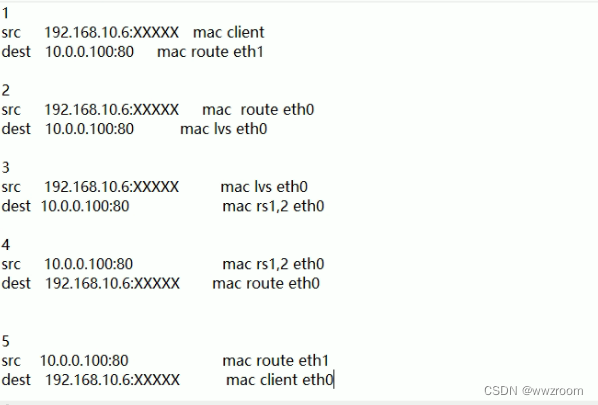
2.实验环境
环境:五台主机
一台:客户端 eth0:仅主机 192.168.10.6/24 GW:192.168.10.200

一台:ROUTER
eth0 :NAT 10.0.0.200/24
eth1: 仅主机 192.168.10.200/24
启用 IP_FORWARD

一台:LVS
eth0:NAT:DIP:10.0.0.8/24 GW:10.0.0.200#必须要有,可以随意写,因为没有的时候,lvs看到的是192.168.10.6的数据,不会进行转发,

两台RS:
RS1:eth0:NAT:10.0.0.7/24 GW:10.0.0.200
RS2:eth0:NAT:10.0.0.17/24 GW:10.0.0.200
3.后端RS1的IPVS配置
1.修改主机名
[[email protected]:~]#
hostnamectl set-hostname rs1.magedu.org && exit

2.安装httpd服务
[[email protected]:~]#
yum -y install httpd;echo rs1 `hostname -I` > /var/www/html/index.html;systemctl enable --now httpd

3.修改网关为10.0.0.200,dns用不上,可以删除
[[email protected]:~]#
vim /etc/sysconfig/network-scripts/ifcfg-eth0
DEVICE=eth0
NAME=eth0
BOOTPROTO=static
IPADDR=10.0.0.7
PREFIX=24
GATEWAY=10.0.0.200
DNS1=10.0.0.2
DNS2=180.76.76.76
ONBOOT=yes
[[email protected]:~]#
systemctl restart network

4.绑定VIP到lo回环网卡,同时关掉lo回环网卡arp
[[email protected]:~]#
echo 1 > /proc/sys/net/ipv4/conf/all/arp_ignore
[[email protected]:~]#
echo 1 > /proc/sys/net/ipv4/conf/lo/arp_ignore
#总开关和具体的网卡开关都要关掉才行。

[[email protected]:~]#
echo 2 > /proc/sys/net/ipv4/conf/all/arp_announce
[[email protected]:~]#
echo 2 > /proc/sys/net/ipv4/conf/lo/arp_announce

5. 配置VIP地址
[[email protected]:~]#
cp /etc/sysconfig/network-scripts/ifcfg-lo /etc/sysconfig/network-scripts/ifcfg-lo:1
[[email protected]:~]#
vim /etc/sysconfig/network-scripts/ifcfg-lo:1
DEVICE=lo:1
IPADDR=10.0.0.100
NETMASK=255.255.255.255
ONBOOT=yes
NAME=loopback1
[[email protected]:~]#
systemctl restart network
#临时配置方法,不需重启
ifconfig lo:1 10.0.0.100/32
4.后端RS2的IPVS配置
1.修改主机名
[[email protected]:~]#
hostnamectl set-hostname rs2.magedu.org && exit

2.安装httpd服务
[[email protected]:~]#
yum -y install httpd;echo rs1 `hostname -I` > /var/www/html/index.html;systemctl enable --now httpd

3.修改网关为10.0.0.200,dns用不上,可以删除
[[email protected]:~]#
vim /etc/sysconfig/network-scripts/ifcfg-eth0
DEVICE=eth0
NAME=eth0
BOOTPROTO=static
IPADDR=10.0.0.17
PREFIX=24
GATEWAY=10.0.0.200
DNS1=10.0.0.2
DNS2=180.76.76.76
ONBOOT=yes
[[email protected]:~]#
systemctl restart network

4.绑定VIP到lo回环网卡,同时关掉lo回环网卡arp
[[email protected]:~]#
echo 1 > /proc/sys/net/ipv4/conf/all/arp_ignore
[[email protected]:~]#
echo 1 > /proc/sys/net/ipv4/conf/lo/arp_ignore
#总开关和具体的网卡开关都要关掉才行。

[[email protected]:~]#
echo 2 > /proc/sys/net/ipv4/conf/all/arp_announce
[[email protected]:~]#
echo 2 > /proc/sys/net/ipv4/conf/lo/arp_announce

5. 配置VIP地址
[[email protected]:~]#
vim /etc/sysconfig/network-scripts/ifcfg-lo:1
DEVICE=lo:1
IPADDR=10.0.0.100
NETMASK=255.255.255.255
ONBOOT=yes
NAME=loopback1
[[email protected]:~]#
systemctl restart network
#临时配置方法,不需重启
ifconfig lo:1 10.0.0.100/32
5.client客户端网络配置
1.修改网卡,必须要配置网关,因为要和rs直接建立连接。
[[email protected] ~]#vim /etc/netplan/01-netcfg.yaml
network:
  version: 2
  renderer: networkd
  ethernets:
    eth0:
      addresses: [192.168.10.6/24]
      gateway4: 192.168.10.200
      nameservers:
        search: [magedu.com, magedu.org]
        addresses: [180.76.76.76, 8.8.8.8, 1.1.1.1]
[[email protected] ~]#netplan apply
[[email protected] ~]#route -n
Kernel IP routing table
Destination     Gateway         Genmask         Flags Metric Ref    Use Iface
0.0.0.0         192.168.10.200  0.0.0.0         UG    0      0        0 eth0
192.168.10.0    0.0.0.0         255.255.255.0   U     0      0        0 eth0
6.路由主机配置
1.vmware添加仅主机网卡,详细见下图

2.修改eth0网卡
[[email protected]:~]#
hostnamectl set-hostname route.magedu.org;exit
[[email protected]:~]#网关和dns解析用不上,可以删除。
vim /etc/sysconfig/network-scripts/ifcfg-eth0
DEVICE=eth0
NAME=eth0
BOOTPROTO=static
IPADDR=10.0.0.200
PREFIX=24
GATEWAY=10.0.0.2
DNS1=10.0.0.2
DNS2=180.76.76.76
ONBOOT=yes


3.配置eth1网卡
[[email protected]:~]#
cp /etc/sysconfig/network-scripts/ifcfg-eth0 /etc/sysconfig/network-scripts/ifcfg-eth1
[[email protected]:~]#
vim /etc/sysconfig/network-scripts/ifcfg-eth1
DEVICE=eth1
NAME=eth1
BOOTPROTO=static
IPADDR=192.168.10.200
PREFIX=24
GATEWAY=10.0.0.2
DNS1=10.0.0.2
DNS2=180.76.76.76
ONBOOT=yes
[[email protected]:~]#
nmcli con reload
[[email protected]:~]#
nmcli con
NAME                UUID                                  TYPE      DEVICE
eth0                5fb06bd0-0bb0-7ffb-45f1-d6edd65f3e03  ethernet  eth0
eth1                9c92fad9-6ecb-3e6c-eb4d-8a47c6f50c04  ethernet  eth1
Wired connection 1  36a1faac-f944-3a4a-98d1-21929b079ddf  ethernet  --
4.重启网卡
[[email protected]:~]#
nmcli con up eth1#
#也可以删除Wired connection 1
[[email protected]:~]#
nmcli con delete Wired\ connection\ 1  #必须添加\

[[email protected]:~]#
nmcli con up eth0

5.开启转发功能
[[email protected]:~]#
vim /etc/sysctl.conf
net.ipv4.ip_forward=1
[[email protected]:~]#
sysctl -p

7.LVS的网络配置
1.修改主机名
[[email protected]:~]#
hostnamectl set-hostname lvs.magedu.org && exit

2.安装相关包
[[email protected]:~]#
yum -y install ipvsadm


3.配置网络,网关和dns可以删除,因为不需要访问互联网。
[[email protected]:~]#
vim /etc/sysconfig/network-scripts/ifcfg-eth0
DEVICE=eth0
NAME=eth0
BOOTPROTO=static
IPADDR=10.0.0.8
PREFIX=24
GATEWAY=10.0.0.200
DNS1=10.0.0.2
DNS2=180.76.76.76
ONBOOT=yes
[[email protected]:~]#
nmcli con reload
[[email protected]:~]#
nmcli con up eth0

5.配置回环网卡ip,临时方法。
[[email protected]:~]#
ifconfig lo:1 10.0.0.100/32
8.LVS主机配置lvs规则
1.添加规则,管理集群服务
[[email protected]:~]#
ipvsadm -A -t 10.0.0.100:80 -s rr

2.添加规则,管理集群中的rs
[[email protected]:~]#
ipvsadm -a -t 10.0.0.100:80 -r 10.0.0.7:80 -g
[[email protected]:~]#
ipvsadm -a -t 10.0.0.100:80 -r 10.0.0.17:80 -g
[[email protected]:~]#
ipvsadm -Ln
IP Virtual Server version 1.2.1 (size=4096)
Prot LocalAddress:Port Scheduler Flags
  -> RemoteAddress:Port           Forward Weight ActiveConn InActConn
TCP  10.0.0.100:80 rr
  -> 10.0.0.7:80                  Route   1      0          0
  -> 10.0.0.17:80                 Route   1      0          0
9.client测试访问
[[email protected] ~]#while :; do curl 10.0.0.100;sleep 1;done
rs1 10.0.0.7
rs2 10.0.0.17
rs1 10.0.0.7
rs2 10.0.0.17
rs1 10.0.0.7
rs2 10.0.0.17
rs1 10.0.0.7
rs2 10.0.0.17
边栏推荐
- Unit conversion - mm to pixel - pixel to MM
- [QT] QT 5 procedure: print documents
- The city chain technology platform is realizing the real value Internet reconstruction!
- [QT] qtcreator shortcut key and QML introduction
- 在网上股票开户安全吗?证券账户可以给别人用吗?
- leetcode. 13 --- Roman numeral to integer
- 软件工程复习题
- What is the difference between TP5 and tp6?
- rosbag
- Rank sum ratio (RSR) index calculation
猜你喜欢

如何成为一名软件测试高手? 月薪3K到17K,我做了什么?

C language "recursive series": recursive implementation of 1+2+3++ n

How to calculate the independence weight index?

How to calculate the information entropy and utility value of entropy method?

检测点是否在多边形内

leetcode.13 --- 罗马数字转整数

About i/o -- the relationship between memory and CPU and disk

Find the nearest common ancestor (Sword finger offer) of two nodes in the binary tree (search tree)

The city chain technology platform is realizing the real value Internet reconstruction!

How to design test cases
随机推荐
Is it safe to open a stock account online now?
linux中的mysql有10061错误怎么解决
想开个户,网上股票开户安不安全?
【515. 在每个树行中找最大值】
Go language learning tutorial (13)
Is it safe to open an account for stocks on the Internet? Can the securities account be used by others?
如何设计测试用例
[operation tutorial] how does the tsingsee Qingxi video platform import the old database into the new database?
mysql之Unknown table ‘COLUMN_STATISTICS‘ in information_schema (1109)
想要软件测试效果好,搭建好测试环境是前提
如何成为一名软件测试高手? 月薪3K到17K,我做了什么?
What is the role of software validation testing? What is the price of the confirmation test report?
4個不可不知的采用“安全左移”的理由
城鏈科技平臺,正在實現真正意義上的價值互聯網重構!
Data preprocessing: discrete feature coding method
如何实现一个系统调用
Stimulsoft Ultimate呈现报告和仪表板
Trendmicro:apex one server tools folder
Almost taken away by this wave of handler interview cannons~
[summary] 1361- package JSON and package lock JSON relationship