当前位置:网站首页>Rk3588 compilation problem set
Rk3588 compilation problem set
2022-07-23 12:58:00 【Blue cabuda】
This document mainly records the compilation RK3588 Some problems encountered in the project , Related problems may also occur in other project compilation , The solution of this document is for reference only
1、 compile kernel appear arch/arm64/boot/Makefile:31: recipe for target ‘arch/arm64/boot/Image.lz4’ failed Report errors
  reason :lz4 Does not exist or the version is too low .
  terms of settlement 1: The system compilation environment is missing lz4 Component causes , Execute the following command to install
                        sudo apt-get update
                        apt-get install liblz4-tool
                        if update Execution failure , Please refer to the following links , Replace mirror source
                       http://3ms.huawei.com/km/blogs/details/11561033
But high probability even if the source is updated , Compilation will still report errors , The reason is that the official software source will not provide a very new version of code for stability , So you go through apt-get install To download the installed code is not the latest version . But some compilers specify very new versions , This creates a contradiction . So you can go github Pull the latest version of the code to install . as follows , See attachment for installation package .
terms of settlement 2: Download the latest lz4 Source code , install
$ git clone https://github.com/lz4/lz4.git
$ make
$ sudo make install
<<lz4-dev.zip>>
This project , Law 1 The problem cannot be solved , Recommendation 2.
2、
The development board is powered on , And automatically select from SD The card enters the new system .
Terminal login account :rock
password :rock
3、 compile debian Times wrong ERROR: Running build_debian failed!
4、 Report errors ./mk-base-debian.sh: line 29: cd: ubuntu-build-service/-desktop-: No such file or directory
reason : Without this folder
resolvent :
sudo apt-get install binfmt-support qemu-user-static live-build
sudo dpkg -i ubuntu-build-service/packages/*
sudo apt-get install -f
5、 Report errors E: Failed getting release file http://mirrors.ustc.edu.cn/debian/dists/bullseye/Release
reason : This is because you need to download from the Internet debain The relevant package , Unable to download due to the company's Network , Resulting in compilation failure
resolvent 1: Change to domestic sources
+++ b/ubuntu-build-service/bullseye-desktop-arm64/configure
@@ -11,6 +11,11 @@ set -e
echo “I: create configuration”
export LB_BOOTSTRAP_INCLUDE=“apt-transport-https gnupg”
lb config \
- –mirror-bootstrap “https://mirrors.tuna.tsinghua.edu.cn/debian” \
- –mirror-chroot “https://mirrors.tuna.tsinghua.edu.cn/debian” \
- –mirror-chroot-security “https://mirrors.tuna.tsinghua.edu.cn/debian-security”
\ - –mirror-binary “https://mirrors.tuna.tsinghua.edu.cn/debian” \
- –mirror-binary-security “https://mirrors.tuna.tsinghua.edu.c
n/debian-security”
–apt-indices false
–apt-recommends false
–apt-secure false
resolvent 2: Directly use the pre compiled package . See the attachment .
<<linaro-bullseye-alip-20220420-1.tar.gz>>
6、ERROR: Running build_recovery failed!
7、 Make an offline installation package and install
8、sh: 1: genext2fs: not found
resolvent : install ext2 File system generator
9、/bin/sh: 1: flex: not found
terms of settlement :sudo apt install flex bison coreutils qemu qemu-user-static python3 qemu-user-binfmt
10、[EDGE ERROR] Build kernel failed, cmd: make CROSS_COMPILE=/usr1/edge/prebuilts/gcc/linux-x86/aarch64/gcc-linaro-6.3.1-2017.05-x86_64_aarch64-linux-gnu/bin/aarch64-linux-gnu- LLVM=1 LLVM_IAS=1 -j 16 A
resolvent :sudo apt-get install repo git ssh make gcc libssl-dev liblz4-tool expect g++ patchelf chrpath gawk texinfo chrpath diffstat binfmt-support qemu-user-static live-build bison flex fakeroot cmake gcc-multilib g+±multilib unzip device-tree-compiler ncurses-dev
11、scripts/basic/fixdep.c:92:10: fatal error: ‘sys/types.h’ file not found
resolvent : install libc6-dev apt-get install libc6-dev
12、E: Unmet dependencies. Try ‘apt --fix-broken install’ with no packages (or specify a solution).
terms of settlement :apt --fix-broken install
13、You may also need to install pkg-config to find the ncurses installed in a non-default location.
resolvent :apt install pkg-config
14、dpkg: error: 1 expected program not found in PATH or not executable
resolvent :
sudo apt-get download libc-bin
dpkg -x libc-bin*.deb unpackdir/
sudo cp unpackdir/sbin/ldconfig /sbin/
sudo apt-get install --reinstall libc-bin
sudo apt-get -f install
15、Unable to find the ncurses package. Install ncurses (ncurses-devel or libncurses-dev depending on your distribution).
terms of settlement :apt install libncurses-dev
16、fatal error: cannot execute ‘cc1’: execvp: No such file or directory
reason : Missing from the tool chain cc1 file
resolvent : Copy the libraries and dependencies required for a complete cross tool chain to the compiler .
17、 fatal error: string.h: No such file or directory
reason : Same question 16
resolvent : Same question 16
18、/bin/sh: 1: flex: not found
reason : Related files are not installed
resolvent :sudo apt-get install flex bison
19、:0:12: fatal error: curses.h: No such file or directory
resolvent : install libncurses5-dev library
command :sudo apt-get install libncurses5-dev
20、When using ADD with more than one source file, the destination must be a directory and end with a /
reason : defect / Symbol .
resolvent : add to / Symbol
21、configure: error: *** gperf not found
resolvent :
install :
sudo apt-get install gperf
22、/bin/bash: pkg-config: command not found
resolvent :
install :
sudo apt-get install pkg-config
23、error: systemctl preset failed on samba-ad-dc.service: No such file or directory
resolvent :systemctl mask samba-ad-dc.service
24、/usr/lib/sudo/sudoers.so must be only be writable by owner
resolvent :
pkexec chmod go-w /usr/lib/sudo/sudoers.so
25、configure: error: cannot guess build type; you must specify one
resolvent : Add a platform option
./configure --build=arm-linux
边栏推荐
- 为什么要搭建本地yum仓库?
- DNS domain name resolution service
- Knowledge points and skills of Wireshark network analysis is so simple
- C # custom bidirectional linked list
- Learning diary - (routing and switching technology) dynamic routing (RIP protocol) and static routing
- C custom queue set
- Understanding of LSM tree (log structured merge tree)
- Vmware虚拟机和主机之间复制、粘贴内容、拖拽文件
- 0 dynamic planning leetcode1024. Video splicing
- Unity3d+moba+ skill indicator (II)
猜你喜欢

Unity3d:assetbundle simulation loading, synchronous loading, asynchronous loading, dependent package loading, automatic labeling, AB browser, incremental packaging

Learning diary (routing and switching technology) -- floating static routing and default routing
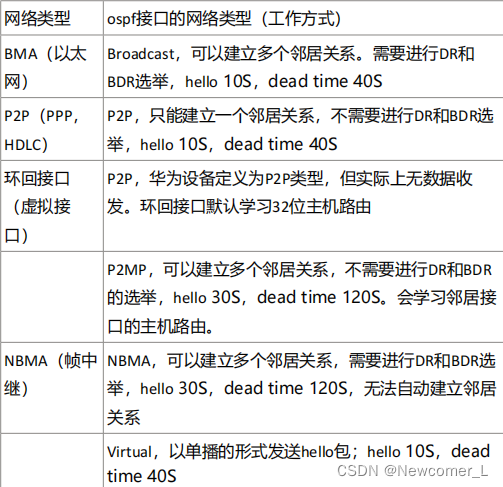
Hcip --- OSPF details

C # custom stack

FTP experiment and overview
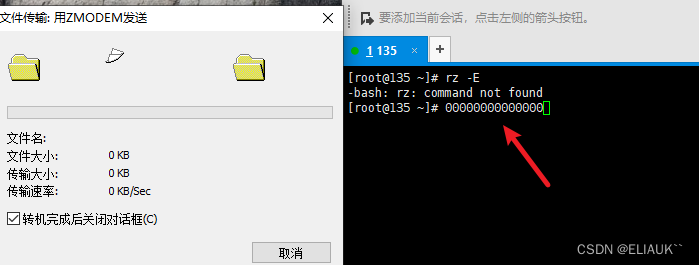
Quick solution: xshell can't drag into folders or software packages
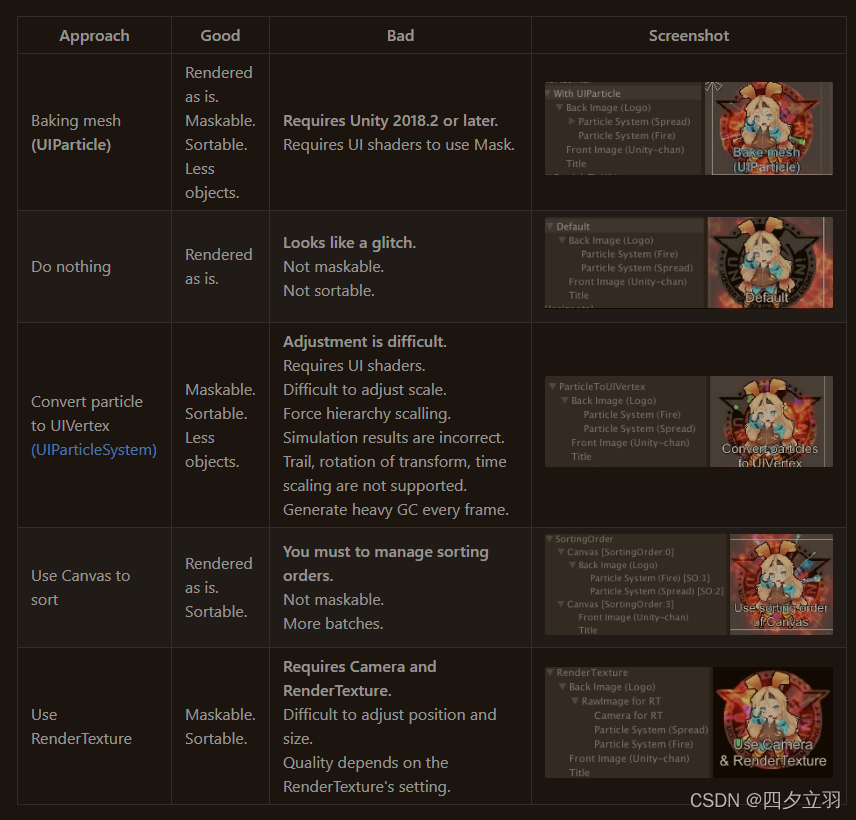
Unity3d:ugui, UI and special effect particle level, bakemesh above 2018.2, particles between two images and in Scrollview

单臂路由配置实例学习记录
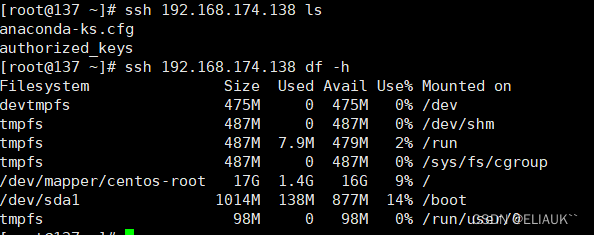
秘钥远程登录服务器实现免密登录实战

Explanation of websocket protocol
随机推荐
Knowledge points and skills of Wireshark network analysis is so simple
Learning diary - (routing and switching technology) dynamic routing (RIP protocol) and static routing
Hcip --- condition matching and OSPF Protocol
Array leetcode977. Square of ordered array
Learning diary - (routing and switching technology) OSPF Protocol
快速解决:Xshell拖不进去文件夹或者软件包的问题
Hcip-hcia knowledge review (II)
0 double pointer leetcode844. Compare strings with backspace
Explain various network protocols in detail
yum安装LNMP服务部署
Explain the establishment of TCP connection in detail
2020-09-20
Post form submission data limit
快速解决:Xshell拖不進去文件夾或者軟件包的問題
Routing and interface technology -- Summary of direct network
Unity3d+gameframework: resource analysis, resource dependency, circular dependency detection
RIP 配置实例学习记录
学习日记——(路由与交换技术)三层交换机
Understand the article frankly and get the HTTP protocol cache
Explanation of websocket protocol