当前位置:网站首页>Operate files through QT drag events
Operate files through QT drag events
2022-06-21 23:58:00 【Manon Feifei】
In order to improve the friendly interaction of users , stay QT Sometimes in the application, we need to drag and drop events to realize file shortcut . Here's how to achieve file shortcut by dragging events , First, we need to enable the drag event in the corresponding interface implementation , The corresponding configuration is as follows :
setAcceptDrops(true);
After the drag event is enabled, we can dragEnterEvent Event to determine whether there is a file in the dragged object . By judgment mimeData Include in text/uri-list Format data to determine whether there is a file in the drag object . If the dragged object contains a file , We can continue the follow-up events :
class ImageLoader : public QWidget
{

    Q_OBJECT
...
protected:
    // Drag into event
    void dragEnterEvent(QDragEnterEvent* event) override;
...
}
void ImageLoader::dragEnterEvent(QDragEnterEvent *event)
{

    // This event will be triggered every time a file is dragged onto the control
    // We can determine whether there is a corresponding file by dragging the data format
    // Follow up operations are only accepted when there are documents
    if(event->mimeData()->hasFormat("text/uri-list")){

        event->acceptProposedAction();
    }
}
After the control accepts the drag event , We can do that drop The file is processed when it is released , The processing flow is as follows , In the example, we mainly deal with text files and image files , In actual business, we can process files in different formats according to our own business .
class ImageLoader : public QWidget
{

    Q_OBJECT
...
protected:
    // Release dragged event
    void dropEvent(QDropEvent* event) override;
...
}
void ImageLoader::dropEvent(QDropEvent *event)
{

    // If there is no file, do nothing
    const QMimeData* mimeData = event->mimeData();
    if (!mimeData->hasUrls()) {

        return;
    }
    // Perform different operations according to the file type
    const QUrl url = mimeData->urls().first();
    QMimeType mime = QMimeDatabase().mimeTypeForUrl(url);
    // Print file type
    qDebug() << mime.name();
    if (mime.inherits("audio/wav")) {

        m_image_label->setText(" Audio file ");
    }
    else if(mime.inherits("text/plain"))
    {

        QString file_path = url.toLocalFile();
        QFile file(file_path);
        file.open(QIODevice::ReadOnly);
        QByteArray array = file.readAll();
        m_image_label->setText(array);
        file.close();
    }
    else if(mime.inherits("image/png"))
    {

        QString file_path = url.toLocalFile();
        QPixmap pixmap(file_path);
        m_image_label->setPixmap(pixmap);
    }
}
The example code of the whole calling process of dragging operation file is as follows , Welcome to :
//imageloader.h
#ifndef IMAGELOADER_H
#define IMAGELOADER_H

#include <QWidget>
#include <QLabel>

namespace Ui {

class ImageLoader;
}

class ImageLoader : public QWidget
{

    Q_OBJECT

public:
    explicit ImageLoader(QWidget *parent = 0);
    ~ImageLoader();


protected:
    // Drag into event
    void dragEnterEvent(QDragEnterEvent* event) override;

    // Release dragged event
    void dropEvent(QDropEvent* event) override;

private:
    QLabel* m_image_label = nullptr;
};
#endif // IMAGELOADER_H
//imageloader.cpp
#include "imageloader.h"
#include "ui_imageloader.h"
#include <QDropEvent>
#include <QMimeData>
#include <QMimeDatabase>
#include <QMimeType>
#include <QHBoxLayout>
#include <QDebug>

ImageLoader::ImageLoader(QWidget *parent) :
    QWidget(parent)
{


    m_image_label = new QLabel(this);
    QHBoxLayout* main_layout = new QHBoxLayout(this);
    main_layout->addWidget(m_image_label);
    this->setLayout(main_layout);
    m_image_label->setText(" Drag the file here ");
    // Set the control to receive drag events
    setAcceptDrops(true);
}

ImageLoader::~ImageLoader()
{

}

void ImageLoader::dragEnterEvent(QDragEnterEvent *event)
{

    // This event will be triggered every time a file is dragged onto the control
    // We can determine whether there is a corresponding file by dragging the data format
    // Follow up operations are only accepted when there are documents
    if(event->mimeData()->hasFormat("text/uri-list")){

        event->acceptProposedAction();
    }
}

void ImageLoader::dropEvent(QDropEvent *event)
{

    // If there is no file, do nothing
    const QMimeData* mimeData = event->mimeData();
    if (!mimeData->hasUrls()) {

        return;
    }
    // Perform different operations according to the file type
    const QUrl url = mimeData->urls().first();
    QMimeType mime = QMimeDatabase().mimeTypeForUrl(url);
    // Print file type
    qDebug() << mime.name();
    if (mime.inherits("audio/wav")) {

        m_image_label->setText(" Audio file ");
    }
    else if(mime.inherits("text/plain"))
    {

        QString file_path = url.toLocalFile();
        QFile file(file_path);
        file.open(QIODevice::ReadOnly);
        QByteArray array = file.readAll();
        m_image_label->setText(array);
        file.close();
    }
    else if(mime.inherits("image/png"))
    {

        QString file_path = url.toLocalFile();
        QPixmap pixmap(file_path);
        m_image_label->setPixmap(pixmap);
    }
}
The use effect is as follows: :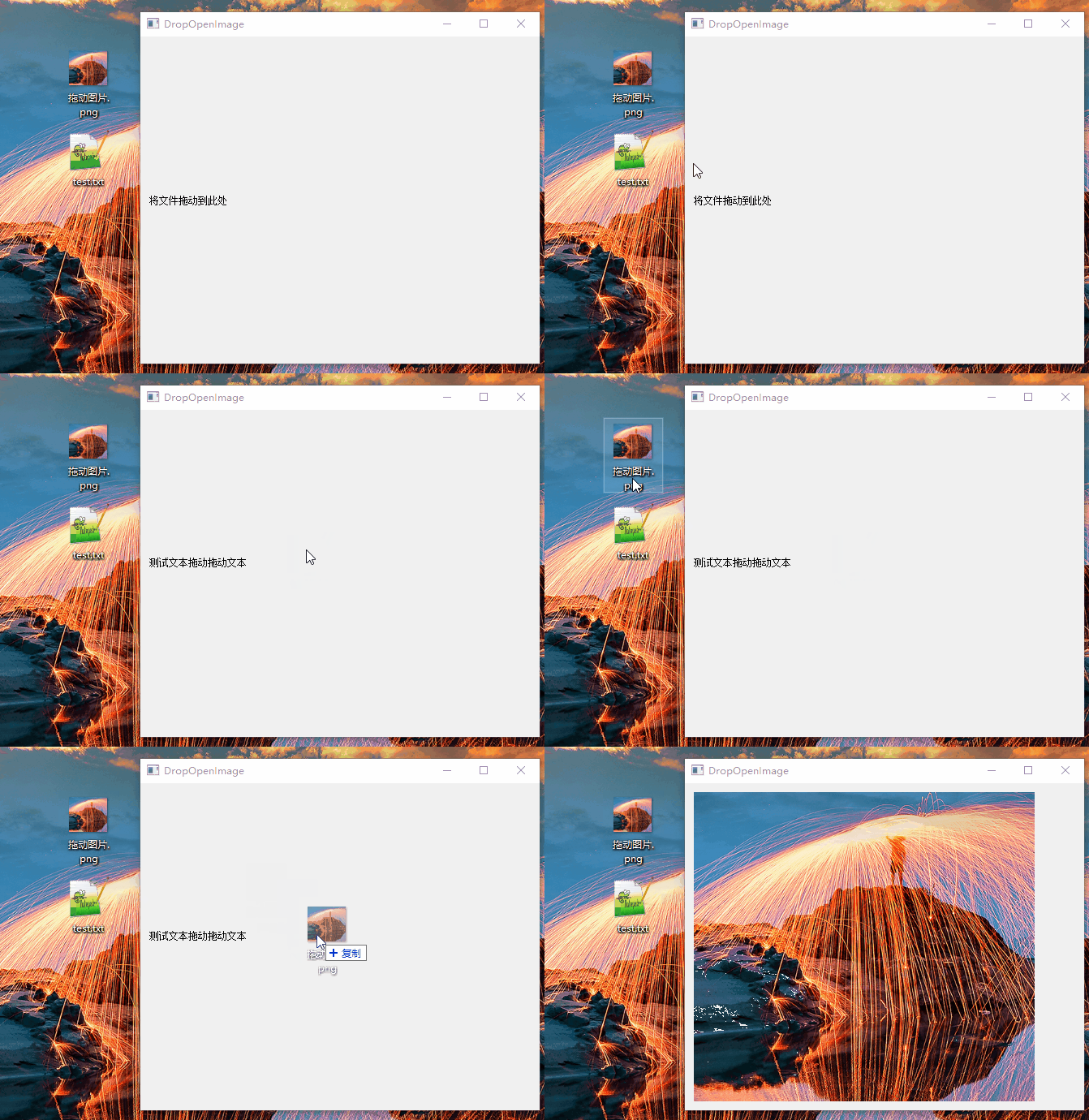
边栏推荐
- Notes on the development of raspberry pie (16): Raspberry pie 4b+ install MariaDB database (MySQL open source branch) and test basic operations
- Win11打字不显示选字框怎么办?Win11打字不显示选字框的解决方法
- ERP已死,管理后台已凉,秒杀系统称王!
- Layout roadmap, the perfect combination of spatial layout and data visualization
- Fork join thread pool
- 组件传值:子组件向父组件传递数据
- After a low code manufacturer stopped serving
- 211高校神級碩士論文刷屏!75行字錯了20行!學校回應:導師停招...
- ERP is dead, the management background is cold, and seckill system is king!
- Unity network development (I)
猜你喜欢

What are the trends of cloud computing in 2022?

Fork join thread pool

标志位生成

转载:网络加载框架 - Retrofit

Hardware development notes (IV): basic process of hardware development, making a USB to RS232 module (III): design schematic diagram

Cola and herbal tea speed up mutual rolling

基于Arduino框架下VSCode PlatformIO一个项目配置两种不同开发板的兼容模式
硬件开发笔记(四):硬件开发基本流程,制作一个USB转RS232的模块(三):设计原理图

树莓派开发笔记(十六):树莓派4B+安装mariadb数据库(mysql开源分支)并测试基本操作

关于 安装Qt5.15.2启动QtCreator后“应用程序无法正常启动0xc0000022” 的解决方法
随机推荐
关于 安装Qt5.15.2启动QtCreator后“应用程序无法正常启动0xc0000022” 的解决方法
QT scrollarea qscrollarea
关于 QtCreator的设计器QtDesigner完全无法正常拽托控件 的解决方法
Software project lawyer due diligence white paper - full text 19 pages, please contact the author
Install the domestic image of scoop in Windows
Voir la valeur des données, éclairer l'avenir numérique, le pouvoir numérique est sorti
Truncate strings by length into an array
Based on vscode platformio under Arduino framework, one project is configured with two compatibility modes of different development boards
Kirin System Development Notes (V): making and installing the startup USB flash disk of the Kirin system, installing the Kirin system on the physical machine, and building a Qt development environment
Layout roadmap, the perfect combination of spatial layout and data visualization
今日睡眠质量记录81分
About the designer of qtcreator the solution to the problem that qtdesigner can't pull and hold controls normally
软件项目律师尽职调查白皮书-全文19页,请与作者联系
Fork join thread pool
企业综合组网实训二
Insight into the value of data, enlighten the digital future, and the power of digitalization came out
通过QT的拖拽事件来操作文件
布局路线图,空间布局与数据可视化的完美结合
What are the trends of cloud computing in 2022?
Pltmodify abscissa and ordinate colors