当前位置:网站首页>Home page navigation + left menu of spa project development
Home page navigation + left menu of spa project development
2022-06-22 22:08:00 【Gu Bei!】
The content of this issue :
1、mock.js Analog response ajax request
2、 Construction of front desk main interface
3、 Exit function
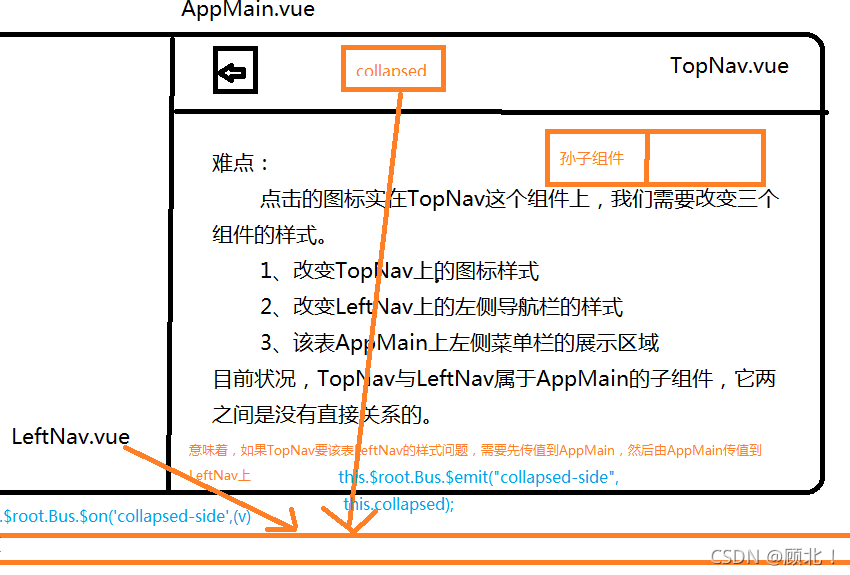
4、 Left tree shrinkage function (vue The concept of bus )
One 、mock.js Analog response ajax request
1、 install mockjs rely on
npm install mockjs -D # Only in the development environment
2、 Configure development environment and production environment
For use only in the development environment mock, When packaged into the production environment, it is not used automatically mock, We can do it in env Make a configuration in
development environment dev.env.js:
'use strict'
const merge = require('webpack-merge')
const prodEnv = require('./prod.env')

module.exports = merge(prodEnv, {
  NODE_ENV: '"development"',
  MOCK:'true'
})
Production environment prod.env:
'use strict'
module.exports = {
  NODE_ENV: '"production"',
  MOCK:'false'
}
Only in the development environment will mockjs:main.js
process.env.MOCK && require('@/mock')
// The Vue build version to load with the `import` command
// (runtime-only or standalone) has been set in webpack.base.conf with an alias.
import Vue from 'vue'
//  Only in the development environment will mock.js
// development environment :true && require('@/mock') Will execute the following code , in other words mock.js Will be imported into the current environment
//  Production environment :false && require('@/mock') Will not execute the following code , in other words mock.js Will not be introduced into the current environment
process.env.MOCK && require('@/mock')

import 'element-ui/lib/theme-chalk/index.css'
import App from './App'
import router from './router'
import ElementUI from 'element-ui'
import axios from '@/api/http'  /* #vue Project pair axios Global configuration for  */
import VueAxios from 'vue-axios'


Vue.use(ElementUI)
Vue.use(VueAxios,axios)
Vue.config.productionTip = false

/* eslint-disable no-new */
new Vue({
  el: '#app',
  router,
  components: { App },
  template: '<App/>'
})
Introducing tools :

login-mock.js: Multiple interfaces can be generated , To build the data
// const loginInfo = {
//     code: -1,
//     message: ' Wrong password '
// }

// Use mockjs Generate random data from the template
const loginInfo = {
    'code|0-1': 0,
    'msg|3-10': 'msg'
}
export default loginInfo;
index.js: Reference data
import Mock from 'mockjs' // introduce mockjs,npm already installed
import action from '@/api/action' // Import request address

// Global settings : Set all ajax The timeout for the request , Analog network transmission takes time
Mock.setup({
    // timeout: 400  // Time delay 400s Request to data
    timeout: 200 - 400 // Time delay 200-400s Request to data
})

// Test data of landing , And add to mockjs
import loginInfo from '@/mock/json/login-mock.js'
let s1 = action.getFullPath('SYSTEM_USER_DOLOGIN')
Mock.mock(s1, "post", loginInfo)
// Mock.mock(s1, /post|get/i, loginInfo)
summary mock.js Use :
①、 Define the returned by the interface call json Format
②、 Back to json The format is bound with the corresponding interface request address index.js
s1 Address :http://localhost:8080/t_216/userAction_login.action
let s1 = action.getFullPath('SYSTEM_USER_DOLOGIN')
Mock.mock(s1, "post", loginInfo)
Presenting results : The results are randomly generated , There are successes and failures

Two 、 The concept of bus
1、 Import components into

AppMain.vue:
<template>
	<el-container class="main-container">
		<el-aside v-bind:class="asideClass">
			<LeftNav></LeftNav>
		</el-aside>
		<el-container>
			<el-header class="main-header">
				<TopNav></TopNav>
			</el-header>
			<el-main class="main-center">Main</el-main>
		</el-container>
	</el-container>
</template>

<script>
	//  Import components
	import TopNav from '@/components/TopNav.vue'
	import LeftNav from '@/components/LeftNav.vue'

	//  Export module
	export default {
		data(){
      return{
        asideClass:'main-aside'
      }
    },
    components:{
      TopNav,LeftNav
    },
    created(){
      this.$root.Bus.$on('collapsed-side',(v)=>{
        this.asideClass=v ? 'main-aside-collapsed':'main-aside';
      })
    }
	};
</script>
<style scoped>
	.main-container {
		height: 100%;
		width: 100%;
		box-sizing: border-box;
	}

	.main-aside-collapsed {
		/*  stay CSS in , By declaring... On a style ! important , You can change the default CSS Style priority rules , Give the style attribute declaration the highest priority  */
		width: 64px !important;
		height: 100%;
		background-color: #334157;
		margin: 0px;
	}

	.main-aside {
		width: 240px !important;
		height: 100%;
		background-color: #334157;
		margin: 0px;
	}

	.main-header,
	.main-center {
		padding: 0px;
		border-left: 2px solid #333;
	}
</style>
LeftNav.vue:
<template>
	<el-menu default-active="2" class="el-menu-vertical-demo" background-color="#334157"
	 text-color="#fff" active-text-color="#ffd04b" :collapse="collapsed" >
		<!-- <el-menu default-active="2" :collapse="collapsed" collapse-transition router :default-active="$route.path" unique-opened class="el-menu-vertical-demo" background-color="#334157" text-color="#fff" active-text-color="#ffd04b"> -->
		<div class="logobox">
			<img class="logoimg" src="../assets/img/logo.png" alt="">
		</div>
		<el-submenu index="1">
			<template slot="title">
				<i class="el-icon-location"></i>
				<span> Navigation one </span>
			</template>
			<el-menu-item-group>
				<template slot="title"> Group one </template>
				<el-menu-item index="1-1"> Options 1</el-menu-item>
				<el-menu-item index="1-2"> Options 2</el-menu-item>
			</el-menu-item-group>
			<el-menu-item-group title=" grouping 2">
				<el-menu-item index="1-3"> Options 3</el-menu-item>
			</el-menu-item-group>
			<el-submenu index="1-4">
				<template slot="title"> Options 4</template>
				<el-menu-item index="1-4-1"> Options 1</el-menu-item>
			</el-submenu>
		</el-submenu>
		<el-menu-item index="2">
			<i class="el-icon-menu"></i>
			<span slot="title"> Navigation two </span>
		</el-menu-item>
		<el-menu-item index="3" disabled>
			<i class="el-icon-document"></i>
			<span slot="title"> Navigation three </span>
		</el-menu-item>
		<el-menu-item index="4">
			<i class="el-icon-setting"></i>
			<span slot="title"> Navigation four </span>
		</el-menu-item>
	</el-menu>
</template>
<script>
	export default {
  data(){
    return{
      collapsed:false
    }
  },
  created(){
    this.$root.Bus.$on('collapsed-side',(v)=>{
      this.collapsed=v;
    })
  }
	}
</script>
<style>
	.el-menu-vertical-demo:not(.el-menu--collapse) {
		width: 240px;
		min-height: 400px;
	}

	.el-menu-vertical-demo:not(.el-menu--collapse) {
		border: none;
		text-align: left;
	}

	.el-menu-item-group__title {
		padding: 0px;
	}

	.el-menu-bg {
		background-color: #1f2d3d !important;
	}

	.el-menu {
		border: none;
	}

	.logobox {
		height: 40px;
		line-height: 40px;
		color: #9d9d9d;
		font-size: 20px;
		text-align: center;
		padding: 20px 0px;
	}

	.logoimg {
		height: 40px;
	}
</style>
TopNav.vue:
<template>
	<!-- <el-menu :default-active="activeIndex2" class="el-menu-demo" mode="horizontal" @select="handleSelect" background-color="#545c64"
	 text-color="#fff" active-text-color="#ffd04b">
		<el-menu-item index="1"> Processing center </el-menu-item>
		<el-submenu index="2">
			<template slot="title"> My workbench </template>
			<el-menu-item index="2-1"> Options 1</el-menu-item>
			<el-menu-item index="2-2"> Options 2</el-menu-item>
			<el-menu-item index="2-3"> Options 3</el-menu-item>
			<el-submenu index="2-4">
				<template slot="title"> Options 4</template>
				<el-menu-item index="2-4-1"> Options 1</el-menu-item>
				<el-menu-item index="2-4-2"> Options 2</el-menu-item>
				<el-menu-item index="2-4-3"> Options 3</el-menu-item>
			</el-submenu>
		</el-submenu>

		<el-menu-item index="3" disabled> Message center </el-menu-item>
		<el-menu-item index="4"><a href="https://www.ele.me" target="_blank"> Order management </a></el-menu-item>
	</el-menu> -->
	<el-menu class="el-menu-demo" mode="horizontal" background-color="#334157" text-color="#fff" active-text-color="#fff">
		<el-button class="buttonimg">
			<img class="showimg" :src="collapsed?imgshow:imgsq" @click="doToggle()">
		</el-button>
		<el-submenu index="2" class="submenu">
			<template slot="title"> Super administrator </template>
			<el-menu-item index="2-1"> Set up </el-menu-item>
			<el-menu-item index="2-2"> Personal center </el-menu-item>
			<el-menu-item @click="exit()" index="2-3"> sign out </el-menu-item>
		</el-submenu>
	</el-menu>
</template>

<script>
	export default {
		data(){
     return{
       collapsed:false,
       imgsq:require('@/assets/img/sq.png'),
       imgshow:require('@/assets/img/show.png')
     }
    },
    methods:{
      doToggle(){
        this.collapsed=!this.collapsed;
        this.$root.Bus.$emit("collapsed-side",this.collapsed);
      },
      exit(){
        this.$router.push({
          path:'/login'
        })
      }
    }
	}
</script>

<style scoped>
	.el-menu-vertical-demo:not(.el-menu--collapse) {
		border: none;
	}

	.submenu {
		float: right;
	}

	.buttonimg {
		height: 60px;
		background-color: transparent;
		border: none;
	}

	.showimg {
		width: 26px;
		height: 26px;
		position: absolute;
		top: 17px;
		left: 17px;
	}

	.showimg:active {
		border: none;
	}
</style>
2、 Import image

3、 Configuration components
index.js:
import Vue from 'vue'
import Router from 'vue-router'
import HelloWorld from '@/components/HelloWorld'
import login from '@/views/login'
import Reg from '@/views/Reg'
import AppMain from '@/components/AppMain'
import LeftNav from '@/components/LeftNav'
import TopNav from '@/components/TopNav'

Vue.use(Router)

export default new Router({
  routes: [
    {
      path: '/',
      name: 'login',
      component: login
    },
    {
      path: '/login',
      name: 'login',
      component: login
    },
    {
      path: '/Reg',
      name: 'Reg',
      component: Reg
    },
    {
      path: '/AppMain',
      name: 'AppMain',
      component: AppMain,
      children:[
        {
          path: '/LeftNav',
          name: 'LeftNav',
          component: LeftNav
        },
        {
          path: '/TopNav',
          name: 'TopNav',
          component: TopNav
        }
      ]
    }
  ]
})
4、 Log in to the jump interface
Login.js Add the jump of the interface after successful login to the file :
this.$router.push({path:'/AppMain'});
5、 Defining variables , Certified components LeftNav.vue,AppMain.vue,TopNav.vue The code is on top
Presenting results :

6、 Click on the top left corner to shrink it
①、 Define mainline :main.js
new Vue({
  el: '#app',
  data(){
    return{
      //  Define mainline
      Bus:new Vue({

      })
    }
  },
  router,
  components: { App },
  template: '<App/>'
})
②、 Picture switching , Define click events
TopNav:
<script>
    export default {
        data(){
      return{
        collapsed:false,
        //  Picture to be displayed without folding
        imgshow:require('@/assets/img/show.png'),
        imgsq:require('@/assets/img/sq.png')
      }
    },
    methods:{
      doToggle(){
        this.collapsed=!this.collapsed;
      }
    }
    }
</script>
Registration events :TopNav
<script>
    export default {
        data(){
      return{
        collapsed:false,
        //  Picture to be displayed without folding
        imgshow:require('@/assets/img/show.png'),
        imgsq:require('@/assets/img/sq.png')
      }
    },
    methods:{
      doToggle(){
        this.collapsed=!this.collapsed;
        this.$root.Bus.$emit("collapsed-aside",this.collapsed);
      }
    }
    }
</script>
monitor :LeftNav
<script>
    export default {
        data(){
      return{
        collapsed:false
      }
    },
    //  Triggered when a component is accessed ,v It refers to the collapsed variable
    created(){
      this.$root.Bus.$on("collapsed-aside",(v)=>{
        this.collapsed=v;
      });
    }
    }
</script>
AppMain:
<script>
    //  Import components
    import TopNav from '@/components/TopNav.vue'
    import LeftNav from '@/components/LeftNav.vue'

    //  Export module
    export default {
        data(){
      return {
        asideClass:'main-aside'
      }
    },
    //  Certified components
    components:{
      TopNav,LeftNav
    },
    //  Triggered when a component is accessed ,v It refers to the collapsed variable
    created(){
      this.$root.Bus.$on("collapsed-aside",(v)=>{
        this.asideClass=v ? 'main-aside-collapsed ' : 'main-aside';
      });
    }
    };
</script>
effect :

3、 ... and 、 Exit function
Click to exit :TopNav
<script>
    export default {
        data(){
      return{
        collapsed:false,
        //  Picture to be displayed without folding
        imgshow:require('@/assets/img/show.png'),
        imgsq:require('@/assets/img/sq.png')
      }
    },
    methods:{
      doToggle(){
        this.collapsed=!this.collapsed;
        this.$root.Bus.$emit("collapsed-aside",this.collapsed);
      },
      exit(){
        this.$router.push({path:'/Login'});
      }
    }
    }
</script>边栏推荐
- 万字长文 | 使用 RBAC 限制对 Kubernetes 资源的访问
- Lesson 031: permanent storage: pickle a jar of delicious pickles | after class test questions and answers
- 第029讲:文件:一个任务 | 课后测试题及答案
- 第021讲:函数:lambda表达式 | 课后测试题及答案
- 第022讲:函数:递归是神马 | 课后测试题及答案
- TC397 Flash
- 第020讲:函数:内嵌函数和闭包 | 课后测试题及答案
- Lesson 019: function: my site listen to my after-school test questions and answers
- Share deadlock problems encountered in insert into select (project practice)
- 数据科学家是不是特有前途的职业?
猜你喜欢

引入稀疏激活机制!Uni-Perceiver-MoE显著提升通才模型的性能

7-9 super Mary

Lesson 014-15: string (see lesson 27-32 of the new version of little turtle) | after class test questions and answers

SPA项目开发之CRUD+表单验证

Optimization solver | gurobi's Mvar class: a sharp tool for matrix modeling and an alternative solution to dual problems (with detailed cases and codes attached)

Redis核心技术与实战:学习总结目录
Redis core technology and practice: learning summary directory
CVPR2022 | 用于重采图像的特征解耦学习与动态融合

第025讲:字典:当索引不好用时 | 课后测试题及答案

Lesson 019: function: my site listen to my after-school test questions and answers
随机推荐
Lesson 014-15: string (see lesson 27-32 of the new version of little turtle) | after class test questions and answers
7-1 前序序列创建二叉树
TC397 Flash
第030讲:文件系统:介绍一个高大上的东西 | 课后测试题及答案
第033讲:异常处理:你不可能总是对的2 | 课后测试题及答案
第020讲:函数:内嵌函数和闭包 | 课后测试题及答案
NiO copy file call getchannel method transferfrom()
The second harmonyos application development training
(duc/ddc) digital up mixing / quadrature down mixing principle and MATLAB simulation
Install MySQL for Linux (package succeeded!!)
90- review of several recently optimized Oracle databases
How to use the data dictionary function in the low code platform of the Internet of things?
杰理之外挂 4M 的 flash 在 PC 上查看大小只有 1M 的处理方法【篇】
Why do you think it is common for Chinese people to earn more than 10000 yuan a month?
Jerry's problem of opening the near end of four channel call [chapter]
7-9 超级玛丽
第026讲:字典:当索引不好用时2 | 课后测试题及答案
Research hotspot - Official publicity! The release time of JCR zoning and impact factors will be determined in 2022!
86- to attend & lt; SQL writing and rewriting training & gt; 's participants add a second-hand case
6-1 operation set of binary search tree