当前位置:网站首页>Share deadlock problems encountered in insert into select (project practice)
Share deadlock problems encountered in insert into select (project practice)
2022-06-22 21:33:00 【Chen Xi should work hard】
【 Chen Xi has to work hard 】:hello Hello, I'm Chen Xi , I'm glad you came to read , Nickname is the hope that you can constantly improve , Moving forward to good programmers !
The blog comes from the project and the summary of the problems encountered in programming , Occasionally there are books to share , I'll keep updating Java front end 、 backstage 、 database 、 Project cases and other related knowledge points summary , Thank you for your reading and attention , I hope my blog can help more people , Share and gain new knowledge , Make progress together !
We quarryers , The heart of a cathedral , May we go in our own love …
One 、 The deadlock problem
Recently, when it comes to the migration of large data table data , Using the insert into select, Encountered some deadlock problems , I met some pits , Now organize and share !

The reason for my deadlock may be that the business logic is too complex , The top layer is added with transactions , This causes the business process to execute too slowly , Transaction not committed , Other threads may use the same data table , The previous resource is not released, resulting in a deadlock .
Finally, checking the business code is related to two things , One is the use of transactions , One is insert into select Application
### Cause: com.mysql.jdbc.exceptions.jdbc4.MySQLTransactionRollbackException: Lock wait timeout exceeded; try restarting transaction
; SQL []; Lock wait timeout exceeded; try restarting transaction; nested exception is com.mysql.jdbc.exceptions.jdbc4.MySQLTransactionRollbackException: Lock wait timeout exceeded; try restarting transaction

Effect corresponding to deadlock

Kill by command line MySQL Threads
--  Query all currently running transactions
select * from information_schema.innodb_trx

--  If a deadlock occurs , You can kill the currently running transaction through the following command
kill 258956
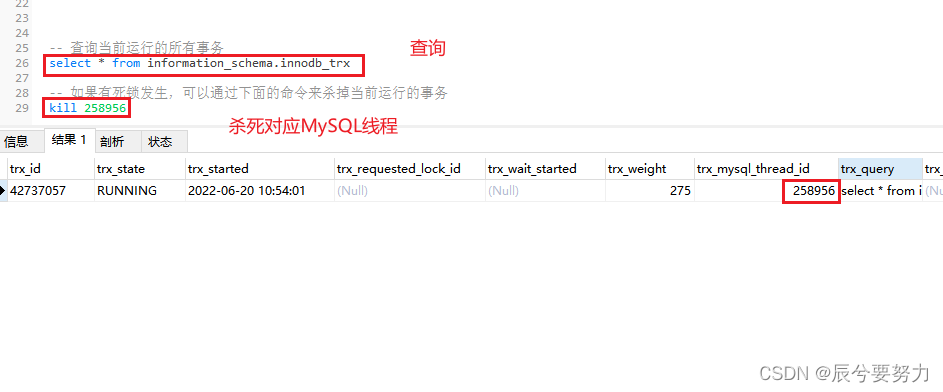
After executing the corresponding command, execute the query operation again to see the transactions that are not running ;

Use in the database insert into select when ,select Statement plus a filter condition , Go to the index , In this way, the whole table will not be scanned and the table will not be locked .
In case of deadlock, you must check the business logic repeatedly sql, Check whether the table is locked due to writing problems !

matters needing attention
- InnoDB The row lock of is the lock added for the index , It's not a lock on records . And the index cannot be invalidated , Otherwise, it will be upgraded from row lock to table lock .
How to check your own SQL Whether the statement uses the index ?
- Use EXPLAIN Just use it :key Show SQL The keys that actually determine the results of the query ( Indexes ). If index is not used , The value is NULL

Expand the problem
- When using transactions, you should notice when transactions will fail
- When you use an index, you should notice when the index will fail
Two 、 Insert the question
In execution insert into select The corresponding fields must be mapped one by one , Otherwise, an error will be reported , Or data execution error
CREATE TABLE `bill` (
  `id` int(11) NOT NULL AUTO_INCREMENT COMMENT ' Primary key ',
  `title` varchar(255) DEFAULT NULL,
  `userid` int(11) DEFAULT NULL COMMENT ' user id',
  `money` float(99,2) DEFAULT NULL COMMENT ' amount of money ',
  `typeid` int(11) NOT NULL COMMENT ' type  1  income  2  spending ',
  `remark` varchar(255) DEFAULT NULL COMMENT ' remarks ',
  `paywayid` int(11) DEFAULT NULL COMMENT ' Method of payment ',
  `time` datetime NOT NULL DEFAULT CURRENT_TIMESTAMP COMMENT ' Trading hours ',
  PRIMARY KEY (`id`) USING BTREE
) ENGINE=InnoDB AUTO_INCREMENT=234 DEFAULT CHARSET=utf8 ROW_FORMAT=DYNAMIC;
CREATE TABLE `bill_test` (
  `id` int(11) NOT NULL AUTO_INCREMENT COMMENT ' Primary key ',
  `title` varchar(255) DEFAULT NULL,
  `userid` int(11) DEFAULT NULL COMMENT ' user id',
  `money` float(99,2) DEFAULT NULL COMMENT ' amount of money ',
  `typeid` int(11) NOT NULL COMMENT ' type  1  income  2  spending ',
  `remark` varchar(255) DEFAULT NULL COMMENT ' remarks ',
  `paywayid` int(11) DEFAULT NULL COMMENT ' Method of payment ',
  `time` datetime NOT NULL DEFAULT CURRENT_TIMESTAMP COMMENT ' Trading hours ',
  PRIMARY KEY (`id`) USING BTREE
) ENGINE=InnoDB AUTO_INCREMENT=234 DEFAULT CHARSET=utf8 ROW_FORMAT=DYNAMIC;
insert into bill_test (`id`,`title`,`userid`,`money`,`typeid`,`remark`,`paywayid`)
select  `id`,`title`,`userid`,`money`,`typeid`,`remark`,`paywayid`  from   bill

Because the normal business scenario will not have such a field , There are enough docking fields between tables , And the fields of the table and the table do not correspond in order , All items should be arranged in order and found out , Insert again , In the final test, go to the database to check whether the data is correct
Wrong cases : Here is a simple demonstration of a type mismatch problem

appear Data truncated for column ‘xxx’ at row 1 Why
MySQL When importing files, it is easy to see "Data truncated for column ‘xxx’ at row x", In the string xxx and x It refers to the specific number of columns and rows .
occasionally , This is because the data types do not correspond , Or the string length is not enough .
Thank you very much for reading here , If this article helps you , I hope I can leave your praise Focus on ️ Share Leaving a message. thanks!!!
May we go in our own love !
边栏推荐
- ByteDance proposes a lightweight and efficient new network mocovit, which has better performance than GhostNet and mobilenetv3 in CV tasks such as classification and detection
- RuntimeError: CUDA error: CUBLAS_STATUS_EXECUTION_FAILED when calling `cublasSgemmStridedBatched( ha
- 74- how to remedy the loss of Oracle to MySQL for this kind of SQL optimization?
- 92 match for several_ Recognize SQL write example
- Learning websites that programmers must see
- RealNetworks vs. 微软:早期流媒体行业之争
- 百家讲坛 黄帝内经(第一部)
- 第030讲:文件系统:介绍一个高大上的东西 | 课后测试题及答案
- ACM. HJ45 名字的漂亮度 ●●
- 78- several methods to solve SQL performance problems without changing code in production system
猜你喜欢
![[the penultimate node in the linked list]](/img/b2/be3b0611981dd0248b3526e8958386.png)
[the penultimate node in the linked list]

2022年山东省安全员C证考试试题模拟考试平台操作
![[redis] cluster and common errors](/img/a5/94906b62b1ec0d549f9b72ff3db7f2.png)
[redis] cluster and common errors
![[redis] publish and subscribe](/img/50/0c2fbbb8f56fccdd3222b77efdd723.png)
[redis] publish and subscribe
![[redis]Redis6的主从复制](/img/47/3be33a0d7435bd75cdd6e7b4ea51d4.png)
[redis]Redis6的主从复制
Operation of simulation test platform for 2022 Shandong safety officer C certificate test

Install MySQL in ECS (version 2022)
【链表中倒数第k个结点】

优化求解器 | Gurobi的MVar类:矩阵建模利器、求解对偶问题的备选方案 (附详细案例+代码)

【CM11 链表分割】
随机推荐
kali2021安装RTL8188GU无线网卡[TL-WN726N]驱动
92 match for several_ Recognize SQL write example
[redis] publish and subscribe
75- when left join encounters subquery
PHP image making
[the penultimate node in the linked list]
第022讲:函数:递归是神马 | 课后测试题及答案
CVPR2022 | 海德堡大学《深度视觉相似性与度量学习》教程
第028讲:文件:因为懂你,所以永恒 | 课后测试题及答案【无标题】
第026讲:字典:当索引不好用时2 | 课后测试题及答案
NFT,只可远观不可亵玩焉
[160. cross linked list]
解决phpstudy中mysql无法启动,与本地安装的mysql冲突
第029讲:文件:一个任务 | 课后测试题及答案
第025讲:字典:当索引不好用时 | 课后测试题及答案
杰理之在music模式下提示音使用打断模式无法播放的问题【篇】
Operation of simulation test platform for 2022 Shandong safety officer C certificate test
[redis]配置文件
Apple corefoundation source code
安卓kotlin sp dp转px