当前位置:网站首页>Lesson 014-15: string (see lesson 27-32 of the new version of little turtle) | after class test questions and answers
Lesson 014-15: string (see lesson 27-32 of the new version of little turtle) | after class test questions and answers
2022-06-22 21:35:00 【ChaseTimLee】
Due to the latest version of small turtle python Updated to function , And the logic of the new version is clearer , After class test exercises use the new version of test questions
A collection of various methods of string https://fishc.com.cn/thread-183975-1-3.html
The first 027 speak : character string (I)| After class test questions and answers
- Change the upper and lower case letters
capitalize()、casefold()、title()、swapcase()、upper()、lower() - Align left middle right
center(width, fillchar=’ ‘)、ljust(width, fillchar=’ ‘)、rjust(width, fillchar=’ ')、zfill(width)
Q & A questions :
0. casefold() and lower() Both methods make all letters lowercase , What's the difference between them ?
According to the official documentation ,lower() Can only handle English letters , and casefold() Besides English , You can also handle more characters in other languages , Like German ……
1. The execution result of the following code is ?
>>> "-520".zfill(10)
-000000520
2. Excuse me, “-520”.zfill(10) and “-520”.rjust(10, “0”) Are the results the same ?
Dissimilarity
-520".zfill(10) -> -000000520
-520".rjust(10, “0”) -> 000000-520
3. The execution result of the following code is ?
>>> "-520".center(6, "0").zfill(10)
-520".center(6, “0”) -> 0-5200
-520".center(6, “0”).zfill(10) -> 00000-5200
4. The execution result of the following code is ?
>>> "I love FishC".swapcase()[::-1]
“I love FishC”.swapcase() -> “i LOVE fISHc”
“I love FishC”.swapcase()[::-1] -> “cHSIf EVOL i”
5. Use one line of code to detect whether each element in the list is a palindrome number , And return a list with palindromes as the result
List provided :[“123”, “33211”, “12321”, “13531”, “112233”]
The result returned :[‘12321’, ‘13531’]
>>>x = ["123", "33211", "12321", "13531", "112233"]
>>>[each for each in x if each == each[::-1]]
['12321', '13531']
use one's hands :
0. Please arrange a given string according to the following rules s.
In a sorted string , Two adjacent characters s[j] and s[j+1], among 0 <= j <= s.length - 2, The following conditions must be met :
if s[j] Is a lowercase character , be s[j+1] Cannot be the same uppercase character
if s[j] Is an uppercase character , be s[j+1] Lowercase characters can be different
If s[j] and s[j+1] Meet the above two conditions , Delete them together
give an example :
Before finishing :“FishCcCode”
After finishing :“FishCcCode” -> “FishCode”
Before finishing :“AbBaACc”
After finishing :“AbBaACc” -> “AaACc” -> “AaA” -> “A”
Before finishing :“AABaAbCc”
After finishing :“AABaAbCc” -> “AABbCc” -> “AACc” -> “AA”
Please arrange the string as required , And print the results to the screen .
Tips : Read the strings one by one , Put it in a list , Finally, print the elements in the list one by one .
#  This code is different from the example , In the example, it is not strictly implemented from left to right
pre_code = input(" Please enter a string to be processed :")
flag = True
list_pre_code = [each for each in pre_code]
lens = len(list_pre_code)
while flag:
    l = lens
    j = 0
    while j < lens - 1:
        if list_pre_code[j].islower():
            if list_pre_code[j] == list_pre_code[j+1].lower():
                list_pre_code = list_pre_code[:j] + list_pre_code[j+2:]
                lens -= 2
                print(''.join(list_pre_code))
                j = 0
                continue
        elif list_pre_code[j].isupper():
            if list_pre_code[j] == list_pre_code[j+1].upper():
                list_pre_code = list_pre_code[:j] + list_pre_code[j+2:]
                lens -= 2
                print(''.join(list_pre_code))
                j = 0
                continue
        j += 1
    if l == lens:
        flag = False
Small turtle code :
 Strictly carry out , It is also inconsistent with the example
s = input(" Please enter a string :")
# AbBaACc
res = []
for each in s:
    if res and res[-1].lower() == each.lower() and res[-1] != each:
        res.pop()
    else:
        res.append(each)

for each in res:
    print(each, end='')
''' analysis : What is difficult to understand here should be the judgment part , It first determines whether the list is empty ;  If it's not empty , The last element in the list ( That is, the characters put in the previous iteration ) Compare them ,  Everyone converts to lowercase , If the same , So it's the same letter ( In this case, it may be one upper case and one lower case ,  Both are capitalized , Or both are lowercase  3  A possibility ); Finally, if the two are different ,  It means the case of the same letter .'''
1. Given string s It is stored according to the following rules : Its even subscript is a lowercase English letter , The odd number subscript is a positive integer .
Subject requirements : Write code , Converts an odd subscript number to a letter offset from the previous letter .
such as s = “a1b2c3” The result of the conversion is “abbdcf”(a1 -> ab,b2 -> bd,c3 -> cf);s = “x7y8z9” The result of the conversion is “xeygzi”( Encounter the last letter z , From a Continue to calculate the offset )
Tips : You may use chr() and ord() These two functions .
#  It can be perfectly realized
s = input(" Please enter a string that meets the requirements ( Even subscripts are lowercase letters , The odd number subscript is a positive integer ):")
res = []
for each in s:
    if s.index(each) % 2 == 0:
        res.append(each)
    else:
        res.append(chr(ord(res[-1]) + int(each) % 26))
print(''.join(res))
Small turtle code :
s = input(" Please enter a string according to the rules :")

length = len(s)
res = []
#  Get the letters  a  The encoding value of
base = ord('a')

#  Let's start with the first element , Skip one element per iteration
for i in range(0, length, 2):
    # ord(s[i]) - base  Operation to get the offset value of a letter , such as  b  Namely  1
    #  Follow  26  The function of remainder is to prevent overflow , Cycle through offsets
    shift = chr((ord(s[i]) - base + int(s[i+1])) % 26 + base)
    print(s[i]+shift, end="")
The first 028 speak : character string (II)| After class test questions and answers
lookup
count(sub[, start[, end]])、find(sub[, start[, end]])、rfind(sub[, start[, end]])、index(sub[, start[, end]])、rindex(sub[, start[, end]])Replace
expandtabs([tabsize=8])、replace(old, new, count=-1)、translate(table)
expandtabs([tabsize=8]) Returns a new string that replaces tabs with spaces , If not specified tabsize Parameters , So default 1 A tab = 8 A space
translate(table) Method , This is to return a basis table Parameters ( A table used to specify a conversion rule ) New converted String . Need to use str.maketrans(x[, y[, z]]) Method to create a table containing transformation rules .
>>> table = str.maketrans("ABCDEFG", "1234567")
>>> "I love FishC.com".translate(table)
'I love 6ish3.com'
This str.maketrans() Method also supports a third parameter , Indicates that the specified string is ignored :
>>> "I love FishC.com".translate(str.maketrans("ABCDEFG", "1234567", "love"))
'I 6ish3.cm'
Q & A questions :
0. What is the print result of the following code ?
>>> str1 = "xxxxx"
>>> str1.count("xx")
2
analysis :count(sub[, start[, end]]) The method is to return sub The number of occurrences that do not overlap in the string . What do you mean “ No overlap ” Well ? An element cannot be matched repeatedly .OGt;j`?u|
If you don't understand the children's shoes, you can see it at a glance by looking at the diagram below the little turtle .
1. A string of find() Methods and index() Method returns the index value of the lookup object , So the difference between them is ?
The main difference between the two methods is that when the lookup object cannot be found , The results are not the same .
find() Method returns -1 Express ;index() Method throws an exception (ValueError: substring not found)
2. What is the value returned by the following code ?
>>> x = " Shanghai tap water comes from the sea "
>>> x.rindex(" Incoming water ")
3
rindex() and rfind() The method is to search from right to left , Match from left to right .
I added : The following table returned is still a positive subscript , And is the subscript of the leftmost element of the substring
3. The execution result of the following code is A still B Or is it C Well ( So that you can count more easily , Use * Said the blank space )?
print(x)
print(x.expandtabs(2))
print(x.expandtabs(5))
print(x.expandtabs(10))
A:
Hello****FishC
Hello**ishC
Hello*****FishC
Hello**********FishC
B:
Hello***FishC
Hello*FishC
Hello*****FishC
Hello*****FishC
C:
Hello***FishC
Hello*FishC
Hello*****FishC
Hello**********FishC
B
analysis : Is it incredible ? Is it unimaginable ? If it is , So that means you're right about the tab key (tab) May not be fully understood .
Self supplement : I don't know what it means , The experimental results feel the same ( If the original string is “Hello\tFishC” Only then can achieve the topic effect )
4. What is the print result of the following code ?
>>> "I love FishC.com".translate(str.maketrans("ABCDEFG", "12345678"))
answer : Report errors .
analysis :str.maketrans() Method requires that the two parameters constituting the mapping relationship must be of equal length . in addition , It must also be a parameter type and a string .
5. What is the print result of the following code ?
>>> "I love FishC.com".translate(str.maketrans("love", "1234", "love"))
‘I FishC.com’
analysis : Um. , This question is about ,str.maketrans() The method is to replace or ignore first . The fact proved that , If the... Is passed in 3 Parameters , Then it ignores ‘l’、‘o’、‘v’、‘e’ 4 Characters , Then perform the replacement operation
use one's hands :
0. The user enters two version numbers v1 and v2, Please write code to compare them , Find the newer version
The popular science :
The version number consists of one or more revision numbers , Each revision number is divided by a point number (.) Connect , Each revision number consists of multiple digits , for example 1.2.33 and 0.0.11 All valid version numbers .
Compare their revision numbers from left to right , Order number (.) The value on the left is more important than the weight on the right , namely 0.1 than 0.0.99 Big
The program is implemented as follows ( Make sure you get a screenshot ):

#  My answer
temp1 = input(" Please enter the first version number :")
temp2 = input(" Please enter the second version number : ")

list1 = temp1.split(".")
list2 = temp2.split(".")

flag = True
i = 0
print(list1, list2) #  Check whether the version number is correctly stored in the list

#1. Based on the shortest list , Compare from left to right
while flag and i < min(len(list1), len(list2)):
    if int(list1[i]) > int(list2[i]):
        print("v1")
        flag = False
    elif int(list1[i]) < int(list2[i]):
        print("v2")
        flag = False
    else:
        i += 1
#2. If you don't get results , It indicates that no results have been compared within the shortest benchmark , It is necessary to compare the parts beyond the shortest length

j = min(len(list1), len(list2))

while flag:
    if j == len(list1):
        for k in range(j, len(list2)):
            if int(list2[k]) != 0:  #  If one of the longer lists is not 0, It indicates that the longer table version is new
                print("v2")
                flag = False
                break
            elif k == (len(list2) - 1):  #  No results were obtained , And has come to the end of the long list , The explanation is all 0
                print("v1 = v2")     # there elif The main reason that a statement has judgment is to output only once v1=v2
                flag = False
    elif j == len(list2):
        for k in range(j, len(list1)):
            if int(list1[k]) != 0:
                print("v1")
                flag = False
                break
            elif k == (len(list1) - 1):
                print("v1 = v2")
                flag = False
Small turtle code
v1 = input(" Please enter the first version number ,v1 = ")
v2 = input(" Please enter the second version number ,v2 = ")

n, m = len(v1), len(v2)
i, j = 0, 0

while i < n or j < m:
    x = 0
    while i < n and v1[i] != '.':
        x = x * 10 + int(v1[i])
        i += 1
    i += 1
    y = 0
    while j < m and v2[j] != '.':
        y = y * 10 + int(v2[j])
        j += 1
    j += 1
    if x > y:
        print("v1")
        break
    elif x < y:
        print("v2")
        break

if x == y:
    print("v1 = v2")
1. Write an encryption program , Its implementation principle is to encrypt by replacing the specified characters , The additional requirement is to realize ciphertext reverse detection .
The program is implemented as follows ( Make sure you get a screenshot ):
Small turtle code
plain = input(" Please enter the plaintext to be encrypted :")
x = input(" Please enter the characters to be replaced :")
y = input(" Please enter the character to be replaced :")

#  Encrypted code
if len(x) != len(y):
    print(" The number of characters to be replaced must be the same as the number of characters to be replaced !")
else:
    cipher = plain.translate(str.maketrans(x, y))
    print(" The encrypted ciphertext is :" + cipher)

#  Detect conflicting code
# flag  Whether the variable flag exits detection ( Just find a conflict , You can exit directly )
flag = 0

#  If  x  The same characters exist in , that  y  The corresponding subscript characters should also be the same
for each in x:
    if x.count(each) > 1 and flag == 0:
        i = x.find(each)
        last = y[i]
        while i != -1:
            if last != y[i]:
                print(" There was a conflict due to replacement characters , The ciphertext cannot be decrypted !")
                flag = -1
                break

            i = x.find(each, i+1)

#  If  y  The same characters exist in , that  x  The corresponding subscript characters should also be the same
for each in y:
    if y.count(each) > 1 and flag == 0:
        i = y.find(each)
        last = x[i]
        while i != -1:
            if last != x[i]:
                print(" There was a conflict due to replacement characters , The ciphertext cannot be decrypted !")
                flag = -1
                break

            i = y.find(each, i+1)
The first 029 speak : character string (III)| After class test questions and answers
- Judge
startswith(prefix[,start[,end]]) 、endswith(suffix[,start[,end]])、isupper()、islower()、istitle()、isalpha()、isascii()、isspace()、isprintable()、isdecimal()、isdigit()、isnumeric()、isalnum()、isidentifier()
Q & A questions :
0. The execution result of the following code is ?
>>> x = " I love Pyhon"
>>> x.startwith([" you ", " I ", " she "])
answer : Will report a mistake .
analysis :startswith(prefix[, start[, end]]) Methodical prefix Parameters support strings or tuples ( If multiple alternative strings are provided , Then use tuples to wrap )
1. The execution result of the following code is ?
>>> "I love FishC\s".isprintable()
answer :True.
analysis : You must think \s It's an escape character , So you should print False Isn't it ? I was taken in ,\s Not an escape character
2. isdecimal()、isdigit() and isnumeric() this 3 Both methods are for judging numbers , So which of these methods “ The strictest ”, Which one is “ Most relaxed ” What about ?
answer :isdecimal() The method is the strictest , Only real numbers can be obtained True;isnumeric() The method is the most relaxed , Rome digital 、 Chinese numbers are all right .
analysis : It is generally used to judge whether the input is legal , Can I proceed to the next step , therefore isdecimal() The most rigorous method , It will be used more frequently .
isdecimal() The strictest , Must be a decimal number
isdigit() second , It can be something like “2²” Numbers like this
isnumeric() Most relaxed , It can even be Chinese “ One, two, three ”
3. The execution result of the following code is ?
>>> " One, two, three, four, five, go up the mountain to fight a tiger ".isalnum()
answer :True.
analysis :isalnum() The method is the integrator , as long as isalpha()、isdecimal()、isdigit() perhaps isnumeric() Any method returns True, The result is True
This is because isalpha() How to judge “ Letter ” yes Unicode The letters defined in the code , It's not just 26 English letters o
4. Please use one line of code to judge s In a string , Whether all characters are English letters ?
answer :x.isalpha() and x.isascii()
analysis : Please look at the analysis of the previous question , because isalpha() The letter of method judgment is Unicode The letters defined in the code , So it's like “FishC Little turtle ” Such a string will also return True, Obviously not in line with the meaning of the question .
therefore , We need to further determine whether it is ASCII code , This will stabilize ~
5. The execution result of the following code is ?
>>> " One, two, three wooden people ".isidentifier()
answer :True.
analysis : Due to Unicode Coding support ,Python Chinese can be used as legal identifier .
use one's hands :
0. Given a string text And string list words, return words Every word in is in text Position in ( The final position is required to be sorted from small to large ).
give an example :
text:“I love FishC and FishC love me”
words:“FishC”
Output :[[7, 11], [17, 21]]
text:“I love FishC and FishC love me”
words:“FishC love”
Output :[[2, 5], [7, 11], [17, 21], [23, 26]]
text:“FCFCF”
words:“FCF FC”
Output :[[0, 1], [0, 2], [2, 3], [2, 4]]
The program is implemented as follows :
Small turtle code
text = input(" Please enter text The content of :")
words = input(" Please enter words The content of :")
words = words.split()

result = []
for each in words:
    temp = text.find(each)
    while temp != -1:
        result.append([temp,temp+len(each)-1])
        temp = text.find(each, temp+1)

print(sorted(result))
1. Write a program , Judge whether the input string is composed of multiple substrings repeatedly .
give an example :
Input :“FCFC”
Output :True
Input :“FishCFish”
Output :False
Input :“FCCF”
Output :False
Input :“FishCFishc”
Output :False
The program is implemented as follows :
Tips :
If a length is n String s It can be determined by a length of i The string of s’ Repeat many times to form , Then the following conditions must be met :
- n It must be i Multiple
- s‘ It must be s Prefix substring of
- n Divide i The result must be s’ stay s Is the number of times
Small turtle code
s = input(" Please enter a string of letters :")

n = len(s)
for i in range(1, n//2+1):
    #  If the length of the substring is i, be n Must be able to be i Just divide it
    if n % i == 0:
        #  If the length of the substring is i, be i To i*2 Is a repeated substring
        if s.startswith(s[i:i*2]) and s.count(s[i:i*2]) == n/i:
            print(True)
            break
# for...else Usage of , Little turtle, I hope you haven't forgotten ^o^
else:
    print(False)
The first 030 speak : character string (IV)| After class test questions and answers
- Intercept
strip(chars = None)、lstrip(chars = None)、rstrip(chars = None)、removeprefix(prefix)、removesuffix(suffix) - Split
partition(sep)、rpartition(sep)、split(sep=None,maxsplit=-1)、rsplit(sep=None,maxsplit=-1)、splitlines(keepends=False) - Splicing
join(iterable)
Q & A questions :
0. What are the execution results of the following three lines of code ?

answer :
>>> "www.ilovefishc.com".lstrip("wcom.")
'ilovefishc.com'
>>> "www.ilovefishc.com".rstrip("wcom.")
'www.ilovefish'
>>> "www.ilovefishc.com".strip("wcom.")
'ilovefish'
1. What is the printed content of the following code ?
>>> "www.ilovefishc.com".removeprefix("w.")
answer :
>>> "www.ilovefishc.com".removeprefix("w.")
'www.ilovefishc.com'
analysis : Different from the previous question ,removeprefix(prefix) and removesuffix(suffix) These two methods are in string units .
2. split() Methods are often used to parse data , So let's test everyone , If you want to start from a string “https://ilovefishc.com/html5/index.html” To extract from “ilovefishc.com”, Use split() How should the method be implemented ?
>>> "https://ilovefishc.com/html5/index.html".split('//')[1].split('/')[0]
'ilovefishc.com'
3. If you want to break a string by a newline character , Small turtle is recommended splitlines() Method , Instead of split("\n"), What do you think is the basis for small turtle ?
answer : Compared with split("\n") Come on ,splitlines() The method is more “ intelligence ”, It can automatically determine the line breaks of different systems ( such as Linux The newline character under the system is “\n”;Mac yes “\r”; and Windows It is “\r\n”). in addition ,splitlines() The method can also be through keepends Parameter to specify that newline characters are retained in the result .`
4. The following code uses the plus operator (+) String splicing , It seems a little too low 了 , Please change it to use join() Method to splice ~
>>> s = "I" + " " + "love" + " " + "FishC"
>>> s
'I love FishC'
answer :
>>> s = " ".join(["I", "love", "FishC"])
>>> s
'I love FishC'
- What is the printed content of the following code ?
>>> print(",\n".join("FishC"))
answer :
F,
i,
s,
h,
C
use one's hands :
- Write a program to generate Caesar's password
The popular science :
The Caesar code was first written by Gaius, the military commander of ancient Rome · Julius · Caesar used it in the army to send encrypted messages , So it's called Caesar code .
principle :
Caesar code is a method of encryption by displacement , Yes 26 individual ( Case write ) Letters are encrypted by displacement , For example, the lower part is a positive displacement 6 An alphabet of digits :
The alphabet of the text is as follows
ABCDEFGHIJKLMNOPQRSTUVWXYZabcdefghijklmnopqrstuvwxyz
The ciphertext alphabet is as follows
GHIJKLMNOPQRSTUVWXYZABCDEFghijklmnopqrstuvwxyzabcdef
therefore , If the given encrypted plaintext is :
I love FishC
Then the ciphertext output after the program encryption is :
O rubk LoynI
The program is implemented as follows :
Small turtle code
plain = list(input(" Please enter the plaintext to be encrypted ( Only English letters are supported ):"))
key = int(input(" Please enter the number of digits to move :"))

base_A = ord('A')
base_a = ord('a')

cipher = []
for each in plain:
    if each == ' ':
        cipher.append(' ')
    else:
        if each.isupper():
            base = base_A
        else:
            base = base_a
        cipher.append(chr((ord(each) - base + key) % 26 + base))

print(''.join(cipher))
- Given an array of strings words, Returns only words that can be printed using letters on the same line of the American keyboard , The keyboard layout is shown in the following figure .

American keyboard :
- The first line consists of the characters “qwertyuiop” form
- The second line consists of characters “asdfghjkl” form
- The third line consists of the characters “zxcvbnm” form
give an example :
Input :words = [“Twitter”, “TOTO”, “FishC”, “Python”, “ASL”]
Output :[‘Twitter’, ‘TOTO’, ‘ASL’]
Small turtle code
words = ["Twitter", "TOTO", "FishC", "Python", "ASL"]

res = []
for i in words:
    #  Because words have case , So here, the unified first converts to lowercase letters
    j = i.lower()
    #  Flexible use of  strip()  Method , Judge  j  Whether all characters are on the same line of the keyboard
    if j.strip("qwertyuiop") == '' or j.strip("asdfghjkl") == '' or j.strip("zxcvbnm") == '':
        res.append(i)

print(res)
The first 031 speak : character string (V)| After class test questions and answers
:[[fill]align][sign][#][0][width][group.option][.precision][type]
Q & A questions :
0. What will the following code print ?
"{}, {}, {}".format(" Apple ", " Banana ", " pear ")
answer :
>>> "{}, {}, {}".format(" Apple ", " Banana ", " pear ")
' Apple ,  Banana ,  pear '
analysis : In the string , The routine of formatting strings is to use a pair of curly braces ({}) To represent the replacement field , It means to occupy a hole in the original string , Then the real content is put in format() Method .
1. What will the following code print ?
"{1} notice {0} It's exciting !".format(" Little turtle ", " Beautiful little sister ")
answer :‘ The beautiful little sister was very excited when she saw the little turtle !’
analysis : Can be in curly braces ({}) Add a number to , Indicates the number of parameters used .
2. What will the following code print ?
>>> " My name is {name}, I love {0}. love {0} People who , Not too bad luck ^o^".format(name=" Little turtle ", "python")
answer : Report errors .
Here is a small detail that needs your attention , Is to use keywords for indexing , It must be placed after the location index , Otherwise you will report an error ( In fact, when we talk about custom functions later , This rule will also be mentioned ).
3. What will the following code print ?
>>> "{
    {0}}".format(1)
answer :’{0}’
Put a layer of curly braces around the curly braces , The outer layer plays a role in the inner layer “ notes “ The role of ,
So-called ” notes “, It deprives the curly braces of their special function , Make it a serious string .
4. What will the following code print ?
>>> "{
    {
    {0}}}".format(1)
answer :’{1}’
There is a little bit of complexity here , Due to the existence 3 Layer curly braces wrap , We must peel it off layer by layer .
First, the outermost layer is annotated with the penultimate layer , Then the final result will keep a curly bracket .
next , What's left inside {0}, Normal resolution , obtain format() The first parameter of .
5. What will the following code print ?
>>> "{
    {
    {
    {
    {
    {0}}}}}}".format(1)
answer :’{ { {0}}}’
analysis :
Count it , There is 6 Layer curly braces wrap , So it's not hard to imagine , Every time 2 The layer is annotated once , What you get is 3 For curly braces that have lost their special function , So there's one left 0 It is also a serious string .
use one's hands :
0. Please write a program , Count the number of words in the string (“ word ” Separated by spaces )
give an example :
Input :( An empty string )
Output :0
Input :Python
Output :1
Input :I love FishC
Output :3
Small turtle code
s = input(" Please enter the test string :")
print(len(s.split()))
1. Please write a program , Reformat the string entered by the user , Make letters and numbers separate from each other ( That is, one letter and one number are separated from each other )
give an example :
Input :FishC1314
Output :F1i3s1h4C
Input :FishC520
Output : The number of numbers and letters in the string does not satisfy the reformatting condition
Input :Python6543210
Output :6P5y4t3h2o1n
Small turtle code :
s = input(" Please enter the test string :")

str09 = []
strAZ = []

#  Put numbers and letters in categories
for each in s:
    if each.isdecimal():
        str09.append(each)
    else:
        strAZ.append(each)

len09 = len(str09)
lenAZ = len(strAZ)

#  If the number of elements in two containers is different  1  More than , The reformatting condition is not satisfied
if abs(len09 - lenAZ) > 1:
    print(" The number of numbers and letters in the string does not satisfy the reformatting condition .")
else:
    if len09 > lenAZ:
        shorter = strAZ
        longer = str09
    else:
        shorter = str09
        longer = strAZ

    result = []
    for i in range(len(shorter)):
        result.append(longer[i])
        result.append(shorter[i])

    #  because  longer  It is possible to be equal to  shorter  Of , You don't have to do this step
    if len(longer) > len(shorter):
        result.append(longer[-1])

print("".join(result))
The first 032 speak : character string (VI)| After class test questions and answers
Q & A questions :
0. use f-string, What needs attention most ?
answer : Compatibility .
analysis : If it is in formal development , Be sure to know what version of your code will be in Python Up operation ! It's important , stay Python3.6 Before ,f-string It's not supported .
1. What will the following code print ?
f"{
     {1 + 2}}"
answer :’{1 + 2}’
analysis : Put a layer of curly braces around the curly braces , The outer layer plays a role in the inner layer “ notes “ The role of .
So-called ” notes “, It deprives the curly braces of their special function , Make it a serious string .
2. What will the following code print ?
f"{
     {
     {
      1 + 2}}}"
answer :’{3}’
analysis : The two outer braces here are due to “ notes ” The role of , Lost special functions ……
But there is still {1+2}, This is about to be parsed normally .
- Please send the following format() Change the format string to f-string The format of ?
"{:.{prec}f}".format(3.1415, prec=2)
>>> f"{
      3.1415:.2f}"
'3.14'
- What will the following code print ?
>>> f"{
      520:.2}"
answer : Will report a mistake .
analysis : Because integers are not allowed to be set “ precision ” Options , If you have to do , You can add one ‘f’( namely f"{520:.2f}"), Indicates that the parameter is output as a decimal .
- Please send the following format() Change the format string to f-string The format of ?
>>> "{:{fill}{align}{width}.{prec}{ty}}".format(3.1415, fill='$', align='^', width=10, prec=2, ty='f')
answer : f"{3.1415:$^10.2f}"
use one's hands :
0. I believe you are no stranger to the operation of compression and decompression , But its internal implementation principle , How much do you know ?
Next, please follow the topic , Let's realize the compression and decompression of strings .
The number of times characters are used to repeat , Write a program , Realize basic string compression function . such as , character string FFiiiisshCCCCCC Compressed into F2i4s2h1C6(15 character -> 10 character ,66% compression ratio ).
This naive compression algorithm is not always ideal , such as FFishCC It becomes longer after compression F2i1s1h1C2, This is not what we want , So for repetition times less than 3 The characters of , Our program should choose not to compress it .
Okay , Let's start writing code ~
The program implementation is shown in the figure :
s = input(" Please enter the string to be compressed :")

ch = s[0]
result = ''
count = 0

for each in s:
    if each == ch:
        count += 1
    else:
        if count > 2:
            result += ch + str(count)
        if count == 2:
            result += ch + ch
        if count == 1:
            result += ch
        ch = each
        count = 1

result += ch + str(count)

print(f" Compressed string :{
      result}")
print(f" The compression ratio is :{
      len(result)/len(s)*100:.2f}%")
- Please write a decompression program , Decompress the compressed string of the previous question .
The program implementation is shown in the figure :
s = input(" Please enter the string to be unzipped :")

ch = s[0]
result = ''

for each in s:
    if each.isdecimal():
        for i in range(int(each)-1):
            result += ch
    else:
        result += each
        ch = each

print(f" Decompressed string :{
      result}")
边栏推荐
- 【链表中倒数第k个结点】
- 第029讲:文件:一个任务 | 课后测试题及答案
- Jerry's plug-in 4m flash to view the processing method with a size of only 1m on the PC [chapter]
- 2022危险化学品经营单位主要负责人上岗证题库及模拟考试
- [palindrome structure of or36 linked list]
- [138. copy linked list with random pointer]
- Baijia forum in the 13th year of Yongzheng (lower part)
- View Apple product warranty status
- Correspondence between int and char in C language
- 第025讲:字典:当索引不好用时 | 课后测试题及答案
猜你喜欢
![[138. copy linked list with random pointer]](/img/87/b2f1d224cfc627b4311208ccb9e274.png)
[138. copy linked list with random pointer]
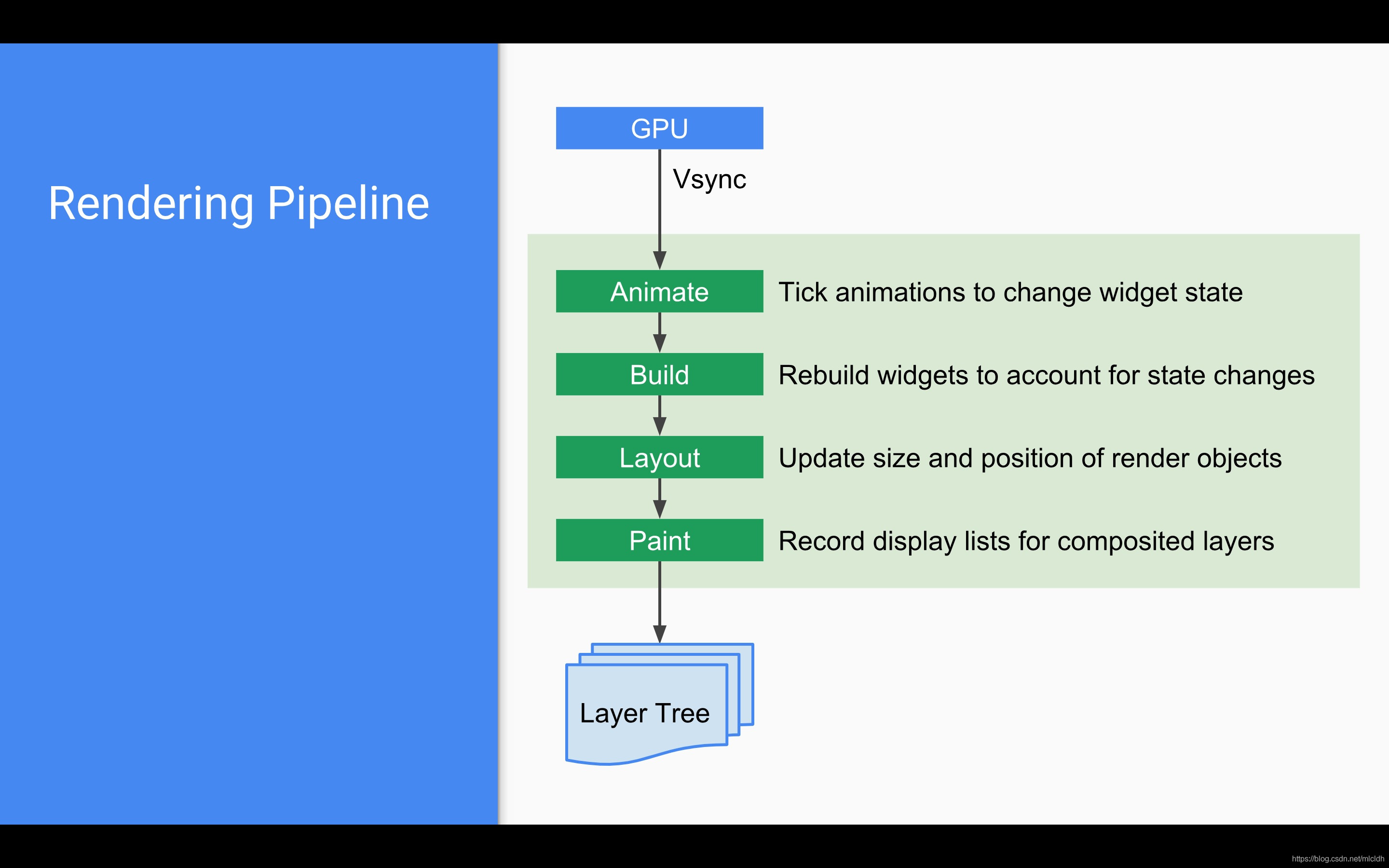
Fluent system architecture

杰理之开启四声道通话近端卡顿问题【篇】

第033讲:异常处理:你不可能总是对的2 | 课后测试题及答案
![[redis]Redis6的事务操作](/img/50/639867a2fcb92082ea262a8a19bb68.png)
[redis]Redis6的事务操作

HarmonyOS应用开发培训第二次

300. longest increasing subsequence ●●
![[206. reverse linked list]](/img/c8/d83655395379a512c8b67a82dc4cae.png)
[206. reverse linked list]

Simulated 100 questions and simulated examination of hoisting machinery command examination in 2022

第025讲:字典:当索引不好用时 | 课后测试题及答案
随机推荐
第030讲:文件系统:介绍一个高大上的东西 | 课后测试题及答案
分享insert into select遇到的死锁问题(项目实战)
ICML2022 | 利用虚拟节点促进图结构学习
92 match for several_ Recognize SQL write example
[redis]Redis6的主从复制
[palindrome structure of or36 linked list]
Simulated 100 questions and simulated examination of hoisting machinery command examination in 2022
Adblock屏蔽百度热搜
杰理之动态切换 EQ 文件【篇】
2022 group programming TIANTI race L1
为了不曾忘却的纪念:孙剑专题
List of outstanding talents: no crystal vibration, one drag, eight burn and upgrade [chapter]
[records of different objects required by QIPA]
Install MySQL in ECS (version 2022)
[206. reverse linked list]
杰理之开启四声道通话近端变调问题【篇】
牛客 52次月赛 C 说谎的机器 (区间赋值操作由O(n^2)转为O(n)的复杂度)
Use Charles to capture packets
2022危险化学品经营单位主要负责人上岗证题库及模拟考试
71- analysis of an Oracle DBA interview with Alibaba in 2010