当前位置:网站首页>一键编译安装redis6.2.4
一键编译安装redis6.2.4
2022-07-24 21:46:00 【wwzroom】

1.编写脚本
[[email protected]:~]#
vim install_redis.sh
#!/bin/bash

VERSION=redis-6.2.4
PASSWORD=123456
INSTALL_DIR=/apps/redis

color () {

    RES_COL=60
    MOVE_TO_COL="echo -en \\033[${RES_COL}G"
    SETCOLOR_SUCCESS="echo -en \\033[1;32m"
    SETCOLOR_FAILURE="echo -en \\033[1;31m"
    SETCOLOR_WARNING="echo -en \\033[1;33m"
    SETCOLOR_NORMAL="echo -en \E[0m"
    echo -n "$1" && $MOVE_TO_COL
    echo -n "["
    if [ $2 = "success" -o $2 = "0" ] ;then
        ${SETCOLOR_SUCCESS}
        echo -n $" OK "
    elif [ $2 = "failure" -o $2 = "1"  ] ;then
        ${SETCOLOR_FAILURE}
        echo -n $"FAILED"
    else
        ${SETCOLOR_WARNING}
        echo -n $"WARNING"
    fi
    ${SETCOLOR_NORMAL}
    echo -n "]"
    echo
}


install() {

yum  -y install gcc jemalloc-devel || {
     color "安装软件包失败,请检查网络配置" 1 ; exit; }

wget http://download.redis.io/releases/${VERSION}.tar.gz || {
     color "Redis 源码下载失败" 1 ; exit; }


tar xf ${VERSION}.tar.gz
cd ${VERSION}
make -j 4 PREFIX=${INSTALL_DIR} install && color "Redis 编译安装完成" 0 || {
     color "Redis 编译安装失败" 1 ;exit ; }


ln -s ${INSTALL_DIR}/bin/redis-*  /usr/bin/
mkdir -p ${INSTALL_DIR}/{
    etc,log,data,run}
cp redis.conf  ${INSTALL_DIR}/etc/

sed -i -e 's/bind 127.0.0.1/bind 0.0.0.0/'  -e "/# requirepass/a requirepass $PASSWORD"  -e "/^dir .*/c dir ${INSTALL_DIR}/data/"  -e "/logfile .*/c logfile ${INSTALL_DIR}/log/redis-6379.log"  -e  "/^pidfile .*/c pidfile ${INSTALL_DIR}/run/redis_6379.pid" ${INSTALL_DIR}/etc/redis.conf


if id redis &> /dev/null ;then
    color "Redis 用户已存在" 1
else
    useradd -r -s /sbin/nologin redis
    color "Redis 用户创建成功" 0
fi

chown -R redis.redis ${INSTALL_DIR}

cat >> /etc/sysctl.conf <<EOF net.core.somaxconn = 1024 vm.overcommit_memory = 1 EOF
sysctl -p

echo 'echo never > /sys/kernel/mm/transparent_hugepage/enabled' >> /etc/rc.d/rc.local
chmod +x /etc/rc.d/rc.local
/etc/rc.d/rc.local

cat > /usr/lib/systemd/system/redis.service <<EOF [Unit] Description=Redis persistent key-value database After=network.target [Service] ExecStart=${INSTALL_DIR}/bin/redis-server ${INSTALL_DIR}/etc/redis.conf --supervised systemd ExecStop=/bin/kill -s QUIT \$MAINPID #Type=notify User=redis Group=redis RuntimeDirectory=redis RuntimeDirectoryMode=0755 [Install] WantedBy=multi-user.target EOF
systemctl daemon-reload
systemctl enable --now  redis &> /dev/null && color "Redis 服务启动成功,Redis信息如下:"  0 || {
     color "Redis 启动失败" 1 ;exit; }
sleep 2
redis-cli -a $PASSWORD INFO Server 2> /dev/null

}

install
2.执行脚本
[[email protected]:~]#
bash install_redis.sh
3.查看版本
[[email protected]:~]#
redis-cli -a 123456 info server
Warning: Using a password with '-a' or '-u' option on the command line interface may not be safe.
# Server
redis_version:6.2.4
redis_git_sha1:00000000
redis_git_dirty:0
redis_build_id:644804cc09e3937e
redis_mode:standalone
os:Linux 3.10.0-1160.el7.x86_64 x86_64
arch_bits:64
multiplexing_api:epoll
atomicvar_api:atomic-builtin
gcc_version:4.8.5
process_id:1361
process_supervised:no
run_id:30a434b67b81bce356dfd9f7274469854df74f6c
tcp_port:6379
server_time_usec:1658599865613597
uptime_in_seconds:1085
uptime_in_days:0
hz:10
configured_hz:10
lru_clock:14432697
executable:/apps/redis/bin/redis-server
config_file:/apps/redis/etc/redis.conf
io_threads_active:0
边栏推荐
- How to realize three schemes of finclip wechat authorized login
- 一种自动化九点标定工具原理(包涵部分源码)
- What should I do to select the method of mongodb instance accessing the database?
- Clever use of sort (list & lt; T & gt;, comparator & lt;? Super T & gt;) comparator
- What is a database password?
- @typescript-eslint/ [email protected]
- Deep understanding of affairs
- 【类的组合(在一个类中定义一个类)】
- ESP32C3 LED PWM使用和ESP32差异说明
- 深入理解事务
猜你喜欢

The relationship between cloud computing and digital transformation has finally been clarified
![[combination of classes (define a class in a class)]](/img/ae/a8226e1795bb45171a11c65d35bcac.png)
[combination of classes (define a class in a class)]

Uniqueness and ordering in set

Alibaba cloud and parallel cloud launched the cloud XR platform to support the rapid landing of immersive experience applications

Circom 2.0: A Scalable Circuit Compiler
![[image processing] pyefd.elliptic_ fourier_ How descriptors are used](/img/72/d2c825ddd95f541b37b98b2d7f6539.png)
[image processing] pyefd.elliptic_ fourier_ How descriptors are used
 [email protected]"/>
@typescript-eslint/ [email protected]
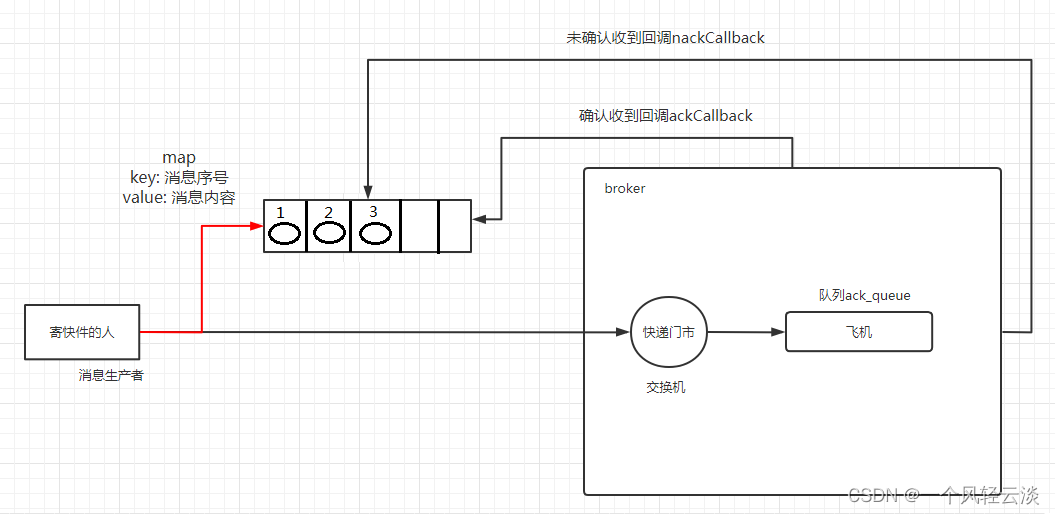
MQ release confirmation

Es+redis+mysql, the high availability architecture design is awesome! (supreme Collection Edition)

91. (leaflet chapter) leaflet situation plotting - offensive direction drawing
随机推荐
Atcoder beginer contest 260 a~f problem solution
微信小程序监听实时地理位置变化事件接口申请
CAD sets hyperlinks to entities (WEB version)
Both Chen Chunhua and Mo Yan have words of suffering
Ch single database data migration to read / write separation mode
Applet location interface application
With this PDF, I successfully got offers from ant, jd.com, Xiaomi, Tencent and other major manufacturers
Drawing library matplotlibmatplotlib quick start
Image processing notes (1) image enhancement
Redis (12) -- redis server
Dtable launched in the public beta, which is not only a table, but also a business application builder
Can bank financial products be redeemed and transferred out on the same day?
What should I do when selecting the RDS instance access method?
CAD disable a button on the toolbar (WEB version)
@typescript-eslint/ [email protected]
Shell introduction and variable definition
Binary search
如何修改 Kubernetes 节点 IP 地址?
【类的组合(在一个类中定义一个类)】
CAD calls mobile command (COM interface)