当前位置:网站首页>Install the custom module into the system and use find in the independent project_ Package found
Install the custom module into the system and use find in the independent project_ Package found
2022-06-24 19:35:00 【Potato, watermelon and sesame】
Because the current program and library construction method adopted by the project is to install all libraries and executable programs into /opt/xxx/1.0.1/bin perhaps /opt/xxx/1.0.1/lib as well as /opt/xxx/1.0.1/include Under the table of contents . But this way of writing death is certainly not appropriate , Therefore, it is necessary to master other commonly used installation methods , For example, we installed OpenCV And so on , Where will they be installed , How to use them .
be based on Cmake Compilation of C++ A common way to use a third-party library file in a project is find_package() function , It is very convenient to use . But how to build your own modules and install them into the system , Use in separate projects find_packag() To use this package , There are few relevant introductions ( Most of the Internet is built in the same package test Program , Not used in independent projects find_package() To reference the package ). for example , Use some libraries written by others from the Internet , The general procedure is to download it first , Use the following command in the source folder of the library to install :
cd <libABC_path>
mkdir build
cd build
cmake ..
make
sudo make install
Install the library into the system through the above series of commands . If we're writing something else C The library is called in the program , Then we need to compile the program CMakeLists Chinese characters such as :
find_package(libABC REQUIRED)1.find_package()
If an external library is used in the program , You don't know the location of its header file and link library in advance , It is necessary to give the search methods for header files and link libraries , And link them to the program .
find_package(<name> [major.minor] [QUIET] [NO_MODULE]
[[REQUIRED|COMPONENTS] [componets...]])
find_package() The search path for
find_package() The command first looks in the module path for A pre compiled FindXXX.cmake file , And the general official gives a lot , You don't need to write it yourself. This is a typical way to find a library . The specific search paths are CMake:
Module mode
- ${CMAKE_MODULE_PATH} All directories in .
- Module directory /share/cmake-x.y/Modules/ .
Configuration mode
- ~/.cmake/packages/ or /usr/local/share/ Find in each package directory in , seek < Capitalize the library name >Config.cmake perhaps < Lowercase of library name >-config.cmake ( Like the library Opencv, It will look for /usr/local/share/OpenCV Medium OpenCVConfig.cmake or opencv-config.cmake).
The first is to find the root directory of the path . I summarize several important default lookup root directories as follows :
<package>_DIR
CMAKE_PREFIX_PATH
CMAKE_FRAMEWORK_PATH
CMAKE_APPBUNDLE_PATH
PATH
among ,PATH If the path in bin or sbin ending , Then it will automatically fall back to the upper level directory . Find the root directory ( The root directory is used as the following <prefix>),cmake Will check the contents of these directories
<prefix>/(lib/<arch>|lib|share)/cmake/<name>*/          (U)
<prefix>/(lib/<arch>|lib|share)/<name>*/                (U)
<prefix>/(lib/<arch>|lib|share)/<name>*/(cmake|CMake)/  (U)
cmake After finding these directories , Will start looking for <package>Config.cmake or Find<package>.cmake file . Once found, you can execute the file and generate relevant link information .
Now look back at the root directory of the search path . I think the most important one is PATH. because /usr/bin/ stay PATH in ,cmake Will go automatically. /usr/(lib/<arch>|lib|share)/cmake/<name>*/ Find module ( because /usr/bin With bin ending , So automatically back to /usr/ As the root directory ), This allows most of us to go directly through apt-get The installed library can be found .
Another more important thing is <package>_DIR. We can call cmake Send this directory to cmake. Because of its highest priority , therefore cmake Will give priority to finding from this directory , In this way, we can configure as we like cmake Make it find the bag we want it to find . And in addition to the path specified above ,cmake And directly into <package>_DIR Look for . As I am 3rd_parties Compiled a OpenCV( Use find_package The package name to be looked up at is OpenCV), Then perform cmake You can use
OpenCV_DIR=../../3rd-party/opencv-3.3.4/build/ cmake .. After doing so ,cmake Will give priority to looking from this directory OpenCV.
*.cmake File definition variables
No matter which mode you use , Just find .cmake,.cmake The following variables will be defined inside :
<NAME>_FOUND
<NAME>_INCLUDE_DIRS or <NAME>_INCLUDES
<NAME>_LIBRARIES or <NAME>_LIBRARIES or <NAME>_LIBS
<NAME>_DEFINITIONS
Note that the package names in these variables of most packages are all uppercase , Such as LIBFOO_FOUND , Some packages use the actual case of the package , Such as LibFoo_FOUND
Add header file and link library file
If you find this bag , In the top-level directory of the project CMakeLists.txt File to add include_directories(XXX_INCLUDE_DIRS) To include the header file of the library , add to target_link_libraries( Source file _LIBRARIES) The command links the source file to the library file .
link OpenCV Example
establish t4 Catalog add cmake Directory and main.cpp And CMakeList.txt file
establish cmake Catalog add FindOpenCV.cmake file .
CMakeList.txt
cmake_minimum_required(VERSION 2.8)
PROJECT (HELLO)
SET(SRC_LIST main.cpp)

INCLUDE_DIRECTORIES(cmake)

SET(CMAKE_MODULE_PATH ${PROJECT_SOURCE_DIR}/cmake)
# stay ${CMAKE_MODULE_PATH} Add to include FindOpenCV.cmake Catalog

FIND_PACKAGE(OpenCV)
# obtain OPENCV_FOUND OPENCV_INCLUDE_DIR OPENCV_LIBRARIES

INCLUDE_DIRECTORIES(${OPENCV_INCLUDE_DIR})

ADD_EXECUTABLE(hello ${SRC_LIST})
TARGET_LINK_LIBRARIES(hello ${OPENCV_LIBRARIES})
The above describes find_package Usage of , as well as find_package Find paths and examples . But how can I write a module by myself , And then like OpenCV That way, it can be installed in the system for others to use ?
2. Custom module
Build and install custom modules
First create a folder cmake_tutorial1, Create four folders in it src include cmake_modules build, Create a file CMakeLists.txt.src Used to put program source files ,include Used to put header files ,cmake_modules Used to put the configuration files related to the installation that describe the module , I'll explain it later .

stay include Create a file called test_install.h, The contents of the source file are simple .
#include <iostream>
class Print{
public:
    void PrintHelloWorld();
};
Defines a class , To have a print HelloWorld Function of . natural , stay src We implement that function in , stay src Create a file in test_install.cpp, The contents are as follows
#include <test_install.h>

void Print::PrintHelloWorld(){
   std::cout<<"hello world "<<std::endl;
}
stay cmake_modules The files in are called FindPackage.cmake, cmake_uninstall.cmake.in, install_package.cmake, PackageConfig.cmake.in, PackageConfigVersion.cmake.in, PkgConfig.pc.in. These documents are all gross ? In fact, I didn't care about their specific content , But you can use them directly to install our libraries , There is no need to change the library , They're like CMake Your own library .
FindPackage.cmake
SET( @[email protected]_LIBRARIES  @[email protected] CACHE INTERNAL "@[email protected] libraries" FORCE )
SET( @[email protected]_INCLUDE_DIRS  @[email protected] CACHE INTERNAL "@[email protected] include directories" FORCE )
SET( @[email protected]_LIBRARY_DIRS @[email protected] CACHE INTERNAL "@[email protected] library directories" FORCE )

mark_as_advanced( @[email protected]_LIBRARIES )
mark_as_advanced( @[email protected]_LIBRARY_DIRS )
mark_as_advanced( @[email protected]_INCLUDE_DIRS )
PackageConfig.cmake.in
SET( @[email protected]_LIBRARIES  "@[email protected]" CACHE INTERNAL "@[email protected] libraries" FORCE )
SET( @[email protected]_INCLUDE_DIRS  @[email protected] CACHE INTERNAL "@[email protected] include directories" FORCE )
SET( @[email protected]_LIBRARY_DIRS @[email protected] CACHE INTERNAL "@[email protected] library directories" FORCE )

mark_as_advanced( @[email protected]_LIBRARIES )
mark_as_advanced( @[email protected]_LIBRARY_DIRS )
mark_as_advanced( @[email protected]_INCLUDE_DIRS )


# Compute paths
get_filename_component( PACKAGE_CMAKE_DIR "${CMAKE_CURRENT_LIST_FILE}" PATH )

# This file, when used for INSTALLED code, does not use Targets... sigh.
## Library dependencies (contains definitions for IMPORTED targets)
#if(NOT TARGET "@[email protected]_LIBRARIES" AND NOT "@[email protected]_BINARY_DIR")
#    include( "${PACKAGE_CMAKE_DIR}/@[email protected]" )
#    include( "${PACKAGE_CMAKE_DIR}/@[email protected]" )
#endif()

#SET(@[email protected]_LIBRARIES @[email protected])
#SET(@[email protected]_LIBRARY @[email protected])
#SET(@[email protected]_INCLUDE_DIRS @[email protected])
#SET(@[email protected]_LINK_DIRS @[email protected])
and FindPackage.cmake Is essentially the same , Just one more word get_filename_component(). It is mainly used to set package related paths and variables . this 2 The two files represent the above two modes respectively .
PackageConfigVersion.cmake.in
set(PACKAGE_VERSION "@[email protected]")

# Check build type is valid
if( "System:${CMAKE_SYSTEM_NAME},Android:${ANDROID},iOS:${IOS}" STREQUAL
    "System:@[email protected],Android:@[email protected],iOS:@[email protected]" )
    # Check whether the requested PACKAGE_FIND_VERSION is compatible
    if("${PACKAGE_VERSION}" VERSION_LESS "${PACKAGE_FIND_VERSION}")
      set(PACKAGE_VERSION_COMPATIBLE FALSE)
    else()
      set(PACKAGE_VERSION_COMPATIBLE TRUE)
      if ("${PACKAGE_VERSION}" VERSION_EQUAL "${PACKAGE_FIND_VERSION}")
        set(PACKAGE_VERSION_EXACT TRUE)
      endif()
    endif()
else()
    set(PACKAGE_VERSION_COMPATIBLE FALSE)
endif()
Set the package version , Handling when the actually found version is inconsistent with the declared version . This is the same as the one in front PackageConfig.cmake.in Same for configuration mode .
PkgConfig.pc.in
[email protected][email protected]
exec_prefix=${prefix}
libdir=${exec_prefix}/lib
includedir=${prefix}/include

Name: @[email protected]
Description: @[email protected]
Version: @[email protected]
Cflags: @[email protected]
Libs: -L${libdir} @[email protected] @[email protected]
Set up cmake The root path to find is the installation path of the Library , Set up lib Contents and include Catalog , Set package name 、 describe 、 edition 、 Signs and other information . This is also used in the configuration mode .
install_package.cmake
################################################################################
# install_package.cmake - This function will install and "export" your library
#   or files in such a way that they can be found using either CMake's
#   "FindXXX.cmake" mechanism or with pkg-config.  This makes your code boradly
#   compatible with traditional unix best practices, and also easy to use from
#   other CMake projets.
#
# This function will create and install a ${PACKAGE}.pc pkg-config file.
# Will also create a Find${PACKAGE}.cmake, which will in turn call.

#
# install_package - Takes a package name and the following optional named arguments:
#  PKG_NAME <name of the package for pkg-config>, usually the same as ${PROJECT_NAME}
#  LIB_NAME <name of a library to build, if any>
#  VERSION <version>
#  INSTALL_HEADERS <header files to install, if any>
#  DESTINATION <directory to install headers>
#  INCLUDE_DIRS <list of required include directories, if any>
#  LINK_LIBS <list of required link libraries, if any >
#  LINK_DIRS <list of required link directories, if any>
#  CFLAGS <optional list of REQUIRED c flags>
#  CXXFLAGS <optional list of REQUIRED c++ flags>
#
################################################################################
include(CMakeParseArguments)

get_filename_component(modules_dir ${CMAKE_CURRENT_LIST_FILE} PATH)

function(install_package)
  set(PACKAGE_OPTIONS "")
  set(PACKAGE_SINGLE_ARGS "")
  set( PACKAGE_MULTI_ARGS
      PKG_NAME
      LIB_NAME
      VERSION
      DESCRIPTION
      INSTALL_HEADERS
      INSTALL_GENERATED_HEADERS
      INSTALL_HEADER_DIRS
      INSTALL_INCLUDE_DIR
      DESTINATION
      INCLUDE_DIRS
      LINK_LIBS
      LINK_DIRS
      CFLAGS
      CXXFLAGS
     )
  cmake_parse_arguments( PACKAGE
    "${PACKAGE_OPTIONS}"
    "${PACKAGE_SINGLE_ARGS}"
    "${PACKAGE_MULTI_ARGS}"
    "${ARGN}"
    )

  # Add package to CMake package registery for use from the build tree. RISKY.
  option( EXPORT_${PROJECT_NAME}
      "Should the ${PROJECT_NAME} package be exported for use by other software" OFF )

  mark_as_advanced( EXPORT_${PROJECT_NAME} )


  # clean things up
  if( PACKAGE_LINK_DIRS )
    list( REMOVE_DUPLICATES PACKAGE_LINK_DIRS )
  endif()
  if(PACKAGE_LINK_LIBS)
    list( REMOVE_DUPLICATES PACKAGE_LINK_LIBS )
  endif()
  if( PACKAGE_INCLUDE_DIRS)
    list( REMOVE_DUPLICATES PACKAGE_INCLUDE_DIRS )
  endif()

  # construct Cflags arguments for pkg-config file
  set( PACKAGE_CFLAGS "${PACKAGE_CFLAGS} ${CMAKE_C_FLAGS}" )
  foreach(var IN LISTS PACKAGE_INCLUDE_DIRS )
    set( PACKAGE_CFLAGS "${PACKAGE_CFLAGS} -I${var}" )
  endforeach()

  # now construct Libs.private arguments
  foreach(var IN LISTS PACKAGE_LINK_DIRS )
    set( PACKAGE_LIBS "${PACKAGE_LIBS} -L${var}" )
  endforeach()
  foreach(var IN LISTS PACKAGE_LINK_LIBS )
    if( EXISTS ${var} OR  ${var} MATCHES "-framework*" )
      set( PACKAGE_LIBS "${PACKAGE_LIBS} ${var}" )
    else() # assume it's just a -l call??
      set( PACKAGE_LIBS "${PACKAGE_LIBS} -l${var}" )
    endif()
  endforeach()

  # add any CXX flags user has passed in
  if( PACKAGE_CXXFLAGS )
    set( PACKAGE_CFLAGS ${PACKAGE_CXXFLAGS} )
  endif()

  # In case we want to install.
  if( NOT EXPORT_${PROJECT_NAME} )
        # add "installed" library to list of required libraries to link against
        if( PACKAGE_LIB_NAME )
            if(POLICY CMP0026)
              cmake_policy( SET CMP0026 OLD )
            endif()
            get_target_property( _target_library ${PACKAGE_LIB_NAME} LOCATION )
            get_filename_component( _lib ${_target_library} NAME )
            list( APPEND PACKAGE_LINK_LIBS ${PACKAGE_LIB_NAME} )
        endif()

        if( PACKAGE_INSTALL_HEADER_DIRS )
            foreach(dir IN LISTS PACKAGE_INSTALL_HEADER_DIRS )
            install( DIRECTORY ${dir}
                DESTINATION ${PACKAGE_DESTINATION}/include
                FILES_MATCHING PATTERN "*.h|*.hxx|*.hpp"
                )
            endforeach()
        endif()

        # install header files
        if( PACKAGE_INSTALL_HEADERS )
          foreach(hdr IN LISTS PACKAGE_INSTALL_HEADERS )
              get_filename_component( _fp ${hdr} ABSOLUTE )
              file( RELATIVE_PATH _rpath ${CMAKE_SOURCE_DIR} ${_fp} )
              get_filename_component( _dir ${_rpath} DIRECTORY )
              install( FILES ${_fp}
                DESTINATION ${PACKAGE_DESTINATION}/${_dir} )
         endforeach()
        endif()
        if( PACKAGE_INSTALL_GENERATED_HEADERS )
          foreach(hdr IN LISTS PACKAGE_INSTALL_GENERATED_HEADERS )
             get_filename_component( _fp ${hdr} ABSOLUTE )
             file( RELATIVE_PATH _rpath ${CMAKE_BINARY_DIR} ${_fp} )
             get_filename_component( _dir ${_rpath} DIRECTORY )
             install( FILES ${_fp}
                 DESTINATION ${PACKAGE_DESTINATION}/${_dir} )
         endforeach()
        endif()

        if( PACKAGE_INSTALL_INCLUDE_DIR )
            install(DIRECTORY ${CMAKE_SOURCE_DIR}/include DESTINATION ${PACKAGE_DESTINATION} )
        endif()

        # install library itself
        if( PACKAGE_LIB_NAME )
            install( FILES ${_target_library} DESTINATION ${CMAKE_INSTALL_PREFIX}/lib )
            set( PACKAGE_LIB_LINK "-l${PACKAGE_LIB_NAME}" )
        endif()

        # build pkg-config file
        if( PACKAGE_PKG_NAME )
            configure_file( ${modules_dir}/PkgConfig.pc.in ${PACKAGE_PKG_NAME}.pc @ONLY )

        # install pkg-config file for external projects to discover this library
            install( FILES ${CMAKE_CURRENT_BINARY_DIR}/${PACKAGE_PKG_NAME}.pc
                DESTINATION ${CMAKE_INSTALL_PREFIX}/lib/pkgconfig/ )

        #######################################################
        # Export library for easy inclusion from other cmake projects. APPEND allows
        # call to function even as subdirectory of larger project.
        FILE(REMOVE "${CMAKE_CURRENT_BINARY_DIR}/${PROJECT_NAME}Targets.cmake")
        export( TARGETS ${LIBRARY_NAME}
        APPEND FILE "${CMAKE_CURRENT_BINARY_DIR}/${PROJECT_NAME}Targets.cmake" )

        # Version information.  So find_package( XXX version ) will work.
        configure_file( ${CMAKE_SOURCE_DIR}/cmake_modules/PackageConfigVersion.cmake.in
        "${CMAKE_CURRENT_BINARY_DIR}/${PROJECT_NAME}ConfigVersion.cmake" @ONLY )

        # Build tree config.  So some folks can use the built package (e.g., any of our
        # own examples or applcations in this project.
        configure_file( ${CMAKE_SOURCE_DIR}/cmake_modules/PackageConfig.cmake.in
            ${CMAKE_CURRENT_BINARY_DIR}/${PROJECT_NAME}Config.cmake @ONLY )
        install(FILES
            ${CMAKE_CURRENT_BINARY_DIR}/${PROJECT_NAME}Config.cmake
            ${CMAKE_CURRENT_BINARY_DIR}/${PROJECT_NAME}Targets.cmake
            ${CMAKE_CURRENT_BINARY_DIR}/${PROJECT_NAME}ConfigVersion.cmake
            DESTINATION
            lib/cmake/${PROJECT_NAME})

        install( FILES ${CMAKE_CURRENT_BINARY_DIR}/Find${PACKAGE_PKG_NAME}.cmake
            DESTINATION ${CMAKE_INSTALL_PREFIX}/share/${PACKAGE_PKG_NAME}/ )


  #  # Install tree config.  NB we DO NOT use this.  We install using brew or
  #  pkg-config.
  #  set( EXPORT_LIB_INC_DIR ${LIB_INC_DIR} )
  #  set( EXPORT_LIB_INC_DIR "\${PROJECT_CMAKE_DIR}/${REL_INCLUDE_DIR}" )
  #  configure_file( ${CMAKE_CURRENT_SOURCE_DIR}/${PROJECT_NAME}Config.cmake.in
  #      ${CMAKE_CURRENT_BINARY_DIR}${CMAKE_FILES_DIRECTORY}/${PROJECT_NAME}Config.cmake @ONLY )
        endif()

  # In case we want to export.
  elseif( EXPORT_${PROJECT_NAME} )

      if( PACKAGE_LIB_NAME )
            if(POLICY CMP0026)
              cmake_policy( SET CMP0026 OLD )
            endif()
            get_target_property( _target_library ${PACKAGE_LIB_NAME} LOCATION )
            list( APPEND PACKAGE_LINK_LIBS ${_target_library} )
        endif()

        if( PACKAGE_INSTALL_HEADER_DIRS )
            foreach(dir IN LISTS PACKAGE_INSTALL_HEADER_DIRS )
                list( APPEND PACKAGE_INCLUDE_DIRS ${dir} )
            endforeach()
        endif()

        #if( PACKAGE_INSTALL_HEADER_DIRS )
        #   foreach(dir IN LISTS PACKAGE_INSTALL_HEADER_DIRS )
        #        FILE( GLOB ${dir} "*.h" "*.hpp" )
        #        list( APPEND PACKAGE_INCLUDE_DIRS ${dir} )
        #    endforeach()
        #endif()

        list( APPEND PACKAGE_INCLUDE_DIRS ${CMAKE_SOURCE_DIR}
            ${CMAKE_BINARY_DIR} )

        # install library itself
        #if( PACKAGE_LIB_NAME )
        #    set( PACKAGE_LIB_LINK "-l${PACKAGE_LIB_NAME}" )
        #endif()
   #######################################################
  # Export library for easy inclusion from other cmake projects. APPEND allows
  # call to function even as subdirectory of larger project.
  FILE(REMOVE "${CMAKE_CURRENT_BINARY_DIR}/${PROJECT_NAME}Targets.cmake")
  export( TARGETS ${LIBRARY_NAME}
      APPEND FILE "${CMAKE_CURRENT_BINARY_DIR}/${PROJECT_NAME}Targets.cmake" )

  export( PACKAGE ${PROJECT_NAME} )
#  install( EXPORT ${PROJECT_NAME}Targets DESTINATION ${CMAKECONFIG_INSTALL_DIR} )
#  install(TARGETS ${LIBRARY_NAME}
#      EXPORT ${PROJECT_NAME}Targets DESTINATION ${CMAKE_INSTALL_PREFIX}/lib
#      )

  # Version information.  So find_package( XXX version ) will work.
  configure_file( ${CMAKE_SOURCE_DIR}/cmake_modules/PackageConfigVersion.cmake.in
      "${CMAKE_CURRENT_BINARY_DIR}/${PROJECT_NAME}ConfigVersion.cmake" @ONLY )

  # Build tree config.  So some folks can use the built package (e.g., any of our
  # own examples or applcations in this project.
  configure_file( ${CMAKE_SOURCE_DIR}/cmake_modules/PackageConfig.cmake.in
      ${CMAKE_CURRENT_BINARY_DIR}/${PROJECT_NAME}Config.cmake @ONLY )

  #  # Install tree config.  NB we DO NOT use this.  We install using brew or
  #  pkg-config.
  #  set( EXPORT_LIB_INC_DIR ${LIB_INC_DIR} )
  #  set( EXPORT_LIB_INC_DIR "\${PROJECT_CMAKE_DIR}/${REL_INCLUDE_DIR}" )
  #  configure_file( ${CMAKE_CURRENT_SOURCE_DIR}/${PROJECT_NAME}Config.cmake.in
  #      ${CMAKE_CURRENT_BINARY_DIR}${CMAKE_FILES_DIRECTORY}/${PROJECT_NAME}Config.cmake @ONLY )
    #export( PACKAGE ${PROJECT_NAME} )
  endif()


  # write and install a cmake "find package" for cmake projects to use.
  # NB: this .cmake file CANNOT refer to any source directory, only to
  # _installed_ files.
  configure_file( ${modules_dir}/FindPackage.cmake.in Find${PACKAGE_PKG_NAME}.cmake @ONLY )

endfunction()
Defined a cmake Function of , Used to install packages and export related configuration files (.cmake etc. ).
cmake_uninstall.cmake.in
## A simple uninstall script.
## Alternatively UNIX users can run/sudo `xargs rm < install_manifest.txt` in the build directory.

set(unfile ${CMAKE_CURRENT_BINARY_DIR}/cmake_uninstall.cmake)
file(WRITE ${unfile} "IF(NOT EXISTS \"install_manifest.txt\")\n")
file(APPEND ${unfile} "MESSAGE(\"FATAL_ERROR Cannot find \\\"install manifest\\\": install_manifest.txt\")\n")
file(APPEND ${unfile} "ENDIF(NOT EXISTS \"install_manifest.txt\")\n")
file(APPEND ${unfile} "FILE(READ \"install_manifest.txt\" files)\n")
file(APPEND ${unfile} "STRING(REGEX REPLACE \"\\n\" \";\" files \"\${files}\")\n")
file(APPEND ${unfile} "FOREACH(file \${files})\n")
file(APPEND ${unfile} "  MESSAGE(STATUS \"Uninstalling \\\"\${file}\\\"\")\n")
file(APPEND ${unfile} "  IF(EXISTS \"\${file}\")\n")
file(APPEND ${unfile} "    EXEC_PROGRAM(\n")
file(APPEND ${unfile} "      \"\${CMAKE_COMMAND}\" ARGS \"-E remove \\\"\${file}\\\"\"\n")
file(APPEND ${unfile} "    OUTPUT_VARIABLE rm_out\n")
file(APPEND ${unfile} "      RETURN_VALUE rm_retval\n")
file(APPEND ${unfile} "      )\n")
file(APPEND ${unfile} "    IF(\"\${rm_retval}\" STREQUAL 0\)\n")
file(APPEND ${unfile} "    ELSE(\"\${rm_retval}\" STREQUAL 0\)\n")
file(APPEND ${unfile} "    MESSAGE(FATAL_ERROR \"Problem when removing \\\"\${file}\\\"\")\n")
file(APPEND ${unfile} "    ENDIF(\"\${rm_retval}\" STREQUAL 0)\n")
file(APPEND ${unfile} "  ELSE(EXISTS \"\${file}\")\n")
file(APPEND ${unfile} "    MESSAGE(STATUS \"File \\\"\${file}\\\" does not exist.  \")\n")
file(APPEND ${unfile} "  ENDIF(EXISTS \"\${file}\")\n")
file(APPEND ${unfile} "ENDFOREACH(file)\n")
Generate the program required to support package uninstallation . Be careful , The package installation must be performed (make install) Uninstall from the same path .
CMakeLists.txt
cmake_minimum_required(VERSION 2.6.0)

project(TestInstall)

# Add to module path, so we can find our cmake modules
list( APPEND CMAKE_MODULE_PATH ${CMAKE_CURRENT_SOURCE_DIR}/cmake_modules)

include_directories( ${PROJECT_SOURCE_DIR}/include)

add_library(test_install STATIC src/test_install.cpp) # Change to shared It becomes a dynamic library

#The following will do install
include(install_package)
install_package(# The functions defined in the previous file are used install_package Set the related variables
  PKG_NAME TestInstall
  LIB_NAME test_install
  VERSION 0.2
  DESCRIPTION "installation test"
  INSTALL_INCLUDE_DIR true
  DESTINATION ${CMAKE_INSTALL_PREFIX}
  #INCLUDE_DIRS ${REQUIRED_INCLUDE_DIRS}
  #LINK_LIBS ${REQUIRED_LIBRARIES}
  )

#The following can make `sudo make uninstall` work
include(${CMAKE_MODULE_PATH}/cmake_uninstall.cmake.in)

add_custom_target(uninstall
    COMMAND ${CMAKE_COMMAND} -P ${CMAKE_CURRENT_BINARY_DIR}/cmake_uninstall.cmake)
- The first two lines of the document need not be explained , The third line
list( APPEND CMAKE_MODULE_PATH ${CMAKE_CURRENT_SOURCE_DIR}/cmake_modules)
It's for telling CMake In path ${CMAKE_CURRENT_SOURCE_DIR}/cmake_modules We found a pile of unknown documents just now . among ${CMAKE_CURRENT_SOURCE_DIR} Refer to your current CMakeLists The path of .
- In the fourth row
include_directories( ${PROJECT_SOURCE_DIR}/include)
Is used to specify the location of the header file . We wrote in the source file #include <test_install.h>, At compile time, the program could not find the file , With the line above , It knows to be in ${PROJECT_SOURCE_DIR}/include Go down the path to find the header file . among ${PROJECT_SOURCE_DIR} Refers to the path of the current project , Here and ${CMAKE_CURRENT_SOURCE_DIR} Point to the same path , But you should have seen that some large libraries have multiple CMakeLists In different folders , We call them the underlying folders , The latter can refer to the location of the underlying folder ( So called CMAKE_CURRENT...). The former always points to the top floor .CMake There are many built-in variables that point to a particular location , You can view it in the following website , No more tables .
Useful Variables · Wiki · CMake / Community · GitLab
- The fifth row
add_library(test_install STATIC src/test_install.cpp)
Make the source file we wrote earlier into a file named test_install Library file . Here is a man named STATIC The logo of , This indicates that the library file we created is a static library . If we want to build a dynamic library , It is necessary to use SHARED Instead of STATIC.
- The sixth line of command
include(install_package)
Let us CMake Find and use us before cmake_modules Folder install_package.cmake file . So that we can use what we call install_package The order of ( function ).
install_package(
  PKG_NAME TestInstall
  LIB_NAME test_install
  VERSION 0.2
  DESCRIPTION "installation test"
  INSTALL_INCLUDE_DIR true
  DESTINATION ${CMAKE_INSTALL_PREFIX}
  #INCLUDE_DIRS ${REQUIRED_INCLUDE_DIRS}
  #LINK_LIBS ${REQUIRED_LIBRARIES}
  )
install The first line of the command PKG_NAME TestInstall Specify the name of the library we want to install when calling , In the future, we will use this library in other programs find_package(TestInstall REQUIRED) command .install The second line LIB_NAME test_install. Is the name of the static library we want to output , With this line, we'll be running cmake After installing the program, you get a file called test_install.a The file of .install The third line refers to the version of the current library , I wrote a random one . The fourth line describes the contents of the library .install The fifth row INSTALL_INCLUDE_DIR true It means that we should include All files in the folder are installed in the system folder .install Sixth elements DESTINATION ${CMAKE_INSTALL_PREFIX} Indicates that the location of the library to be installed is ${CMAKE_INSTALL_PREFIX}, So is it CMake Built in path variables , Refer to /usr/local.Install Line 67 is a temporary note , We will use in the second example .
- Line 78 names
include(${CMAKE_MODULE_PATH}/cmake_uninstall.cmake.in)
add_custom_target(uninstall
    COMMAND ${CMAKE_COMMAND} -P ${CMAKE_CURRENT_BINARY_DIR}/cmake_uninstall.cmake)
The seventh line indicates that it contains and can be used in cmake_modules Placed cmake_uninstall.cmake.in file , Line 8 no matter what you mean . Maybe everyone is using sudo make install After installing a series of files, you may want to delete them , But you will find that some immature libraries do not have the function of one click deletion , You often need to use it manually in the system folder sudo rm And so on , The above two lines are matched install_package Use , When you want to delete a library, you only need to delete it in build Enter... In the folder sudo make uninstall You can put the install All the files have been deleted . Note here that you must use install_package Installed files uninstall Command to find and delete , If you use your own or other methods to install library files and the like to other locations , This command cannot delete the installed files .
We have said so many times before System folder , What is and where is this system folder ? Our personal installed Libraries , General header files are in /usr/local/inlcude in , The static library or dynamic library file is in /usr/local/lib in , In short, the system folder here generally refers to /usr/local Under the folder . Now let's take a look at where the above naming will install the program .
cd To build Go to the folder . Use
cmake ..
There is something similar to the following

It probably means that we instal_package.cmake There is a command that may be eliminated in a later version , So there are warnings , There is no problem now , If you have any problems in the future, you can correct them by yourself , I don't care (Em....).
Then use
make
sudo make install
You can see something similar to the following
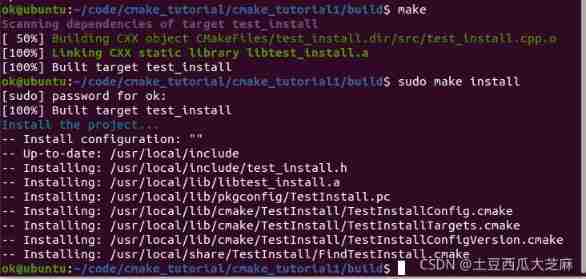
After performing the installation , Files that are critical to finding the library FindTestInstall.cmake The file is installed in /usr/local/share/TestInstall Folder , With this document , Use find_package Command to find the library . Others cmake File you can go online to see their role . The header file is installed in /usr/local/include below , If there is a domain name , The corresponding directory will be created . Library files and module configuration files are installed in /usr/local/lib/ In the relevant directory .
The result of the above installation , It allows us to use two modes: module mode and configuration mode to find TestInstall This package .
Let's try to uninstall this package , Remember to also be in build Under the directory , Otherwise there is no uninstall Orders .

Used in separate projects find_package() Find installed custom modules
Set up a folder anywhere check_install, Set up one called check_install_1.cpp file ,CMakeLists.txt Document and build Folder , Enter the following to check whether the library is installed .
#include "test_install.h" // The header file in the module was generated earlier

int main(){
    Print check_print;
    check_print.PrintHelloWorld();
}
Create the file in the same location CMakeLists.txt, Input
cmake_minimum_required(VERSION 2.6.0)

project(CheckInstall)

# Add to module path, so we can find our cmake modules
#list( APPEND CMAKE_MODULE_PATH ${CMAKE_CURRENT_SOURCE_DIR}/cmake_modules)

find_package(TestInstall REQUIRED)
#find_package(TestInstall2 REQUIRED)

add_executable(check_install_1 check_install_1.cpp)
target_link_libraries(check_install_1 ${TestInstall_LIBRARIES})

#add_executable(check_install_2 check_install_2.cpp)
#target_link_libraries(check_install_2 ${TestInstall2_LIBRARIES} ${TestInstall_LIBRARIES})
The comments section is what we will use later , Other contents are common library searching TestInstall And link our program to a few lines of code on the library , I believe everyone is familiar with .cd To build Folder usage
cmake ..
make
./check_install_1
You can see the output on the screen hello world 了 . Prove that our library is installed and used normally .
We uninstalled before TestInstall After this bag , We compile as check_install_1,
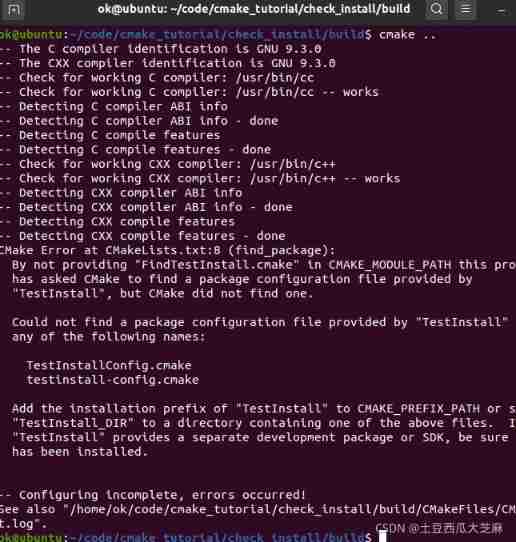
Found not found TestInstall This package .
Let's reinstall the custom module TestInstall, Then compile check_install


Here we find that we can find TestInstall This package uses the functions in it .
Custom package links to another custom package
More time , The library we want to install is linked to other libraries . Now CMakeLists The content in is slightly different , Now let's set up a system called cmake_tutorial_2 Folder , There are several C The file uses the library created in our first example and installs . stay cmake_tutorial_2 Created in include, src, cmake_modules, build Folders and CMakeLists.txt.include Created in test_install_2.h, The contents are as follows
#pragma once
#include <test_install.h>

class Print2{
public:
    Print print;
    void PrintHelloWorldAgain();
};
Indicates that the class of the first library Print Object as a member and added an object called void PrintHelloWorldAgain() Function of . The contents of this function are defined in src Of test_install_2.cpp in , It's just a simple use print Object to call... In the first library PrintHelloWorld function .test_install_2.cpp The contents in are as follows :
#include <test_install_2.h>

void Print2::PrintHelloWorldAgain(){
   print.PrintHelloWorld();
}
CMakeLists.txt The contents in are as follows
cmake_minimum_required(VERSION 2.6.0)

project(TestInstall2)

# Add to module path, so we can find our cmake modules
list( APPEND CMAKE_MODULE_PATH ${CMAKE_CURRENT_SOURCE_DIR}/cmake_modules)

find_package(TestInstall REQUIRED)

include_directories( ${PROJECT_SOURCE_DIR}/include)
include_directories( ${TestInstall_INCLUDE_DIRS})

add_library(test_install_2 STATIC src/test_install_2.cpp)

set(REQUIRED_INCLUDE_DIRS ${TestInstall_INCLUDE_DIRS})
set(REQUIRED_LIBRARIES ${TestInstall_LIBRARIES})

#The following will do install
include(install_package)
set(ICPCUDA_LIBRARIES icpcuda)
install_package(
  PKG_NAME TestInstall2
  LIB_NAME test_install_2
  VERSION 0.2
  DESCRIPTION "installation test 2"
  INSTALL_INCLUDE_DIR true
  DESTINATION ${CMAKE_INSTALL_PREFIX}
  INCLUDE_DIRS ${REQUIRED_INCLUDE_DIRS}
  LINK_LIBS ${REQUIRED_LIBRARIES}
  )

#The following can make `sudo make uninstall` work
include(${CMAKE_MODULE_PATH}/cmake_uninstall.cmake.in)

add_custom_target(uninstall
    COMMAND ${CMAKE_COMMAND} -P ${CMAKE_CURRENT_BINARY_DIR}/cmake_uninstall.cmake)
Roughly the same as the first library CMakeLists equally , The following differences
find_package(TestInstall REQUIRED)
Find the first library .
include_directories( ${TestInstall_INCLUDE_DIRS})
Find the header file of the first library . next
set(REQUIRED_INCLUDE_DIRS ${TestInstall_INCLUDE_DIRS})
set(REQUIRED_LIBRARIES ${TestInstall_LIBRARIES})
Rename the path of the library header file that library 2 needs to connect to as REQUIRED_INCLUDE_DIRS and REQUIRED_LIBRARIES. This step is not necessary here . But if our library 2 is connected to many libraries A,B,C, We can use
set(REQUIRED_INCLUDE_DIRS ${A_DIRS} ${B_DIRS} ${C_DIRS})
set(REQUIRED_LIBRARIES ${A_LIBRARIES} ${B_LIBRARIES} ${C_LIBRARIES})
Name the header file of the library and the library itself into the same variable . So we are install_package Can be used in
INCLUDE_DIRS ${REQUIRED_INCLUDE_DIRS}
LINK_LIBS ${REQUIRED_LIBRARIES}
We have really connected our new library to the third-party library it uses . At this time we enter build Folder usage cmake .. make sudo make install A series of commands to install this library .

After installation, go back to our previous check_install Folder put it in CMakeLists.txt Notes in
#find_package(TestInstall2 REQUIRED)
...
#add_executable(check_install_2 check_install_2.cpp)
#target_link_libraries(check_install_2 ${TestInstall2_LIBRARIES} ${TestInstall_LIBRARIES})
uncomment , Get into build Folder re make once , Build and run check_install_2 You can see hello_world On the screen again , Prove that we installed and connected successfully . Pay attention here target_link_libraries Not only connected TestInstall2_LIBRARIES, Still connected TestInstall_LIBRARIES Of , Otherwise, there will be errors in compilation .


The initial directory structure of the whole project is as follows :

Last , For installation to non /usr/local/ The way under the directory , It seems that I have read a post before , But forget .
Reference link :https://www.jianshu.com/p/53cc5f52b37e
边栏推荐
- Geoscience remote sensing data collection online
- 一文详解|Go 分布式链路追踪实现原理
- flink cdc全量读mysql老是报这个错怎么处理
- High dimension low code: component rendering sub component
- 【Go語言刷題篇】Go從0到入門4:切片的高級用法、初級複習與Map入門學習
- How to customize cursor position in wechat applet rotation chart
- The group offsets of the Kafka of the Flink SQL. If the specified groupid is not mentioned
- 敏捷之道 | 敏捷开发真的过时了么?
- R for Data Science (note) -- data transformation (select basic use)
- Zadig + cave Iast: let safety dissolve in continuous delivery
猜你喜欢
Zadig + 洞态 IAST:让安全溶于持续交付

Obstacle avoidance sensor module (stm32f103c8t6)

Unity移动端游戏性能优化简谱之 以引擎模块为划分的CPU耗时调优

Download steps of STM32 firmware library

LCD12864 (ST7565P) Chinese character display (STM32F103)

R language 4.1.0 software installation package and installation tutorial

UART communication (STM32F103 library function)

Internet of things? Come and see Arduino on the cloud

Understanding openstack network

制造业项目MDM主数据项目实施心得
随机推荐
Does version 2.2.0 support dynamic addition of MySQL synchronization tables
Application practice | massive data, second level analysis! Flink+doris build a real-time data warehouse scheme
Power supply noise analysis
Comparative analysis of arrayblockingqueue and linkedblockingqueue
Dataworks development ODPs SQL development production environment automatic completion of ProjectName
Download steps of STM32 firmware library
What are the functions of IBPs open source form designer?
Digital twin industry case: Digital Smart port
[go language questions] go from 0 to entry 4: advanced usage of slice, elementary review and introduction to map
Northwestern Polytechnic University attacked by hackers? Two factor authentication changes the situation!
LCD12864 (ST7565P) Chinese character display (STM32F103)
flink cdc全量读mysql老是报这个错怎么处理
AI时代生物隐私如何保护?马德里自治大学最新《生物特征识别中的隐私增强技术》综述,全面详述生物隐私增强技术
Redis error: -bash: redis cli: command not found
Saltstack state state file configuration instance
To open the registry
全链路业务追踪落地实践方案
Programmers spend most of their time not writing code, but...
Volcano becomes spark default batch scheduler
8 challenges of BSS application cloud native deployment