当前位置:网站首页>Real time computing framework: Spark cluster setup and introduction case
Real time computing framework: Spark cluster setup and introduction case
2022-06-24 00:39:00 【A cicada smiles】
One 、Spark summary
1、Spark brief introduction
Spark Designed for large-scale data processing , Based on memory, it is fast and universal , Scalable cluster computing engine , Achieve efficient DAG Execution engine , Data flow can be processed efficiently through memory , Compared with MapReduce Has been significantly improved .
2、 Operation structure

Driver
function Spark Of Applicaion in main() function , Will create SparkContext,SparkContext Responsible for and Cluster-Manager communicate , And apply for resources 、 Task allocation and monitoring, etc .
ClusterManager
Responsible for application and management in WorkerNode The resources needed to run the application on , It can efficiently scale computing from one computing node to thousands of computing nodes , Currently include Spark Native ClusterManager、ApacheMesos and HadoopYARN.
Executor
Application Running on the WorkerNode Last process , Be responsible for running as a work node Task Mission , And responsible for storing data in memory or on disk , Every Application Each has its own independent group Executor, Tasks are independent of each other .
Two 、 The deployment environment
1、Scala Environmental Science
Installation package management
[[email protected] opt]# tar -zxvf scala-2.12.2.tgz
[[email protected] opt]# mv scala-2.12.2 scala2.12
Configuration variables
[[email protected] opt]# vim /etc/profile

export SCALA_HOME=/opt/scala2.12
export PATH=$PATH:$SCALA_HOME/bin

[[email protected] opt]# source /etc/profile
Version view
[[email protected] opt]# scala -version
Scala The environment needs to be deployed in Spark Running on the relevant service node .
2、Spark Based on the environment
Installation package management
[[email protected] opt]# tar -zxvf spark-2.1.1-bin-hadoop2.7.tgz
[[email protected] opt]# mv spark-2.1.1-bin-hadoop2.7 spark2.1
Configuration variables
[[email protected] opt]# vim /etc/profile

export SPARK_HOME=/opt/spark2.1
export PATH=$PATH:$SPARK_HOME/bin

[[email protected] opt]# source /etc/profile
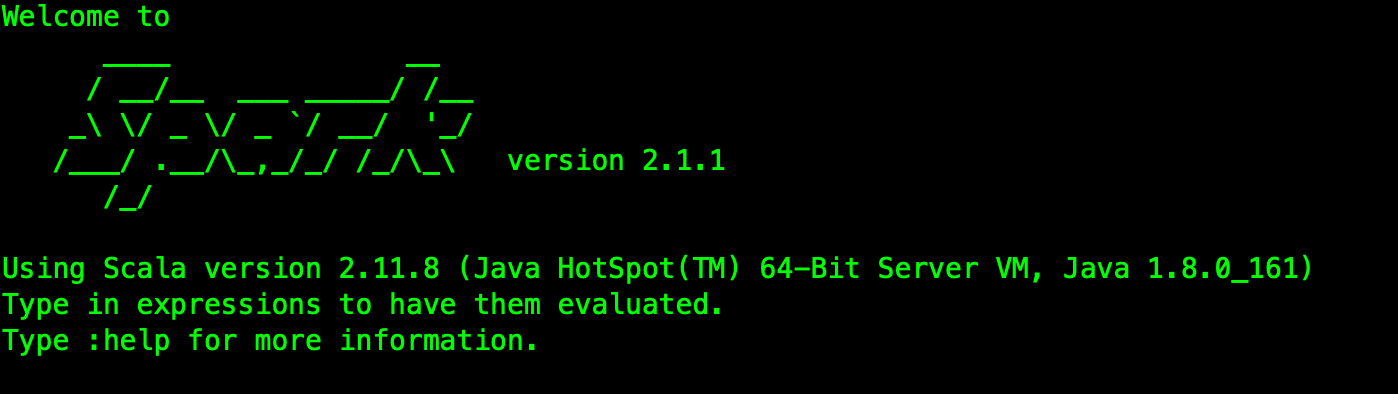
Version view
[[email protected] opt]# spark-shell
3、Spark Cluster configuration
Service node
[[email protected] opt]# cd /opt/spark2.1/conf/
[[email protected] conf]# cp slaves.template slaves
[[email protected] conf]# vim slaves

hop01
hop02
hop03
Environment configuration
[[email protected] conf]# cp spark-env.sh.template spark-env.sh
[[email protected] conf]# vim spark-env.sh

export JAVA_HOME=/opt/jdk1.8
export SCALA_HOME=/opt/scala2.12
export SPARK_MASTER_IP=hop01
export SPARK_LOCAL_IP= Install nodes IP
export SPARK_WORKER_MEMORY=1g
export HADOOP_CONF_DIR=/opt/hadoop2.7/etc/hadoop
Be careful SPARK_LOCAL_IP Configuration of .
4、Spark start-up
rely on Hadoop Related to the environment , So start it first .
 start-up :/opt/spark2.1/sbin/start-all.sh
 stop it :/opt/spark2.1/sbin/stop-all.sh
Here, two processes are started at the master node :Master and Worker, Other nodes start only one Worker process .
5、 visit Spark colony
The default port is :8080.
http://hop01:8080/

Basic operation cases :
[[email protected] spark2.1]# cd /opt/spark2.1/
[[email protected] spark2.1]# bin/spark-submit --class org.apache.spark.examples.SparkPi --master local examples/jars/spark-examples_2.11-2.1.1.jar

 Running results :Pi is roughly 3.1455357276786384
3、 ... and 、 The development case
1、 Core dependence
rely on Spark2.1.1 edition :
<dependency>
    <groupId>org.apache.spark</groupId>
    <artifactId>spark-core_2.11</artifactId>
    <version>2.1.1</version>
</dependency>
introduce Scala Compile the plug-in :
<plugin>
    <groupId>net.alchim31.maven</groupId>
    <artifactId>scala-maven-plugin</artifactId>
    <version>3.2.2</version>
    <executions>
        <execution>
            <goals>
                <goal>compile</goal>
                <goal>testCompile</goal>
            </goals>
        </execution>
    </executions>
</plugin>
2、 Case code development
Read the file in the specified location , And output file content word statistics results .
@RestController
public class WordWeb implements Serializable {


    @GetMapping("/word/web")
    public String getWeb (){

        // 1、 establish Spark Configuration objects for
        SparkConf sparkConf = new SparkConf().setAppName("LocalCount")
                                             .setMaster("local[*]");

        // 2、 establish SparkContext object
        JavaSparkContext sc = new JavaSparkContext(sparkConf);
        sc.setLogLevel("WARN");

        // 3、 Read the test file
        JavaRDD lineRdd = sc.textFile("/var/spark/test/word.txt");

        // 4、 Line content segmentation
        JavaRDD wordsRdd = lineRdd.flatMap(new FlatMapFunction() {

            @Override
            public Iterator call(Object obj) throws Exception {

                String value = String.valueOf(obj);
                String[] words = value.split(",");
                return Arrays.asList(words).iterator();
            }
        });

        // 5、 Mark the segmented words
        JavaPairRDD wordAndOneRdd = wordsRdd.mapToPair(new PairFunction() {

            @Override
            public Tuple2 call(Object obj) throws Exception {

                // Mark words :
                return new Tuple2(String.valueOf(obj), 1);
            }
        });

        // 6、 Count the number of times words appear
        JavaPairRDD wordAndCountRdd = wordAndOneRdd.reduceByKey(new Function2() {

            @Override
            public Object call(Object obj1, Object obj2) throws Exception {

                return Integer.parseInt(obj1.toString()) + Integer.parseInt(obj2.toString());
            }
        });

        // 7、 Sort
        JavaPairRDD sortedRdd = wordAndCountRdd.sortByKey();
        List<Tuple2> finalResult = sortedRdd.collect();

        // 8、 Results the print
        for (Tuple2 tuple2 : finalResult) {

            System.out.println(tuple2._1 + " ===> " + tuple2._2);
        }

        // 9、 Save the statistics
        sortedRdd.saveAsTextFile("/var/spark/output");
        sc.stop();
        return "success" ;
    }
}
Package execution results :

Look at the file output :
[[email protected] output]# vim /var/spark/output/part-00000
Four 、 Source code address
GitHub· Address
https://github.com/cicadasmile/big-data-parent
GitEE· Address
https://gitee.com/cicadasmile/big-data-parent

Read the label
【Java Basics 】【 Design patterns 】【 Structure and algorithm 】【Linux System 】【 database 】
【 Distributed architecture 】【 Microservices 】【 Big data components 】【SpringBoot Advanced 】【Spring&Boot Basics 】
【 Data analysis 】【 Technology map 】【 In the workplace 】
Technology Series
OLAP engine :Druid Component for statistical analysis of data
边栏推荐
- Accompanist组件库中文指南 - Glide篇,劲爆
- The easycvr program started abnormally as a service, but the process started normally. What is the reason?
- Empty encoded password警告原因
- Tiktok practice ~ one click registration and login process of mobile phone number and password (restrict mobile terminal login)
- Is it safe to open an account for shares of tongdaxin?
- Andorid 开发艺术探索笔记(2),跨平台小程序开发框架
- [technique of planting grass] spit blood and clean up, and take you to collect goose feathers in a fancy way! Do not spread!!!
- 【小程序】相对路径和绝对路径的表示符
- 数据管理:业务数据清洗,落地实现方案
- 解决base64压缩文件,经过post请求解压出来是空格的问题
猜你喜欢

超标量处理器设计 姚永斌 第3章 虚拟存储器 --3.1~3.2 小节摘录

UART protocol timing summary

What should I pay attention to in the interview of artificial intelligence technology?

C语言:利用自定义函数排序
【图像检测显著图】基于matlab失真提示鱼眼图显著图计算【含Matlab源码 1903期】

Andorid development art exploration notes (2), cross platform applet development framework

【虹科案例】3D数据如何成为可操作的信息?– 对象检测和跟踪
Andorid 开发艺术探索笔记(2),跨平台小程序开发框架

阿里巴巴面试题:多线程相关

数字化工厂可以分为哪两类
随机推荐
【小程序】编译预览小程序时,出现-80063错误提示
Throttling and anti shake
C language: structure array implementation to find the lowest student record
Superscalar processor design yaoyongbin Chapter 3 virtual memory -- Excerpt from subsection 3.1~3.2
Delegation attack of Intranet penetration and lateral mobility
Principles and differences between hash and history
The industrial Internet era will be realized by products, technologies and models derived from the industry itself
【图像检测显著图】基于matlab失真提示鱼眼图显著图计算【含Matlab源码 1903期】
同行评议论文怎么写
version `ZLIB_1.2.9‘ not found (required by /lib64/libpng16.so.16)
setfacl命令的基本用法
How many of the 36 difficult points of activity do you know?, Android interview 2020
Revit API: schedule viewschedule
国内首款开源MySQL HTAP数据库即将发布,三大看点提前告知 石原子科技重磅推出
Empty encoded password警告原因
Andorid development art exploration notes (2), cross platform applet development framework
【CVPR 2022】高分辨率小目标检测:Cascaded Sparse Query for Accelerating High-Resolution Smal Object Detection
机器学习中 TP FP TN FN的概念
After the deployment of Beidou navigation system, why didn't we launch a high-precision map similar to Google maps?
【CVPR 2020 Oral】极低光去噪论文:A Physics-based Noise Formation Model for Extreme Low-light Raw Denoising