当前位置:网站首页>Revit API: schedule viewschedule
Revit API: schedule viewschedule
2022-06-24 00:04:00 【Geek BIM studio】
Revit Schedule definitions
Official interpretation of the schedule
Parts lists display information in tabular form , This information is extracted from the element properties in the project . A schedule can list each instance of the element type to schedule , Or compress multiple instances into one row according to the grouping standard of the parts list .
You can create a schedule at any time during the design process . If changes to the model will affect the schedule , The schedule will automatically update to reflect these changes . You can add a schedule to a sheet .
You can export parts lists to other software programs , Such as spreadsheet program .
Schedule update
When modifying the model , All parts lists are automatically updated . for example , If you move a wall , The square feet in the room schedule are updated accordingly .
When changing the properties of building components in the model , The related parts list is automatically updated .
for example , You can select a door in the model and modify its manufacturer properties . The door schedule will reflect changes in the manufacturer's attributes .
Schedule yes Revit A view of
From the inheritance level, you can see that the schedule is View Subclasses of .
TableView
If you want to read the contents of the parts list , It can be used ViewSchedule Parent class TableView The interface of .
namespace Autodesk.Revit.DB
{

    public class TableView : View
    {

        public int MaximumRowHeight {
     get; }
        public int MaximumColumnWidth {
     get; }
        public int MinimumRowHeight {
     get; }
        public int MinimumColumnWidth {
     get; }
        public int MaximumGridWidth {
     get; }
        public ElementId TargetId {
     get; set; }
        public static IList<ElementId> GetAvailableParameters(Document cda, ElementId categoryId);
        public IList<ElementId> GetAvailableParameterCategories(SectionType sectionType, int row);
        public string GetCalculatedValueName(SectionType sectionType, int row, int column);
        public string GetCalculatedValueText(SectionType sectionType, int row, int column);
        public string GetCellText(SectionType sectionType, int row, int column);
        public bool IsValidSectionType(SectionType sectionType);
    }
}
ViewSchedule
establish
The ViewSchedule class represents schedules and other schedule-like views, including single-category and multi-category schedules, key schedules, material takeoffs, view lists, sheet lists, keynote legends, revision schedules, and note blocks.
// ViewSchedule  Related creation interfaces
// Creates a keynote legend.
public static ViewSchedule CreateKeynoteLegend(Document document);
// Create a key schedule.
public static ViewSchedule CreateKeySchedule(Document document, ElementId categoryId);
// Creates a material takeoff.
public static ViewSchedule CreateMaterialTakeoff(Document document, ElementId categoryId);
// Creates a note block.
public static ViewSchedule CreateNoteBlock(Document document, ElementId familyId);
// Creates a revision schedule.
public static ViewSchedule CreateRevisionSchedule(Document document);
// Creates a regular schedule that can relate to a specific area scheme.
public static ViewSchedule CreateSchedule(Document document, ElementId categoryId, ElementId areaSchemeId);
// Creates a regular schedule.
public static ViewSchedule CreateSchedule(Document document, ElementId categoryId);
// Creates a sheet list.
public static ViewSchedule CreateSheetList(Document document);
// Creates a view list.
public static ViewSchedule CreateViewList(Document document);
Definition
// ViewSchedule
public ScheduleDefinition Definition {
     get; }
Fields in the following figure 、 filter 、 Sort / Group 、 Format 、 Appearance is defined in ScheduleDefinition.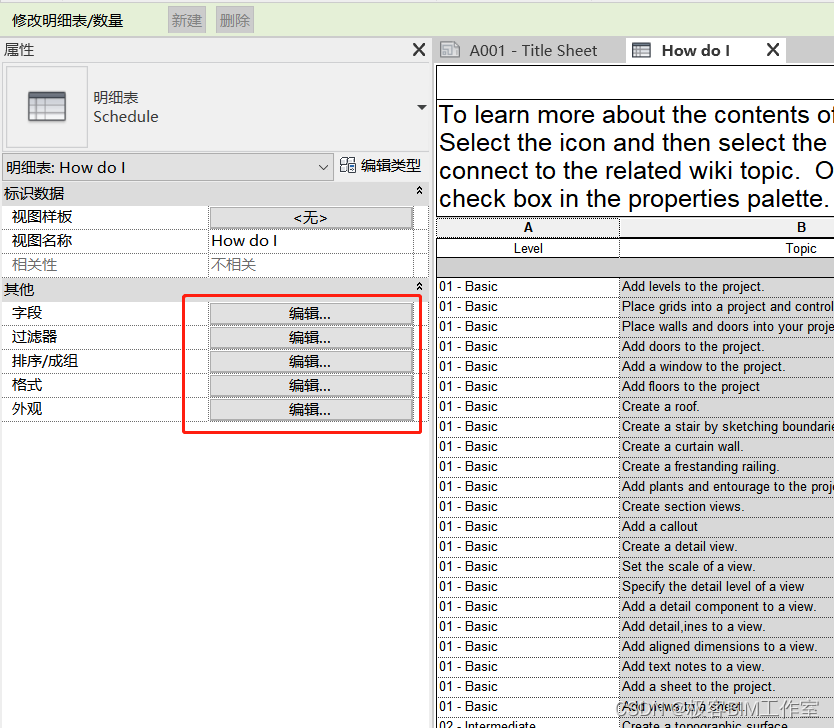
Change the background color of parts list Columns
The following example is to set the background color of the parts list , Logically, font type, color, etc. can be set .
//  Get the style of a column
ScheduleField field = definition.GetField(id);
TableCellStyle style = field.GetStyle();
TableCellStyleOverrideOptions options = style.GetCellStyleOverrideOptions();

// Override  Background color
options.BackgroundColor = true;
style.SetCellStyleOverrideOptions(options);

//  Set background color
style.BackgroundColor = highlight;
field.SetStyle(style);
边栏推荐
- 点乘和叉乘
- 【红绿灯识别】基于matlab GUI红绿灯识别【含Matlab源码 1908期】
- Visual explanation of clockwise inner curve in Green's formula hole digging method
- Chaos engineering, learn about it
- Confused test / development programmers, different people have different stories and different puzzles
- 测试 - 用例篇 - 细节狂魔
- Setting method of bar code local segment data variable
- Android 7,2021最新Android面试笔试题目分享
- 迷茫的测试/开发程序员,不同人有着不同的故事、有着不同的迷茫......
- Taylor formula and common expansion
猜你喜欢

APP性能优化之启动流程分析

NLP工程师是干什么的?工作内容是什么?

List<? Extensions T > and list <? Super T > difference

Chaos engineering, learn about it

Classical Chinese can be programmed???

Solve the problem of project dependency red reporting

PMP Exam related calculation formula summary! Must see before examination
人工智能技术岗位面试要注意什么?

1. < tag dynamic programming and path combination problem > lt.62 Different paths + lt.63 Different paths II

Flux in three dimensional vector field
随机推荐
Index principle and filling factor in database
Different objects use the same material and have different performances
[proteus simulation] example of T6963C driving pg12864 (with Chinese and English display)
Save: software analysis, verification and test platform
Docker Deployment redis
[things about gbase] gbase 8s high availability technology and case analysis (issue 02)
2021-11-23: Regulations: l[1] corresponds to a, l[2] corresponds to B, l[3] corresponds to C
C语言c89(c90)的所有的32个关键字分类
抖音实战~密码找回
跟着CTF-wiki学pwn——ret2text
如何利用數倉創建時序錶
合成大西瓜小游戏微信小程序源码/微信游戏小程序源码
How to take the PMP Exam agile on June 25? Share your troubles
What is the use of AI technology in the medical field?
MySQL architecture (basic)
Cross domain issues of the new version of Google browser
This high imitation millet mall project is amazing
Learn PWN from CTF wiki - ret2text
暑假第一周
Leetcode - linked list written test questions