当前位置:网站首页>AD教程系列 | 4 - 创建集成库文件
AD教程系列 | 4 - 创建集成库文件
2022-06-26 05:02:00 【toyjis】
前面第三篇讲述了如何创建原理图库(.schlib)和PCB库(.pcblib),在完成这两个文件后,我们可以进行PCB设计。但是,为了规范化和以后使用更加方便,本篇文章讲一下如何生成集成库文件(.intlib),本次采用较为简单直接的74HC00,软件版本AD19。
0 - 准备工作
首先,需要在同一个项目下面完成原理图库和PCB库的绘制,具体方法:绘制基础库文件,注意:原理图库中的器件需要映射PCB库封装。
在完成两个文件后,需要映射封装。原理图库的左下角有Add Footprint,,点击按钮

在弹出的对话框中选择浏览,如果项目内有创建的PCB库文件,则会显示出来;也可以选择其他现有的库文件。
 使用我们刚刚创建的pcb库,选择下方的合适封装,点击确定即可关联文件;也可以点击三个省略号,选择现有的库文件进行关联。
成功关联文件和下图一样,点击保存,集成库文件的准备工作就完成了。

1 - 创建集成库
路径:文件-新的…-库-集成库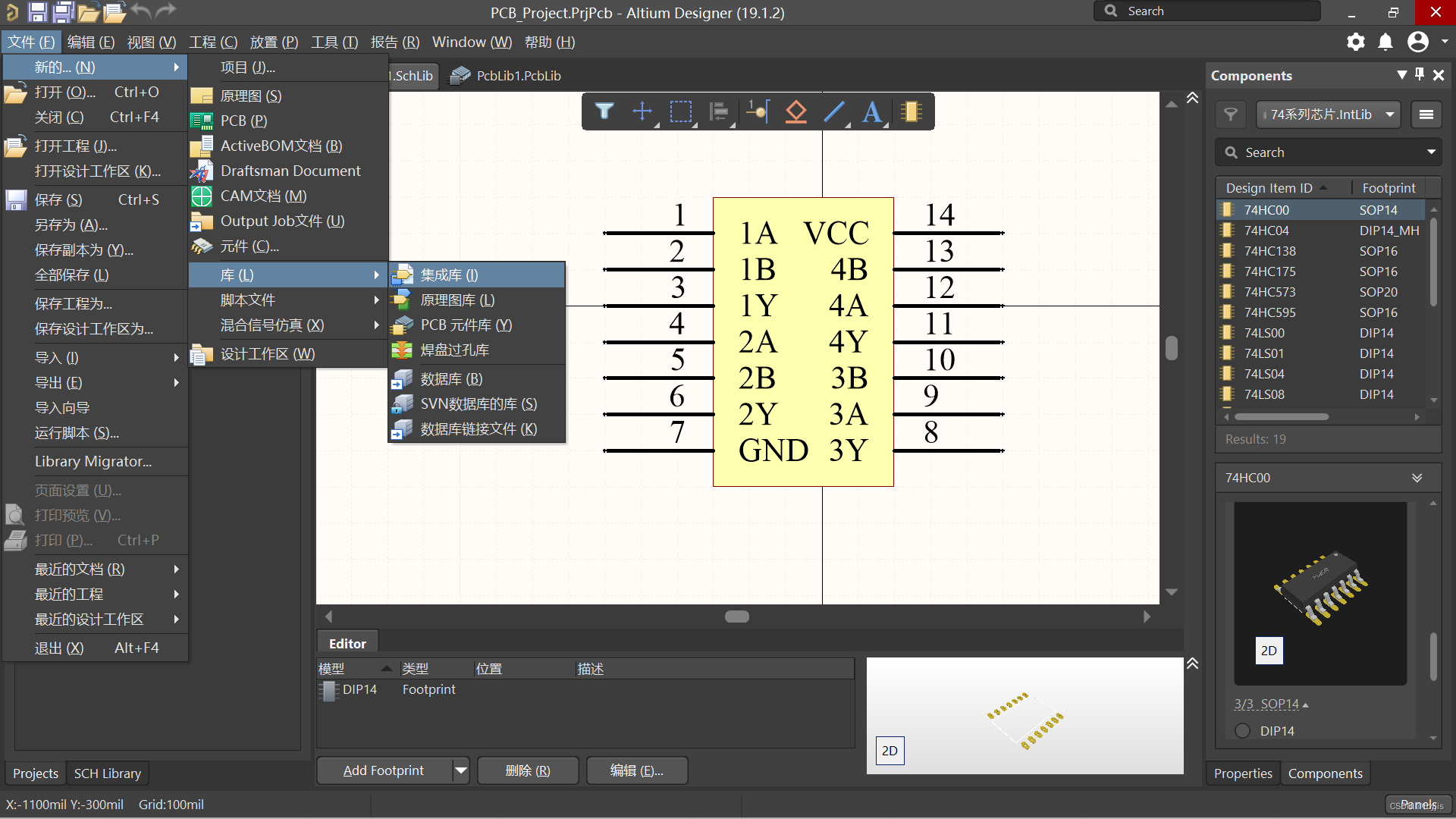
新文件创建好后,会显示没有文件加入,此时,可以选择直接将我们创建好的文件拖入新项目中,也可以选择从其他文件导入。
完成后的效果如下图,要记得保存文件
第二步,编译文件,方法:右键项目-选择第一个 Compile integrated library
编译完成后,会显示编译信息,如果不弹出,可以在右下角Panels中选择Messages查看,no error found才是正常状态。
此时,集成库就已经生成了,存放在文件目录的output下面。
2 - 添加、安装集成库
刚刚创建的集成库文件一般会直接导入到现有工程中,但是如果需要迁移,或者在其他项目中使用,就需要安装集成库文件。具体方法如下。
点击Components的三道横杠按钮,在弹出的下拉菜单中选择**“File-based Libraries Preferences”**
在新弹出的对话框中,选择安装按键。
按照库文件的路径选取,并打开即可实现安装
之后,在库文件目录,Components中都可以看见更新的库
3 - 总结
1、创建集成库之前需要做好引脚映射等工作
2、输出的库文件位于项目文件的output文件夹下
3、Components中的三道横杠可以点击安装库文件
边栏推荐
- Hash problem
- Wechat applet exits the applet (navigator and api--wx.exitminiprogram)
- How MySQL deletes all redundant duplicate data
- File upload and security dog
- Datetime data type ---now() gets the current time, datetime() creation date, performs mathematical operations, and to_ Datetime() converts to date type and extracts various parts of date
- Use to_ Numeric to numeric type
- PHP之一句话木马
- date_ Range creation date range freq parameter value table and creation example
- Selection of programming language
- UWB ultra high precision positioning system architecture
猜你喜欢







随机推荐
Generalized linear model (logistic regression, Poisson regression)
1.17 learning summary
Comment enregistrer une image dans une applet Wechat
Datetime data type ---now() gets the current time, datetime() creation date, performs mathematical operations, and to_ Datetime() converts to date type and extracts various parts of date
2022.1.23
Datetime data type - min() get the earliest date and date_ Range() creates a date range, timestamp() creates a timestamp, and tz() changes the time zone
2022.2.15
Use of better scroll
Genius makers: lone Rangers, technology giants and AI | ten years of the rise of in-depth learning
Computer Vision Tools Chain
天才制造者:獨行俠、科技巨頭和AI|深度學習崛起十年
1.18 learning summary
2022.2.13
What is UWB in ultra-high precision positioning system
6.1 - 6.2 introduction to public key cryptography
1.19 learning summary
0622-马棕榈跌9%
1.11 learning summary
Record a circular reference problem
BACK-OFF RESTARTING FAILED CONTAINER 的解决方法