当前位置:网站首页>Kunpeng arm server compilation and installation paddlepaddle
Kunpeng arm server compilation and installation paddlepaddle
2022-06-24 14:08:00 【Tomato expert】
Don't talk nonsense , Open up !
Many of the official tutorials do not cover , Various problems occurred during installation , The following is a supplement to the official tutorial , What's the problem? , Welcome to correct !
One 、cmake
Paddle rely on cmake Build it , need cmake edition >=3.15, If the source provided by the operating system includes the appropriate version of cmake, Direct installation , Otherwise, you need to install the source code
#  Remove previous versions of cmake
yum remove cmake

wget https://github.com/Kitware/CMake/releases/download/v3.16.8/cmake-3.16.8.tar.gz
tar -xzf cmake-3.16.8.tar.gz && cd cmake-3.16.8
./bootstrap && make && sudo make install
I encountered the following errors during installation :
Could NOT find OpenSSL, try to set the path to OpenSSL root folder in the system variable OPENSSL_ROOT_DIR (missing: OPENSSL_LIBRARIES OPENSSL_INCLUDE_DIR) 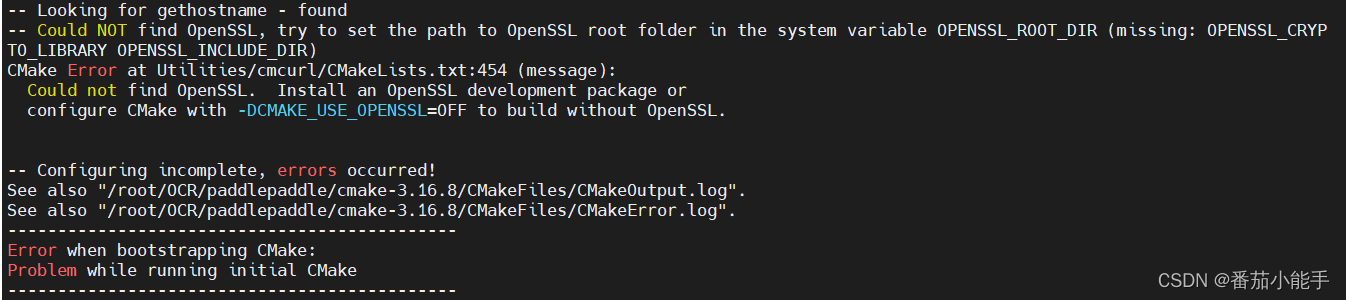
terms of settlement , Use the following command to install :
yum install openssl-develThen do it again cmake Installation command .
Two 、patchelf
The meaning of the official installation documentation , This is still needed at present , The process is as follows
Be sure to download aarch64 The branch
git clone -b aarch64 https://github.com/NixOS/patchelf.git
./bootstrap.sh
./configure
make
make check
sudo make install
The following error may be reported during installation :failed to run aclocal: No such file or directory
terms of settlement , Use the following command to install :
yum install autoconf
yum install automake
Then do it again make Installation command .
3、 ... and 、paddle
The process is consistent with the official , But officially develop The branch , I use the official version of the branch here
git clone -b release/2.3 https://github.com/PaddlePaddle/Paddle.git
cd Paddle
mkdir build && cd build
There are a large number of open files during the linking process , The system default limit may be exceeded, resulting in compilation errors , Set the maximum number of files allowed to be opened by the process :
ulimit -n 4096perform cmake:
Python2 Commands in the environment :
cmake .. -DPY_VERSION=2 -DPYTHON_EXECUTABLE=`which python2` -DWITH_ARM=ON -DWITH_TESTING=OFF -DCMAKE_BUILD_TYPE=Release -DON_INFER=ON -DWITH_XBYAK=OFF
Python3 Environmental order :
cmake .. -DPY_VERSION=3 -DPYTHON_EXECUTABLE=`which python3` -DWITH_ARM=ON -DWITH_TESTING=OFF -DCMAKE_BUILD_TYPE=Release -DON_INFER=ON -DWITH_XBYAK=OFF
A wrong : Errors that may be encountered during compilation :Could NOT find PythonLibs (missing: PYTHON_LIBRARIES PYTHON_INCLUDE_DIRS)

terms of settlement
https://felaim.blog.csdn.net/article/details/105832560
Error 2 : No, numpy package

install numpy It may also appear that you cannot find ‘Python.h’ file , terms of settlement , download python3 Development package for :
yum install python3-develError of three :


terms of settlement :
pip3 install wheel -i https://mirror.baidu.com/pypi/simple
pip3 install protobuf -i https://mirror.baidu.com/pypi/simple
Four 、make
Use the following command to compile , Be careful , Because the processor is ARM framework , If not TARGET=ARMV8 An error will be reported during compilation .
make TARGET=ARMV8 -j$(nproc) Enter after compilation Paddle/build/python/dist Found generated in directory .whl package .
make In the process from git Download various packages from , slowly , You can speed up the package download in this way : Speed up github Access and download - GitClone
边栏推荐
- PM should also learn to reflect every day
- 杰理之.睡眠以后定时唤醒系统继续跑不复位【篇】
- 2022 recurrent training question bank and answers for hoisting signal Rigger (special type of construction work)
- 食品饮料行业渠道商管理系统解决方案:实现渠道数字化营销布局
- The hidden corner of codefarming: five things that developers hate most
- Kotlin asynchronous flow
- Can a team do both projects and products?
- 根据前序&中序遍历生成二叉树[左子树|根|右子树的划分/生成/拼接问题]
- 返回新列表
- AntD checkbox,限制选中数量
猜你喜欢

杰理之串口接收 IO 需要设置数字功能【篇】
![Jerry's infrared filtering [chapter]](/img/6b/7c4b52d39a4c90f969674a5c21b2c7.png)
Jerry's infrared filtering [chapter]

群晖向阿里云OSS同步
杰理之TIMER0 用默认的 PA13 来检测脉宽【篇】

知识经济时代,教会你做好知识管理

位于相同的分布式端口组但不同主机上的虚拟机无法互相通信

Three efficient programming skills of go language

卷积核、特征图可视化

智慧园区SaaS管理系统解决方案:赋能园区实现信息化、数字化管理

Dragon lizard developer said: first time you got an electric shock, so you are such a dragon lizard community| Issue 8
随机推荐
取消冒泡
【无标题】
Jupyter notebook操作
HarmonyOS. two
Research and development practice of Kwai real-time data warehouse support system
2022 coal mine gas drainage operation certificate examination questions and simulation examination
2022 construction elevator driver (construction special type of work) examination questions and online simulation examination
Jerry's serial port receiving IO needs to set the digital function [chapter]
Jerry's test mic energy automatic recording automatic playback reference [article]
Jericho turns on shouting in all modes to increase mic automatic mute [chapter]
杰理之检测 MIC 能量自动录音自动播放参考【篇】
21set classic case
快手实时数仓保障体系研发实践
NPM package [details] (including NPM package development, release, installation, update, search, uninstall, view, version number update rules, package.json details, etc.)
Mit-6.824-lab4a-2022 (ten thousand words explanation - code construction)
2022年江西省安全员B证考试题库模拟考试平台操作
PM也要学会每天反省
钛星数安加入龙蜥社区,共同打造网络安全生态
AQS初探
Activity lifecycle