当前位置:网站首页>Cross domain and jsonp
Cross domain and jsonp
2022-06-24 00:54:00 【51CTO】
1. Understand homology strategy and cross domain
1.1 The same-origin policy
1. What is homology
If two pages of the protocol , Domain name and port are the same , The two pages have the same source .
2. What is homology strategy
Homology policy is a security function provided by the browser
Generally speaking, the browser rules A Website JavaScript Not allowed with non homologous sites C Resource interaction between .
1. Can't read non homologous pages Cookie、LocalStorage and IndexedDB
2. It is impossible to contact non homologous networks DOM
3. Can't send... To a non homologous address Ajax request
1.2 Cross domain
1. What is cross-domain
There are two homologous values URL The agreement 、 The domain name and port are consistent , conversely 、 It's cross domain
The root cause of cross domain : The browser's homology policy does not allow non homology URL Interact with resources .
2. Browser interception of cross domain requests

Be careful : The browser allows cross domain requests , however , Data returned from cross domain requests , Will be blocked by the browser , Unable to get... By the page !
3. How to implement cross domain data requests
Today, , Implement cross domain data requests , The two main schemes , Namely JSONP and CORS.
JSONP: It's early , Compatibility is good. , It's the front-end programmer to solve cross domain problems , Forced to come up with a temporary solution . The disadvantage is that it only supports GET request , I won't support it POST request .
CORS: Late appearance , He is W3C standard , Cross domain Ajax The underlying solution to the request . Support GET and POST request , The disadvantage is that it is not compatible with some lower versions of browsers .
2.JSONP
2.1 What is? JSONP
JSONP yes JSON A kind of “ Usage mode ”, It can be used to solve the problem of cross-domain data access in major browsers
2.2 JSONP Implementation principle of
Due to the restriction of browser homology strategy , Can't pass... In the web page Ajax Request non homologous interface data . however <script> Tags are not affected by browser homology policy , Can pass src attribute , Request non homologous js Script .
therefore ,JSONP Implementation principle of , It is through <script> Labeled src attribute , Request a cross domain data interface , And in the form of function calls , Receive the data returned from the cross domain interface response .
2.3 Realize a simple JSONP
Define a success Callback function :

adopt <script> label , Request interface data :

2.4JSONP The shortcomings of
because JSONP It's through <script> Labeled src attribute , To achieve cross domain data acquisition , therefore ,JSONP Only support GET Data request , I won't support it POST request
Be careful :JSONP and Ajax There is no relationship between , Can't take JSONP The way to request data is called Ajax, because JSONP Not used XMLHttpRequest This object
2.5jQuery Medium JSPNP
jQuery Provides $.ajax() function , In addition to initiating real Ajax In addition to data requests , Can also initiate JSONP Data request
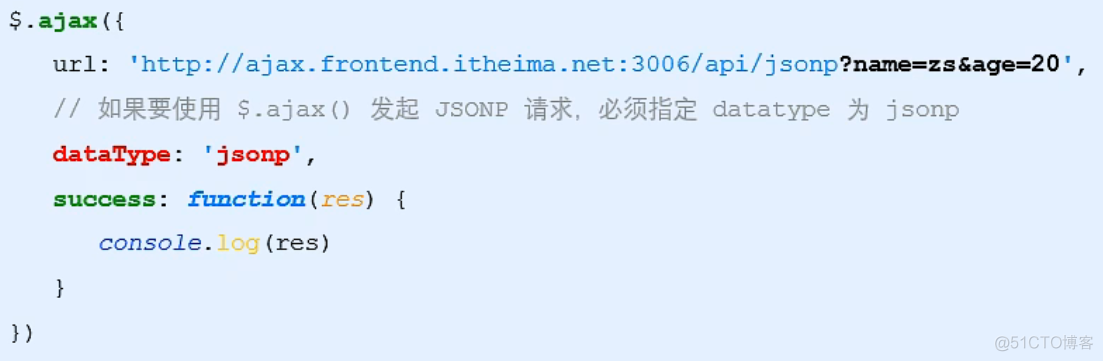
By default , Use jQuery Sponsored JSONP request , Will automatically carry a callback=jQueryxxx Parameters of ,jQuery Is the name of a randomly generated callback function
2.6 Custom parameter and callback function name
In the use of jQuery launch JSONP When asked , If you want to customize JSONP And the callback function , You can specify... In two ways :

2.7jQuery in JSONP Implementation process
jQuery Medium JSONP, through <script> Labeled src Property to achieve cross domain data access , It's just ,jQuery It adopts dynamic creation and removal <script> Label mode to initiate JSONP Data request
Is initiating JSONP On request , Dynamic direction <header> in append One <script> label
stay JSONP After the request is successful , Dynamic from <heaber> Remove just append In the <script> label
3. Case study - Taobao Search
3.1 What needs to be achieved UI effect

       <!DOCTYPE html>


<html lang="en">


  <head>


    <meta charset="UTF-8" />


    <meta name="viewport" content="width=device-width, initial-scale=1.0" />


    <meta http-equiv="X-UA-Compatible" content="ie=edge" />


    <title>Document</title>


    <!--  Import the basic style of the page  -->


    <link rel="stylesheet" href="./css/search.css" />


    <!--  Import  jQuery -->


    <script src="./lib/jquery.js"></script>


  </head>


  <body>


    <div class="container">


      <!-- Logo -->


      <img src="./images/taobao_logo.png" alt="" class="logo" />


      <div class="box">


        <!-- tab  bar  -->


        <div class="tabs">


          <div class="tab-active"> baby </div>


          <div> The store </div>


        </div>


        <!--  Search area ( Search box and search button ) -->


        <div class="search-box">


          <input type="text" class="ipt" placeholder=" Please enter what you want to search for " /><button class="btnSearch">


             Search for


          </button>


        </div>


      </div>


    </div>


  </body>


</html>
- 1.
- 2.
- 3.
- 4.
- 5.
- 6.
- 7.
- 8.
- 9.
- 10.
- 11.
- 12.
- 13.
- 14.
- 15.
- 16.
- 17.
- 18.
- 19.
- 20.
- 21.
- 22.
- 23.
- 24.
- 25.
- 26.
- 27.
- 28.
- 29.
- 30.
- 31.
- 32.
- 33.
3.2 Get the search keywords entered by the user
In order to get what the user has entered each time he presses the keyboard , Need to listen to the input box keyup event , The sample code is as follows

3.3 encapsulation getSuggestList function
The code that will get the list of search suggestions , Package to getSuggestList Function , The code structure is as follows
3.4 Rendering suggestion list UI structure
1. Define a list of search suggestions

2. Define template structure

3. Functions that define the render template structure

4. Hide the list of search suggestions when the search keyword is empty

3.5 Anti shake of input box
1. What is anti shake
Anti shake strategy (debounce) When the event is triggered , Delay n Seconds later, the callback , If in this n The second event is triggered again , Then the time will be counted again
2. Application scenario of anti shake
When the user continuously enters a string of characters in the input box , You can use the anti shake strategy , Only after the input is completed , To execute the query request , This can effectively reduce the number of requests , Saving resource ;
3. Achieve input box anti shake

3.6 List of suggestions for cache search
1. Define global cache objects

2. Save search results to cache objects

3. Get search suggestions from the cache first

Case code
       <!DOCTYPE html>


<html lang="en">


<head>


  <meta charset="UTF-8" />


  <meta name="viewport" content="width=device-width, initial-scale=1.0" />


  <meta http-equiv="X-UA-Compatible" content="ie=edge" />


  <title>Document</title>


  <!--  Import the basic style of the page  -->


  <link rel="stylesheet" href="./css/search.css" />


  <!--  Import  jQuery -->


  <script src="./lib/jquery.js"></script>


  <script src="/lib/template-web.js"></script>


</head>


<body>


  <div class="container">


    <!-- Logo -->


    <img src="./images/taobao_logo.png" alt="" class="logo" />


    <div class="box">


      <!-- tab  bar  -->


      <div class="tabs">


        <div class="tab-active"> baby </div>


        <div> The store </div>


      </div>


      <!--  Search area ( Search box and search button ) -->


      <div class="search-box">


        <input type="text" id="ipt" class="ipt" placeholder=" Please enter what you want to search for " /><button class="btnSearch">


           Search for


        </button>


      </div>


      <!--  Search suggestion list  -->


      <div id="suggest-list">


      </div>


    </div>


  </div>


  <!--  Template engine structure  -->


  <script type="text/html" id="tpl-suggestList">


{{each result}}


  <!--  Search suggestions  -->


<div class="suggest-item">{{$value[0]}}</div>


{{/each}}


  </script>


  <script>


    $(function () {


      // 1. Defines the of the delayer ID


      let timer = null


      //  Define global cache objects


      let cacheObj = {}


      // 2. Define the anti shake function


      function debounceSearch(kw) {


        timer = setTimeout(function () {


          getSuggestList(kw);


        }, 500)


      }


      //  Bind... To the input box keyup event


      $('#ipt').on('keyup', function () {


        // 3. Empty  timer


        let keywords = $(this).val().trim();


        if (keywords.length <= 0) {


          return $("#suggest-list").empty().hide()


        }


        //  First determine whether there is data in the cache


        if (cacheObj[keywords]) {


          return renderSiggestList(cacheObj[keywords])


        }


        // TODO: Get a list of search suggestions


        // console.log(keywords);


        // getSuggestList(keywords);


        debounceSearch(keywords)


      })


      function getSuggestList(kw) {


        $.ajax({


          url: 'https://suggest.taobao.com/sug?q=' + kw,


          dataType: 'jsonp',


          success: function (res) {


            // console.log(res);


            renderSiggestList(res)


          }


        })


      }


      //  Rendering UI structure


      function renderSiggestList(res) {


        if (res.length <= 0) {


          return $('#suggest-list').empty().hide()


        }


        let htmlStr = template('tpl-suggestList', res)


        $('#suggest-list').html(htmlStr).show()


        // 1. Get the content entered by the user , As a key


        let k = $('#ipt').val().trim()


        // 2. You need to cache the data as a value


        cacheObj[k] = res


      }


    })


  </script>


</body>


</html>
- 1.
- 2.
- 3.
- 4.
- 5.
- 6.
- 7.
- 8.
- 9.
- 10.
- 11.
- 12.
- 13.
- 14.
- 15.
- 16.
- 17.
- 18.
- 19.
- 20.
- 21.
- 22.
- 23.
- 24.
- 25.
- 26.
- 27.
- 28.
- 29.
- 30.
- 31.
- 32.
- 33.
- 34.
- 35.
- 36.
- 37.
- 38.
- 39.
- 40.
- 41.
- 42.
- 43.
- 44.
- 45.
- 46.
- 47.
- 48.
- 49.
- 50.
- 51.
- 52.
- 53.
- 54.
- 55.
- 56.
- 57.
- 58.
- 59.
- 60.
- 61.
- 62.
- 63.
- 64.
- 65.
- 66.
- 67.
- 68.
- 69.
- 70.
- 71.
- 72.
- 73.
- 74.
- 75.
- 76.
- 77.
- 78.
- 79.
- 80.
- 81.
- 82.
- 83.
- 84.
- 85.
- 86.
- 87.
- 88.
- 89.
- 90.
- 91.
- 92.
- 93.
- 94.
- 95.
- 96.
- 97.
- 98.
- 99.
- 100.
- 101.
- 102.
- 103.
- 104.
- 105.
- 106.
- 107.
- 108.
4. Anti shake and throttling
4.1 Throttling strategy (throttle), It's called Siyi , It can reduce the trigger frequency of events over a period of time .
4.2 Application scenarios of throttling
1. When the mouse continuously triggers an event , Trigger only once per unit time
2. Listen and calculate the position of the scroll bar when lazy loading , But you don't have to trigger every slide , It can reduce the frequency of calculation , Without having to waste CPU resources
4.3 Throttling cases - Mouse follow effect
1. Rendering UI Structure and beautify style

2. Achieve mouse following effect when throttling is not used

3. Concept of throttle valve

Throttle valve is empty , Indicates that the next operation can be performed ; Not empty , Indicates that the next operation cannot be performed
The current operation has been executed , The throttle must be reset to empty , Indicates that the next operation can be performed
Before each operation , You must first judge whether the throttle valve is empty .
4. Use throttling to optimize the mouse following effect

4.4 The difference between anti shake and throttling
Shake proof : If the event is triggered frequently , Anti shake can only ensure that only one trigger takes effect , front N Multiple triggers are ignored
throttle : If the event is triggered frequently , Throttling can reduce the frequency of event triggering , therefore , Throttling is the selective execution of some events
边栏推荐
- Cvpr2022 𞓜 thin domain adaptation
- 【虹科案例】3D数据如何成为可操作的信息?– 对象检测和跟踪
- Is it safe to open an account for shares of tongdaxin?
- 使用递归形成多级目录树结构,附带可能是全网最详细注释。
- 解决base64压缩文件,经过post请求解压出来是空格的问题
- [day 25] given an array of length N, count the number of occurrences of each number | count hash
- What are the two types of digital factories
- kubernetes之常用核心资源对象
- 【小程序】实现双列商品效果
- How to get started with machine learning?
猜你喜欢

What are the two types of digital factories

一次 MySQL 误操作导致的事故,「高可用」都顶不住了!

小猫爪:PMSM之FOC控制15-MRAS法

C language: on the right shift of matrix

利用Scanorama高效整合异质单细胞转录组

Skywalking installation and deployment practice

CVPR2022 | 可精简域适应

MIP nerf: anti aliasing multiscale neural radiation field iccv2021

C language: sorting with custom functions

Handwritten digit recognition using SVM, Bayesian classification, binary tree and CNN
随机推荐
Chinese guide to accompanist component library - glide, hot
【机器学习】线性回归预测
[iccv workshop 2021] small target detection based on density map: coarse-grained density map guided object detection in aerial images
同行评议论文怎么写
CVPR2022 | 可精简域适应
[redis advanced ziplist] if someone asks you what is a compressed list? Please dump this article directly to him.
Handwritten digit recognition using SVM, Bayesian classification, binary tree and CNN
Empty encoded password warning reason
WinSCP和PuTTY的安装和使用
SQL database: summary of knowledge points, no suspension at the end of the period
WinSCP和PuTTY的安装和使用
股票网上开户安全吗?需要满足什么条件?
Installation and use of winscp and putty
9次Android面试经验总结,已收字节,阿里,高级android面试答案
Common core resource objects of kubernetes
用一个软件纪念自己故去的母亲,这或许才是程序员最大的浪漫吧
[Hongke case] how can 3D data become operable information Object detection and tracking
[applet] when compiling the preview applet, a -80063 error prompt appears
规律/原理/规则/法则/定理/公理/本质/定律
Google Earth engine (GEE) - verification results used by NDVI, NDWI and NDBI to increase classification accuracy (random forest and cart classification)