当前位置:网站首页>将一维数据(序列)转化为二维数据(图像)的方法汇总GAFS, MTF, Recurrence plot,STFT
将一维数据(序列)转化为二维数据(图像)的方法汇总GAFS, MTF, Recurrence plot,STFT
2022-06-22 17:59:00 【xiaoweiwei99】
将一维序列数据转化为二维图像数据的方法汇总 详细 全面
一、背景
虽然深度学习方法(1D CNN, RNN, LSTM 等)可以直接处理一维数据,但是当前的深度学习方法主要还是处理二维结构数据的,特别是在计算机视觉CV以及自然语言处理NLP领域,各种各样的方法层出不穷。因此,如果能够将一维序列数据转化为二维(图像)数据, 则可以直接结合CV以及NLP领域的方法,是不是很有趣!
二、方法介绍
格拉米角场 GAFs
原理
将缩放后的1D序列数据从直角坐标系统转换到极坐标系统,然后通过考虑不同点之间的角度和/差以识别不同时间点的时间相关性。取决于是做角度和还是角度差,有两种实现方法:GASF(对应做角度和), GADF(对应做角度差)。
实现步骤
Step 1:缩放,将数据范围缩放到[-1,1]或者[0, 1], 公式如下:
Step 2: 将缩放后的序列数据转换到极坐标系统,即将数值看作夹角余弦值,时间戳看作半径,公式如下:
注: 若数据缩放范围为[-1, 1],则转换后的角度范围为[0, π pi π];若缩放范围为[0, 1],则转换后的角度范围为[0, π pi π/2]。
Step 3:
可以看到,最终GASF和GADF的计算转化到直角坐标系下变成了“类似”内积的操作。
效率问题:对于长度为n的序列数据,转换后的GAFs尺寸为[n, n]的矩阵,可以采用PAA(分段聚合近似)先将序列长度减小,然后在转换。 所谓的PAA就是:将序列分段,然后通过平均将每个段内的子序列压缩为一个数值, 简单吧!
调用示例
Python工具包pytl中已经提供了API,另外,笔者自行实现代码, 想要查看实现细节以及获取更多测试用例,可从我的 链接获取。
'''
EnvironmentPython 3.6,  pyts: 0.11.0, Pandas: 1.0.3
'''
from mpl_toolkits.axes_grid1 import make_axes_locatable
from pyts.datasets import load_gunpoint
from pyts.image import GramianAngularField
# call API
X, _, _, _ = load_gunpoint(return_X_y=True)
gasf = GramianAngularField(method='summation')
X_gasf = gasf.transform(X)
gadf = GramianAngularField(method='difference')
X_gadf = gadf.transform(X)

plt.figure()
plt.suptitle('gunpoint_index_' + str(0))
ax1 = plt.subplot(121)
ax1.plot(np.arange(len(rescale(X[k][:]))), rescale(X[k][:]))
plt.title('rescaled time series')
ax2 = plt.subplot(122, polar=True)
r = np.array(range(1, len(X[k]) + 1)) / 150
theta = np.arccos(np.array(rescale(X[k][:]))) * 2 * np.pi  # radian -> Angle

ax2.plot(theta, r, color='r', linewidth=3)
plt.title('polar system')
plt.show()

plt.figure()
plt.suptitle('gunpoint_index_' + str(0))
ax1 = plt.subplot(121)
plt.imshow(X_gasf[k])
plt.title('GASF')
divider = make_axes_locatable(ax1)
cax = divider.append_axes("right", size="5%", pad=0.2) # Create an axes at the given *position*=right with the same height (or width) of the main axes
plt.colorbar(cax=cax)

ax2 = plt.subplot(122)
plt.imshow(X_gadf[k])
plt.title('GASF')
divider = make_axes_locatable(ax2)
cax = divider.append_axes("right", size="5%",
                          pad=0.2)  # Create an axes at the given *position*=right with the same height (or width) of the main axes
plt.colorbar(cax=cax)
plt.show()
结果如下图所示:
缩放后的序列数据以及在极坐标系统的表示:
转换后的GASF和GADF:
马尔可夫变迁场 MTF
原理
基于1阶马尔可夫链,由于马尔科夫转移矩阵对序列的时间依赖并不敏感,因此作者考虑了时间位置关系提出了所谓的MTF。
实现步骤
Step 1: 首先将序列数据(长度为n)按照其取值范围划分为Q个bins (类似于分位数), 每个数据点 i 属于一个唯一的qi ( ∈ in ∈ {1,2, …, Q}).
Step 2: 构建马尔科夫转移矩阵W,矩阵尺寸为:[Q, Q], 其中W[i,j]由qi中的数据被qj中的数据紧邻的频率决定,其计算公式如下:
w i , j = ∑ x ∈ q i , y ∈ q j , x + 1 = y 1 / ∑ j = 1 Q w i , j w_{i,j}=sum_{ orall x in q_{i}, y in q_{j},x+1=y}1/sum_{j=1}^{Q}w_{i,j} wi,j=∑x∈qi,y∈qj,x+1=y1/∑j=1Qwi,j
Step 3:构建马尔科夫变迁场M, 矩阵尺寸为:[n, n], M[i,j]的值为W[qi, qj]
效率问题:原因与GAFs类似,为了提高效率,设法减小M的尺寸,思路与PAA类似,将M网格化,然后每个网格中的子图用其平均值替代。
调用示例
Python工具包pytl中已经提供了API,API接口参考:https://pyts.readthedocs.io/en/latest/generated/pyts.image.MarkovTransitionField.html。另外,笔者自行实现代码, 想要查看实现细节以及获取更多测试用例,可从我的 github 链接获取。
'''
EnvironmentPython 3.6,  pyts: 0.11.0, Pandas: 1.0.3
'''
from mpl_toolkits.axes_grid1 import make_axes_locatable
from pyts.datasets import load_gunpoint
from pyts.image import MarkovTransitionField
## call API
X, _, _, _ = load_gunpoint(return_X_y=True)
mtf = MarkovTransitionField()
fullimage = mtf.transform(X)

# downscale MTF of the time series (without paa) through mean operation
batch = int(len(X[0]) / s)
patch = []
for p in range(s):
    for q in range(s):
        patch.append(np.mean(fullimage[0][p * batch:(p + 1) * batch, q * batch:(q + 1) * batch]))
# reshape
patchimage = np.array(patch).reshape(s, s)

plt.figure()
plt.suptitle('gunpoint_index_' + str(k))
ax1 = plt.subplot(121)
plt.imshow(fullimage[k])
plt.title('full image')
divider = make_axes_locatable(ax1)
cax = divider.append_axes("right", size="5%", pad=0.2)
plt.colorbar(cax=cax)

ax2 = plt.subplot(122)
plt.imshow(patchimage)
plt.title('MTF with patch average')
divider = make_axes_locatable(ax2)
cax = divider.append_axes("right", size="5%", pad=0.2)
plt.colorbar(cax=cax)
plt.show()
结果如图所示: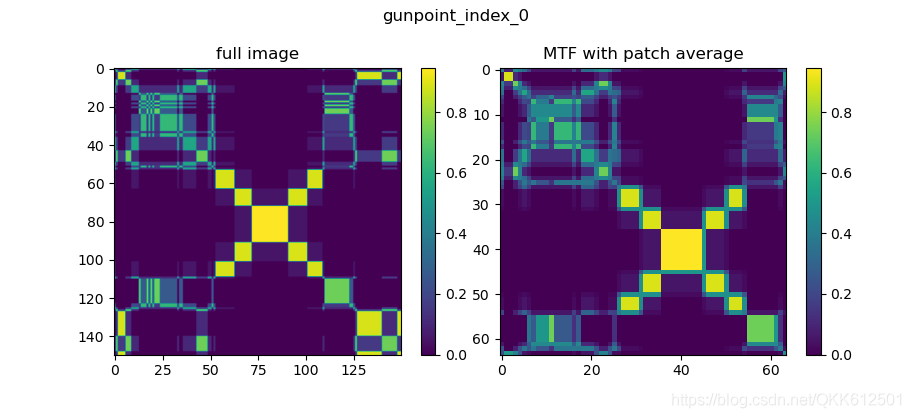
递归图 Recurrence Plot
递归图(recurrence plot,RP)是分析时间序列周期性、混沌性以及非平稳性的一个重要方法,用它可以揭示时间序列的内部结构,给出有关相似性、信息量和预测性的先验知识,递归图特别适合短时间序列数据,可以检验时间序列的平稳性、内在相似性。
原理
递归图是表示从原始时间序列提取的轨迹之间的距离的图像
给定时间序列数据: ( x 1 , … , x n ) (x_1, ldots, x_n) (x1,…,xn),提取到的轨迹为:
x i = ( x i , x i + τ , … , x i + ( m 1 ) τ ) , i ∈ { 1 , … , n ( m 1 ) τ } ec{x}_i = (x_i, x_{i + au}, ldots, x_{i + (m - 1) au}), quad orall i in {1, ldots, n - (m - 1) au } x i=(xi,xi+τ,…,xi+(m1)τ),i∈{1,…,n(m1)τ}
其中: m m m是轨迹的维数, τ au τ是时延。 递归图R是轨迹之间的成对距离,计算如下:
R i , j = Θ ( ε ∥ x i x j ∥ ) , i , j ∈ { 1 , … , n ( m 1 ) τ } R_{i, j} = Theta(arepsilon - | ec{x}_i - ec{x}_j |), quad orall i,j in {1, ldots, n - (m - 1) au } Ri,j=Θ(ε∥x ix j∥),i,j∈{1,…,n(m1)τ}
其中, Θ Theta Θ为Heaviside函数,而 ε arepsilon ε 是阈值。
调用示例
'''
EnvironmentPython 3.6,  pyts: 0.11.0, Pandas: 1.0.3
'''
from mpl_toolkits.axes_grid1 import make_axes_locatable
from pyts.datasets import load_gunpoint
from pyts.image import RecurrencePlot

X, _, _, _ = load_gunpoint(return_X_y=True)
rp = RecurrencePlot(dimension=3, time_delay=3)
X_new = rp.transform(X)
rp2 = RecurrencePlot(dimension=3, time_delay=10)
X_new2 = rp2.transform(X)
plt.figure()
plt.suptitle('gunpoint_index_0')
ax1 = plt.subplot(121)
plt.imshow(X_new[0])
plt.title('Recurrence plot, dimension=3, time_delay=3')
divider = make_axes_locatable(ax1)
cax = divider.append_axes("right", size="5%", pad=0.2)
plt.colorbar(cax=cax)

ax1 = plt.subplot(122)
plt.imshow(X_new2[0])
plt.title('Recurrence plot, dimension=3, time_delay=10')
divider = make_axes_locatable(ax1)
cax = divider.append_axes("right", size="5%", pad=0.2)
plt.colorbar(cax=cax)
plt.show()
结果如图:
短时傅里叶变换 STFT
STFT可看作一种量化非平稳信号的频率和相位含量随时间变化的方式。.
原理
通过添加窗函数(窗函数的长度是固定的),首先对时域信号加窗,通过滑动窗口的方式将原始时域信号分割为多个片段,然后对每一个片段进行FFT变换,从而得到信号的时频谱(保留了时域信息)。
实现步骤
假设序列的长度为 T T T, τ au τ为窗口窗口长度, s s s为滑动步长,W表示窗函数, 则STFT可以计算为:
S T F T ( τ , s ) ( X ) [ m , k ] = ∑ t = 1 T X [ t ] W ( t s m ) e x p { j 2 π k / τ ( t s m ) } STFT^{( au,s)}(X)_{[m,k]}=sum_{t=1}^{T}X_{[t]} cdot W(t-sm)cdot exp{-j2pi k / au cdot (t-sm)} STFT(τ,s)(X)[m,k]=∑t=1TX[t]W(tsm)exp{j2πk/τ(tsm)}
变换后的STFT尺寸为:[M, K], M代表时间维度,K代表频率幅值(复数形式),为方便起见,假设 s = τ s= au s=τ, 即窗口之间没有重叠,则
M = T / τ M=T/ au M=T/τ,
K = τ K =lfloor au floor K=τ/2 + 1
注:相比于DFT, STFT在某种程度上帮助我们恢复时间分辨率,然而在可达到的时间分辨率和频率之间会发生权衡,这就是所谓的不确定性原理。具体来说,窗口的宽度( τ au τ)越大,频域分辨率就越高,相应地,时域分辨率越低;窗口的宽度( τ au τ)越小,频域分辨率就越低,相应地,时域分辨率越高。
调用示例
python包 scipy提供STFT的API,具体官方文档介绍见:https://docs.scipy.org/doc/scipy/reference/generated/scipy.signal.stft.html
scipy.signal.stft(x,fs = 1.0,window =‘hann’,nperseg = 256,noverlap = None,nfft = None,detrend = False,return_oneside = True,boundary
=‘zeros’,padded = True,axis = -1 )
参数解释:
x: 时域信号;
fs: 信号的采样频率;
window: 窗函数;
nperseg: 窗函数长度;
noverlap: 相邻窗口的重叠长度,默认为50%;
nfft: FFT的长度,默认为nperseg。如大于nperseg会自动进行零填充;
return_oneside : True返回复数实部,None返回复数。
示例代码:
"""
@author: masterqkk, [email protected]
Environment:
    python: 3.6
    Pandas: 1.0.3
    matplotlib: 3.2.1
"""
import pickle
import numpy as np
import matplotlib.pyplot as plt
import scipy.signal as scisig
from mpl_toolkits.axes_grid1 import make_axes_locatable
from pyts.datasets import load_gunpoint

if __name__ == '__main__':
    X, _, _, _ = load_gunpoint(return_X_y=True)

    fs = 10e3  # sampling frequency
    N = 1e5  # 10 s 1signal
    amp = 2 * np.sqrt(2)
    time = np.arange(N) / float(fs)
    mod = 500 * np.cos(2 * np.pi * 0.25 * time)
    carrier = amp * np.sin(2 * np.pi * 3e3 * time + mod)
    noise_power = 0.01 * fs / 2
    noise = np.random.normal(loc=0.0, scale=np.sqrt(noise_power), size=time.shape)
    noise *= np.exp(-time / 5)
    x = carrier + noise  # signal with noise

    per_seg_length = 1000 # window length
    f, t, Zxx = scisig.stft(x, fs, nperseg=per_seg_length, noverlap=0, nfft=per_seg_length, padded=False)
    print('Zxx.shaope: {}'.format(Zxx.shape))

    plt.figure()
    plt.suptitle('gunpoint_index_0')
    ax1 = plt.subplot(211)
    ax1.plot(x)
    plt.title('signal with noise')

    ax2 = plt.subplot(212)
    ax2.pcolormesh(t, f, np.abs(Zxx), vmin=0, vmax=amp)
    plt.title('STFT Magnitude')
    ax2.set_ylabel('Frequency [Hz]')
    ax2.set_xlabel('Time [sec]')
    plt.show()
运行结果:
得到STFT结果尺寸为:
Zxx.shaope: (501, 101), 频率成分的数量为 1000 lfloor 1000 floor 1000/2 + 1 = 501, 窗口片段的长度为1e5/1000 + 1=101 (此处应该是进行了pad)
References
1.Imaging Time-Series to Improve Classification and Imputation
2.Encoding Time Series as Images for Visual Inspection and Classification Using Tiled Convolutional Neural Networks
3.J.-P Eckmann, S. Oliffson Kamphorst and D Ruelle, “Recurrence Plots of Dynamical Systems”. Europhysics Letters (1987)
4.Stoica, Petre, and Randolph Moses,Spectral Analysis of Signals, Prentice Hall, 2005
5.https://laszukdawid.com/tag/recurrence-plot/
总结
最后附上时间序列数据集下载链接:http://www.cs.ucr.edu/~eamonn/time_series_data/, 几乎包含了所有当前该领域的数据集。
希望能帮助到大家, 未完待续。欢迎交流:[email protected]
边栏推荐
- org.apache.ibatis.binding.BindingException: Invalid bound statement (not found)
- 创建者模式大汇总
- Shell script explanation (IV) -- while loop and until loop of loop statements (additional examples and analysis)
- IPLOOK和思博伦通信建立长期合作
- Niuke.com: judge whether it is palindrome string
- Pre training language model, Bert, roformer SIM, also known as simbertv2
- Redis中的布隆过滤器与布谷鸟过滤器,你了解多少?
- DBMS in Oracle_ output. put_ Example of line usage
- TypeScript(7)泛型
- 函数的导数与微分的关系
猜你喜欢

牛客网:合并区间

维智科技亮相西部数博会,时空AI技术获高度认可

2022 Chongqing preschool education industry exhibition 𞓜 hi tech Toy Puzzle decompression Toy Expo

Message Oriented Middleware (I) MQ explanation and comparison of four MQS

Notes on new reports

2022 operation of simulated examination platform for examination question bank of welder (elementary) special operation certificate
Interview MySQL

AUTOCAD——五种标注快捷键

上半年,这个领域竟出了7家新独角兽,资本争抢入局
Golang implements reliable delay queue based on redis

随机推荐
Cluster, distributed and microservice concepts and differences
Shell script explanation (II) -- conditional test, if statement and case branch statement
Makefile does not compile some files
Error in created hook: “TypeError: Cannot read property ‘tableId‘ of undefined“
牛客网:最小覆盖子串
std::enable_shared_from_this 错误:error: expected template-name before ‘<’ token
Dynamically changing the style of label elements in a loop
chrome突然无法复制粘贴了
After reading the hated courage
基于云架构的业务稳定性建设思路
shell脚本(五)——函数
Sre is bound to move towards the era of chaotic engineering -- Huawei cloud chaotic engineering practice
什么?HomeKit、米家、Aqara等生态也能通过智汀与天猫精灵生态联动?
session机制详解以及session的相关应用
Iplook, as a member of o-ran alliance, will jointly promote the development of 5g industry
China's two meteorological "new stars" data products are shared with global users
Active Directory用户登录报告
C#,入门教程——关于函数参数ref的一点知识与源程序
贪心之区间问题(2)
STM32控制矩阵按键,HAL库,cubeMX配置