当前位置:网站首页>Haas506 2.0 development tutorial -hota (only supports versions above 2.2)
Haas506 2.0 development tutorial -hota (only supports versions above 2.2)
2022-06-23 06:38:00 【Zhiyunfu】
haas506 2.0 Development tutorial -hota
1.hota.py upgrade
Case description
Use HTTP Protocol implementation OTA Air upgrade , Update the development board python Program . You only need to get the corresponding... Of the storage location URL You can update it .( The case uses Alibaba cloud OSS demonstrate , Users can change the storage location as needed )
(1) obtain URL
Upload the latest program to Alibaba cloud OSS. Get the name of the storage location URL.
- take main.py and board.json The file is compressed into zip Format file

- Alibaba cloud creation Bucket

- Upload files zip file
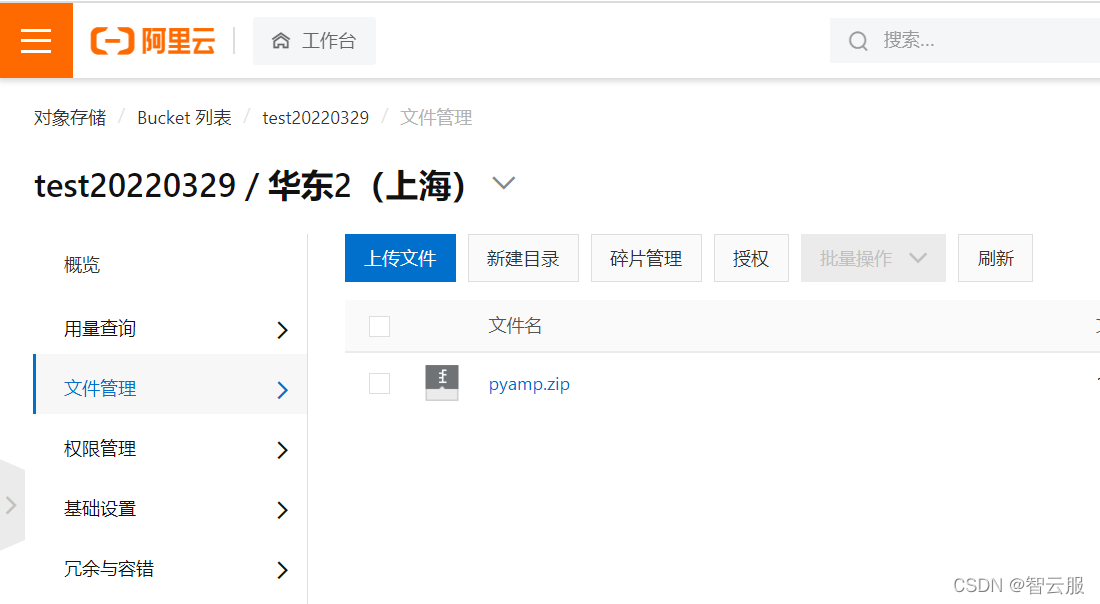
- Click on the details - Copy file URL( The time can be extended appropriately , After a timeout URL It will fail )

(2) Function code
Will duplicate url Fill in code
main.py
import utime as time
from modem import net
import hota
import network
import sntp
from modem import info
import system

pyversion="202204281243"
g_connect_status = False

def on_4g_cb(args):
    global g_connect_status
    pdp = args[0]
    netwk_sta = args[1]
    if netwk_sta == 1:
        g_connect_status = True
    else:
        g_connect_status = False

def connect_network():
    global netw,on_4g_cb,g_connect_status
    netw = network.NetWorkClient()
    g_register_network = False
    if netw._stagecode is not None and netw._stagecode == 3 and netw._subcode == 1:
        g_register_network = True
    else:
        g_register_network = False
    if g_register_network:
        netw.on(1,on_4g_cb)
        netw.connect(None)
    else:
        print('network register failed')
    while True:
        if g_connect_status:
            print('network register successed')
            break
        time.sleep_ms(20)

#py The upgrade package contains haas506 Of python Script upgrade package ,.zip File format
def ota_py_app():
    global ota_flag
    # initialization
    hot = hota.client()
    # modify url
    #########################################################################
    ota_url = " Fill in the copied url Replace "
    #########################################################################
    ota_flag = 0
    if hot.fotaPy(ota_url) == 0:  #py Firmware download succeeded , Restart the device
        print('------------------htp.pyfotaPy')
        time.sleep_ms(1000)
        system.reset()
    else:
        print('pyota failed!')


if __name__ == '__main__':
    connect_network()# Connect to the network
    pacversion = info.getDevFwVersion()
    print('---------------------------pacversion={}'.format(pacversion))
    sntp.settime()#SNTP Right time
    print("csq:",net.getCsq())
    print('pyversion:{}'.format(pyversion))
    time.sleep(5)
    ota_py_app()
    while True:
        print('httpota test')
        time.sleep(3)
(3) Output log
network register successed
csq: 31
pyversion:202203281800
------------------htp.pyfotaPy

# restart
# Of the latest program log
2.hota.pac upgrade
Case description
- The firmware pac If necessary, you can chat privately
- Specific upgrade steps and py Upgrade similar
(1) obtain URL
Get pac After firmware package , The above method , take pac Package storage oss, Copy url.
(2) Function code
Will duplicate url Fill in code
main.py
import utime as time
from modem import net
import hota
import network
import sntp
from modem import info
import system

pyversion="202204281243"
g_connect_status = False

def on_4g_cb(args):
    global g_connect_status
    pdp = args[0]
    netwk_sta = args[1]
    if netwk_sta == 1:
        g_connect_status = True
    else:
        g_connect_status = False

def connect_network():
    global netw,on_4g_cb,g_connect_status
    netw = network.NetWorkClient()
    g_register_network = False
    if netw._stagecode is not None and netw._stagecode == 3 and netw._subcode == 1:
        g_register_network = True
    else:
        g_register_network = False
    if g_register_network:
        netw.on(1,on_4g_cb)
        netw.connect(None)
    else:
        print('network register failed')
    while True:
        if g_connect_status:
            print('network register successed')
            break
        time.sleep_ms(20)


#pac The upgrade package contains haas506 Of pac Differential upgrade package ,.pack File format
def ota_pac_app():
    global ota_flag
    # initialization
    hot = hota.client()
    # fill url
    #########################################################################
    ota_url = " Fill in the copied url Replace "
    #########################################################################
    if hot.fotaSys(ota_url) == 0:  #pac Firmware download succeeded , Restart the device
        print('------------------htp.pacfotaPy')
        time.sleep_ms(1000)
        system.reset()
    else:
        print('pacota failed!')


if __name__ == '__main__':
    connect_network()# Connect to the network
    pacversion = info.getDevFwVersion()
    print('---------------------------pacversion={}'.format(pacversion))
    sntp.settime()#SNTP Right time
    print("csq:",net.getCsq())
    print('pyversion:{}'.format(pyversion))
    time.sleep(5)
    ota_pac_app()
    while True:
        print('httpota test')
        time.sleep(3)
(3) Output log
network register successed
csq: 31
pyversion:202203281800
------------------------------------htp.pacfotaPy
# restart
(4) Check the firmware version
Run the following program , View the current firmware version .
from modem import info

print(" Device firmware version ",info.getDevFwVersion())
3.Class-hota
| client | fotaPy | fotaSys |
|---|---|---|
| initialization | py Firmware upgrade | pac Firmware upgrade |
hota - Firmware upgrade module
- Module function : be used for py Firmware upgrade , perhaps pac Firmware upgrade
client - Initialize firmware upgrade
The functionality : initialization , Create a firmware upgrade
The function prototype :
hota.client()
- Parameter description : nothing
fotaPy - py Firmware upgrade
The functionality : py Firmware upgrade
The function prototype :
hota.fotaPy(url)
- Parameter description :
| Parameters | explain |
|---|---|
| url | url Is the firmware address , Support http, I won't support it https |
fotaSys - pac Firmware upgrade
The functionality : pac Firmware upgrade
The function prototype :
hota.fotaSys(url)
- Parameter description :
| Parameters | explain |
|---|---|
| url | url Is the firmware address , Support http, I won't support it https |
边栏推荐
- C语言去除字符串尾部的换行(或其他字符)
- Day_03 传智健康项目-预约管理-检查组管理
- C # database reports errors. Let's have a look
- Day_08 传智健康项目-移动端开发-体检预约
- MySQL ON DUPLICATE KEY 和 PgSQL ON CONFLICT(主键) 处理主键冲突
- 同步开关电源降低EMI布局 dv/dt di/dt
- haas506 2.0开发教程-sntp(仅支持2.2以上版本)
- Day_ 10 smart health project - permission control, graphic report
- 将TensorFlow1.x改写为pytorch
- 图解 Google V8 # 17:消息队列:V8是怎么实现回调函数的?
猜你喜欢

Haas 506 2.0 Tutoriel de développement - bibliothèque de composants avancés - modem. SMS (ne prend en charge que les versions supérieures à 2,2)

Laravel log channel 分组配置

综合培养学生脑力思维的少儿编程

Progress of layer 2 technical scheme

华为软件测试笔试真题之变态逻辑推理题

设计师需要懂的数据指标与数据分析模型

Day_06 传智健康项目-移动端开发-体检预约
百度URL參數之LINK?URL參數加密解密研究(代碼實例)

Summary of business logic security ideas

qt creater搭建osgearth环境(osgQT MSVC2017)

随机推荐
Shutter style
idea的去除转义的复制粘贴
Given a node of a binary tree, return the successor node of the node
Day_ 11 smart communication health project - graphic report and poi Report
Index - MySQL
haas506 2.0开发教程-sntp(仅支持2.2以上版本)
phpStudy设置301重定向
Coordinate transformation
设计师需要懂的数据指标与数据分析模型
Jour 04 projet de santé mentale - gestion des rendez - vous - gestion des forfaits
2020 smart power plant industry insight white paper
C language removes line breaks (or other characters) at the end of strings
qt creater搭建osgearth环境(osgQT MSVC2017)
Global attribute lang attribute
ffplay实现自定义输入流播放
Day_07 传智健康项目-Freemarker
Kubesphere offline deployment without network environment
Detailed explanation of redis persistence, master-slave and sentry architecture
Redis sentry
【Leetcode】431. Encode n-ary tree to binary tree (difficult)