当前位置:网站首页>Maui uses Masa blazor component library
Maui uses Masa blazor component library
2022-06-22 14:16:00 【InfoQ】
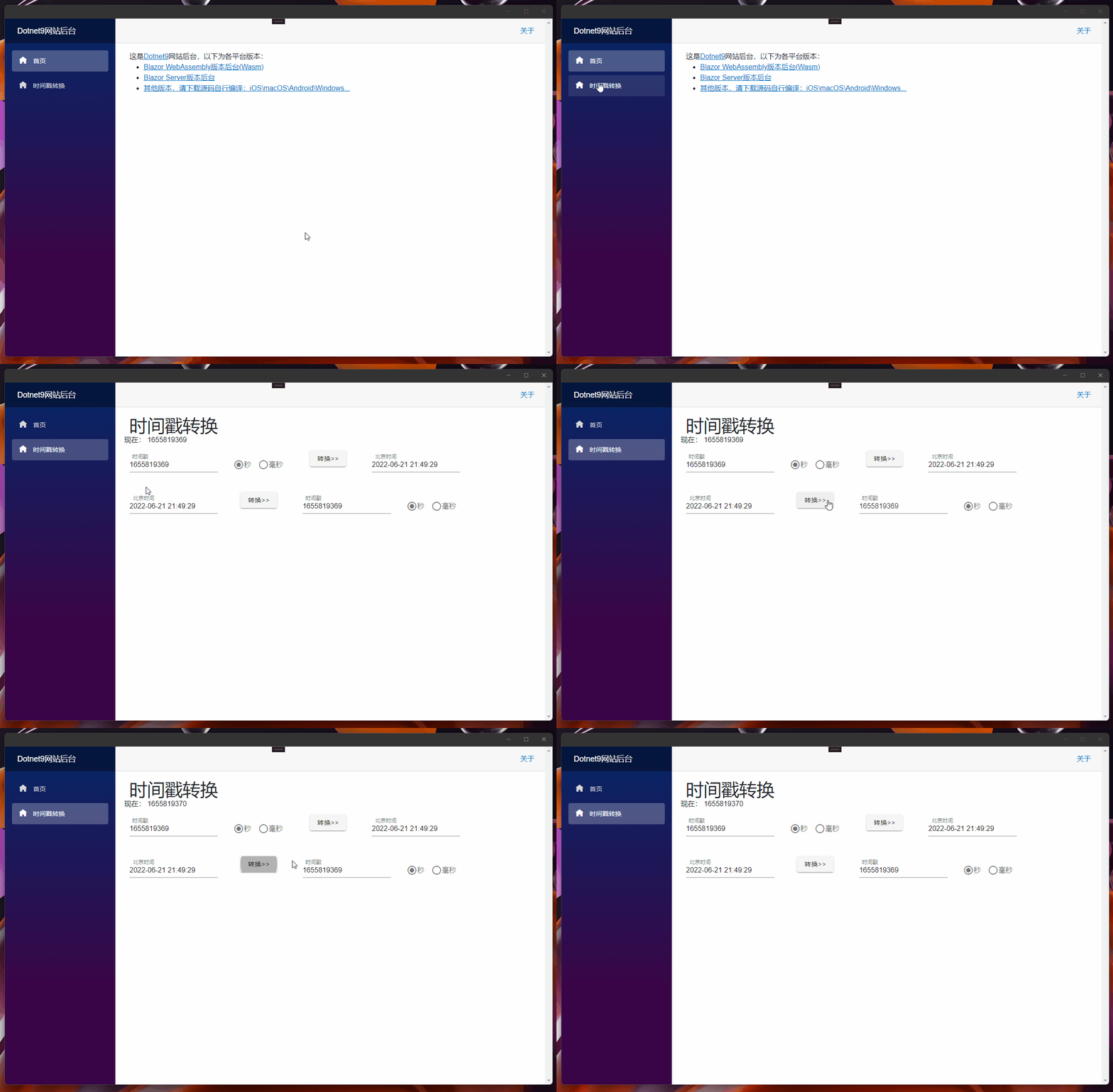
1. Pre knowledge
2. Reference to component library
2.1 UI Modification of shared library -
Dotnet9.WebApp
- UI Shared library
Dotnet9.WebAppadd toMaas.Blazorpackage , Just today (21 Number )Masa Released0.5.0-preview.3edition , We download and use :
Install-Package Masa.Blazor -Version 0.5.0-preview.3

- encapsulation
Maas.BlazorComponent references
./MasaExtensions/MasaSetup.csusing Microsoft.Extensions.DependencyInjection;
namespace Dotnet9.WebApp.MasaExtensions;
public static class MasaSetup
{
public static void AddMasaSetup(this IServiceCollection services)
{
if (services == null) throw new ArgumentNullException(nameof(services));
services.AddMasaBlazor(); // This key code
}
}
services.AddMasaBlazor();_Imports.razorintroduceMasa.BlazorNamespace
@using Masa.Blazor
Dotnet9.WebApp2.2 Cross platform project modification -Dotnet9.MAUI
- modify
MauiProgram.csfile , Add the extension method encapsulated aboveAddMasaSetup():
using Dotnet9.WebApp.MasaExtensions; // The first 1 It's about : Add this namespace
namespace Dotnet9.MAUI;
public static class MauiProgram
{
public static MauiApp CreateMauiApp()
{
var builder = MauiApp.CreateBuilder();
builder
.UseMauiApp<App>()
.ConfigureFonts(fonts => { fonts.AddFont("OpenSans-Regular.ttf", "OpenSansRegular"); });
builder.Services.AddMauiBlazorWebView();
#if DEBUG
builder.Services.AddBlazorWebViewDeveloperTools();
#endif
builder.Services.AddMasaSetup(); // The first 2 Outside : Add an extension method to introduce Masa Blazor
return builder.Build();
}
}
- add to
Masa.BlazorResource file
wwwwroot/index.htmlBlazor WebAssembly<link href="_content/Masa.Blazor/css/masa-blazor.css" rel="stylesheet" />
<link href="_content/Masa.Blazor/css/masa-extend-blazor.css" rel="stylesheet" />
<link href="https://cdn.masastack.com/npm/@mdi/[email protected]/css/materialdesignicons.min.css" rel="stylesheet">
<link href="https://cdn.masastack.com/npm/materialicons/materialicons.css" rel="stylesheet">
<link href="https://cdn.masastack.com/npm/fontawesome/v5.0.13/css/all.css" rel="stylesheet">
<script src="_content/BlazorComponent/js/blazor-component.js"></script>
2.3 Blazor WebAssembly Project modification -Dotnet9.Wasm
- modify
Program.csfile , Add the extension method encapsulated aboveAddMasaSetup():
using Dotnet9.WebApp;
using Dotnet9.WebApp.MasaExtensions; // The first 1 It's about : Add this namespace
using Microsoft.AspNetCore.Components.Web;
using Microsoft.AspNetCore.Components.WebAssembly.Hosting;
var builder = WebAssemblyHostBuilder.CreateDefault(args);
builder.RootComponents.Add<Main>("#app");
builder.RootComponents.Add<HeadOutlet>("head::after");
builder.Services.AddMasaSetup(); // The first 2 Outside : Add an extension method to introduce Masa Blazor
builder.Services.AddScoped(sp => new HttpClient { BaseAddress = new Uri(builder.HostEnvironment.BaseAddress) });
await builder.Build().RunAsync();
- add to
Masa.BlazorResource file
Dotnet9.MAUI2.4 Blazor Server Project modification -Dotnet9.Server
- modify
Program.csfile , Add the extension method encapsulated aboveAddMasaSetup():
using Dotnet9.WebApp.MasaExtensions;        //  The first 1 It's about : Add this namespace

var builder = WebApplication.CreateBuilder(args);

// Add services to the container.
builder.Services.AddRazorPages();
builder.Services.AddServerSideBlazor();
builder.Services.AddMasaSetup();            //  The first 2 Outside : Add an extension method to introduce Masa Blazor

var app = builder.Build();

// Configure the HTTP request pipeline.
if (!app.Environment.IsDevelopment())
{
    app.UseExceptionHandler("/Error");
    // The default HSTS value is 30 days. You may want to change this for production scenarios, see https://aka.ms/aspnetcore-hsts.
    app.UseHsts();
}

app.UseHttpsRedirection();

app.UseStaticFiles();

app.UseRouting();

app.MapBlazorHub();
app.MapFallbackToPage("/_Host");

app.Run();
- add to
Masa.BlazorResource file
Pages/_Layout.cshtmlBlazor Server<!-- masa blazor css style -->
<link href="_content/Masa.Blazor/css/masa-blazor.css" rel="stylesheet" />
<link href="_content/Masa.Blazor/css/masa-extend-blazor.css" rel="stylesheet" />
<!--icon file,import need to use-->
<link href="https://cdn.masastack.com/npm/@("@mdi")/[email protected]/css/materialdesignicons.min.css" rel="stylesheet">
<link href="https://cdn.masastack.com/npm/materialicons/materialicons.css" rel="stylesheet">
<link href="https://cdn.masastack.com/npm/fontawesome/v5.0.13/css/all.css" rel="stylesheet">
<!--js(should lay the end of file)-->
<script src="_content/BlazorComponent/js/blazor-component.js"></script>
materialdesignicons.min.css
Masa.Blazor- add to
Masa.BlazorNuget package :Install-Package Masa.Blazor;
Masa.BlazorComponent registration use :services.AddMasaBlazor();;
- add to
Masa.BlazorResource file :Wasm yeswwwwroot/index.html, blazor server yes_Layout.cshtml, Note the difference between adding resource files .
3. Add timestamp function
4. summary
Masa.BlazorMasa.Blazor- this paper Blazor Server Site Preview :https://server.dotnet9.com/
- this paper Blazor Wasm Site Preview :https://wasm.dotnet9.com/
- MAUI(Android\Windows\macOS\iOS) preview :https://github.com/dotnet9/Dotnet9/tree/develop/src/Dotnet9.MAUI( No release document is made , You need to compile the source code yourself )
边栏推荐
- Word skills summary
- 轻松上手Fluentd,结合 Rainbond 插件市场,日志收集更快捷
- Oceanbase database helps the ideal automobile intelligent production line to realize automatic recovery within 30 seconds
- Are you familiar with redis cache of highly paid programmers & interview questions series 114? How are redis keys designed? Are you familiar with the memory obsolescence mechanism?
- Double hands of daily practice of Li Kou 2day9
- Tianrun cloud is about to be listed: VC tycoon Tian Suning significantly reduces his holdings and is expected to cash out HK $260million
- Tables converting to latex format
- 史蒂芬·柯维写给年轻人的高效工作秘笈
- 软件项目验收测试范围和流程,这些你都知道吗?
- Cve - 2022 - 22965 Resume
猜你喜欢

My suggestions on SAP ABAP transformation

"N'osez pas douter du Code, vous devez douter du Code" notez une analyse de délai de demande réseau

Stop using system Currenttimemillis() takes too long to count. It's too low. Stopwatch is easy to use!

【云原生】Nacos中的事件发布与订阅--观察者模式

芯片硅片与流片技术

程序员要不要选择软件人才外包公司?
[cloud native] event publishing and subscription in Nacos -- observer mode

In 5g era, how to create an amazing live VR activity?

Word skills summary

轻松上手Fluentd,结合 Rainbond 插件市场,日志收集更快捷
随机推荐
VR全景拍摄,打破传统宣传雁过不留痕的僵局
华为这份关于专利的会议纪要,都说了什么?(内含华为十大发明彩蛋)
Stop using system Currenttimemillis() takes too long to count. It's too low. Stopwatch is easy to use!
MySQL如何让一个表中可以有多个自增列
polardbx是pg还是mysql?
测试组的任务职责和测试的基本概念
How MySQL enables multiple auto incrementing columns in a table
What is the difference between Z-score and deltf/f?
Interaction between awk language and Oracle database for nearly half a year
JasperReport报表生成工具的基本使用和常见问题
Configuring cplex12.4 tutorial in VS2010
Detailed explanation of rules and ideas for advance sale of deposit
散户开户哪个证券公司好?手机开户安全么?
Oceanbase database helps the ideal automobile intelligent production line to realize automatic recovery within 30 seconds
聊一聊数据库的行存与列存
Shan Zhiguang, chairman of BSN Development Alliance: DDC can provide the underlying support for the development of China's meta universe industry
Seven cattle cloud upload picture
BSN发展联盟理事长单志广:DDC可为中国元宇宙产业发展提供底层支撑
In 5g era, how to create an amazing live VR activity?
防火墙基础之策略部署