当前位置:网站首页>Bi-sql create
Bi-sql create
2022-06-25 01:15:00 【Powerbi white tea】

CREATE sentence
CREATE Statements in SQL Language is a very important part . Need to know SQL Grammar is basically divided into four categories : increase 、 Delete 、 Change 、 check . We usually use query statements , Although the number of other three types of grammatical statements is not very large , But it is also an indispensable part .
CREATE There are many uses of statements , Can be used to create a database , Can be used to create tables , Can be used to create views , It can also be used to create some temporary tables for calculation and use, etc .
Basic grammar
Create database :
CREATE DATABASE Database name
Create table :
CREATE TABLE  The name of the table
(
 Name 1  data type ,
 Name 2  data type ,
 Name 3  data type ,
....
)
Create view :
CREATE VIEW  View name  AS
SELECT  Column (*)
FROM  The name of the table
WHERE  filter
Create a temporary table :
CREATE TABLE  Temporary table name  (  Column 1  data type ,  Column 2  data type ,......)
INSERT INTO  Temporary table name  ( Column 1,  Column 2,...) VALUES ( value 1,  value 2,....)
SELECT * FROM  Temporary table name
Using examples
Case data :

In the database of white tea machine , There is a name “TEST” The database of , There is a name “ Product list ” Case data for .
Example 1:
adopt PowerBI Create a “Back_TPT” The database of .
CREATE DATABASE Backup_TPT
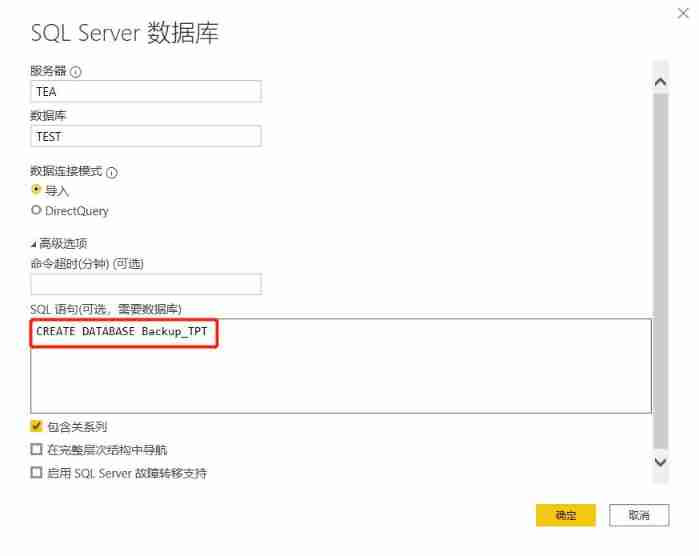
The result returns as follows :

It failed in the end , But we return SQL The database view is as follows :

Created successfully .
Example 2:
adopt PowerBI Create a “BAICHATEST” Table of .
CREATE TABLE BAICHATEST

give the result as follows :
Return to the database to view :

Created successfully .
Example 3:
adopt PowerBI Create a “BAICHATEST2” The view of .
CREATE VIEW BAICHATEST2 AS
SELECT *
FROM  Product list
WHERE  Item number =01

give the result as follows :
Return to the database to view :

Created successfully .
Example 4:
adopt PowerBI Create a temporary table to query .
CREATE TABLE TEST ( BAICHA INT, ID INT)
INSERT INTO TEST
SELECT 120 AS BAICHA ,123 AS ID
SELECT * FROM TEST

give the result as follows :

Results in line with expectations .
Have a chat :
PowerBI No matter which data source is connected , All partners need to pay attention to the connection account permissions , Once the permission is too large , And if there is a read-write window , So you are in PowerBI The statements built in can all return to the corresponding database .
therefore , In addition to creating temporary virtual tables for use as queries , The other creation syntax white tea is not recommended for you .


This is white tea , One PowerBI Beginners .
边栏推荐
猜你喜欢

QT (35) - operate excel qxlsx qaxobject

QT electronic clock

Assembly language (4) function transfer parameters

Simulation questions and answers of the latest national fire facility operator (senior fire facility operator) in 2022

15. several methods of thread synchronization

I brush the question I - copy the linked list with random pointer

Bi SQL alias

2022 crane driver (limited to bridge crane) examination question bank simulated examination platform operation

Deep learning LSTM model for stock analysis and prediction

Text editor for QT project practice - Episode 12
随机推荐
Bi SQL alias
LLVM TargetPassConfig
欢迎来到联想智能大屏的新世界
汇编语言(3)16位汇编基础框架与加减循环
Scala responsibility chain pattern
How to store dataframe data in pandas into MySQL
Introduction to bi-sql wildcards
The latest QQ wechat domain name anti red PHP program source code + forced jump to open
The optimism about technology is making Dell achieve more than expected
对技术的乐观,正让戴尔取得比想象中更多的成就
Sanic service startup failed
Bi-sql - join
Text border format and text block of rich text
Zuckerberg demonstrated four VR head display prototypes, and meta revealed the "family" of metauniverse
VB learning notes
This national day! Tencent cloud wecity will accompany you to travel and light up the city landmark
使用 Loki 微服务模式部署生产集群
Start service 11111
卷积与转置卷积
利用 Redis 的 sorted set 做每周热评的功能