当前位置:网站首页>[unity entry program] make my first little game
[unity entry program] make my first little game
2022-07-25 07:33:00 【flashinggg】
Catalog
1 Import playground Project resources
3.2 adjustment Game View background
3.3 Inspector -> rename & change Tag
About Unity The label of (Tag)
5 Add obstacles and collisions
add to ModifyHealth Script components
add to 2D Rigid body components
5.3 Add collision -> The spacecraft
6.2 Realize the operation of reducing blood volume
Learned from Unity course
my Unity edition
2021.3.6f1c1
1 Import playground Project resources
Get into assetstoreUnity Asset Store - The Best Assets for Game Making
Search for Unity playground preservation , Again from Unity Import Assert that will do .
palyground The project is an official introductory video for novices , Preset a encapsulated development environment , Let's get started , To get familiar with the game concept and production process , It's easier to operate !
2 Create a new scene
Assets -> Scene Right click -> Create -> Scene, Create a new scene .
Click the name to rename , Name it PlaneAsteroid

Double click this Scene object , On the right side of the Hierarchy The window will show the current scene object .

By default, the engine will also create : Player camera Main Camera And directional light Directional Light Two objects .
3 Create player ships
In this “ The spaceship ” In the small game of , Players operate spaceships , Therefore, the player object of this game is the spaceship !
We will use the imported playground The resources in the project are ok .
Asesets -> Images -> Spaceships, Choose your favorite spacecraft , Add to scene , There are two ways to add to a scene :
- Drag directly to Scene In the view , This method can directly implement objects stay Scene Positioning in
- Drag onto Hierarchy Window , This method can be implemented in Create a parent-child relationship while joining

3.1 Resize position
The initial spacecraft was too big , stay Game Click Run in the view , Is this

So we need to shrink it a little , Exit the running state -> Choose SpaceshipRed object -> R key , Zoom .
meanwhile , If you want to zoom accurately , On the right side Inspector window -> Transform Under the hierarchy Scale, Enter a value .
It can also be opened Scale Lock button , Realization XYZ Three way proportional scaling , What I choose here is to zoom to 0.2.

You can stay here again Game View run view , The size is more comfortable .

3.2 adjustment Game View background
In the course UP The background color of the game view is different from mine , I also want to make it solid , I found it on the player's camera Main Camera Of Inspector Change in .

Main Camera -> Inspector -> Camera -> Clear Flags&Background, You can see the initial sky box , This is changed into Solid Color And set the color to black .


3.3 Inspector -> rename & change Tag
According to the tutorial , stay Inspector Change the name of the spacecraft in the window -> ship, stay Hierarchy The name in the window will also be automatically synchronized .

About Unity The label of (Tag)

unity official : label - Unity manual
- stay Unity in ,Tag Is a reference word assigned to one or more game objects , Play the role of identification 、 The role of distinction ;
- The same kind of model , It can be set as a unified label ;
- You can find objects by labels ;
The rest, such as how the code is written , later , Here, give our spacecraft an object first Player Of Tag.

4 The ship moves
Direct use playground Written in the project Move Script will do , Click on the one on the right Inspector Look at the code .

So how to assign the script to our spacecraft ? There are two ways :
- A way for laymen —— hold Move Drag script to ship Of Inspector In the window ;
- Compare the suggested way —— from ship Of Inspcetor Window Add Component add to
After adding , You can see that there is one more attribute Rigidbody 2D And a Move With Arrows, about 2D Rigid body components Rigidbody 2D I have made a preliminary study summary :Unity Study -2D rigid body Rigidbody 2D
the other one Move With Arrows It is a component created by programming to control game objects through the keyboard .

5 Add obstacles and collisions
5.1 Add obstacles
Asesets -> Images -> Asteroids, Choose asteroids to join Scene in , And size it .

5.2 Add collision -> obstacle
add to ModifyHealth Script components
playground A script component for changing blood volume has been packaged for us in the project .
Asserts -> Scripts -> Attributes -> ModifyHealthAttribute
adopt Add Component Add this script component to the obstacle just now , When joining, we need to choose :

This component needs to add a 2D Colliding body (Collider 2D) To achieve collision , Here you need to choose the type of collision , Because of our obstacles —— Asteroids are irregular objects , Here you can choose polygon.
About 2D Colliding body , You can see another blog I introduced :Unity Study -2D Colliding body Collider 2D_flashinggg The blog of
You can see , This encapsulated component contains :
- Modify Health Components —— Realize the operation of blood loss after the aircraft touches it
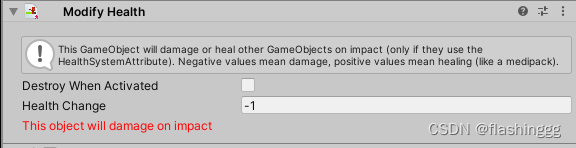
Polygon Collider 2D 2D Colliding body —— To achieve collision detection , Both planes and meteorites should be collision bodies , Therefore, we need to add a collider component to the meteorite , Be careful , This cannot be a trigger , So we need to get rid of Is Trigger Check box ;

add to 2D Rigid body components
We also want to achieve the effect of a little movement after the meteorite is collided , Therefore, we need to give a meteorite Rigidbody 2D Of 2D Rigid body components , And properly adjust the parameter value of the rigid body , Do you , Simulate the real effect .

5.3 Add collision -> The spacecraft
It's mentioned above , To achieve collision, both must be collision bodies , Therefore, we also need to add one to the spacecraft Polygon Coliider 2D Components .

6 Add blood reducing effect
6.1 Add user interface

playground The project also encapsulates the components of such a user interface , Search for interface find UserInterface Drag the component into the... On the right Hierarchy Just a window .


6.2 Realize the operation of reducing blood volume
Blood volume control is accomplished by the following two parts
- Obstacles have Modify Health—— Change your HP after collision

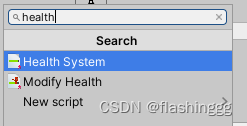
- The ship's own HP , Need to add a Health System Component to set the initial health

After all the above , When the mobile spacecraft collides with an obstacle meteorite , The upper left corner will reduce HP .
7 Add background
Still use the drawings provided by the project ,images -> Backgrounds, hold Space Drag in Hierarchy Just go .
However, the size of the drawing and the background drawing need to be modified 、 The plane 、 Layer order of obstacles , Avoid obstructions .
7.1 Adjust the layer order
The layer order is in the Sprite Renderer Revision in China , my unity2021.3 Version can be modified directly layer In order to adjust :
- BG_Space -> 0
- ship&Asteroid2 -> 1
We can avoid the background blocking our spacecraft and obstacles .
7.2 Adjust the background size
Here the size is set to

Final effect :

8 Add precast units
Because the game has more than one obstacle , Multiple obstacles will also be added , But a series of properties of obstacles should be the same , And that's where it comes in unity Prefabricated parts in , Namely A reusable resource template .
About the creation and use of prefabricated parts :Unity Study - Preforms Prefab_flashinggg The blog of
After adding several obstacles , Adjusted the size and style , The result is shown in Fig. :

9 Add stars to get points
This is the last part of the game , If you need to join, you can ” eat “ And ” eat “ The function of getting scores after .
9.1 Join the stars
Project Window search star, And drag in Hierarchy window

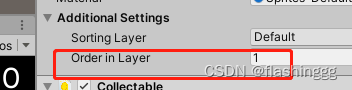
It needs to be revised Star Layer order ,Order in Layer Change to 1 that will do .
9.2 Add the score component
It's still Star Of Add Component -> Search for Collectable

After joining, you can find , Synchronization requires the addition of an impactor assembly , choice polygon Just go .

Be careful , there Polygon Collider 2D Of Is Trigger You need to check , Here we can reach “ Touch the stars and eat ” The effect of .

Collectable The above content in the script is the implementation : After the plane hit the stars -> score++ -> Stars disappear , The effect of , Specific preparation will be carried out after C# Learning from .
10 Grouping is easy to manage
The operation part is over ! Pretty simple , Finally, you can group objects of the same kind , Easy to manage .
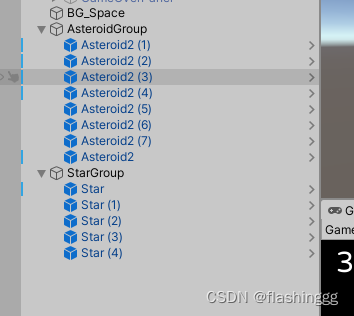
It's the end of the first Unity The practice of , Continue to work hard !

边栏推荐
- [cloud native] the ribbon is no longer used at the bottom of openfeign, which started in 2020.0.x
- The application of for loop and if judgment statement
- Common cross domain scenarios
- Quickly build a centralized logging platform through elk
- Matlab self programming series (1) -- angular distribution function
- 3. Promise
- NLP hotspots from ACL 2022 onsite experience
- cesium简介
- 数据提交类型 Request Payload 与 Form Data 的区别总结
- [software testing] package resume from these points to improve the pass rate
猜你喜欢

曼哈顿距离简介

How to use network installation to deploy multiple virtual servers in KVM environment

钉钉最新版,怎么清除登录手机号历史记录数据
Problems in deep learning training and testing: error: the following arguments are required: --dataroot, solution: the configuration method of training files and test files
【Unity入门计划】制作我的第一个小游戏
LeetCode118. 杨辉三角

BOM overview

数据提交类型 Request Payload 与 Form Data 的区别总结
![[300 + selected interview questions from big companies continued to share] big data operation and maintenance sharp knife interview question column (V)](/img/cf/44b3983dd5d5f7b92d90d918215908.png)
[300 + selected interview questions from big companies continued to share] big data operation and maintenance sharp knife interview question column (V)

JS cannot get content disposition in headers
随机推荐
Learn when playing No 7 | don't study this holiday, study only
Paddlepaddle 34 adjust the layer structure and forward process of the model (realize the addition, deletion, modification and forward modification of the layer)
深度学习制作数据集时,从长视频中指定每隔多少帧提取一张图像到指定文件路径的方法
RPC communication principle and project technology selection
【软件测试】包装简历从这几点出发、提升通过率
[programmer 2 Civil Servant] III. resource collection
Lidar construction map (overlay grid construction map)
[programmer 2 Civil Servant] summary of some common problems about system research
深度学习训练和测试时出现问题:error: the following arguments are required: --dataroot,解决:训练文件的配置方法和测试文件的配置方法
Common cross domain scenarios
How to use kotlin flow in Android projects
Alibaba cloud image address & Netease cloud image
一日千里,追风逐月 | 深势科技发布极致加速版分子对接引擎Uni-Docking
UXDB怎么从日期值中提取时分秒?
When providing digital talent services, Xi Zhi quickly opened its own digital school for each organization
转行学什么成为了一大部分人的难题,那么为什么很多人学习软件测试呢?
各位老板 问一下 就是我们mysql cdc保存的是配置数据 然后kafka里面堆积的有历史
cesium简介
A fast method of data set enhancement for deep learning
Xinku online | cnopendata shareholder information data of A-share listed companies