当前位置:网站首页>[arm] build boa based embedded web server on nuc977
[arm] build boa based embedded web server on nuc977
2022-06-26 05:22:00 【Boiled cabbage】
One 、 The experiment purpose
Set up based on arm Development board web Server program , Control the development board through the web page LED state
Two 、boa brief introduction
Boa The server is a small and efficient web The server , It's a program that runs on unix or linux Under the , Support CGI Of 、 Single task for embedded systems http The server , Open source 、 High performance .Boa It's a very small Web The server , Its executable code is only about 60KB about . As a single task Web The server ,Boa Only the user's requests can be completed in turn , Not fork Create a new process to handle concurrent connection requests . but Boa Support CGI, Can be CGI Program fork Create a process to execute .Boa The design goal is speed and safety .
3、 ... and 、 Source download
Download link to :http://www.boa.org/news.html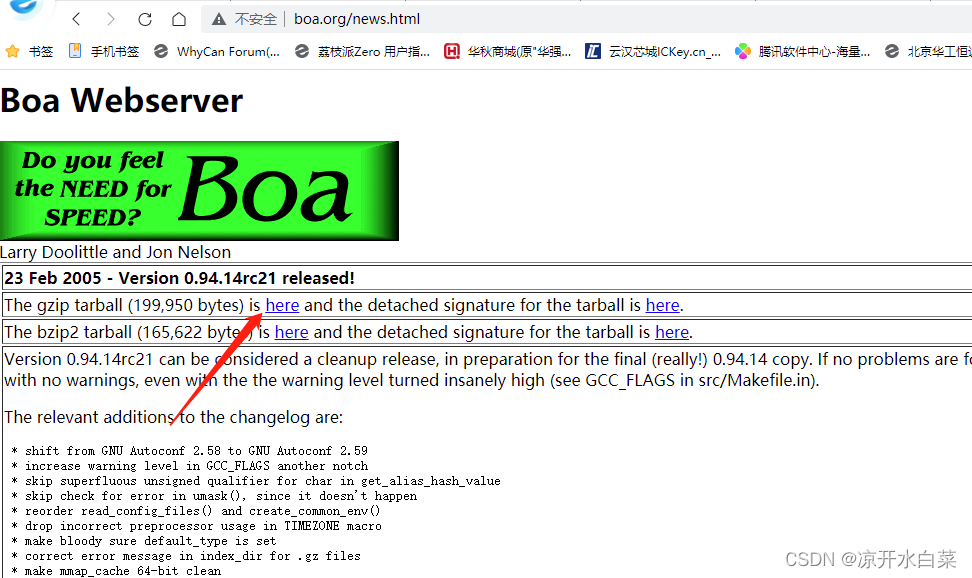
Four 、 Source code compilation
#  decompression
tar- xvf boa-0.94.14rc21.tar.gz
cd boa-0.94.14rc21
#  Configuration generation makefile
./configure
#  modify makefile Compiler tools : Here choose your own cross compiler
vim ./src/Makefile

CC = arm-linux-gcc
CPP = arm-linux-gcc -E

#  compile
make

For the duration of insurance we use file Command to check whether the generated file is arm edition 
Then we begin to prepare the required file configuration on the development board
mkdir nuc977
cp src/boa
cp src/boa ./nuc977/
cp examples/boa.conf ./nuc977/
cp /etc/mime.types ./nuc977/
touch ./nuc977/group
mkdir ./nuc977/www
mkdir ./nuc977/www/cgi-bin
touch ./nuc977/index.html
cd nuc977/
// If there is no example Folders can use “find ./ -name boa.conf” This command looks for the source code conf The location of the file must be 
Then transfer these files to nfs In the folder
5、 ... and 、 Development board configuration
mkdir /etc/boa
cp /mnt/nuc977/www / -rf
cp /mnt/nuc977/boa /etc/boa
cp /mnt/nuc977/boa.conf /etc/boa
cp /mnt/nuc977/mime.types /etc
cp /mnt/nuc977/group /etc
cp /mnt/nuc977/index.html /www
Then we need to modify our etc/boa/box.conf The contents of the document
Group nogroup  Change it to Group 0 //  modify nogroup by 0
ErrorLog /etc/boa/error_log  //  alternate path
AccessLog /etc/boa/access_log //  alternate path
ServerName www.your.org.here //  uncomment
DocumentRoot /www  //  Modify the path
ScriptAlias /cgi-bin/ /www/cgi-bin/  //  Modify the path
modify index.html Interface , The contents are as follows :
 <!DOCTYPE html>
<html>
    <head>
        <meta charset="UTF-8">
        <title>LED Control page </title>
    </head>
    <body>
		<input type="button" value=" open "/>
		<input type="button" value=" Turn off "/>
    </body>
</html>
cd /etc/boa
 ./boa
And then we ifconfig Check out the development board ip, And then we pc The end browser inputs this ip Address view effect 
6、 ... and 、 control led Lamp experiment
programme 1
boaapp.c file
#include <stdio.h>
#include <stdlib.h>
#include <pthread.h>
#include <stdint.h>
#include <sys/types.h>
#include <sys/stat.h>
#include <unistd.h>
#include <fcntl.h>

void led_on()
{

    char ubuf[2] = {
    1, 0};
    int fd;

    fd = open("/dev/led",O_RDWR);

    if(fd < 0)
    {

        printf("open runled device error\r\n");
        return;
    }
    write(fd, ubuf, 1);
    close(fd);
}

void led_off()
{

    char ubuf[2] = {
    0, 0};
    int fd;

    fd = open("/dev/led",O_RDWR);

    if(fd < 0)
    {

        printf("open runled device error\r\n");
        return;
    }
    write(fd, ubuf, 1);
    close(fd);
}

int main(void)
{

    char *data;

    printf("Content-Type:text/html;charset=gb2312\n\n");// It's a MIME Header information , It tells Web The subsequent output of the server is in the form of html In the form of
    printf("<html>\n");
    printf("<body>\n");
    printf("<title>this is title</title> ");
    printf("<h3>this is h3</h3> ");
    data = getenv("QUERY_STRING");// Get the data sent by the client
    printf("<p> The data received is :%d</p>",data);
    if(strcmp(data,"on"))
    {

        led_on();
    }else if(strcmp(data,"off"))
    {

        led_off();
    }
    printf("</body>\n");
    printf("</html>\n");

    // free(data);
    return 0;
}
compile
arm-linux-gcc boaapp.c -o boaapp.cgi -static
Then we copy the compiled file to the development board www/cgi-bin In the folder , Then we go to the browser to access , Then all the time there are mistakes , Through experiments, we can know that the problem lies in the function getenv On (http://192.168.1.3/cgi-bin/boaapp.cgi)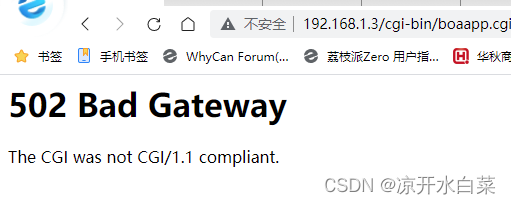

As long as you comment out here, you can access it normally 
programme 2
download https://github.com/boutell/cgic
modify cgictest.c
#include"cgic.h"
#include <stdlib.h>
#include <stdio.h>
#include <pthread.h>
#include <stdint.h>
#include <sys/types.h>
#include <sys/stat.h>
#include <unistd.h>
#include <fcntl.h>

void led_on()
{

    char ubuf[2] = {
    1, 0};
    int fd;

    fd = open("/dev/led",O_RDWR);

    if(fd < 0)
    {

        printf("<p align=\"center\">open onled device error<\p>>");
        return;
    }
    write(fd, ubuf, 1);
    close(fd);
}

void led_off()
{

    char ubuf[2] = {
    0, 0};
    int fd;

    fd = open("/dev/led",O_RDWR);

    if(fd < 0)
    {

        printf("<p align=\"center\">open offled device error<\p>>");
        return;
    }
    write(fd, ubuf, 1);
    close(fd);
}
int cgiMain()
{

	char state[10];
	// cgiFormString("led_num", led_num, 10); //  From the form led_num Field get value stored in led_num
	cgiFormString("state", state, 10);//  From the form led_state Field get value stored in led_state
	cgiHeaderContentType("text/html"); //  Set the output content format   Here we want to output HTML
	fprintf(cgiOut,"<title>LED Test</title>");
	fprintf(cgiOut,"<p align=\"center\">recv from arm:</p>");
	fprintf(cgiOut,"<form action=\"cgictest.cgi\" align=\"center\">LED_STATE<br><input type=\"text\" name=\"state\" \ value=\"on\"><br><input type=\"submit\" value=\"push\"></form>");
	// fprintf(cgiOut,"led_num: %s", led_num);
	fprintf(cgiOut,"<br> <p align=\"center\">state: %s</p>", state);

	if(!strcmp(state,"on"))
    {

        led_on();
		system("echo 1>/dev/led");
    }else if(!strcmp(state,"off"))
    {

        led_off();
		system("echo 0>/dev/led");
    }

	return 0;
}
modify makefile: Reference resources
CFLAGS=-g -Wall
CC=arm-linux-gcc
AR=arm-linux-ar
RANLIB=arm-linux-ranlib
LIBS=-L./ -lcgic

all: libcgic.a cgictest.cgi

install: libcgic.a
	cp libcgic.a /usr/local/lib
	cp cgic.h /usr/local/include
	@echo libcgic.a is in /usr/local/lib. cgic.h is in /usr/local/include.

libcgic.a: cgic.o cgic.h
	rm -f libcgic.a
	$(AR) rc libcgic.a cgic.o
	$(RANLIB) libcgic.a

#mingw32 and cygwin users: replace .cgi with .exe

cgictest.cgi: cgictest.o libcgic.a
	$(CC) cgictest.o -o cgictest.cgi ${LIBS}

clean:
	rm -f *.o *.a cgictest.cgi capture cgicunittest

test:
	$(CC) -D UNIT_TEST=1 cgic.c -o cgicunittest
	./cgicunittest
Final directory composition 
perform make And then what will be generated .cgi Copy the file to the board www/cgi-bin Directory and then open the browser
Final effect ( at present )
边栏推荐
- redis探索之布隆过滤器
- 创建 SSH 秘钥对 配置步骤
- Leetcode114. 二叉树展开为链表
- Install the tp6.0 framework under windows, picture and text. Thinkphp6.0 installation tutorial
- C# 40. byte[]与16进制string互转
- Tp5.0 framework PDO connection MySQL error: too many connections solution
- Douban top250
- Muke.com actual combat course
- 线程优先级
- C# 39. string类型和byte[]类型相互转换(实测)
猜你喜欢

How to select the data transmission format of instant messaging application

Setting pseudo static under fastadmin Apache

Codeforces Round #802 (Div. 2)(A-D)
《财富自由之路》读书之一点体会

递归遍历目录结构和树状展现

Decipher the AI black technology behind sports: figure skating action recognition, multi-mode video classification and wonderful clip editing
![[unity3d] human computer interaction input](/img/4d/47f6d40bb82400fe9c6d624c8892f7.png)
[unity3d] human computer interaction input

Leetcode513.找出树的左下角的值

cartographer_backend_constraint

uni-app吸顶固定样式
随机推荐
CMakeLists.txt Template
基于SDN的DDoS攻击缓解
GD32F3x0 官方PWM驱动正频宽偏小(定时不准)的问题
C# 39. string类型和byte[]类型相互转换(实测)
慢慢学JVM之缓存行和伪共享
Windows下安装Tp6.0框架,图文。Thinkphp6.0安装教程
Introduction to alluxio
11 IO frame
两步处理字符串正则匹配得到JSON列表
data = self._data_queue.get(timeout=timeout)
Experience of reading the road to wealth and freedom
Decipher the AI black technology behind sports: figure skating action recognition, multi-mode video classification and wonderful clip editing
Ai+ remote sensing: releasing the value of each pixel
Use jedis to monitor redis stream to realize message queue function
线程优先级
PHP one sentence Trojan horse
Could not get unknown property ‘*‘ for SigningConfig container of type org. gradle. api. internal
Chapter 9 setting up structured logging (I)
Technical past: tcp/ip protocol that has changed the world (precious pictures, caution for mobile phones)
Status of processes and communication between processes