当前位置:网站首页>Hcip experiment (04)
Hcip experiment (04)
2022-07-25 11:11:00 【Rainy days_】
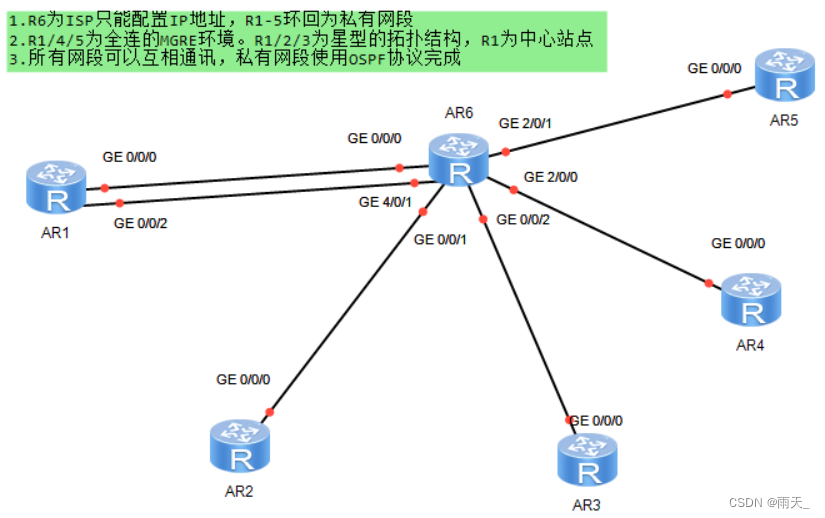
Topology design and IP Address planning 
1. Configure router interface IP Address and loopback
[r1]int LoopBack 0
[r1-LoopBack0]ip add 192.168.1.1 24
[r1]int g0/0/0
[r1-GigabitEthernet0/0/0]ip add 16.1.1.1 24
[r1]int g0/0/2
[r1-GigabitEthernet0/0/2]ip add 61.1.1.1 24
[r2]int LoopBack 0
[r2-LoopBack0]ip add 192.168.2.1 24
[r2]int g0/0/0
[r2-GigabitEthernet0/0/0]ip add 26.1.1.1 24
[r3]int LoopBack 0
[r3-LoopBack0]ip add 192.168.3.1 24
[r3]int g0/0/0
[r3-GigabitEthernet0/0/0]ip add 36.1.1.1 24
[r4]int LoopBack 0
[r4-LoopBack0]ip add 192.168.4.1 24
[r4]int g0/0/0
[r4-GigabitEthernet0/0/0]ip add 46.1.1.1 24
[r5]int LoopBack 0
[r5]int lo0
[r5-LoopBack0]ip add 192.168.5.1 24
[r5]int g0/0/0
[r5-GigabitEthernet0/0/0]ip add 56.1.1.1 24
[r6]int LoopBack 0
[r6-LoopBack0]ip add 6.6.6.6 24
[r6]int g0/0/0
[r6-GigabitEthernet0/0/0]ip add 16.1.1.2 24
[r6]int g4/0/1
[r6-GigabitEthernet4/0/1]ip add 61.1.1.2 24
[r6]int g0/0/1
[r6-GigabitEthernet0/0/1]ip add 26.1.1.2 24
[r6]int g0/0/2
[r6-GigabitEthernet0/0/2]ip add 36.1.1.2 24
[r6]int g2/0/0
[r6-GigabitEthernet2/0/0]ip add 46.1.1.2 24
[r6]int g2/0/1
[r6-GigabitEthernet2/0/1]ip add 56.1.1.2 24
see 
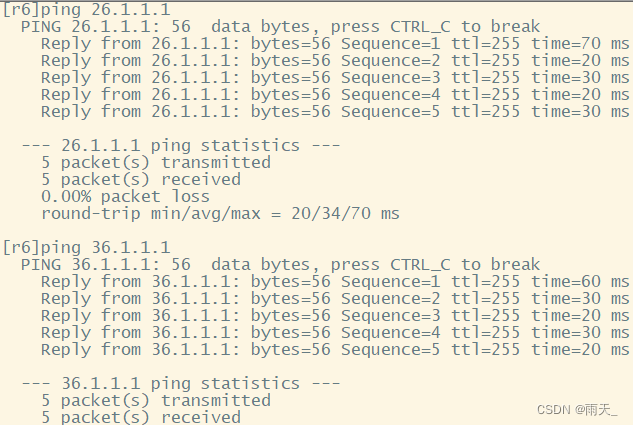
test 
2. Configure the default route
[r1]ip route-static 0.0.0.0 0 16.1.1.2
[r1]ip route-static 0.0.0.0 0 61.1.1.2
[r2]ip route-static 0.0.0.0 0 26.1.1.2
[r3]ip route-static 0.0.0.0 0 36.1.1.2
[r4]ip route-static 0.0.0.0 0 46.1.1.2
[r5]ip route-static 0.0.0.0 0 56.1.1.2
test 

3. structure MGRE Environmental Science
[r1]int t0/0/0
[r1-Tunnel0/0/0]ip add 10.1.1.1 24
[r1-Tunnel0/0/0]tunnel-protocol gre p2mp
[r1-Tunnel0/0/0]source 16.1.1.1
[r1-Tunnel0/0/0]nhrp entry multicast dynamic
[r1-Tunnel0/0/0]nhrp network-id 100
[r2]int t0/0/0
[r2-Tunnel0/0/0]ip add 10.1.1.2 24
[r2-Tunnel0/0/0]tunnel-protocol gre p2mp
[r2-Tunnel0/0/0]source g0/0/0
[r2-Tunnel0/0/0]nhrp entry 10.1.1.1 16.1.1.1 register
[r2-Tunnel0/0/0]nhrp network-id 100
[r3]int t0/0/0
[r3-Tunnel0/0/0]ip add 10.1.1.3 24
[r3-Tunnel0/0/0]tunnel-protocol gre p2mp
[r3-Tunnel0/0/0]source g0/0/0
[r3-Tunnel0/0/0]nhrp entry 10.1.1.1 16.1.1.1 register
[r3-Tunnel0/0/0]nhrp network-id 100
[r1]int t0/0/1
[r1-Tunnel0/0/1]ip add 10.1.2.1 24
[r1-Tunnel0/0/1]tunnel-protocol gre p2mp
[r1-Tunnel0/0/1]source 61.1.1.1
[r1-Tunnel0/0/1]nhrp entry multicast dynamic
[r1-Tunnel0/0/1]nhrp network-id 101
[r4]int t0/0/0
[r4-Tunnel0/0/0]ip add 10.1.2.2 24
[r4-Tunnel0/0/0]tunnel-protocol gre p2mp
[r4-Tunnel0/0/0]source 46.1.1.1
[r4-Tunnel0/0/0]nhrp entry 10.1.2.1 61.1.1.1 register
[r4-Tunnel0/0/0]nhrp entry 10.1.2.3 56.1.1.1 register
[r4-Tunnel0/0/0]nhrp network-id 101
[r5]int t0/0/0
[r5-Tunnel0/0/0]ip add 10.1.2.3 24
[r5-Tunnel0/0/0]tunnel-protocol gre p2mp
[r5-Tunnel0/0/0]source 56.1.1.1
[r5-Tunnel0/0/0]nhrp entry 10.1.2.1 61.1.1.1 register
[r5-Tunnel0/0/0]nhrp entry 10.1.2.2 46.1.1.1 register
[r5-Tunnel0/0/0]nhrp network-id 101
( open R5 Of t0/0/0 Wei Guangbo of )
test 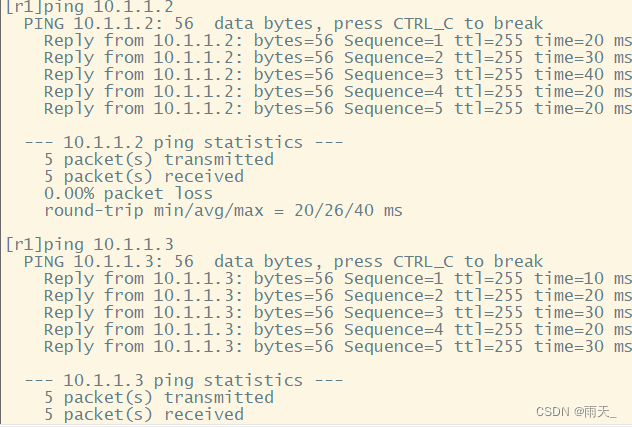

4. Declare
( No zoning , All within the scope of private network )
[r1]ospf 1 router-id 1.1.1.1
[r1-ospf-1]area 0
[r1-ospf-1-area-0.0.0.0]network 192.168.1.1 0.0.0.0
[r1-ospf-1-area-0.0.0.0]network 10.1.1.1 0.0.0.0
[r1-ospf-1-area-0.0.0.0]network 10.1.2.1 0.0.0.0
[r2]ospf 1 router-id 2.2.2.2
[r2-ospf-1]area 0
[r2-ospf-1-area-0.0.0.0]network 192.168.2.1 0.0.0.0
[r2-ospf-1-area-0.0.0.0]network 10.1.1.2 0.0.0.0
[r3]ospf 1 router-id 3.3.3.3
[r3-ospf-1]area 0
[r3-ospf-1-area-0.0.0.0]network 192.168.3.1 0.0.0.0
[r3-ospf-1-area-0.0.0.0]network 10.1.1.3 0.0.0.0
[r4]ospf 1 router-id 4.4.4.4
[r4-ospf-1]area 0
[r4-ospf-1-area-0.0.0.0]network 192.168.4.1 0.0.0.0
[r4-ospf-1-area-0.0.0.0]network 10.1.2.2 0.0.0.0
[r5]ospf 1 router-id 5.5.5.5
[r5-ospf-1]area 0
[r5-ospf-1-area-0.0.0.0]network 192.168.5.1 0.0.0.0
[r5-ospf-1-area-0.0.0.0]network 10.1.2.3 0.0.0.0
see 
Optimize
[r1]int t0/0/0
[r1-Tunnel0/0/0]ospf network-type broadcast
[r2]int t0/0/0
[r2-Tunnel0/0/0]ospf network-type broadcast
[r3]int t0/0/0
[r3-Tunnel0/0/0]ospf network-type broadcast
(R2 and R3 Priority changed to 0, give up DR/BDR The election )
[r2-Tunnel0/0/0]ospf dr-priority 0
[r3-Tunnel0/0/0]ospf dr-priority 0
[r1]int t0/0/1
[r1-Tunnel0/0/0]ospf network-type broadcast
[r4]int t0/0/0
[r4-Tunnel0/0/0]ospf network-type broadcast
[r5]int t0/0/0
[r5-Tunnel0/0/0]ospf network-type broadcast
(R2 and R3 Priority changed to 0, give up DR/BDR The election )
[r4-Tunnel0/0/0]ospf dr-priority 0
[r5-Tunnel0/0/0]ospf dr-priority 0
see
(1)


(2)


5. test


边栏推荐
- 【flask高级】结合源码详解flask的运行机制(出入栈)
- JS collection
- 美国机场围棋风格可视化专题图:ArcGIS Pro版本
- 三万字速通Servlet
- 从开源的视角,解析SAP经典ERP “三十年不用变”的架构设计
- 数字孪生万物可视 | 联接现实世界与数字空间
- Digital twin everything can be seen | connecting the real world and digital space
- Google Earth engine -- Statistics on the frequency of land classification year by year
- SQL语言(三)
- Learn NLP with Transformer (Chapter 6)
猜你喜欢

Flask框架——Session与Cookie

性能测试中TPS的计算【杭州多测师】【杭州多测师_王sir】

I, AI doctoral student, online crowdfunding research topic

The most comprehensive UE4 file operation in history, including opening, reading, writing, adding, deleting, modifying and checking

Introduction to onnx (open neural network exchange)

HCIP(11)

HCIA experiment (07) comprehensive experiment

Flask框架——flask-caching缓存

UE4 quickly find the reason for packaging failure

HCIP(13)
随机推荐
HCIP (01)
Learn NLP with Transformer (Chapter 5)
HCIA experiment (10) nat
Learn NLP with Transformer (Chapter 1)
JS bidirectional linked list 02
Kraken中事件通道原理分析
mysql事务是什么
Learn NLP with Transformer (Chapter 8)
[flask advanced] solve the classic error reporting of flask by combining the source code: working outside of application context
Flask框架——Session与Cookie
信号完整性(SI)电源完整性(PI)学习笔记(三十四)100条估计信号完整性效应的经验法则
Basic experiment of microwave technology - Filter Design
2021 qunar written examination summary
AI technology stack is too huge! Wu Enda gives career planning: lifelong learning
Google Earth Engine——统计逐年土地分类的频率
Reinforcement Learning 强化学习(四)
Flask framework -- flask caching
【域泛化】2022 IJCAI领域泛化教程报告
MySQL master-slave replication and read-write separation
上周热点回顾(7.18-7.24)